

Managing an online store on Shopify is not a tough task at all; however, in converting guests into buyers is where the difficult part lies. Even if your store gets good traffic, people visiting are just leaving without making a purchase, your store still needs some optimization.
In this blog, learn how to optimize your Shopify store for increased conversions through simple and powerful methods that really work.
ON THIS PAGE
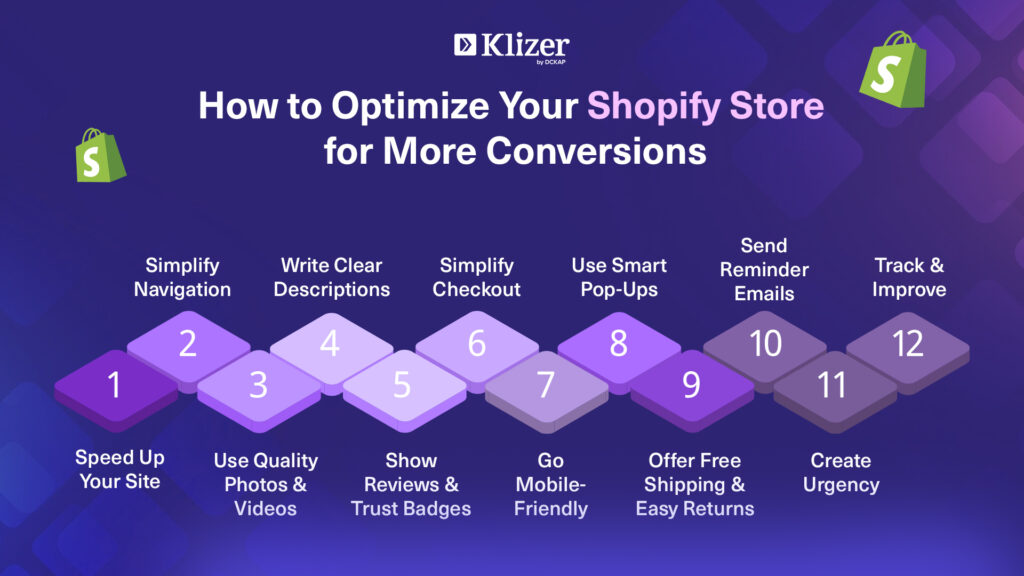
How to Optimize a Shopify Store for Conversions
Also read- Shopify Analytics: A Definitive Guide [Tools + FAQs]
1. Start with Clean and Fast Website
Let’s face it — nobody enjoys or likes a slow or messy website. Research indicates that a one-second delay in loading a page can reduce conversions rate by 7%. This means if your site is very slow, people will exit before even taking a look at your products.
How to fix that:
- Make use of a light-weight, mobile-friendly Shopify theme.
- Images should be compressed first before uploading (for instance, TinyPNG is a really good tool).
- Uninstall and eliminate the unused apps and code that are causing the site to slow down.
- Use either Google PageSpeed Insights or the speed score of Shopify to check the speed of your site.
By just having a fast website, you can keep your customers happy and also help you rank better on Google.
2. Simplify and Clarify Navigation
Imagine your Shopify store like a supermarket. If the customers cannot easily locate what they are searching for, they will leave.
Make your navigation bar simple and have categories that are clearly defined such as “Men,” “Women,” “Accessories,” or “Sale.” Put a search bar on the top so that the customers can easily find the products they want.
Professional tip:
Create a “Shop All” option to enable the visitors to move around your whole collection without the hassle of clicking through different pages.
3. Provide High-Quality Product Pictures and Videos
When it comes to online shopping, the customers cannot touch or feel the products but they rely on visuals for their decision making.
As per the statistics provided by Shopify, the conversion rates of the products which have multiple high-quality images rise to 250%. Use clear, and bright pictures with different viewpoints. Add short clips portraying the functioning or the appearance of the product in real life—it establishes trust and helps customers to make faster decisions.
Besides, make sure to include a zoom option for the customers to check the product details closely.
4. Create Compelling Product Descriptions
Product descriptions are more than simply stating features—they should help the buyer in picturing the product use.
For instance, instead of stating: “100% cotton T-shirt”
Consider using: “Soft, breathable cotton that keeps you feeling comfortable all day”.
Use a conversational style, small paragraphs, and bullet points to increase readability. Moreover, seamlessly incorporate keywords for SEO enhancement.
End your product description with an easy call-to-action (CTA): “Add to cart now and elevate your daily comfort”.
5. Build Trust with Reviews and Social Proof
Online shoppers, as per the survey, 93% of them read reviews prior to making a purchase.
Thus, not displaying customer reviews means that you are losing potential buyers. For each product page, include a review section. You can apply the Shopify apps like Loox, Judge.me, or Yotpo to help in this process.
Furthermore, you can also include:
- Photos from users (customers in/using your product)
- Number of stars given
- A badge of “Verified Buyer”
These small trust signals have a huge impact on convincing people to buy.
6. Simplify the Checkout Process
One of the major challenges that ecommerce faces today is cart abandonment, as around 70% of online shoppers leave their carts without completing their purchase.
To reduce this:
- Let visitors checkout as guests – not everyone would like to register and create an account.
- Provide a variety of payment methods (UPI, credit cards, PayPal, Shop Pay).
- Show shipping charges beforehand – buyers get irritated with hidden charges at checkout.
- Make your checkout page simple and free from distractions.
Additionally, you can insert a progress bar (“Step 1 of 3”) so that buyers can keep track of how close they are to completing their order.
Recommended Read: Shopify Store Development
7. Make Your Site Mobile-Friendly
Over 70 percent of Shopify traffic comes from mobile devices. If your website doesn’t function well or doesn’t look good on a mobile device, you’re missing a large audience.
Provide for:
- Big buttons and text which are easy to touch for everyone.
- Product images are well adapted to the size of a small screen.
- Checkout is easy on the phone.
Tip:
Using Shopify’s preview mode or BrowserStack, you can check how your store looks on various devices.
8. Use Pop-Ups Smartly but Don’t Exceed the Limit
Pop-ups are annoying generally, but if you use them the right way, they can actually be a source of increasing conversion rates.
Consider:
- A pop-up offering a discount of “Get 10% off your first order!”
- An exit-intent pop-up that triggers as soon as a visitor seems to be leaving.
- A reminder about free shipping at the top of the page.
These small pushes can make a non-buying visitor to become a customer. Just ensure pop-ups are not frequent, are not hard to close, and are user-friendly.
9. Make Shipping Free and Returns Easy
There is hardly any argument that free shipping is the most appealing choice. The fact is 88% of consumers are more likely to buy if free shipping is available.
Even if it is not possible on all the orders, you can always set a limit such as:
“Free shipping on orders above ₹999.”
Moreover, clearly mention your return policy. When shoppers know that they can return a product if it doesn’t suit them, they feel secure in making a purchase.
10. Use Email Marketing to Bring Back Old Visitors
It is not all visitors who will make a purchase during their first visit. However, it does not mean that you lose them forever.
Utilize email automation to retrieve those customers. Shopify Email or similar applications such as Klaviyo can assist you with sending:
- Abandoned cart notifications (“You left something behind!”)
- Exclusive discounts or attractive offers
- Product suggestions based on what they viewed
Even a simple reminder can help recover as much as 20% of the abandoned carts.
11. Apply Urgency and Scarcity
Have you ever observed that some retailers display “Only 2 left in stock” or “Offer ends in 3 hours”?
This is not just decoration — it is psychology.
Customers are usually quick to act when they feel that there is a chance of missing out.
You can use Shopify apps for:
- Displaying messages of low stock
- Setting up countdown timers for sales
- Running flash deal banners
However, always remember to be honest. Do not create a false scarcity, or you will lose your trust.
12. Measure and Enhance Using Analytics
Optimization is a never-ending process. Use Shopify Analytics and Google Analytics to track:
- Conversion rate
- Add-to-cart rate
- Average order value
- Drop-off pages
These insights will show you what is working and what needs improvement. Regularly test new ideas — for instance, changing the CTA color, adding testimonials, or improving headlines.
Conclusion
Your Shopify store can have thousands of visitors, but the rate of conversion will depend on the user’s experience in terms of being smooth, trustworthy, and enjoyable.
First, ensure you have the essentials — a neat design, fast loading times, and good product pages. Then, introduce trust signals, make checkout easier, and continue testing new ideas. Even small tweaks can lead to a significant increase in your conversion rate.
Keep in mind: You don’t need more traffic — you need more traffic to take action that is already there.
So, optimize your store with a Shopify development partner such as Klizer and see how your store turns visitors into loyal customers.