
Adobe’s storefront strategy around Edge Delivery Services (EDS) and Adobe Commerce Drop-ins is often misunderstood because it looks unfamiliar at first glance. In reality, the model is intentionally simple, and that simplicity is what enables performance, flexibility, and long-term scalability.
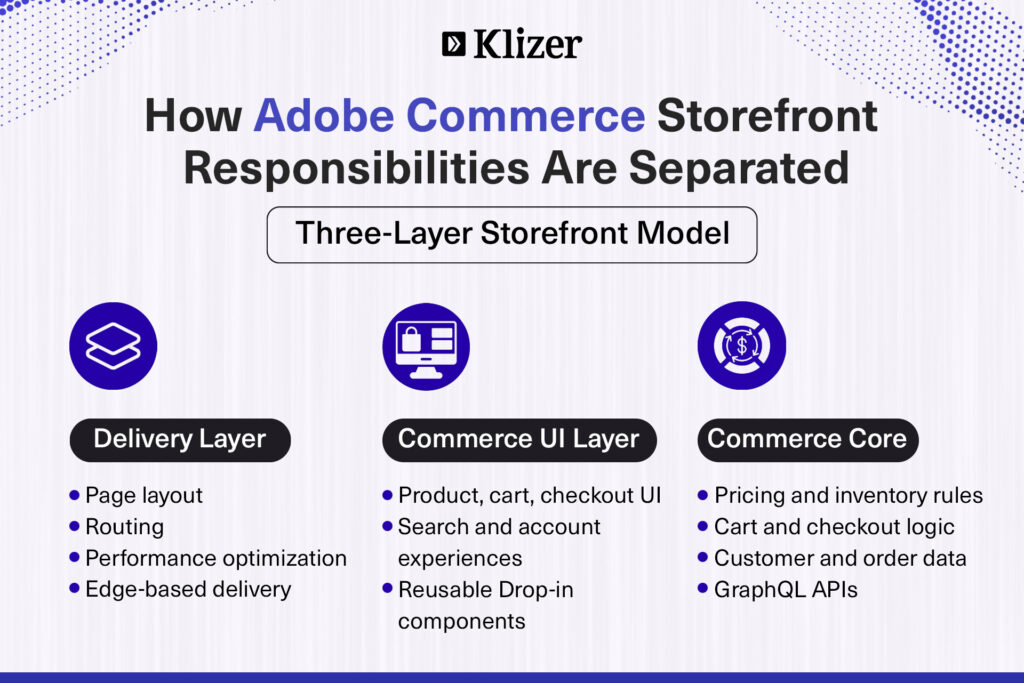
At a foundational level, this architecture separates three concerns that were historically bundled together:
- EDS delivers the pages
- Drop-ins handle commerce features
- Adobe Commerce provides the data
ON THIS PAGE
The Role of Edge Delivery Services With Adobe Commerce Stack
Edge Delivery Services sits at the outermost layer of the storefront. It is responsible for delivery, and not just commerce.
EDS is designed to:
- Serve page layouts from the edge, close to the user
- Optimize performance and load times
- Support simple, scalable content authoring and routing
What EDS deliberately avoids is equally important. It does not:
- Contain product logic
- Handle pricing or inventory rules
- Manage carts, checkout, or user state
By keeping EDS focused on layout, content, and routing, Adobe avoids pushing business logic into the delivery layer which is a common source of complexity and performance bottlenecks in traditional storefronts.
EDS (Edge Delivery Services) is Adobe’s way of serving web pages very fast using the edge (closer to the user). It focuses on:
- Speed
- Simple content authoring
- High performance
EDS mainly handles page layout, content, and routing.
What Drop-ins do
Adobe Commerce Drop-ins are ready-made UI components for commerce features. They are prebuilt, purpose-driven components responsible for rendering key commerce experiences, including:
- Product listing and product detail views
- Search
- Cart and checkout
- User management, accounts, and orders
Drop-ins are intentionally stateless. They do not store data, and they do not act as a backend. Instead, they request commerce data at runtime and render it within the page served by EDS.
How Communication Works Between EDS and Drop-ins
A critical architectural point is that EDS does not communicate with Adobe Commerce directly.
The flow is indirect and intentional:
- User opens a page served by EDS
- The page loads the drop-in components
- Drop-ins call Adobe Commerce GraphQL APIs
- Adobe Commerce returns product/cart data
- Drop-ins render the UI on the page
EDS’s role ends once the page is delivered. All commerce interaction happens between Drop-ins and Adobe Commerce.
This separation prevents the delivery layer from becoming dependent on commerce APIs or backend availability.
Where GraphQL fits in
GraphQL acts as the contract between the commerce UI and Adobe Commerce. Drop-ins use GraphQL to:
- Fetch product details
- Get pricing and stock
- Manage cart and checkout
- Account management
- Login and registration/create account.
EDS simply hosts and delivers the page that contains these Drop-ins.
User Management Flow as an Example (Login / Account / Orders)
When a customer accesses a login or account page:
- EDS delivers the page layout immediately
- The User Management Drop-in is already embedded
- The Drop-in communicates directly with Adobe Commerce APIs to:
- Authenticate the user
- Fetch account details
- Display orders and saved information
EDS never touches user data and never manages authentication. Its only responsibility is fast page delivery.
When a user opens the login or account page, EDS quickly delivers the page layout. The User Management Drop-in is already placed on the page.
Once loaded, the Drop-in talks directly to Adobe Commerce to:
- Authenticate the user
- Fetch account details
- Show orders and saved information
EDS does not manage users or data. It only makes sure the page loads fast.
Checkout Flow in an EDS and Drop-ins Architecture
Checkout is handled entirely through Drop-ins and Adobe Commerce APIs.
- EDS delivers the checkout page
- The Checkout Drop-in manages:
- Cart items
- Address collection
- Payment flow
All transactional communication happens directly with Adobe Commerce. This ensures security, consistency, and compliance without involving the delivery layer.
Why this setup is powerful
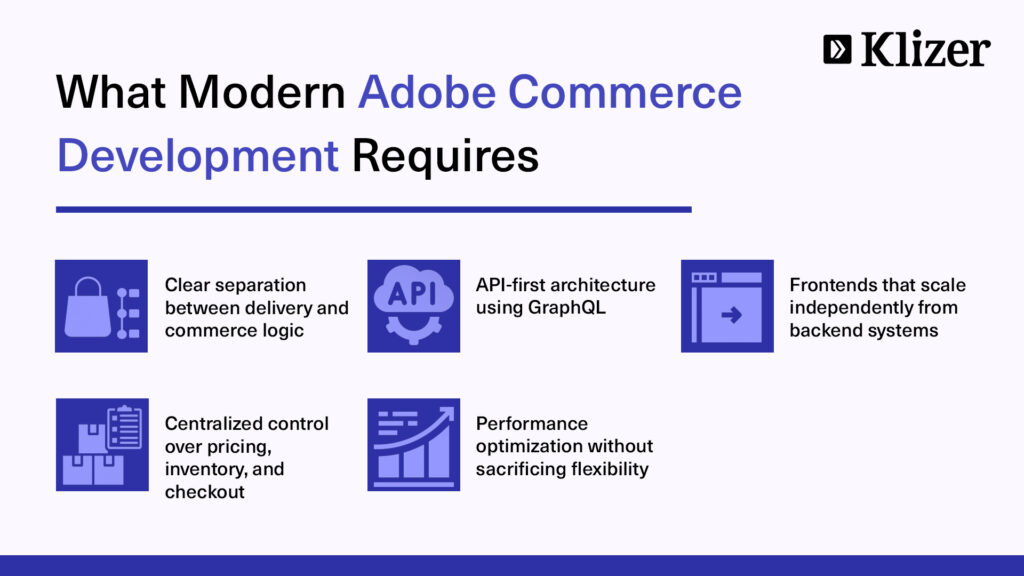
This setup works because responsibilities are clearly defined and enforced.
Clear Responsibility Boundaries
- EDS focuses on content delivery and performance
- Drop-ins handle commerce UI and interaction
- Adobe Commerce owns the business logic and data
Performance by Design
- Pages are served from the edge
- APIs are called only when commerce interaction is required
Flexibility and Composability
- Drop-ins can be replaced or updated without changing EDS
- Frontend delivery and commerce logic can scale independently
This approach avoids tightly coupled storefronts where frontend changes risk breaking backend logic.
Conclusion
In this architecture, EDS is deliberately limited to what it does best: delivering pages fast, close to the user, without carrying commerce complexity. Drop-ins take ownership of commerce interactions without duplicating business logic. Adobe Commerce remains the single source of truth for pricing, inventory, checkout, and customer data.
It enables development teams to enhance performance without modifying commerce logic, evolve storefront experiences without rewriting backend systems, and introduce new capabilities without disrupting existing workflows. More importantly, it avoids the long-term risk of pushing business rules into the frontend.
If you’re looking for more help on edge delivery services with Adobe Commerce Development, reach out to us today!