A small change in a checkout flow can break a payment process. A UI update can make dozens of automated tests fail. A new release can introduce bugs into features that worked perfectly yesterday.
For QA teams, finding these issues is only one part of the challenge. Keeping up with growing test suites, frequent releases, changing requirements, and repetitive testing tasks can take significant time and effort.
This is where Artificial Intelligence (AI) can make a difference.
AI can help QA teams generate test cases, analyze test results, prioritize testing, identify anomalies, and automate repetitive testing activities. It does not replace the need for testers. Instead, it can help teams spend less time on repetitive work and more time on scenarios that require human judgment and domain knowledge.
ON THIS PAGE
The Role of AI in Software Testing
Traditional testing often involves a considerable amount of manual effort, from reviewing requirements and creating test cases to executing tests, identifying defects, and preparing bug reports.
AI can support these activities by analyzing large volumes of testing and application data, identifying patterns, generating test scenarios, and automating repetitive tasks.
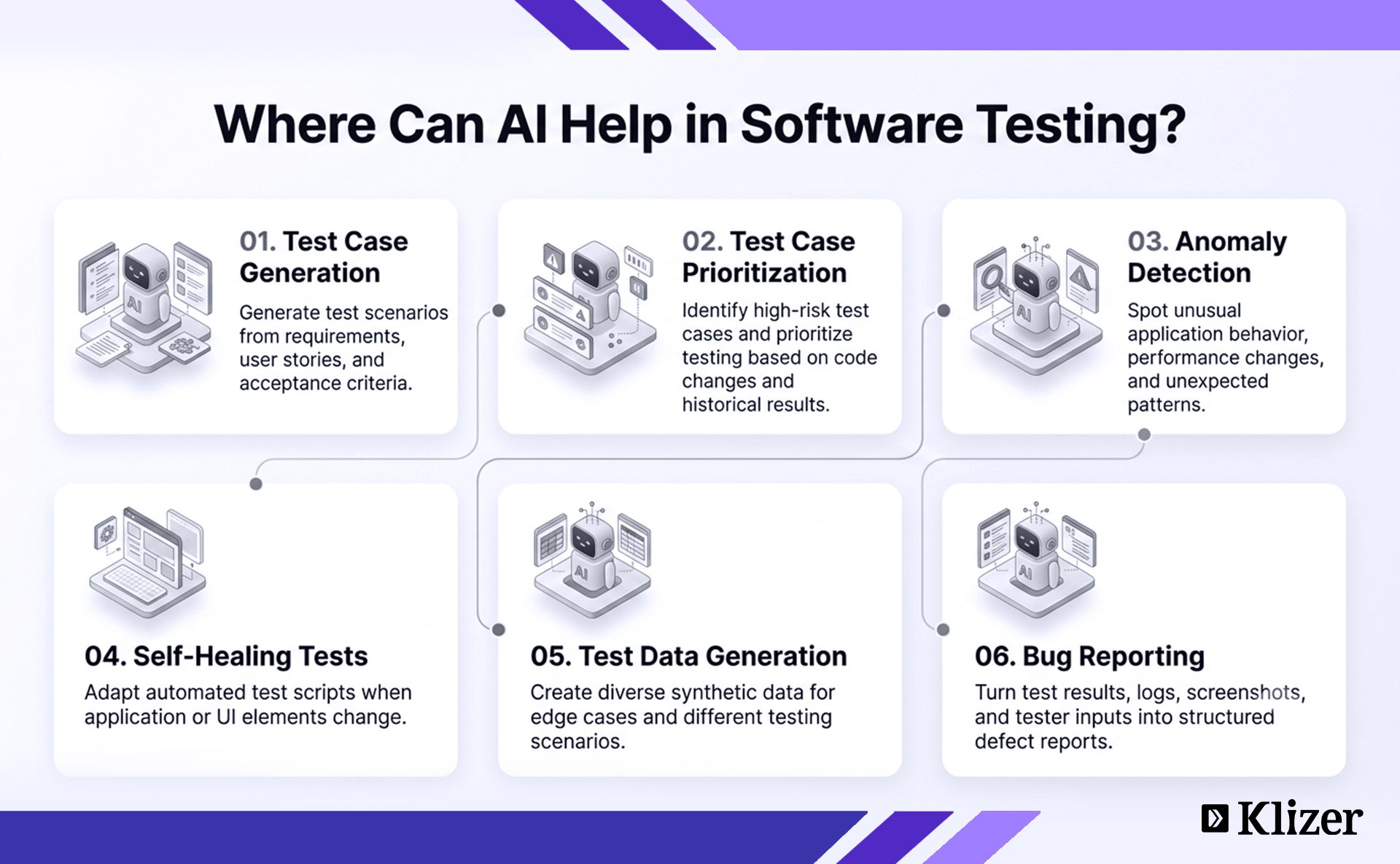
Some common applications of AI in software testing include:
- Test case generation
- Test case prioritization
- Predictive analytics
- Anomaly detection
- Test data generation
- Self-healing test automation
- Bug report generation
- Test result analysis
When integrated into an existing QA workflow, these capabilities can help improve testing efficiency, coverage, and consistency.
AI Algorithms and Techniques Used in Software Testing
Different AI techniques can support different stages of the testing process.
Machine Learning
Machine Learning (ML) enables systems to learn from data and identify patterns or make predictions without being explicitly programmed for every scenario.
In software testing, ML can analyze historical test results, code changes, application behavior, and defect data to support activities such as:
Predictive Analytics
AI can analyze historical data, including code changes, test results, and previous defects, to identify patterns and potential failure areas.
This can help QA teams focus testing efforts on areas that may have a higher risk of failure.
Test Case Prioritization
Not every test case needs to be executed with the same priority.
ML-based systems can analyze factors such as code changes, previous failures, and risk levels to prioritize test cases. This can help teams focus on critical scenarios earlier in the testing cycle.
Anomaly Detection
AI can identify unusual application behavior that may not be immediately obvious through traditional testing.
For example, it can detect unexpected performance changes, unusual response patterns, or deviations from normal application behavior and alert QA teams for further investigation.
Self-Healing Tests
UI and application changes can cause automated test scripts to fail even when the underlying functionality is still working.
AI-powered testing tools can identify certain changes in application elements and automatically adapt test scripts. This can reduce test maintenance effort and help automated test suites remain functional as applications evolve.
Test Data Generation
Testing different scenarios often requires large and varied datasets.
AI and ML can generate synthetic test data based on existing patterns and defined requirements. This can help teams test different conditions, edge cases, and data combinations without relying entirely on manually created data.
Natural Language Processing
Natural Language Processing (NLP) enables machines to understand and process human language.
In software testing, NLP can help QA teams work with requirements, user stories, test cases, and test reports.
Test Case Generation from Requirements
AI can analyze natural language requirements, user stories, and acceptance criteria to identify possible test scenarios and generate structured test cases.
This can reduce the time required to manually convert requirements into test scenarios.
Test Report Analysis
AI can analyze test reports and defect information to identify important patterns, categorize issues, and summarize results.
This can help QA teams quickly understand large volumes of testing information.
Test Case Optimization
AI can analyze existing test cases to identify duplicate, redundant, or potentially unnecessary scenarios.
It can also help identify gaps and suggest areas where additional test coverage may be required.
Key Areas to Use AI in Software Testing
1. AI Test Case Generation and Its Benefits
Creating test cases from requirements is one of the most important activities in software testing, but it can also be time-consuming, especially for large applications with complex workflows.
AI-powered tools can generate test cases based on requirements, user stories, acceptance criteria, existing test cases, application behavior, and other available data.
By analyzing these inputs, AI can identify potential scenarios, edge cases, and variations that may require testing.
Benefits of AI Test Case Generation
- Faster test case creation
- Improved test coverage
- Reduced manual effort
- Support for regression testing
- Better scalability for large test suites
Components of a Test Case
A test case typically defines what needs to be tested, how it should be tested, and what outcome is expected.
- Test Case ID: A unique identifier for the test case.
- Test Description: A brief explanation of what is being tested.
- Preconditions: Conditions that must be met before test execution.
- Test Steps: The actions required to perform the test.
- Test Data: Input values required for testing.
- Expected Result: The outcome expected after execution.
- Actual Result: The outcome observed during execution.
- Status: The pass or fail result of the test case.
Types of Test Cases
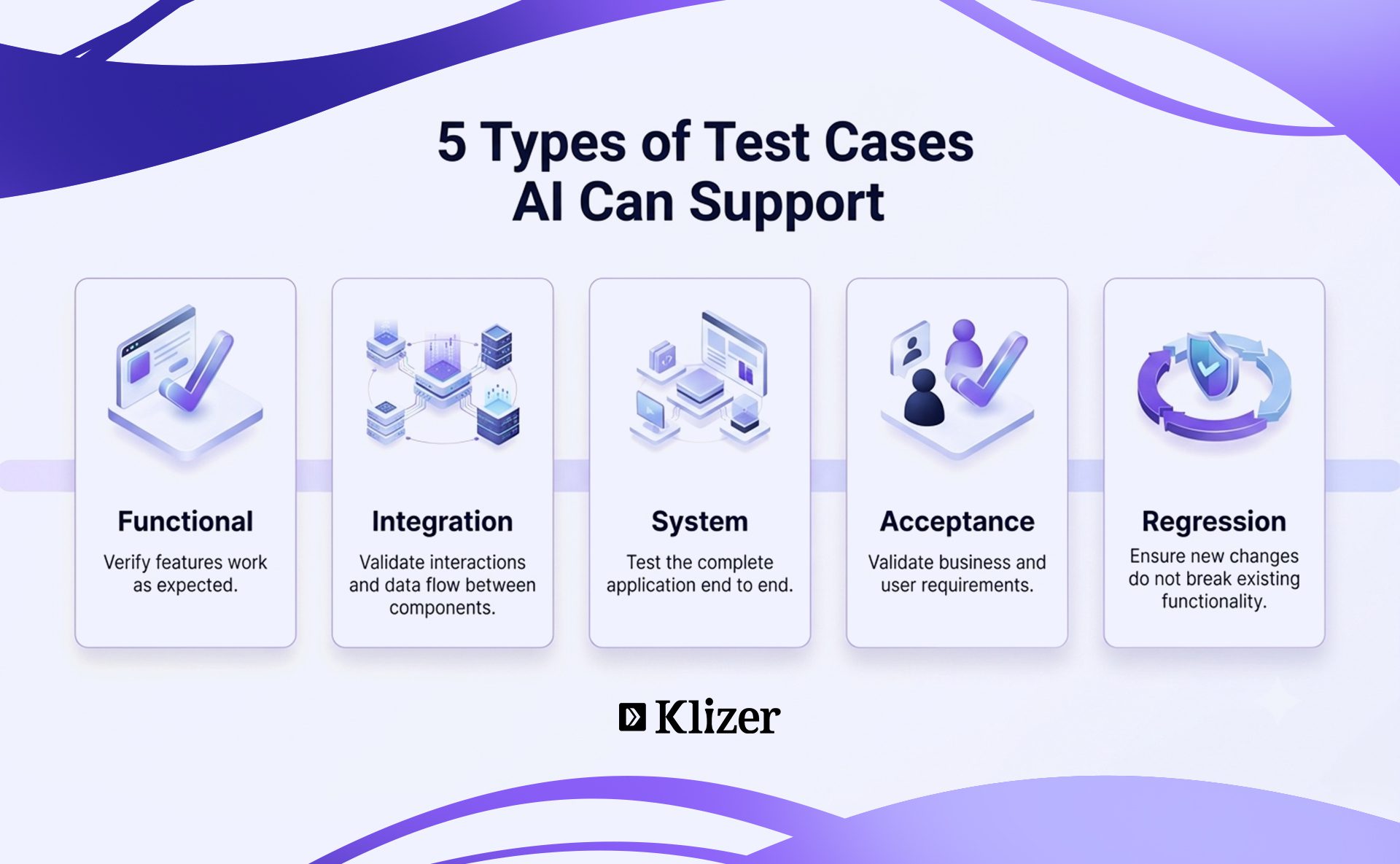
Different types of test cases help QA teams validate different aspects of an application.
1. Functional Test Cases
Functional test cases verify that application features work according to defined requirements.
They help teams:
- Validate input and output behavior
- Ensure requirements are correctly implemented
2. Integration Test Cases
Integration test cases verify whether different modules, systems, or components work together correctly.
They help teams:
- Verify interactions between components
- Validate data flow across systems
3. System Test Cases
System test cases validate the complete application as a whole. They typically focus on end-to-end functionality and help ensure that integrated components work together as expected.
They help teams:
- Test complete end-to-end functionality
- Validate the application against defined requirements
4. Acceptance Test Cases
Acceptance test cases verify whether the application meets user and business requirements before release.
They help teams:
- Validate the system against business and user needs
- Confirm readiness for release
5. Regression Test Cases
Regression test cases verify that new changes do not negatively affect existing functionality.
They help teams:
- Re-test previously working features
- Identify defects introduced by recent changes
How to Use AI for Test Case Generation
AI-powered testing tools are available in both open-source and commercial solutions. Before selecting a tool, QA teams should evaluate how well it fits into their existing testing environment.
Important factors to consider include:
- Pricing
- Tool complexity
- Compatibility with existing tools
- Integration capabilities
- Ease of maintenance
- Community or vendor support
The right tool should fit the team’s existing workflow rather than require the entire testing process to be rebuilt around it.
2. AI-Powered Bug Reporting
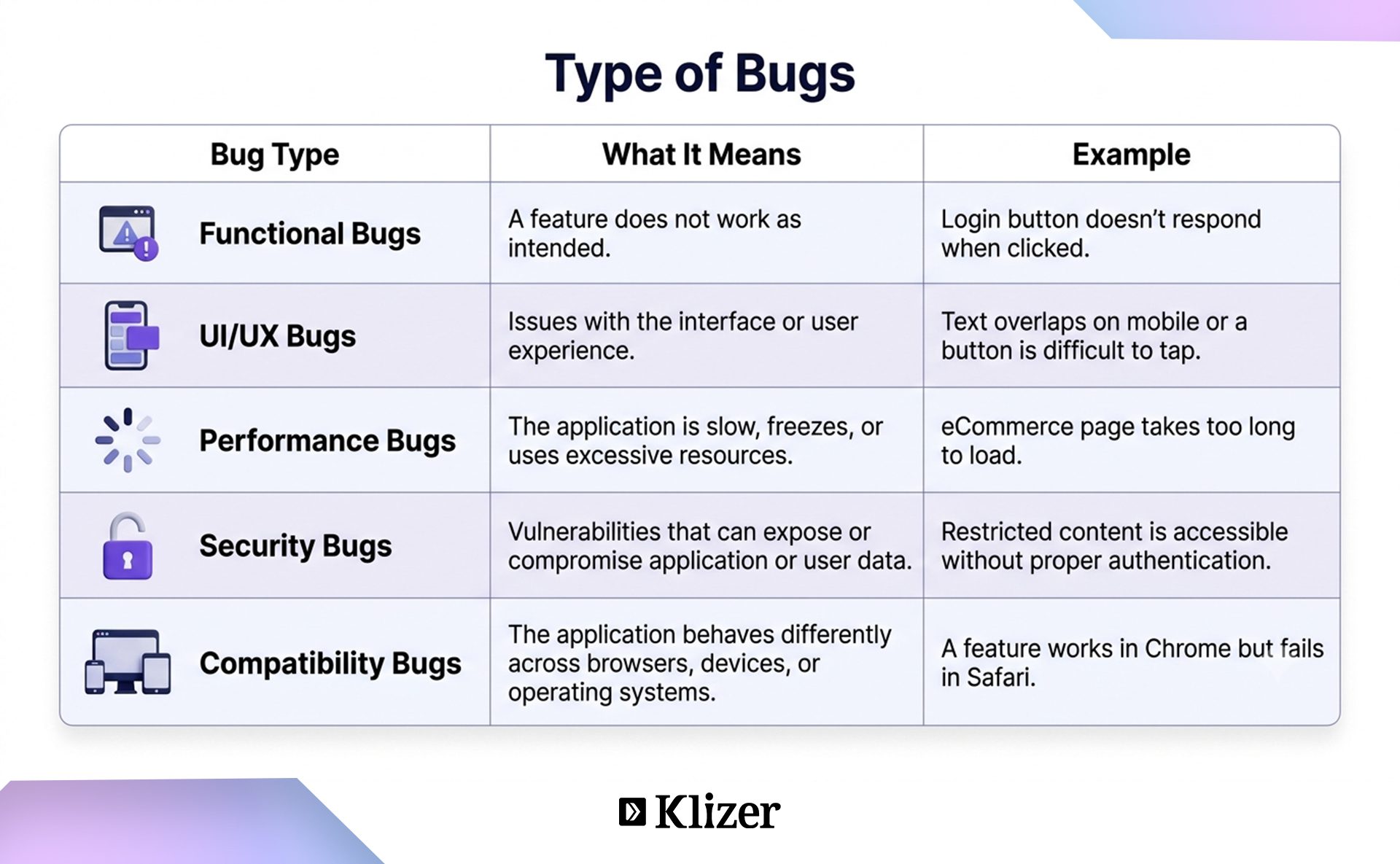
Finding a defect is only the first step. QA teams also need to document the issue clearly so developers can understand, reproduce, and resolve it.
A bug report typically includes details about the issue, steps to reproduce it, expected and actual results, and the environment in which it occurred.
AI can help streamline this process by analyzing test results, logs, screenshots, or tester inputs and turning them into structured defect reports.
Elements of an Effective Bug Report
An effective bug report should provide enough information for the development team to understand and reproduce the issue.
- Clear Title: A concise summary of the issue.
- Description: A clear explanation of the problem and its impact.
- Steps to Reproduce: The exact steps required to recreate the defect.
- Expected Result: What the application should do.
- Actual Result: What the application actually does.
- Environment Details: OS, browser, device, application version, and other relevant details.
- Severity and Priority: The impact of the issue and its urgency.
- Attachments/Evidence: Screenshots, logs, videos, or other supporting information.
- Comments/Updates: Additional information added during investigation and resolution.
How to Use AI for Bug Reporting
Creating detailed bug reports manually can become repetitive, particularly when QA teams work with large test suites and frequent releases.
AI-powered tools can help generate structured bug reports from available testing information. For example, an AI tool can analyze test results, logs, screenshots, or tester inputs and organize the information into a standard defect-reporting format.
This can help provide:
- Faster defect documentation
- More consistent bug reports
- Clearer communication between QA and development teams
- Faster issue tracking during sprints
AI-generated reports should still be reviewed by testers before they are submitted, particularly when severity, business impact, or root cause needs human judgment.
Benefits of Using AI for Software Testing
AI can support QA teams across different stages of the software testing lifecycle.
Better Test Coverage
AI can generate additional test scenarios and identify edge cases that may not be covered by existing test suites.
This can help QA teams improve coverage and identify potential issues earlier in the software development lifecycle.
Faster Test Execution
AI-powered testing tools can help optimize test execution and automate repetitive testing activities.
For large applications, this can reduce the time required to execute extensive test suites and support faster release cycles.
Better Resource Allocation
Automating repetitive testing activities allows QA professionals to spend more time on complex scenarios that require human judgment, domain knowledge, exploratory testing, and creativity.
Self-Maintaining Test Cases
AI-powered tools can identify certain application or UI changes and adapt automated test scripts accordingly.
This can reduce maintenance effort and help automated test suites remain functional as the application evolves.
Earlier Bug Detection
AI can analyze historical testing data, application behavior, and code changes to identify potential failure areas.
Finding defects earlier in the development lifecycle can help teams address issues before they become more expensive or difficult to resolve.
Conclusion
AI is changing how QA teams approach software testing by helping automate repetitive tasks, improve test coverage, analyze testing data, and identify potential issues earlier.
The goal is not to replace testers. It is to reduce repetitive work and give QA teams more time to focus on complex testing and quality decisions.
If you need help improving your ecommerce testing process, Klizer’s eCommerce QA Testing Services can help you build a more efficient and reliable testing approach.
Get in touch with Klizer to learn more.
FAQs
1. How does AI help with software test automation?
AI can help automate repetitive testing activities, prioritize test execution, generate test data, analyze failures, and support self-healing test scripts when application or UI elements change.
2. How is AI used in software testing?
AI can be used to generate test cases, prioritize high-risk tests, detect anomalies, analyze test results, generate test data, maintain automated tests, and create structured bug reports.
3. What are the benefits of AI in software testing?
AI can help QA teams improve test coverage, reduce repetitive manual effort, speed up test execution, identify potential defects earlier, and analyze large volumes of testing data more efficiently.
4. Can AI replace software testers?
No. AI can automate repetitive testing tasks, but software testers are still needed for exploratory testing, complex scenarios, business validation, and decisions that require human judgment and domain knowledge.
5. Can AI generate test cases?
Yes. AI can analyze requirements, user stories, acceptance criteria, existing test cases, and application behavior to generate test scenarios and identify potential edge cases.