B2B distributor commerce involves complex rules that a conventional eCommerce storefront is rarely designed to handle. Customer-specific price lists, contract terms, account hierarchies, role-based purchasing, product restrictions, and ERP-driven inventory data must work together without creating bottlenecks.
A Shopware distributor portal provides a B2B commerce layer for managing these requirements through configurable business rules, customer accounts, product catalogs, pricing structures, permissions, and APIs. Businesses can extend Shopware to connect ERP, CRM, PIM, inventory, payment, and logistics systems. The architecture also supports custom portal experiences for distributors and dealers while helping accommodate more users, higher transaction volumes, and additional integrations.
For organizations moving beyond manual distributor management, the key challenge is engineering a scalable B2B portal that can execute complex commercial rules reliably as the business grows.
ON THIS PAGE
What Is a Shopware Distributor Portal?
A Shopware distributor portal is an account-based B2B commerce interface designed for wholesalers, dealers, and regional partners. It gives each business account access to the products, transactions, documents, and purchasing functions relevant to its relationship with the supplier.
Unlike a conventional ecommerce storefront, distributor portal software like Shopware can organize access around company accounts, user roles, purchasing permissions, account hierarchies, quotes, invoices, order history, and reorder workflows. McKinsey reports that 57% of customers now rank digital as their primary purchasing channel, compared with 33% in 2022. Shopware provides the commerce foundation, while businesses can customize these components to match their distributor structure and purchasing processes.
Why Businesses Need Scalable Distributor Portal Software Like Shopware?
Businesses need scalable portal software to manage complex B2B pricing, account structures, high-volume orders, and self-service purchasing from a single commerce environment. McKinsey’s 2026 research found that buyers use an average of 10 channels throughout their purchasing journey, increasing the need for connected and consistent digital experiences. Here are the reasons to choose Shopware as a distributor portal software.
Manage complex B2B account structures
A Shopware distributor portal supports company hierarchies, user roles, purchasing permissions, budget controls, and approval workflows across distributor branches.
Automate customer-specific pricing
Distributor portal software applies account-level price lists, volume discounts, regional shipping rules, and other purchasing conditions.
Handle growing transaction volumes
A scalable Shopware architecture supports large product catalogs, increasing order volumes, and traffic spikes while maintaining reliable portal performance.
Connect and extend the commerce stack
Shopware’s API-first and headless capabilities support B2B portal development and integration with ERP, PIM, CRM, inventory, payment, and other enterprise systems.
Strengthen B2B self-service
A distributor or dealer portal software solution lets buyers place repeat orders, track shipments, access invoices, manage returns, and complete routine purchasing tasks.
Key Features of a Shopware B2B Distributor Portal
A high-performing Shopware B2B distributor portal combines role-based account controls, personalized pricing, approval workflows, bulk ordering, and quote management to streamline complex B2B purchasing from order to fulfillment. Here are the key features of a Shopware distributor portal.
Account hierarchy and role-based access
A Shopware distributor portal can organize branches, departments, and users while assigning permissions based on administrative, purchasing, or viewing responsibilities.
Approval and budget controls
Distributor portal software can enforce spending limits and approval rules when purchases require authorization from managers or specific departments.
Customer-specific pricing
Apply negotiated rates, contract prices, and volume discounts automatically according to each distributor account.
Quick and bulk ordering
Let buyers enter SKUs, upload product lists, or reorder frequently purchased items without navigating the entire catalog.
Quote and RFQ management
Enable distributors to request custom pricing and manage negotiated quotes directly through the portal.
Self-service order management
A dealer portal software solution can give buyers access to order history, invoices, shipment status, reorders, and return requests.
Business system integration
Connect Shopware with ERP, CRM, PIM, inventory, and other systems to synchronize essential customer, product, pricing, and order data.
API-first and headless architecture
Support B2B portal development with APIs and customized frontend experiences when standard portal functionality does not meet specific business requirements.
How to Develop a Scalable Dealer or Partner Portal with Shopware
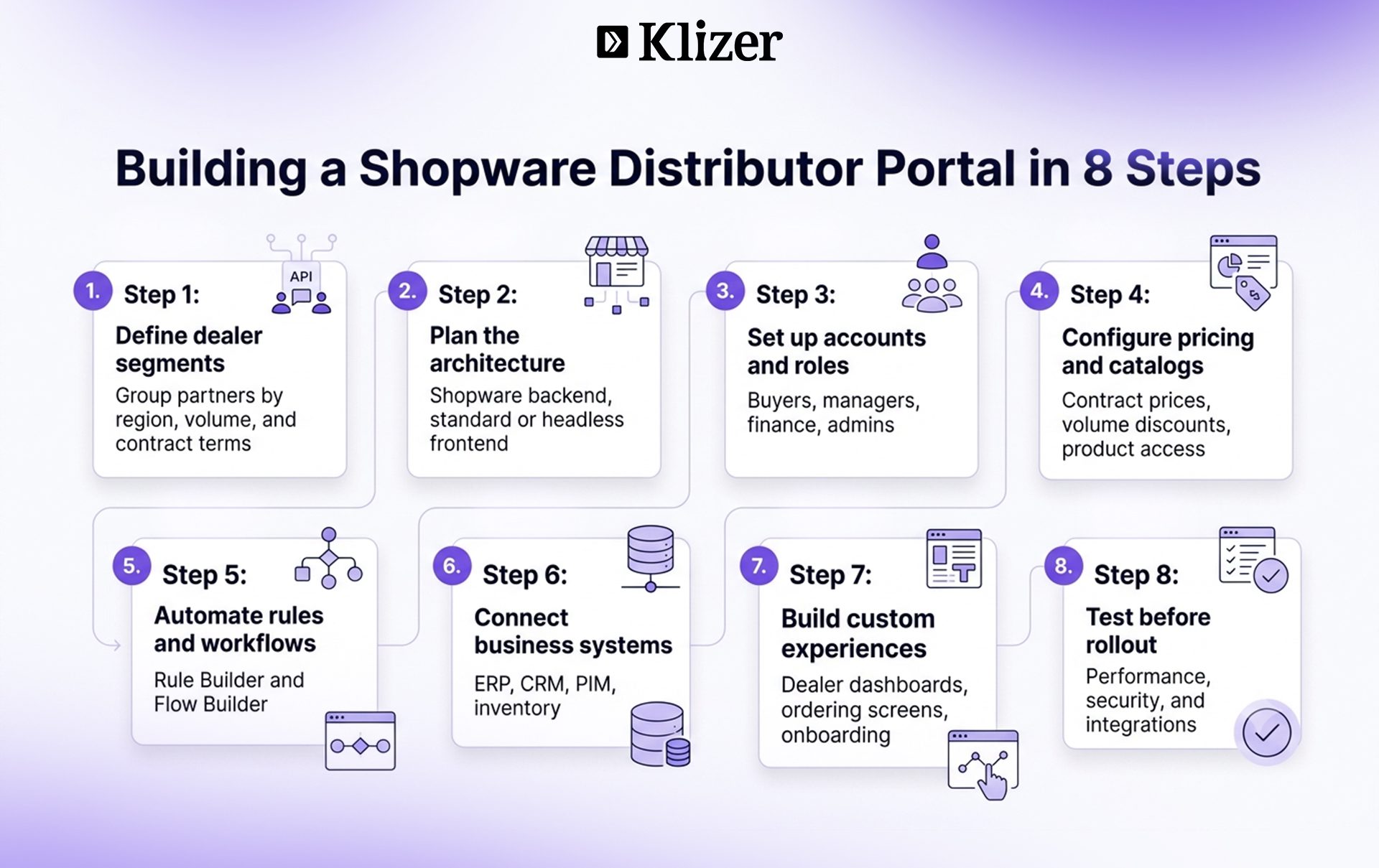
Developing a scalable dealer or partner portal with Shopware requires a B2B architecture that connects partner segmentation, account controls, purchasing rules, automation, integrations, and performance. Here are the steps for Shopware B2B portal development
1. Define Dealer Segments and Business Requirements
Start by identifying how different dealers and partners purchase, access products, and interact with your business. Define these requirements first:
- Group partners by region, order volume, contract terms, or discount structure.
- Map company hierarchies, branches, departments, and user roles.
- Document pricing, catalog, purchasing, approval, and fulfillment requirements.
- Identify recurring orders and self-service processes.
- List the external systems the portal must connect with.
2. Design an API-First Portal Architecture
Shopware uses an API-first architecture with a headless core, allowing businesses to separate the storefront experience from backend commerce functionality. Plan the architecture around these elements:
- Use Shopware as the central commerce backend.
- Choose a standard or headless frontend based on the portal’s requirements.
- Define API communication between Shopware and external applications.
- Design data flows for products, customers, pricing, inventory, and orders.
- Plan infrastructure for increasing users, catalogs, transactions, and integrations.
3. Configure B2B Accounts, Roles, and Permissions
Build account structures that reflect how dealers and their employees purchase. Configure the portal for:
- Multi-user company accounts.
- Buyer, manager, finance, and administrator roles.
- Branch and organization structures.
- Role-based purchasing permissions.
- Approval responsibilities for different employees.
4. Configure Pricing, Catalogs, and Ordering Rules
Shopware supports individual pricing and rule-based conditions that businesses can use to create more precise purchasing experiences. Set up the purchasing logic for:
- Customer-specific and contract pricing.
- Volume-based discounts.
- Partner-specific product availability.
- Regional shipping and tax conditions.
- Quick ordering through product numbers or file imports.
- Reusable order lists for repeat purchases.
5. Automate Rules and B2B Workflows
Shopware’s Rule Builder lets businesses define conditions for commerce processes, while Flow Builder can trigger actions based on business events. Automate processes such as:
- Applying pricing and discount conditions.
- Controlling product or offer visibility for specific customer groups.
- Determining shipping and payment conditions.
- Triggering order notifications and status updates.
- Starting internal workflows after defined order events.
- Supporting partner onboarding and operational handoffs.
6. Integrate ERP, CRM, PIM, and Other Business Systems
A scalable B2B portal development strategy should connect Shopware with the systems that manage critical operational data. Prioritize the integrations that support core operations:
- ERP: Exchange orders, customer information, inventory, and financial data.
- CRM: Keep partner and customer relationship records aligned.
- PIM: Maintain consistent product information across B2B catalogs.
- Inventory systems: Keep availability data synchronized.
- Middleware: Use it when multiple enterprise systems require coordinated data exchange or transformation.
7. Build Custom Dealer and Partner Experiences
Standard B2B functionality may not cover every business-specific requirement. Consider custom development for:
- Dealer-specific dashboards.
- Specialized ordering interfaces.
- Custom approval processes.
- Partner onboarding workflows.
- Additional API services.
- Headless frontend applications.
8. Test Performance, Security, and Scalability
Test the portal under realistic B2B workloads before expanding its user base.
- Large product catalog performance.
- Concurrent user activity.
- Bulk and repeat ordering.
- Pricing and approval rules.
- API response times.
- System synchronization.
- Authentication and access controls.
- Integration failure handling.
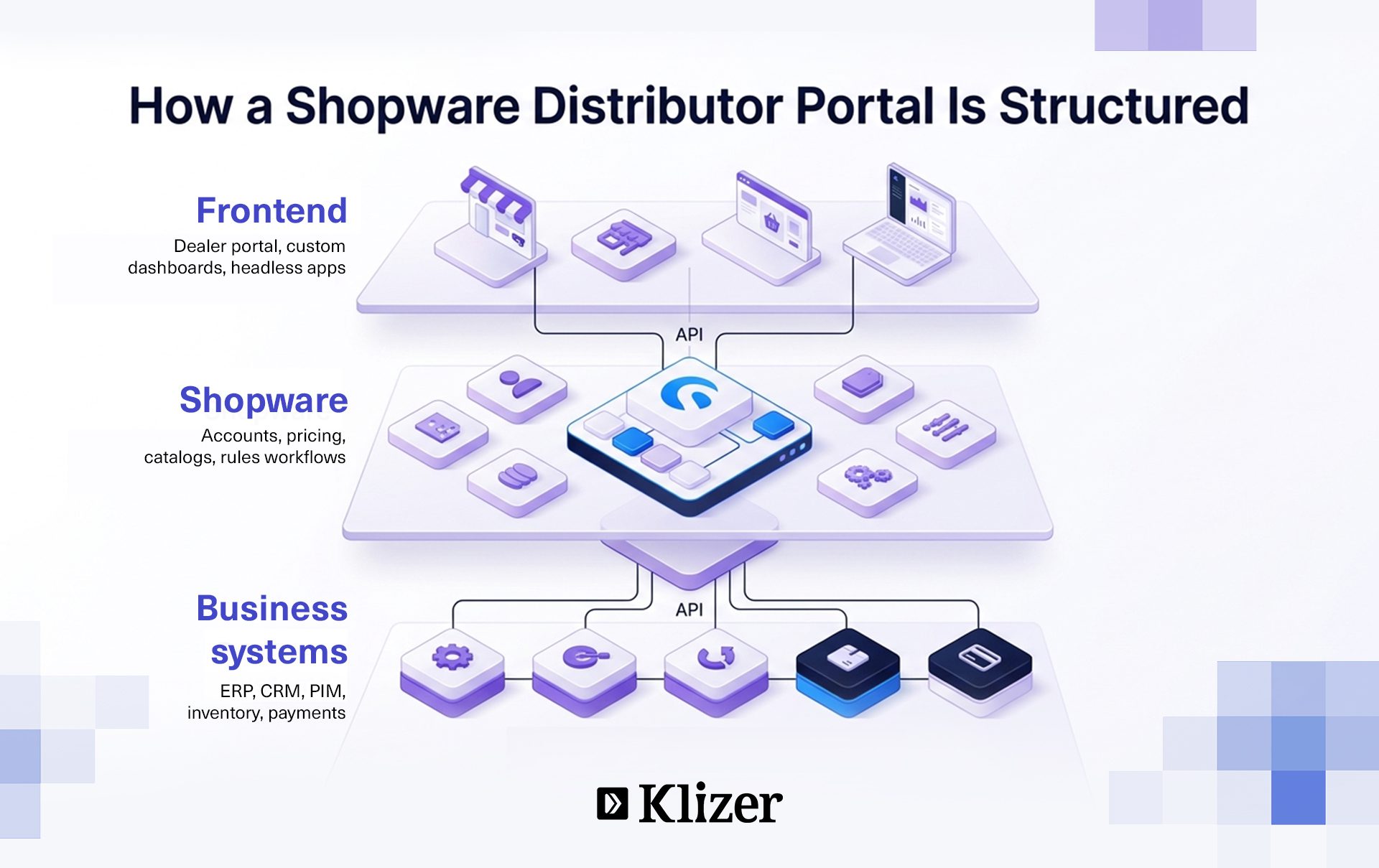
How to Make a Shopware B2B Portal Scalable?
As distributors move more sales and operations online, a scalable B2B infrastructure has become essential. McKinsey found that 93% of major public distributors had made significant digital investments, while digital accounted for roughly 30% of total sales at one leading distributor by early 2025. You can make a Shopware B2B portal scalable by combining elastic infrastructure, headless architecture, efficient integrations, optimized catalog search, asynchronous processing, and continuous performance monitoring. Here are tips for building a scalable Shopware B2B portal.
Scale infrastructure and caching
Use elastic-cloud infrastructure and layered caching to handle traffic spikes and reduce database load.
Use headless architecture
Separate the frontend from Shopware’s backend through APIs to support flexible B2B portal development and handle higher concurrent traffic.
Offload integration workloads
Use middleware to manage complex ERP, CRM, inventory, and pricing data exchanges without overloading the commerce platform.
Optimize large product catalogs
Use dedicated search technology for fast SKU and product searches across extensive catalogs while keeping personalized catalog rules efficient.
Process heavy tasks asynchronously
Use queues for bulk orders, inventory updates, invoices, notifications, and other background processes to keep the Shopware distributor portal responsive.
When Should You Invest in Custom Shopware B2B Portal Development?

Invest in custom Shopware B2B portal development when standard functionality cannot efficiently support your business’s pricing models, purchasing workflows, enterprise integrations, customer requirements, or transaction volumes.
- Complex Pricing and Contract Rules
- High-Volume B2B Ordering
- Advanced ERP and Enterprise Integrations
- Specialized Purchasing and Approval Workflows
- Custom Dealer and Partner Experiences
- Multiple B2B Customer Segments
- Scalability Beyond Standard Shopware Configurations
Build a Scalable Shopware B2B Portal with Klizer
A scalable Shopware distributor portal requires more than standard B2B features. Complex pricing, account hierarchies, approval workflows, ERP integrations, and high-volume transactions demand sound architecture and professional implementation to avoid performance and integration issues.
Klizer brings the technical expertise needed to architect and develop robust Shopware B2B solutions. From B2B portal development, custom frontend experiences, and ERP/CRM/PIM integrations to workflow automation, API development, and performance optimization, Klizer can build a distributor portal around your specific operational requirements.
Partner with Klizer to turn your complex B2B workflows into a seamless digital commerce experience.
Frequently Asked Questions
1. Is Shopware suitable for large B2B ecommerce businesses?
Yes, Shopware suits large B2B businesses because its modular architecture supports complex commerce requirements, integrations, and multiple sales channels.
2. How does Shopware compare with other B2B ecommerce platforms?
Shopware stands out for its API-first architecture, flexible customization, composable capabilities, and support for complex B2B commerce models.
3. Can Shopware support multiple companies from one ecommerce platform?
Yes, businesses can manage multiple companies, brands, markets, and customer groups within a centralized Shopware commerce environment.