Every Prophet 21 (P21) implementation runs on top of a SQL Server database, and how that database is managed has a direct effect on order entry speed, reporting accuracy, integration stability, and how smoothly the environment moves to the cloud. Yet database management is often treated as an afterthought, something IT handles quietly in the background, until a slow order screen, a failed backup, or a stalled month-end close forces it into the spotlight.
The best-run P21 environments treat the database as a strategic asset rather than background infrastructure. The difference between a P21 instance that scales smoothly and one that’s constantly firefighting usually isn’t hardware; it’s discipline around a handful of practices that are easy to describe and easy to skip under deadline pressure.
This article walks through seven database practices that consistently separate high-performing, future-ready P21 environments from the rest, and then covers something that’s often treated as an afterthought but shouldn’t be: what a real P21 database upgrade needs to include.
ON THIS PAGE
1. Use User-Defined Tables (UDT) Instead of Modifying Standard Tables
One of the most common, and most risky, habits in P21 environments is altering standard P21 tables to store extra business data: a custom flag, a status field, a reference number that doesn’t have a home elsewhere. It feels like the fastest path from problem to solution, and on the day it’s done, it usually works fine.
The trouble shows up later. Epicor owns and updates the standard schema, and a custom column bolted onto a standard table is a landmine for the next upgrade, the next patch, or the next report someone builds without knowing it’s there. It’s also invisible to anyone who wasn’t in the room when it was added.
User-Defined Tables (UDTs) solve this the right way. They let you store business-specific data alongside standard P21 data without touching the tables Epicor owns. Because UDTs integrate with the P21 OData API, that custom data is also immediately available to external and custom applications, dashboards, portals, integrations, without anyone needing direct SQL access to get at it.
Why it matters
Standard tables stay untouched, which means upgrades are cleaner, Epicor support stays intact, and custom data doesn’t get silently lost or overwritten the next time a table is modified in a patch. It also means the next person who inherits the environment can find and understand the custom data instead of discovering it by accident.

2. Use the Stored Procedure Executor for Controlled Automation
Historically, automating a business process in P21 meant a DBA writing a stored procedure and scheduling it as a SQL Server Agent job directly against the database. That approach works fine in an on-premises world with open SQL access, but it breaks down in a cloud or SaaS-hosted P21 environment, where direct database access is limited, tightly controlled, or simply unavailable.
The Stored Procedure Executor is the modern answer: it lets you execute and schedule approved stored procedures directly from within P21 itself. Functionally, it does what a SQL Agent job used to do, but it does it through a governed, auditable, application-level path instead of a script sitting on a server that only one person remembers how to find.
Why it matters
Automation keeps working as the environment moves toward the cloud, and every scheduled procedure runs through a controlled, supported mechanism rather than an undocumented job that becomes a mystery the day its author leaves the company.
3. Automate Business Logic with the Business Rule Executor
Business rules, pricing exceptions, approval routing, data validation, notification triggers, are often the most fragile part of an ERP environment, because they tend to live in scattered places: a spreadsheet macro, a personal script on someone’s desktop, a process that only works because one specific person remembers to run it every Friday.
The Business Rule Executor runs P21 business rules ad hoc or on a schedule, which means logic that used to live outside the system can be enforced consistently and automatically, inside the platform, where it’s visible and maintainable.
Why it matters
Business logic becomes repeatable and auditable instead of tribal knowledge, and it keeps running correctly even as staff, processes, and priorities change. That consistency is often the difference between a rule that’s “usually” followed and one that’s actually followed every time.
4. Take an API-First Approach
Every direct SQL connection into a P21 database is a dependency, and every dependency has to be re-tested, re-validated, and sometimes rebuilt with every upgrade. P21 APIs and OData exist specifically to remove that fragility from the equation.
Taking an API-first approach means integrations, custom applications, and third-party tools talk to P21 through supported interfaces rather than reaching directly into tables. It’s a small shift in how a project gets scoped and built at the outset, but it has an outsized payoff in how little breaks later, particularly at upgrade time, when direct-to-table integrations are usually the first thing to fail.
Read More: How to Integrate Epicor P21 with Your B2B eCommerce Platform
Why it matters
Integrations survive upgrades instead of requiring emergency rework, the business logic embedded in P21’s triggers and stored procedures doesn’t get quietly bypassed, and the door to a future cloud migration stays open instead of being blocked by years of direct-database dependencies.
5. Turn Data Into Insight, Not Just Storage
A database that only stores transactions is doing half its job. Combining UDTs with standard P21 data, through P21’s reporting tools, dashboards, or a BI platform, turns operational data into decisions: which customers are trending down, which items are chronically out of stock, which vendors are slipping on lead time, which branches are outperforming forecasts.
This is where the first practice on this list pays off directly. Because UDT data lives alongside standard P21 data and is reachable through the same API layer, it can be combined into reporting without a separate shadow system or a fragile nightly export process.
Why it matters
The same data that runs the business day to day can also tell leadership where the business is heading, without a parallel system to build, maintain, and keep in sync.
6. Stay on Top of SQL Server Performance Essentials
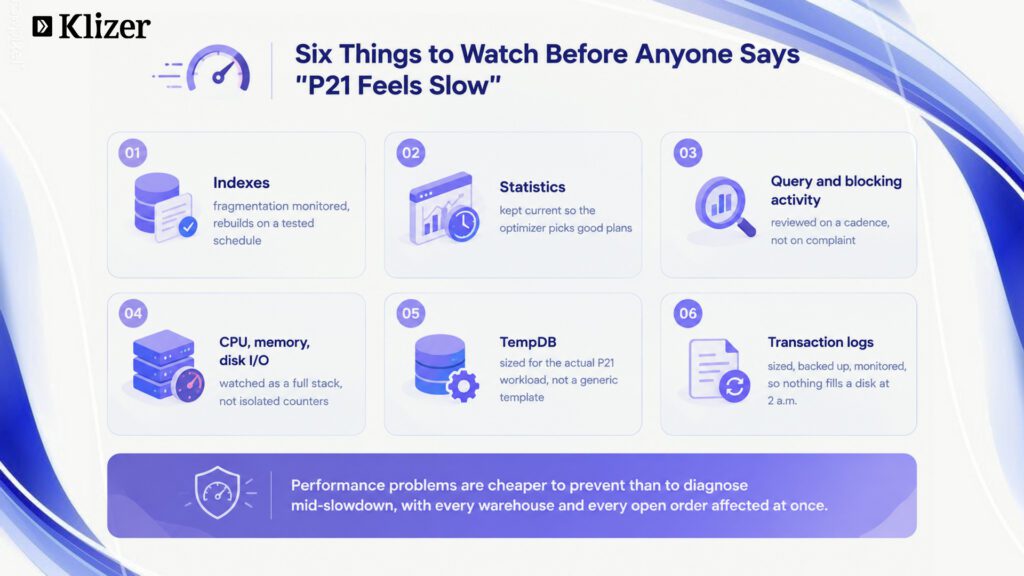
None of the practices above matter if the underlying SQL Server instance isn’t healthy. The fundamentals still apply, and they still matter every single day:
- Indexes, monitored for fragmentation and rebuilt or reorganized on a real, tested schedule, not left to chance.
- Statistics, kept current so the query optimizer can make good decisions about execution plans.
- Query and blocking activity, reviewed on a regular cadence, not only when someone complains that P21 “feels slow.”
- CPU, memory, and disk I/O, monitored as a full stack, not just as isolated SQL Server counters.
- TempDB, sized and configured for the actual P21 workload, not copied from a generic template.
- Transaction logs, sized, backed up, and monitored so a runaway log isn’t the surprise that fills a disk at 2 a.m.
Why it matters
Performance problems are almost always cheaper to prevent than to diagnose under pressure, in the middle of a P21 slowdown that’s affecting every user, every warehouse, and every open order at the same time.
7. Design for Cloud Readiness
Even organizations with no near-term plan to move to the cloud benefit from designing the database as if they will. That means minimizing direct SQL customizations and leaning on supported extension points, UDTs, APIs, business rules, and the Stored Procedure and Business Rule Executors, instead of custom scripts wired directly into the database.
This is really a restatement of everything above, framed as a single design principle: every time there’s a choice between a quick, direct SQL fix and a slightly slower, supported alternative, the supported alternative is the one that keeps the environment portable.
Why it matters
When the time comes to move to a hosted or cloud P21 environment, there’s no scramble to unwind years of direct SQL dependencies first. The migration becomes a project instead of an excavation.
What a Real P21 Database Upgrade Should Include
The seven practices above describe how to run a healthy P21 database day to day. But there’s a second, equally important question that doesn’t get enough attention: when do you upgrade, and what does that upgrade actually need to touch?
A P21 SQL Server upgrade is not “install the new version and move on.” Done properly, it’s a checklist of database-level work that gets rebuilt, re-validated, or reconfigured around the new environment. Skipping any of it doesn’t usually cause a failure on day one, it causes a quiet gap that surfaces weeks later as a missed backup, a silent job failure, or a report nobody realized had stopped refreshing.
1. Update SQL Permissions
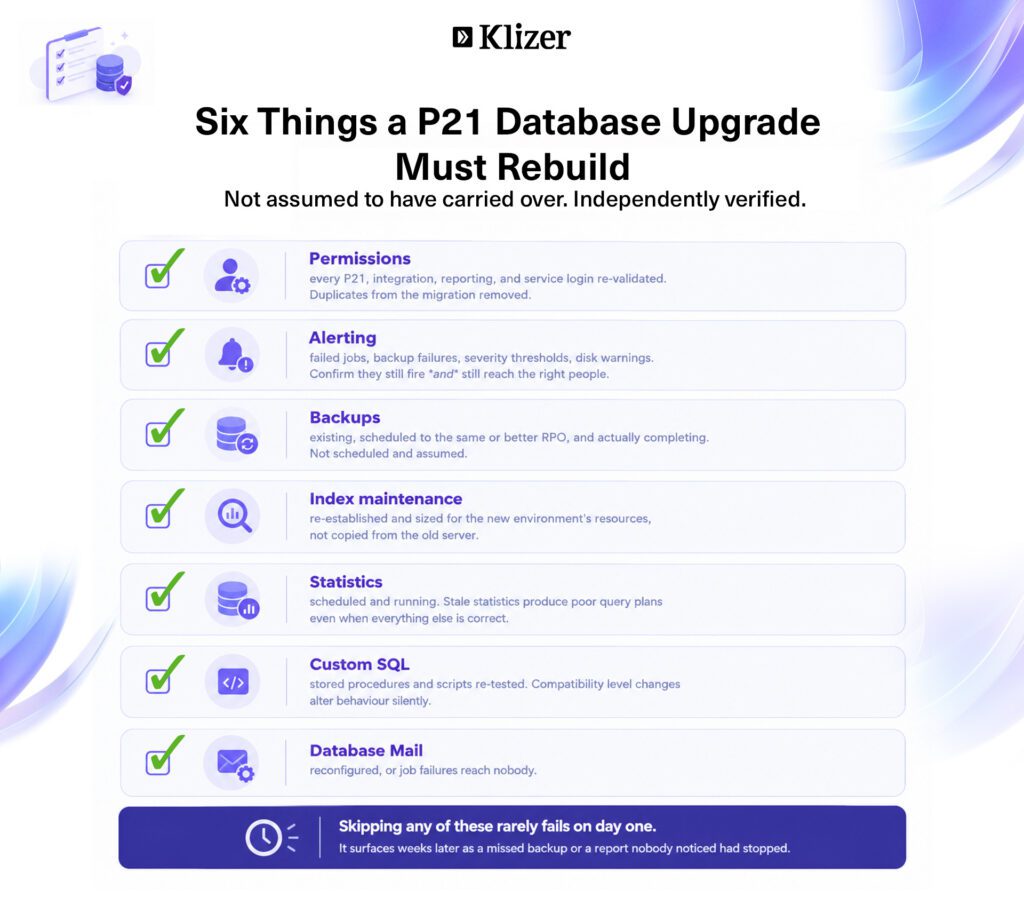
Logins, roles, and permissions don’t always carry over cleanly during a SQL Server upgrade or migration, particularly when moving to a new server, a new SQL Server version, or a cloud-hosted instance. Every login used by P21 itself, by integrations, by reporting tools, and by service accounts should be reviewed and re-validated after the upgrade, not simply assumed to still be correct.
- Confirm P21 application logins have the correct roles on the new instance.
- Re-validate reporting and integration accounts still have read-only or scoped access, not broader access granted “just to get it working.”
- Remove any leftover or duplicate logins created during the migration process itself.
Read More: Common Prophet 21 API Integration Mistakes and How to Avoid Them
2. Rebuild Your Alert System
SQL Server Agent alerts, operators, and notification settings are frequently tied to the specific instance they were configured on, and they don’t always migrate automatically. After an upgrade, confirm that critical alerts, failed jobs, backup failures, error severity thresholds, disk space warnings, are still firing and still routed to the right people.
An upgrade that silently loses alerting isn’t a clean upgrade, it’s an upgrade that trades a known, visible problem for an invisible one that surfaces at the worst possible time.
3. Recreate Maintenance Plans and SQL Jobs
This is the core of a database upgrade, and it deserves to be treated as its own checklist rather than a single line item:
Database and transaction log backups: Confirm backup jobs exist in the new environment, are scheduled to the same (or better) recovery point objective as before, and are actually completing successfully, not just scheduled and assumed to be working.
Rebuild for index: Re-establish index maintenance jobs, sized appropriately for the new environment’s resources and the current data volume, rather than copied blindly from the old server’s settings.
Updating statistics: Confirm statistics maintenance is scheduled and running. A freshly upgraded SQL Server instance with stale statistics will produce poor query plans even if every other setting is correct.
SQL statements: Re-test custom SQL statements, stored procedures, and scheduled scripts against the upgraded environment. Schema changes, compatibility level changes, or version differences between SQL Server releases can silently change behavior in ways that only show up under specific conditions.
Configure database mail: Reconfigure Database Mail so job failures, alerts, and scheduled reports can actually reach someone. It’s a small setting that’s easy to forget during a migration and immediately noticeable the first time a job fails silently and nobody finds out.
Key Takeaway
An upgrade isn’t finished when P21 opens successfully on the new environment. It’s finished when permissions, alerting, backups, index and statistics maintenance, custom SQL, and notifications have all been rebuilt and independently verified, not assumed to have carried over automatically.
A healthy, well-designed database is the foundation of a performant, secure, and future-ready Prophet 21 ERP. The organizations that treat database management, and database upgrades, as a deliberate, ongoing discipline are the ones that scale smoothly, integrate confidently, and move to the cloud without a fight.
If you’re looking for more help, our connected commerce experts are right here. Just book a consultation and get started.