Product catalogs rarely fail all at once. They come apart one attribute at a time until a customer service rep is on the phone explaining why the spec sheet on the website contradicts the one that shipped in the box.
By the time someone escalates it, the storefront is usually the least of the problem. Several systems have been allowed to write to the same product record, and nobody decided which one was right.
That decision needs to happen before anyone buys software.
ON THIS PAGE
What is Shopify Plus PIM integration?
Shopify Plus PIM integration connects a product information management system to a Shopify Plus store. Enriched and validated product data reaches the storefront from one governed source rather than being keyed in a second time.
A connector or middleware layer reads products from the PIM, maps attributes to Shopify’s data model, and writes them through the GraphQL Admin API. What separates a working Shopify PIM integration from an expensive one is decided before any of that: which system is authoritative for which field.
Why Integrate a PIM with Shopify Plus?
The practical gains of a Shopify Plus PIM integration show up in operations long before they show up in conversion reports:
- Products can be held back until required attributes are complete, when the integration enforces the PIM’s completeness rules.
- One approved description feeds the Shopify store, expansion stores, marketplaces, and print, so channels stop drifting apart.
- Supplier data is onboarded once, validated once, and reused, instead of being reformatted before every launch.
- Attribute changes can carry a who, when, and previous value, depending on the PIM’s history features and configuration.
- Launches stop waiting on a developer to bulk-edit metafields when those fields are mapped and managed in the PIM.
A PIM is also another system to license, staff, and integrate. The sections below are about making sure that cost buys governance rather than a fourth copy of the same bad data.
When Does Your Catalog Need a Centralized Data Layer?
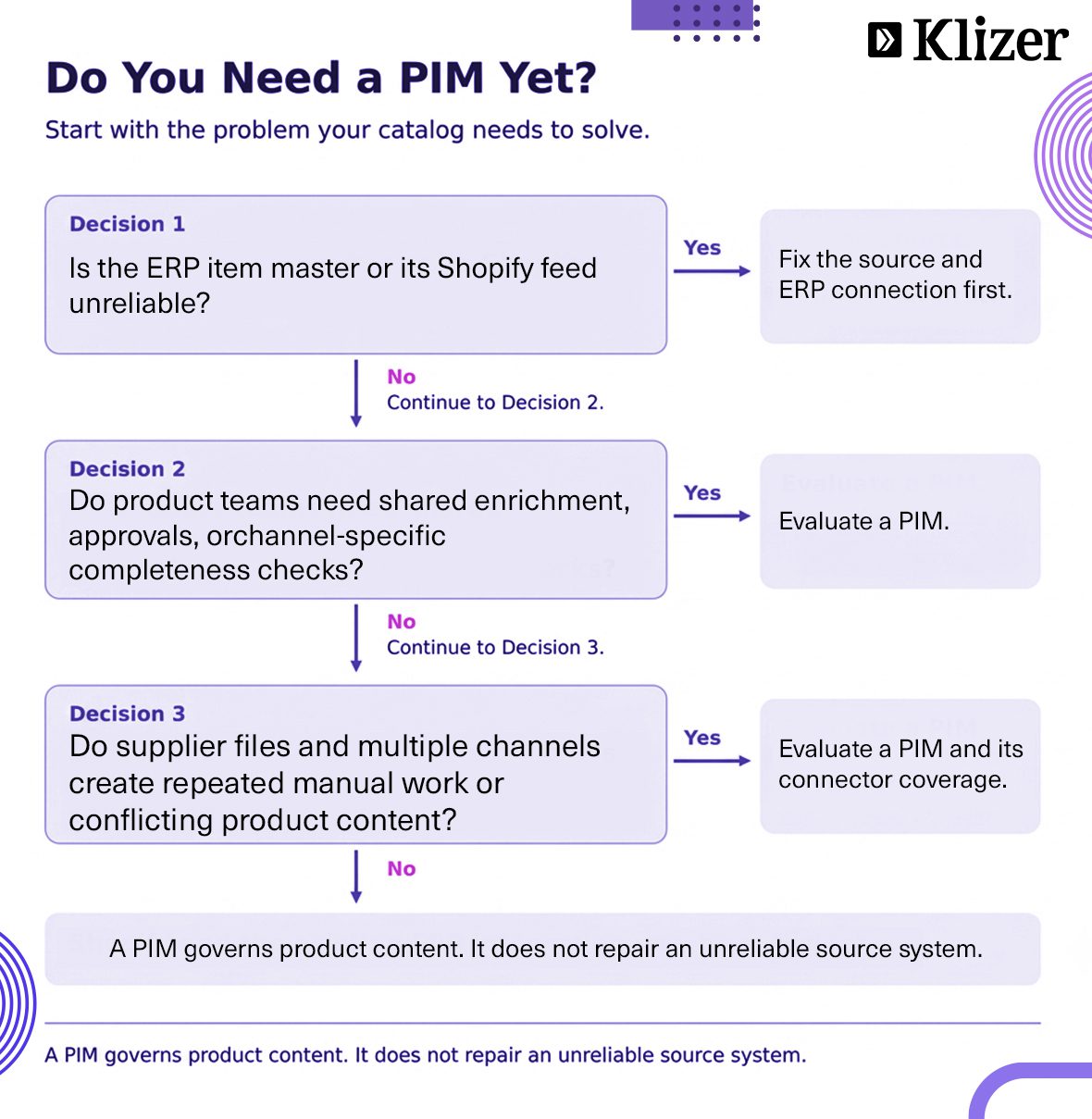
The signals that native Shopify product catalog management has stopped being enough are not about SKU count alone. They show up as supplier spreadsheets reformatted by hand before every launch, two teams disagreeing about which description is current, or one SKU reaching three channels from three files.
One concrete signal is option depth. Shopify raised the variant ceiling from 100 to 2,048 variants per product in October 2025, but the cap of three options per product did not move. A fastener described by material, finish, thread pitch, length, and drive type has five attributes. Additional specifications can be modeled upstream and pushed down as metafields, but metafields do not create extra selectable variant options.
Which System Should Own Each Field?
Shopify Plus stores product data well, but storing it does not establish whether it is correct. Metafield definitions validate a field’s format, but they do not by themselves enforce a complete product record before publication.
That is the gap a centralized data layer fills, and it only works when ownership is assigned field by field. For an ERP such as Prophet 21, NetSuite, or SAP, the following is a starting map to validate against your workflows:
| Data | System of record | Why it belongs there |
|---|---|---|
| Item number, UOM, cost, on-hand inventory | ERP | Financial and fulfillment truth already lives here |
| Contract and customer-specific pricing | ERP | Negotiated terms are operational data, not content |
| Descriptions, specifications, assets, taxonomy | PIM | Enrichment, approvals, and completeness scoring |
| Cross-references and descriptive product relationships | PIM, unless mastered elsewhere | Relationships span suppliers and item numbers |
| Operational kit definitions and supersession rules | ERP, where used for fulfillment | These relationships affect orders and stock |
| Merchandising, SEO fields, collections | Shopify Plus, unless governed upstream | Presentation decisions belong to the channel |
Each field gets exactly one authoritative writer, and downstream copies should not be edited independently. In B2B ecommerce for distributors, allowing the PIM and Prophet 21 to maintain competing list prices makes it difficult to establish which number the website should show.
What Changes at the Shopify Plus Tier?
Two important differences affect a Shopify Plus PIM integration: how B2B pricing is modeled and how much throughput the API allows.
B2B pricing runs through catalogs assigned to B2B markets or directly to company locations. Basic, Grow, and Advanced plans support up to three active catalogs across B2B markets. Plus supports more catalogs and direct assignment to company locations. Shopify’s detailed documentation specifies 25 catalogs per company location and 10,000 total catalogs per store. When catalogs assigned directly to the same location contain the same product at different prices, Shopify shows the lower price before quantity rules or volume pricing breaks. Overlapping catalogs generated from the ERP can therefore expose unintended prices.
Shopify Plus also raises the GraphQL Admin API rate to 1,000 cost points per second, compared with 100 on standard plans and 200 on Advanced. Across large catalogs, this affects how quickly routine updates finish.
How Do You Connect a PIM to Shopify Plus?
The connector is the last decision. A Shopify product data integration that skips the earlier steps risks distributing conflicting data faster.
Step 1: Fix ownership and clean the source
Write the ownership table above for your own fields, then purge duplicates, normalize units, and fill required attributes in whichever system owns them. Doing that at scale is where AI product data enrichment earns its place, with review of technical specifications before publication.
Step 2: Map attributes to Shopify’s model
Decide which PIM attributes become options, which become metafields, and which become metaobjects. Shopify supports up to one million metaobject entries per definition, which can support structured cross-reference data rather than flattening it into text. Storefront display and search behavior still need implementation.
Which attributes belong where depends on the PIM you choose, and our PIM platform comparison covers how the main options differ on attribute modeling.
Step 3: Choose connector or middleware
A Shopify Akeneo integration through Akeneo’s own app supports products, variants, metafields, and images. Where its supported mappings cover your needs and the PIM is the only upstream writer, that may be enough. Check the app’s feature coverage: Akeneo categories do not automatically become Shopify collections, and product deletion is not supported.
Once ERP data is also in play, assess whether separate direct integrations or middleware can enforce field ownership before anything touches the store. Klizer’s Akeneo PIM implementation services cover catalog modeling, enrichment workflows, and integration requirements.
Step 4: Load through bulk operations
Large initial loads are a good fit for the bulk operations API, which takes a JSONL file and runs asynchronously without the usual per-mutation rate limiting. From API version 2026-01, an app can run five bulk mutations at once per shop. Operation management requests still consume API capacity.
Step 5: Set triggers by field type
Price and inventory should move on events where the source systems support them, because stale stock levels can lead to orders you cannot fill. Descriptions and assets can run on a nightly schedule when publishing deadlines allow it. Safety corrections and coordinated launches may need faster updates.
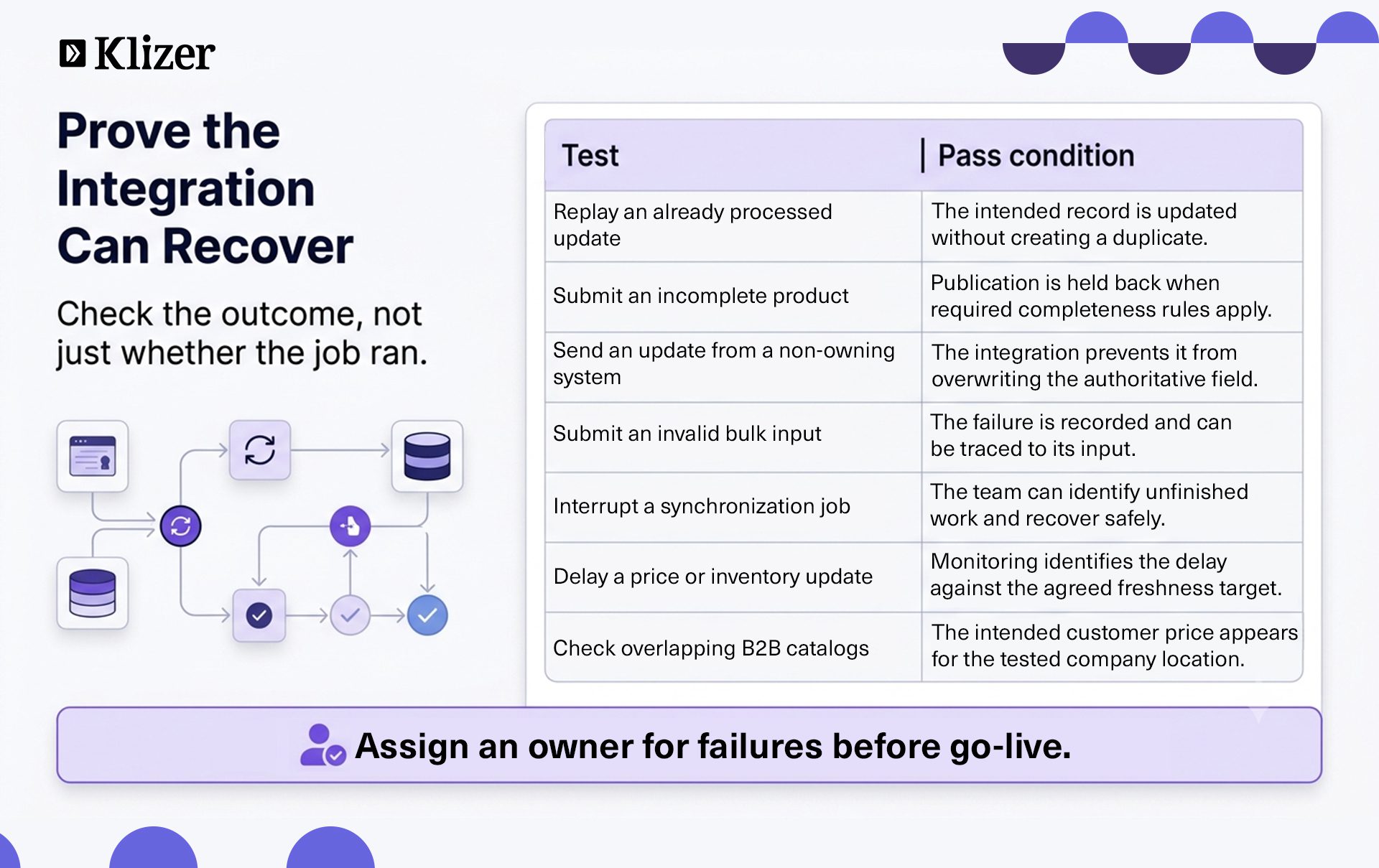
Step 6: Build for failure before go-live
Use a stable identifier, normally the ERP item number, and maintain its mapping to Shopify product and variant IDs. Implement update or upsert logic so a replayed job corrects a record instead of duplicating it.
Bulk operations return a results file, but something still has to read it, identify errors, and retry failed inputs. Do not rely on input order for processing. Assign an owner for failed jobs and monitor synchronization delays after launch.
Test the Shopify Plus PIM integration on a development store, work through a Shopify code review checklist before cutover, then move one expansion store at a time if your rollout includes multiple stores.
What Do Industrial Catalogs Need That Retail Ones Do Not?
Industrial Shopify product catalog management often needs more than titles, prices, and photographs. Distribution data is relational. Selling UOM has to map against stocking UOM, pack quantities drive minimum order rules, and supersession chains link discontinued parts to their replacements. On top of that sit the OEM cross-reference numbers buyers search by and spec sheets tied to specific revisions.
Descriptive relationships can live in the PIM and flow into Shopify as reference metafields or metaobjects. Operational rules need to stay aligned with the ERP and the storefront’s ordering logic. Audit the spreadsheets holding these relationships before a customer complaint or a mismatched spec sheet forces the issue.
FAQs
1. Does Shopify Plus include a PIM?
No. Shopify Plus manages product records for the storefront but is not a dedicated upstream PIM. A Shopify PIM integration adds enrichment and governance capabilities such as completeness scoring and approval workflows, depending on the selected PIM and configuration.
2. When is a PIM the wrong answer?
When the catalog is clean, the ERP already feeds price and inventory reliably, metafields cover the rest, and there is little need for additional enrichment or approval workflows. It is also the wrong first move when the ERP feed itself is broken, because a PIM on top of an unreliable item master distributes bad data faster. The first step is to fix the ERP connection.
3. Is a Shopify Akeneo integration enough on its own?
For content, it may be, if the app supports your required fields and workflows. Once inventory and contract pricing also have to reach the storefront, assess the ERP integration separately rather than assuming the PIM connector replaces it. Internal cost data should only be synchronized where needed.
4. What breaks first without a centralized data layer?
Cross-channel consistency is a common risk. A Shopify product data integration built without clear ownership can overwrite approved data with a later update from another system, leaving the same SKU with different specifications across channels.
Conclusion
The mistake distributors make with product data is treating the PIM purchase as the decision. The real decision is the ownership map. Writing it down before signing anything exposes data conflicts before they become integration work.
Decide which system owns each field, enforce a single writer for each, and build the Shopify Plus PIM integration to survive failure rather than to pass a demo.
That ownership map connects the layers of Klizer’s Connected Commerce: a governed Foundation, a Storefront that reflects approved data, Integration that respects field ownership, and Intelligence working from trustworthy inputs. Product data does not need one physical home. It needs one accountable source for each field.
Get the ownership map right. Book a Connected Commerce consultation to assess how your ERP, PIM, and Shopify Plus should work together.