Modern B2B commerce relies on accurate product data, real-time inventory, and seamless order processing. For businesses using Adobe Commerce and Epicor Prophet 21 (P21), keeping these systems synchronized is essential for delivering a consistent customer experience and efficient operations.
A successful P21 Adobe Commerce integration ensures products, pricing, inventory, and orders stay aligned across both platforms. Instead of relying on traditional custom integrations, Adobe Commerce App Builder provides a serverless, event-driven approach that simplifies maintenance and improves scalability.
In this guide, you’ll learn how Epicor Prophet 21 integration with Adobe Commerce works using App Builder and the best practices for building a scalable integration.
ON THIS PAGE
Why Integrating Epicor P21 with Adobe Commerce Is Challenging
Epicor Prophet 21 manages operational data such as products, pricing, inventory, and orders, while Adobe Commerce delivers the customer-facing ecommerce experience. To operate efficiently, both systems must remain synchronized.
Many businesses start their Adobe Commerce ERP integration using custom modules, cron jobs, or point-to-point APIs. While these methods work initially, they often create challenges such as:
- Tight coupling between systems
- Limited scalability
- Complex upgrades
- Higher maintenance effort
- Limited monitoring and troubleshooting
As business grows, separating the integration layer from the storefront becomes a more sustainable approach.
Traditional ERP Integration vs. Adobe App Builder
Many ERP integrations start with custom Magento modules, cron jobs, or point-to-point API connections. While these approaches can meet initial requirements, they often become difficult to maintain as business needs grow.
Adobe App Builder provides a modern, serverless architecture that separates integration logic from the storefront, making integrations more scalable, flexible, and easier to manage.
| Traditional Integration | Adobe App Builder |
| Cron jobs | Event-driven workflows |
| Custom Magento modules | Serverless Runtime actions |
| Tight coupling | Decoupled architecture |
| Manual scaling | Automatic scaling |
| Difficult upgrades | Independent deployment |
By decoupling the integration layer from Adobe Commerce, organizations can modernize their ERP integration while reducing complexity and improving long-term maintainability.
Why Use Adobe App Builder for Epicor P21 Integration?
Adobe App Builder is Adobe’s serverless extensibility platform for Adobe Experience Cloud applications, including Adobe Commerce. Rather than embedding integration logic directly within Adobe Commerce, App Builder allows developers to build independent Runtime actions that orchestrate communication between external systems.
This architecture provides several advantages for ERP integrations.
| Capability | Business Benefit |
| Serverless Runtime Actions | Automatically scale integration workloads without maintaining dedicated middleware servers. |
| Secure Secret Management | Store ERP and Commerce credentials securely during deployment instead of embedding them in source code. |
| Adobe State API | Maintain synchronization watermarks and processing state across executions. |
| Adobe I/O Events | Trigger workflows automatically based on Commerce events instead of relying solely on scheduled polling. |
| Admin UI SDK | Embed synchronization controls directly within the Adobe Commerce Admin interface. |
| CI/CD Deployment | Simplify deployment across development, staging, and production environments using the Adobe I/O CLI. |
Moving integration logic into App Builder offers several architectural benefits:
- Adobe Commerce remains focused on delivering storefront experiences.
- ERP integration logic can evolve independently of Commerce releases.
- Runtime actions can be updated without redeploying PHP modules.
- Synchronization workflows become easier to monitor, maintain, and extend.
Although Adobe App Builder significantly reduces the amount of business logic inside Adobe Commerce, lightweight Commerce modules are still required. These modules expose REST endpoints, register Admin UI actions, and provide the communication layer between the storefront and App Builder Runtime actions.
High-Level Integration Architecture
A complete P21–Commerce integration typically spans four independent sync flows, each implemented as its own Runtime action:
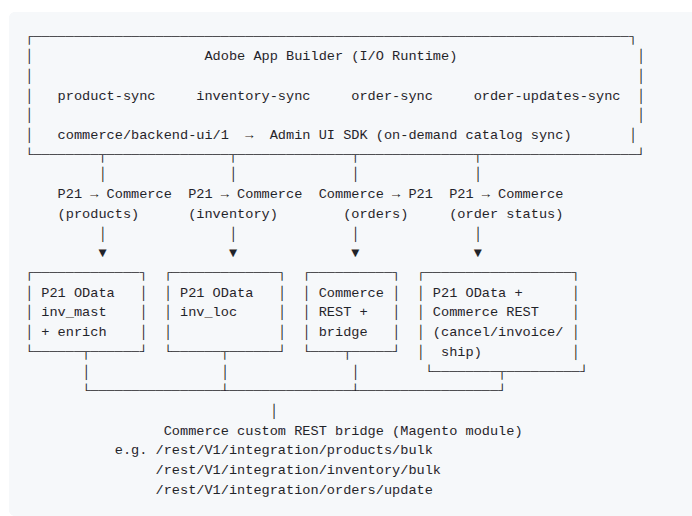
Using a Commerce Bridge Module
Rather than having Adobe App Builder interact directly with Adobe Commerce’s native catalog APIs, a better approach is to introduce a lightweight Commerce bridge module.
This module exposes integration-friendly REST endpoints that accept bulk payloads from App Builder and translate them into Adobe Commerce operations.
Typical responsibilities include:
- Bulk product creation and updates
- Inventory synchronization
- Order write-back
- Customer attribute updates
- Shipment and invoice processing
This pattern offers several advantages.
Simplified Runtime Actions
Adobe App Builder only needs to determine what data should be synchronized. The bridge module handles how that data is applied within Adobe Commerce.
Easier Maintenance
Changes to product attributes, store views, attribute sets, or catalog rules can be handled within the Commerce module without requiring updates to every Runtime action.
Better Performance
Bulk REST endpoints significantly reduce API calls when synchronizing large product catalogs, making the integration more efficient.
Greater Flexibility
As business requirements evolve, the bridge module can accommodate new Commerce-specific functionality while keeping App Builder workflows clean and reusable.
By separating orchestration from platform-specific implementation, organizations create an integration architecture that is easier to extend, test, and maintain over time.
Four Core Synchronization Workflows
A reliable P21 Adobe Commerce integration is built around four independent synchronization workflows. Keeping these processes separate allows each workflow to run on its own schedule, making the integration easier to monitor, troubleshoot, and scale.
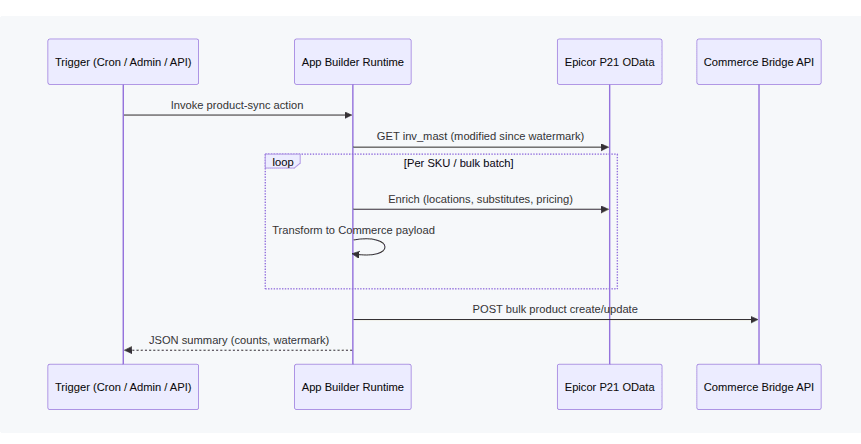
- 1. Product sync (P21 → Commerce)
Typical triggers: Scheduled cron, direct HTTP to a Runtime action, or an Admin UI mass action.
Pipeline:
- Resolve an incremental watermark (last modified timestamp).
- Query P21 OData—commonly views such as p21_view_inv_mast—for rows changed since the watermark.
- Apply eligibility filters (e.g. exclude items not intended for the web).
- Enrich each SKU with related P21 data: warehouse availability, substitutes, supplier pricing, dimensions.
- Transform enriched records into the Commerce bridge payload format.
- Bulk POST to the bridge module in batches sized for your catalog and API limits.
- On success, persist the sync start time as the new watermark.
Mapping considerations:
- P21 classification fields often drive store visibility (which store views a SKU appears in).
- Shipping or hazmat classes may map to shipping group attributes used by rate-shopping extensions.
- Aggregated warehouse availability can populate stock or extension attributes on the product.
2. Inventory sync (P21 → Commerce)
Typical triggers: Cron at a higher frequency than product sync.
Reads P21 inventory location data—often p21_view_inv_loc—filtered by warehouse location_id values relevant to your fulfillment strategy. Available quantity is typically computed as:
qty = on_hand − allocated
Updates are sent in bulk to the Commerce bridge’s inventory endpoint. Inventory sync should use a separate watermark from product sync so frequent stock changes do not interfere with slower catalog enrichment runs.
- 3. Order sync (Commerce → P21)
Typical triggers: Adobe I/O Event on order commit, webhook, or manual replay.
When a customer places an order:
- Commerce emits an event (or App Builder receives a webhook).
- The Runtime action loads the full order via Commerce REST.
- Eligibility checks verify ERP identifiers are present—customer ID, ship-to ID, contact ID—usually stored as order extension attributes populated at checkout.
- Deduplication checks P21 (e.g. p21_view_oe_hdr by web_reference_no) to avoid creating duplicate ERP orders on replay.
- A mapped payload is sent to P21’s sales order API (POST /api/sales/orders/).
- The P21 order number is written back to Commerce through the bridge module.
Event-driven registration in app.config.yaml keeps orders flowing without polling:
events:
registrations:
Commerce Order Save:
events_of_interest:
– provider_metadata: dx_commerce_events
event_codes:
– com.adobe.commerce.observer.sales_order_save_commit_after
runtime_action: your-package/order-sync
This requires Adobe Commerce Events modules on the Commerce side and provider metadata configured in your Adobe I/O workspace.
- 4. Order updates sync (P21 → Commerce)
Typical triggers: Scheduled job or single-order API call.
As P21 fulfills, invoices, or cancels orders, App Builder reads modified order headers linked to Commerce via a web reference field and applies the corresponding Commerce lifecycle action:
| P21 signal | Typical Commerce action |
|---|---|
| Cancel flag set | Cancel order |
| Order completed | Create invoice and shipment |
| Invoice number present | Create invoice |
Some lifecycle operations, especially shipment creation, may require an admin-level bearer token because integration OAuth scopes do not always cover them. Plan for a separate admin credential used only by the integration tier.
Why Separate Synchronization Workflows?
Although these workflows work together, they should remain independent.
Separating synchronization processes provides several operational advantages:
- Different schedules for products, inventory, and orders
- Independent retries if one workflow fails
- Faster troubleshooting
- Better scalability during peak business periods
- Easier testing and deployment
- Reduced impact when introducing new features
For example, inventory synchronization may run every few minutes, product synchronization every few hours, while order synchronization executes instantly through Adobe I/O Events.
This flexibility allows businesses to optimize each workflow according to operational priorities without affecting the others.
Building a Reliable Connected Commerce Experience
When these four synchronization workflows operate together, Adobe Commerce and Epicor P21 function as a connected ecosystem rather than two isolated systems.
Products remain accurate, inventory stays current, orders flow automatically to the ERP, and customers receive timely updates throughout the fulfillment process. The result is a more efficient operation, a better customer experience, and an integration architecture that can scale as your business grows.
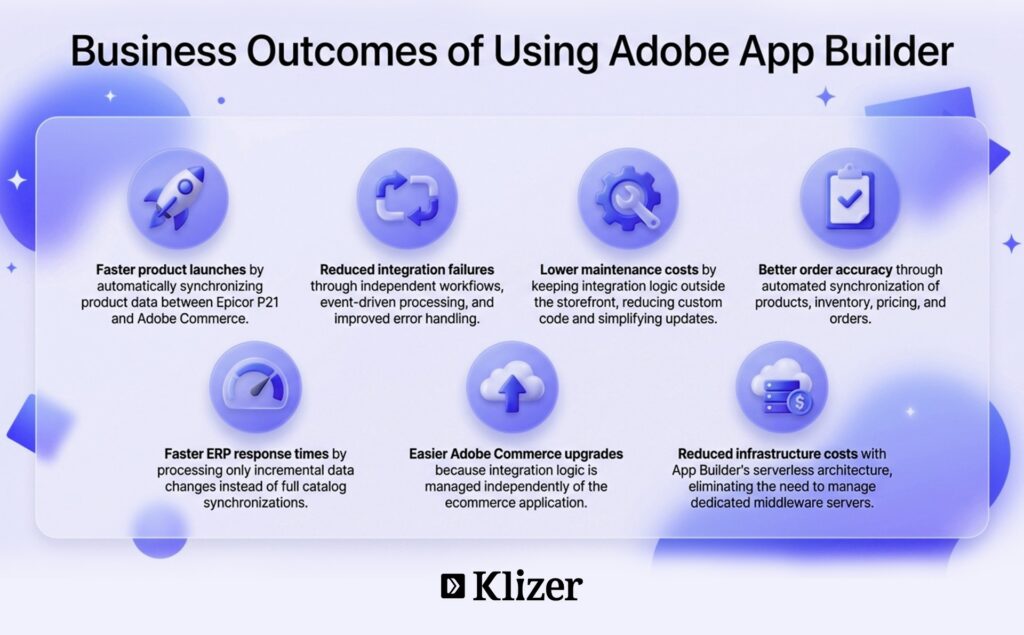
Best Practices for Building a Scalable Epicor P21 and Adobe Commerce Integration
A successful Epicor Prophet 21 integration depends on more than choosing the right technology. Following these best practices can help ensure your integration remains secure, reliable, and easy to maintain.
Synchronize Only What Has Changed
One of the most common mistakes in ERP integrations is reprocessing the entire catalog during every synchronization.
Instead, use incremental synchronization to retrieve only records that have changed since the previous successful run. Adobe App Builder’s State API makes it easy to store synchronization watermarks, allowing each Runtime action to process only newly updated products, inventory, or orders.
This approach offers several benefits:
- Faster synchronization
- Lower API consumption
- Reduced processing time
- Improved scalability for large product catalogs
Maintaining separate synchronization states for products, inventory, and orders also allows each workflow to run independently without affecting the others.
Keep Business Logic Outside the Storefront
Adobe Commerce should focus on delivering exceptional shopping experiences—not managing ERP integration logic.
Business rules such as product filtering, data transformation, batching, retries, and synchronization management are better handled within Adobe App Builder.
Keeping the storefront lightweight offers several advantages:
- Easier Adobe Commerce upgrades
- Lower maintenance effort
- Better separation of responsibilities
- Greater flexibility when business rules change
This architecture also makes it easier to extend the integration without introducing unnecessary complexity into the ecommerce application.
Secure Integration Credentials
ERP integrations often require access to multiple APIs, making credential security a critical consideration.
Rather than storing credentials in application code, use Adobe App Builder’s secure deployment configuration to manage:
- Epicor P21 API credentials
- Adobe Commerce authentication
- Environment-specific configuration values
- API endpoints
- Integration secrets
Centralized credential management improves security while simplifying updates and credential rotation across development, staging, and production environments.
Build Reusable Integration Components
Although product synchronization, inventory updates, and order processing perform different tasks, they often rely on the same underlying functionality.
Creating shared libraries for common services helps reduce duplicated code and improves long-term maintainability.
Reusable components typically include:
- API clients
- Authentication services
- Data transformation logic
- Logging
- Error handling
- Synchronization state management
This modular approach simplifies future enhancements and reduces development effort as the integration evolves.
Design for Reliability
Production integrations should be built with resilience in mind.
Whenever possible:
- Support automatic retries for temporary failures.
- Prevent duplicate order creation during retries.
- Return meaningful error messages for faster troubleshooting.
- Log synchronization results for monitoring and reporting.
- Process records in batches instead of one at a time.
A reliable integration not only reduces operational issues but also provides greater confidence during high-volume periods.
Getting Started with Adobe App Builder
A phased implementation is the safest way to deploy a new ERP integration.
Rather than enabling every synchronization workflow at once, validate each stage independently before moving to production.
A recommended rollout strategy includes:
Phase 1: Product Synchronization
Start by validating product mappings, business rules, and attribute transformations in a staging environment.
Phase 2: Inventory Synchronization
Once product synchronization is stable, introduce inventory updates using a separate schedule to ensure stock levels remain accurate.
Phase 3: Order Synchronization
Test order creation using sample transactions before enabling automated processing.
Confirm that customer information, pricing, taxes, and shipping details are correctly transferred to Epicor P21.
Phase 4: Order Status Updates
Finally, synchronize invoices, shipments, cancellations, and fulfillment updates back to Adobe Commerce so customers can track their orders online.
Rolling out the integration in stages helps identify issues early, reduces implementation risks, and creates a more reliable Adobe Commerce ERP integration.
Conclusion
A successful P21 Adobe Commerce integration requires more than connecting APIs. It demands a scalable architecture that keeps products, inventory, pricing, and orders synchronized while allowing Adobe Commerce and Epicor Prophet 21 to evolve independently.
Using Adobe Commerce App Builder, businesses can build a secure, serverless, and event-driven Adobe Commerce ERP integration that improves operational efficiency, simplifies maintenance, and delivers a better customer experience. Features such as Runtime actions, incremental synchronization, and event-driven workflows help organizations reduce maintenance effort, support easier platform upgrades, and scale their ecommerce operations with confidence.
As an Epicor development partner, Klizer helps distributors build connected commerce solutions that align with their operational goals. Whether you need Adobe Commerce Development, ERP Integration Services, Adobe App Builder Services, or P21 Cloud Migration, our team can help you create a secure, scalable integration that supports long-term business growth.
Ready to connect Epicor P21 with Adobe Commerce? Contact us to build a future-ready connected commerce solution.
FAQs
Why should I integrate Epicor P21 with Adobe Commerce?
Integrating Epicor P21 with Adobe Commerce creates a connected commerce ecosystem where product information, inventory, pricing, and orders remain synchronized. This reduces manual effort, improves operational efficiency, and provides customers with accurate, up-to-date information throughout their buying journey.
What role does Adobe App Builder play in the integration?
Adobe App Builder acts as the middleware layer between Epicor P21 and Adobe Commerce. It orchestrates synchronization workflows, transforms data, manages business rules, and enables secure communication without embedding integration logic directly into the storefront.
Can Adobe App Builder support real-time synchronization?
Yes. Adobe App Builder integrates with Adobe I/O Events, allowing workflows such as order synchronization to be triggered automatically when events occur in Adobe Commerce. This reduces reliance on scheduled polling and improves processing speed.
Is this architecture suitable for large B2B catalogs?
Yes. By combining serverless Runtime actions, incremental synchronization, batch processing, and independent workflows, Adobe App Builder can efficiently support large product catalogs, multiple warehouses, and high transaction volumes.
Can the integration be customized for unique business requirements?
Absolutely. Every business has different pricing models, fulfillment processes, product structures, and ERP workflows. Adobe App Builder’s flexible architecture allows organizations to tailor integrations to meet their operational requirements while maintaining a scalable and maintainable solution.