ON THIS PAGE
Protect Your Adobe Commerce, Magento, and PHP-Based Applications Against Critical Remote Code Execution Risks
A critical security alert has been issued for PHP following the disclosure of the PHP2Shell vulnerabilities, two remote code execution (RCE) flaws identified as CVE-2026-109618 and CVE-2026-109619.
Both vulnerabilities carry a CVSS v4.0 score of 9.2, indicating critical severity. Successful exploitation could allow an unauthenticated attacker to execute malicious code on a vulnerable server, potentially compromising application data, server resources, and connected systems.
The PHP development team has released emergency security updates on October 21, 2026. Organizations running PHP-based applications should prioritize reviewing their infrastructure and applying the appropriate security updates immediately.
Why This Matters for Your Business
PHP powers numerous eCommerce platforms and web applications, including Adobe Commerce (Magento), WooCommerce, and Laravel-based systems.
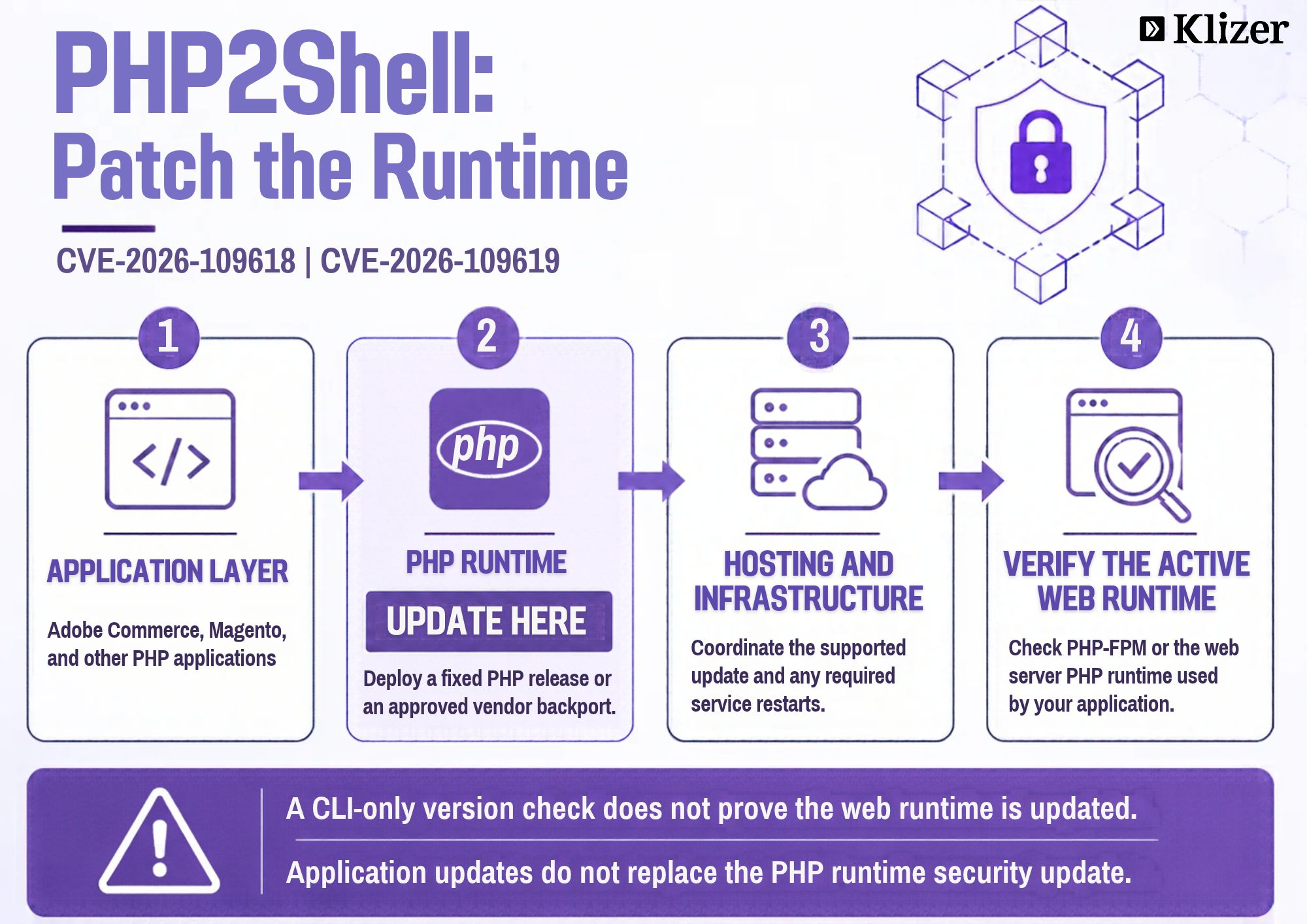
These vulnerabilities affect the PHP runtime itself, rather than a specific application or framework. Consequently, updating Magento extensions, modifying application code, or deploying a storefront hotfix alone will not resolve the underlying vulnerability.
For Adobe Commerce environments, remediation must be coordinated at the infrastructure level, including the PHP runtime used by web servers and PHP-FPM workers, where applicable.
Potential business impacts include:
- Remote code execution: Attackers may execute unauthorized commands on vulnerable servers.
- Data exposure: Sensitive application data and customer information could be at risk.
- eCommerce disruption: Compromised infrastructure may affect storefront availability and checkout operations.
- Wider system compromise: An affected server may become an entry point for further attacks against connected systems.
Which PHP Versions Need Attention?
The official PHP security release provides fixes for the following supported branches:
| PHP branch | Security-fixed version |
| PHP 8.5 | 8.5.12 |
| PHP 8.4 | 8.4.27 |
| PHP 8.3 | 8.3.36 |
| PHP 8.2 | 8.2.35 |
PHP 8.1 and older versions no longer receive standard upstream security support. Organizations running these versions should evaluate upgrading to a supported PHP branch or applying an appropriate security backport from their operating system or PHP vendor.
Important: Confirm compatibility with your Adobe Commerce release, extensions, and hosting environment before changing PHP versions. The security update must be deployed without introducing application compatibility or production stability issues.
Source: Official PHP Security Updates
Immediate Actions for eCommerce and IT Teams
1. Identify All Affected Environments
Inventory every server, container, virtual machine, and managed hosting environment running PHP. Include production, staging, development, background workers, and any separately maintained PHP runtimes.
Do not assume that all environments use the same PHP version.
2. Contact Your Hosting Provider
If your infrastructure is managed by a hosting provider, cloud platform, or infrastructure operations team, confirm that the appropriate security update has been applied.
Ask for confirmation of the deployed PHP version, the scope of the update, and whether PHP workers or services were restarted where necessary.
3. Apply the Appropriate Security Update
Deploy the fixed PHP release or an approved vendor-provided backport. For managed environments, follow the provider’s supported patching process.
For Adobe Commerce, coordinate with the infrastructure team to verify the PHP runtime used by the web-serving processes. Updating a local development environment or a CLI-only PHP binary does not necessarily update the runtime serving customer requests.
4. Validate the Deployment
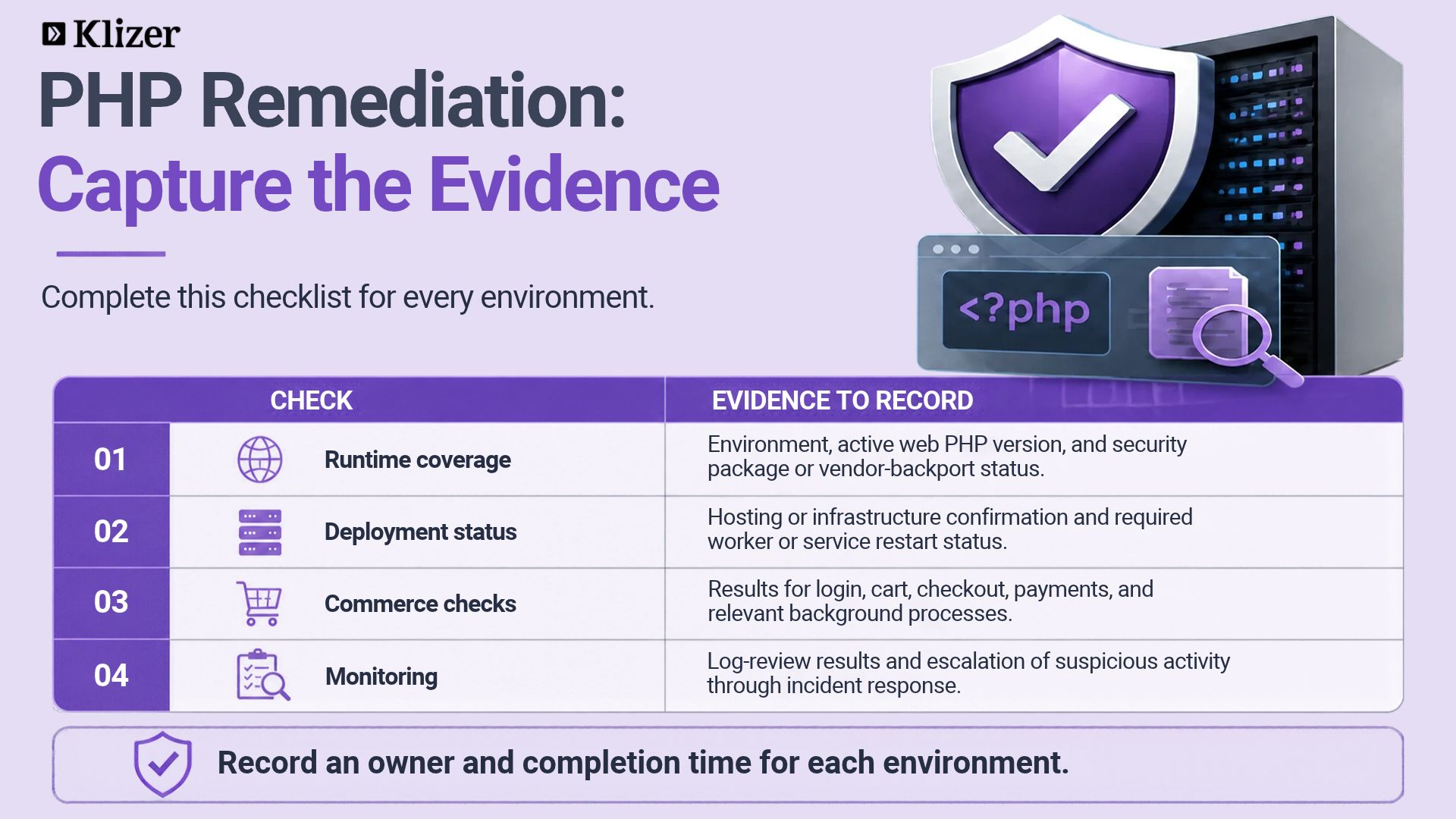
After patching, verify the PHP version and security package status on every affected environment.
Perform appropriate smoke tests covering storefront availability, customer login, product browsing, cart operations, checkout, payment integrations, and relevant background processes.
Review application and infrastructure logs for unexpected errors following the update.
5. Review Security Indicators
Patching is the primary remediation step, but it should not replace security monitoring. Review web server, PHP, system, and security monitoring logs for suspicious activity.
If a system may already have been compromised, follow your incident response process, preserve relevant logs, and investigate before returning the system to normal operation.
What Adobe Commerce and Magento Teams Should Know
For Adobe Commerce and Magento implementations, the PHP runtime is a critical part of the application’s security boundary.
Teams should:
- Confirm the PHP version used by each production web-serving environment.
- Coordinate PHP updates with the hosting or infrastructure team.
- Verify compatibility with the installed Adobe Commerce version and extensions.
- Test essential storefront and checkout workflows after patching.
- Document remediation status across production and non-production environments.
Application-level patches and routine Magento upgrades remain important, but they should not be treated as substitutes for the required PHP security update.
How Klizer Can Help
At Klizer, we understand that maintaining a secure eCommerce platform requires coordination across application code, integrations, infrastructure, and release management.
For organizations running Adobe Commerce and Magento, a structured response to critical PHP vulnerabilities can help reduce exposure while maintaining storefront stability.
We recommend assessing PHP runtime versions, coordinating infrastructure remediation, validating application compatibility, and verifying essential eCommerce workflows after deployment.
Conclusion
The PHP2Shell vulnerabilities highlight the importance of securing not only the application but also the underlying technology stack.
With emergency security updates now available, organizations should prioritize remediation, verify that fixes are active across all relevant environments, and investigate any signs of possible compromise.
Do not wait for the next routine maintenance window. Confirm your PHP security status and take the necessary action now.
Official resources: