Security updates are essential for maintaining a reliable ecommerce platform, especially when online stores handle customer information, payments, integrations, and business-critical operations. Applying an Adobe Commerce security update requires the correct patch baseline, component selection, and verification so that the storefront and connected systems continue to work correctly.
ON THIS PAGE
What Does the October Adobe Commerce Security Update Include?
On October 13, 2026, Adobe released security bulletin APSB26-153, addressing vulnerabilities affecting Adobe Commerce, Adobe Commerce B2B, and Magento Open Source.
The October update is part of Adobe’s monthly isolated security patching approach. Developers can apply targeted code changes without a full Composer-based upgrade for this release.
Key highlights
- Release date: October 13, 2026
- Security bulletin: APSB26-153
- Adobe priority rating: 2
- Total vulnerabilities addressed: 11
- Critical vulnerabilities: 5
- Highest CVSS score: 10.0
- Delivery method: Monthly isolated security patches
- Affected platforms: Adobe Commerce, Adobe Commerce B2B, and Magento Open Source
Affected Adobe Commerce and Magento Versions
The Adobe bulletin lists the following affected release lines. Patch eligibility depends on the product and support entitlement.
| Product | Affected versions |
| Adobe Commerce (Cloud and on-premises) | 2.4.9-2026-sep and earlier; 2.4.8-2026-sep and earlier; 2.4.7-2026-sep and earlier; 2.4.6-2026-sep and earlier; 2.4.5-2026-sep and earlier; 2.4.4-2026-sep and earlier |
| Magento Open Source | 2.4.9-2026-sep and earlier; 2.4.8-2026-sep and earlier; 2.4.7-2026-sep and earlier; 2.4.6-2026-sep and earlier |
| Adobe Commerce B2B | 1.5.3-2026-sep and earlier; 1.5.2-2026-sep and earlier; 1.4.2-2026-sep and earlier; 1.3.4-2026-sep and earlier; 1.3.3-2026-sep and earlier |
Important: October isolated patch downloads for Magento Open Source are provided for versions 2.4.7 and later. The older 2.4.6, 2.4.5, and 2.4.4 patch downloads listed below are available to eligible Adobe Commerce customers only.
Vulnerability Details: What Does APSB26-153 Fix?
The vulnerability details in APSB26-153 cover template processing, authorization, input validation, and cross-site scripting. Impact depends on the affected component and the access needed to exploit it.
Critical vulnerabilities
| CVE ID | Vulnerability type | CVSS score | Authentication required |
| CVE-2026-103849 | Template injection / arbitrary code execution | 10.0 | No |
| CVE-2026-92909 | Incorrect authorization / arbitrary code execution (B2B) | 9.8 | No |
| CVE-2026-91013 | Stored XSS / privilege escalation | 9.3 | No |
| CVE-2026-100133 | Stored XSS / privilege escalation | 9.3 | No |
| CVE-2026-92464 | Improper input validation / arbitrary code execution | 9.1 | Yes |
The most severe issue, CVE-2026-103849, involves unsafe template processing and could allow unauthenticated remote code execution. Adobe reported no known exploitation of the October bulletin’s vulnerabilities when it published the update.
High and medium severity vulnerabilities
| CVE ID | Impact | Severity | CVSS |
| CVE-2026-92911 | Arbitrary code execution through stored XSS | High | 8.7 |
| CVE-2026-95631 | Arbitrary file system write | High | 8.7 |
| CVE-2026-92908 | Security feature bypass (B2B) | High | 8.3 |
| CVE-2026-92922 | Privilege escalation through stored XSS | High | 8.1 |
| CVE-2026-92910 | Security feature bypass (B2B) | High | 7.2 |
| CVE-2026-95630 | Security feature bypass | Medium | 4.3 |
For merchants running ERP integrations, payment services, customer accounts, and multiple storefronts, a security incident can also affect connected systems and business operations.
Download October 2026 Isolated Security Patches
Adobe’s October patch release instructions provide these version-specific ZIP files.
Select the package corresponding to your supported Magento or Adobe Commerce version.
| Magento / Adobe Commerce version | Download | Availability |
| 2.4.9 | 2.4.9 October patch ZIP | Adobe Commerce / Magento Open Source |
| 2.4.8-p5 | 2.4.8-p5 October patch ZIP | Adobe Commerce / Magento Open Source |
| 2.4.7-p10 | 2.4.7-p10 October patch ZIP | Adobe Commerce / Magento Open Source |
| 2.4.6-p15 | 2.4.6-p15 October patch ZIP | Adobe Commerce only |
| 2.4.5-p17 | 2.4.5-p17 October patch ZIP | Adobe Commerce only |
| 2.4.4-p18 | 2.4.4-p18 October patch ZIP | Adobe Commerce only |
Note: Adobe Commerce customers downloading patches for older versions may need to authenticate using their Magento Marketplace Composer credentials.
Before downloading, check these prerequisites
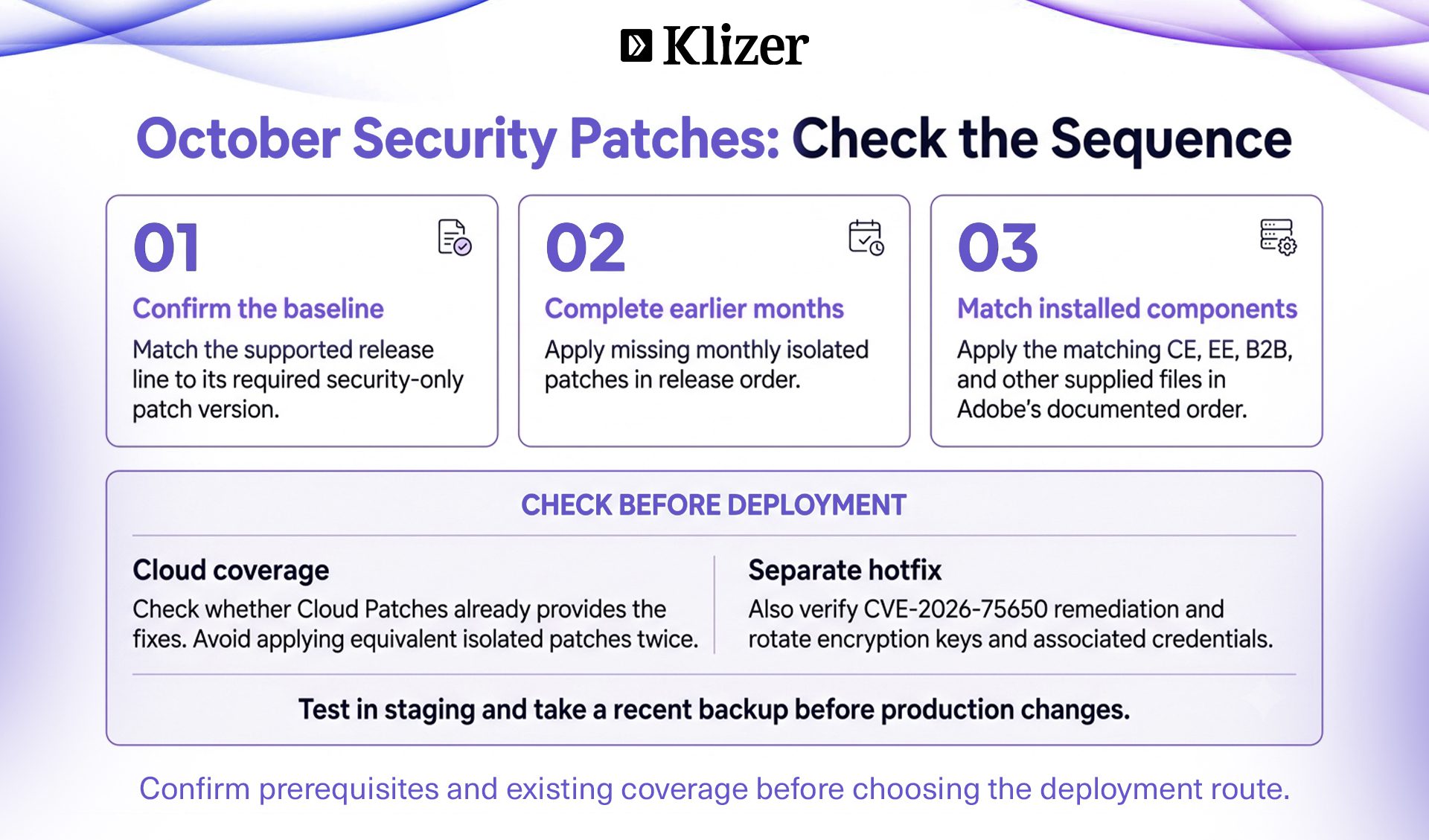
- Use the correct security patch baseline: For example, merchants using the 2.4.8 release line should first be on the required 2.4.8-p5 baseline. Complete any necessary Adobe Commerce upgrade before applying the corresponding isolated patch.
- Apply earlier monthly isolated patches first: Monthly isolated patches are not cumulative.
If your installation is missing an earlier monthly patch, you must apply the missing patches in release order before applying the October patch.
Also, each ZIP can contain multiple patch files for different components, such as Community Edition (CE), Enterprise Edition (EE), Adobe Commerce B2B, and Page Builder.
Apply only the patch files that match the installed components and their versions. Follow Adobe’s monthly and component sequence, applying CE before EE and the matching B2B files where present.
How to Apply the October 2026 Isolated Security Patch
The installation procedure depends on whether the application runs on Adobe Commerce Cloud infrastructure or a self-managed environment.
Follow Adobe’s isolated patch installation instructions. Test patches in staging and take a recent backup before making changes.
Method 1: Adobe Commerce on-premises and Magento Open Source
Step 1: Identify the installed version
Run:
php bin/magento –version
Confirm that the application meets the required security patch baseline.
Step 2: Download and extract the appropriate patch ZIP
For Magento 2.4.8-p5, download and extract the matching ZIP listed above.
Inspect the extracted files and determine which patches apply to your installed components.
Step 3: Review the patch before applying
Review the affected files and changes.
For a compatible patch file, you can test whether it applies cleanly:
patch –dry-run -p1 < filename.patch
Replace filename.patch with the actual extracted filename.
If the dry run fails, investigate whether the patch is already applied, the application version differs, a prerequisite patch is missing, or customizations conflict with the changes.
Do not force the patch through a conflict.
Step 4: Apply the isolated patch
From the Magento project root:
patch -p1 < filename.patch
Adobe also documents -p2 as an alternative when the patch format requires a different path stripping level.
Apply the required component patches in Adobe’s documented order.
Step 5: Clear the cache
php bin/magento cache:clean
php bin/magento cache:flush
If your deployment process requires compilation or static content deployment, complete those operations as part of the release workflow.
Method 2: Adobe Commerce on Cloud Infrastructure
Step 1: Create the hotfix directory in the project root if necessary
mkdir -p m2-hotfixes
Step 2: Copy the required patch files
cp /path/to/filename.patch m2-hotfixes/
Apply the applicable files in the required release and component sequence.
Step 3: Commit and push
git add m2-hotfixes/
git commit -m “Apply October 2026 Commerce security patches”
git push origin <branch-name>
The Adobe Commerce Cloud deployment pipeline will process the patch files according to its configured patching workflow.
After deployment, review the build and deploy logs, run the patch verification tool, and complete storefront regression testing.
For Cloud environments, check the Cloud Patches for Commerce release notes. Version 1.1.22 includes APSB26-153 fixes. Do not reapply equivalent isolated patches when the fixes are already present.
How to Verify Whether the Security Patches Are Applied
A successful deployment does not automatically prove that every required security fix is present.
Adobe provides the Commerce Version Tool (CVT) to identify installed patches, missing patches, and known CVE protection status.
Step 1: Check whether the tool is available
From the Magento project root:
php vendor/bin/patch-status –version
If the tool is unavailable, follow Adobe’s CVT installation guidance for your release line and review prerequisite patch coverage.
Step 2: Run the patch status check
php vendor/bin/patch-status
Step 3: Review the results
Pay attention to:
- applied_patches: Security patches detected as installed.
- missing_patches: Required patches that have not been detected.
- vulnerability_status: Protection status associated with the relevant CVEs.
Possible vulnerability statuses include:
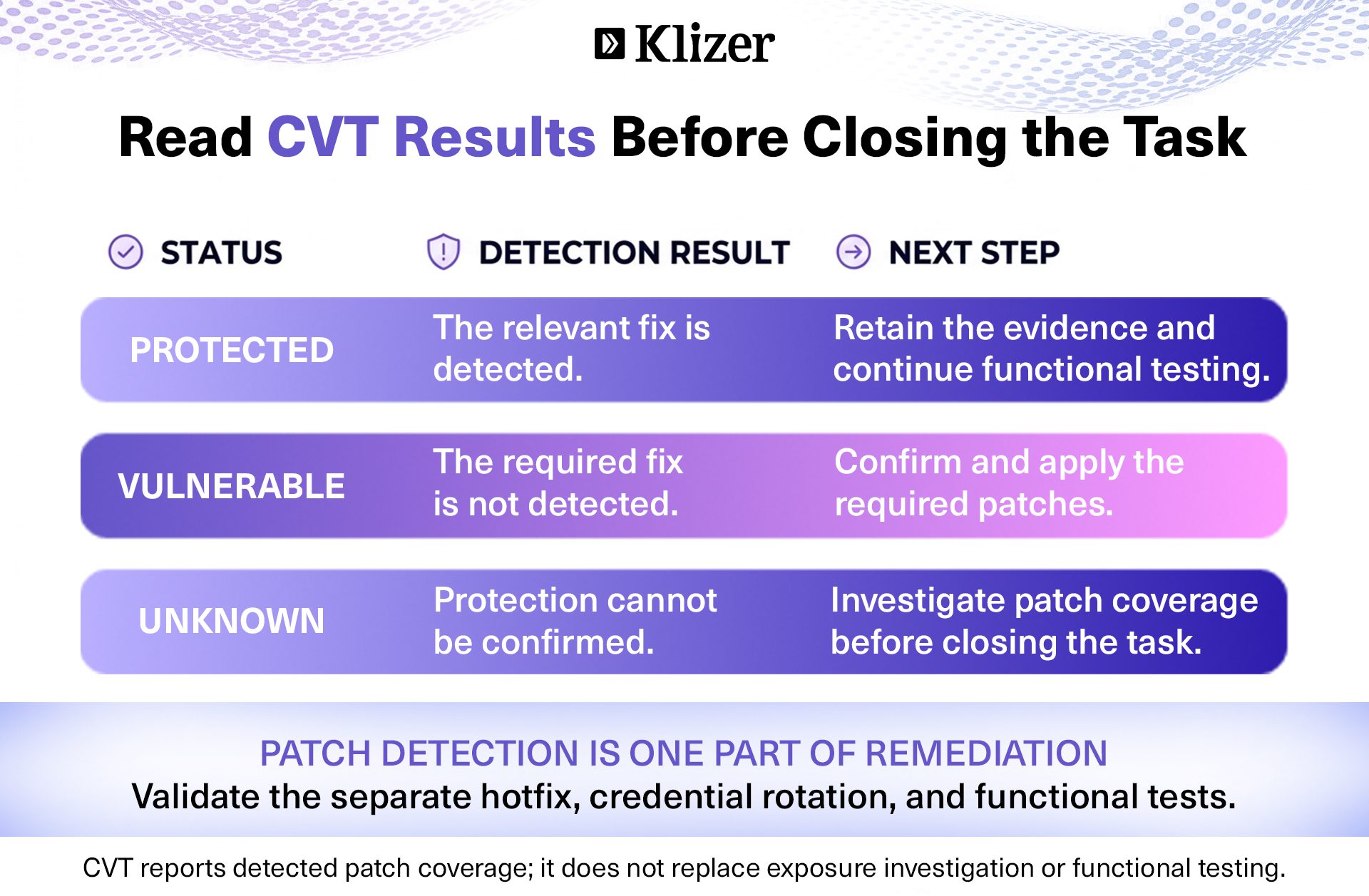
Do not treat UNKNOWN as equivalent to PROTECTED.
Investigate missing or unknown results before considering the remediation complete.
Alternative: Verify Cloud patch status
Adobe Commerce Cloud users can also inspect patch status using the Quality Patches Tool:
vendor/bin/magento-patches -n status
Review the results for the expected isolated patch filenames and confirm that they report an applied status.
The exact patch names depend on the installed Commerce version and components.
Important: Apply the Additional CVE-2026-75650 Hotfix
Alongside APSB26-153, Adobe explicitly instructs merchants to apply the separate hotfix for CVE-2026-75650, associated with the earlier September 2026 security advisory APSB26-146.
The October isolated patches should not be treated as a substitute for this separate remediation requirement.
Merchants should:
- Review the CVE-2026-75650 hotfix instructions.
- Determine whether the hotfix is already present.
- Apply it where required.
- Verify the fix and investigate possible exposure.
- Rotate encryption keys and associated credentials as recommended by Adobe.
Adobe reports exploitation of CVE-2026-75650 in the wild. This is separate from the October bulletin’s vulnerability set.
Why Encryption Key Rotation Is Important
Adobe Commerce and Magento Open Source use encryption keys to protect sensitive application data.
Examples can include encrypted configuration values and credentials used by payment gateways, shipping providers, and other integrations.
The encryption key is generally stored in app/etc/env.php.
Rotating the encryption key helps reduce the risk associated with a potentially compromised key.
How to rotate the Magento encryption key
Follow Adobe’s encryption key rotation instructions. Perform this operation during a planned maintenance window and validate it in staging first.
Step 1: Back up the environment
Take a database backup and securely back up the existing application configuration, including app/etc/env.php.
Ensure that the backup is access-controlled because it contains sensitive configuration information.
Step 2: Enable maintenance mode
php bin/magento maintenance:enable
Step 3: Pause cron jobs
For Adobe Commerce Cloud:
./vendor/bin/ece-tools cron:disable
For self-managed installations, temporarily disable the application cron schedule using your server’s cron management process.
Step 4: Check the encryption key command
php bin/magento list | grep encryption:key:change
Confirm that the command is available.
Step 5: Rotate the encryption key
php bin/magento encryption:key:change
This command updates the encryption key configuration.
Ensure that app/etc/env.php is writable by the appropriate application user.
The Admin-based encryption key change interface was removed in Magento 2.4.8, so the CLI method is the recommended approach.
Step 6: Re-encrypt applicable stored data
Adobe provides a separate command for re-encrypting supported system configuration and payment data:
php bin/magento encryption:data:re-encrypt \
core_config_data sales_order_payment
Review Adobe’s data re-encryption documentation before running this command, especially when your project uses custom encrypted fields.
The default re-encryption operation does not necessarily cover all encrypted values maintained by custom or third-party modules.
Step 7: Clear the cache
For on-premises environments:
php bin/magento cache:flush
For Adobe Commerce Cloud, use the Cloud cache-clearing command:
magento-cloud cc
Step 8: Re-enable cron and disable maintenance mode
For Cloud environments:
./vendor/bin/ece-tools cron:enable
For on-premises installations, restore the application cron schedule.
Then run:
php bin/magento maintenance:disable
What to check after encryption key rotation
Verify that:
- Magento Admin users can log in again.
- Customer authentication works.
- Checkout and payment processing function correctly.
- Shipping and ERP integrations can authenticate.
- Encrypted configuration values remain accessible.
- Custom modules using encrypted values operate correctly.
Encryption key rotation invalidates customer and Admin sessions, excluding integration users, so affected users must log in again.
Follow Adobe’s hotfix remediation guidance to rotate associated credentials at their source, including Admin passwords, integration tokens, OAuth secrets, payment credentials, and applicable infrastructure credentials. Encryption key rotation alone does not invalidate exposed credentials.
Conclusion
Treat APSB26-153 as a verified remediation workflow: correct patch coverage, the separate hotfix, credential rotation, and functional testing. A deployed patch is only part of that work.
For industrial B2B manufacturers and distributors, Connected Commerce means checking the storefront alongside the ERP Foundation and the integrations and operational data that support it. Security maintenance should confirm that pricing, ordering, payments, and connected workflows still function correctly.
Talk to Klizer’s Adobe Commerce experts about security patching, upgrades, and ongoing maintenance for your connected commerce environment.