

Modern Adobe Commerce implementations are no longer defined only by catalog capabilities or checkout customizations. They also depend on how effectively experience delivery, transactional logic, and integrations work together.
Many businesses are already connecting ERP systems through Adobe App Builder and building storefronts with Edge Delivery Services (EDS). The next step is to evaluate where custom business logic should run and whether integration-heavy workloads can move out of the Commerce application process.
Adobe App Builder and API Mesh provide tools to support this transition. By separating selected custom logic and integrations from the Commerce core, businesses can reduce upgrade dependencies, improve workload isolation, and prepare for more flexible commerce architectures.
The goal is not to eliminate PHP modules entirely. It is to choose the right extensibility model for each business requirement.
ON THIS PAGE
Why Traditional PHP Extensibility Is Reaching Its Limits
For years, Magento and Adobe Commerce teams have extended the platform using plugins, observers, preference overrides, and scheduled jobs. These approaches remain useful for requirements that need direct access to Commerce functionality.
However, as commerce environments become more connected, keeping every customization inside the PHP application can introduce operational challenges.
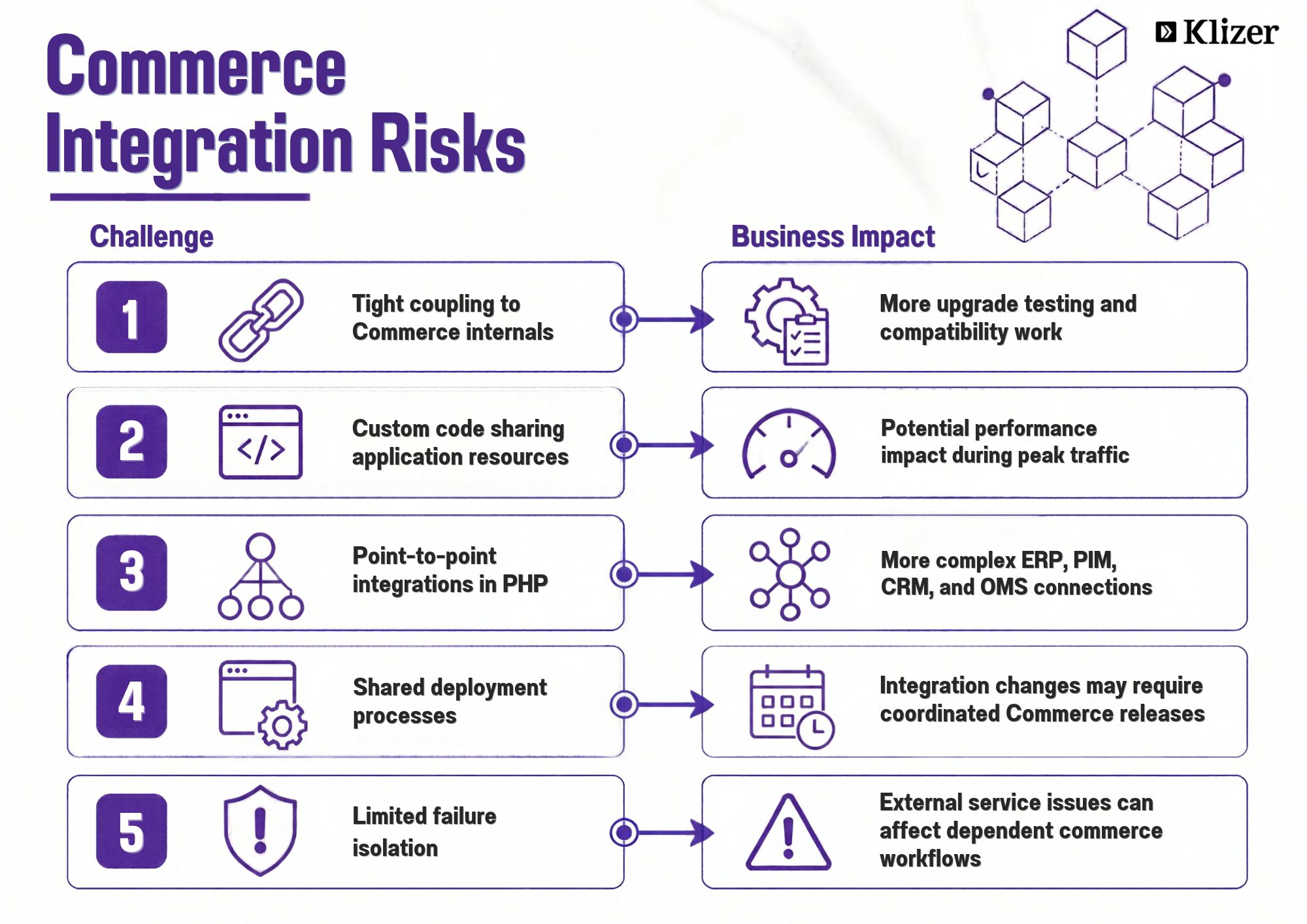
These challenges become more significant when businesses manage multiple storefronts, external systems, and custom workflows.
Out-of-process extensibility provides another option. Instead of running all custom logic inside Commerce, teams can use supported APIs, events, webhooks, and extension points to connect Commerce with applications running outside its core process.
This approach is particularly relevant when evaluating Adobe Commerce as a Cloud Service, where applications must follow supported extension patterns.
Commerce can continue to manage its core responsibilities, including catalog operations, cart and checkout processes, and order management, while external applications handle suitable integration and orchestration workloads.
The Modern Adobe Commerce Stack: Three Clear Layers
A modern Adobe Commerce architecture can be organized into three logical layers.
- Experience layer: Edge Delivery Services, document-based authoring, blocks, and commerce drop-ins.
- Commerce core: Adobe Commerce APIs and services responsible for the transactional capabilities available in the selected deployment model.
- Extensibility and integration layer: Adobe App Builder, I/O Runtime actions, Adobe I/O Events, and API Mesh.
Each layer has a distinct responsibility.
- EDS delivers the storefront experience and supports content-led page delivery.
- Adobe Commerce provides core commerce capabilities and transactional services.
- App Builder supports custom applications, integrations, and workflows that run outside the Commerce process.
- API Mesh combines supported API sources behind a unified GraphQL endpoint for consuming applications.
A simplified architecture looks like this:
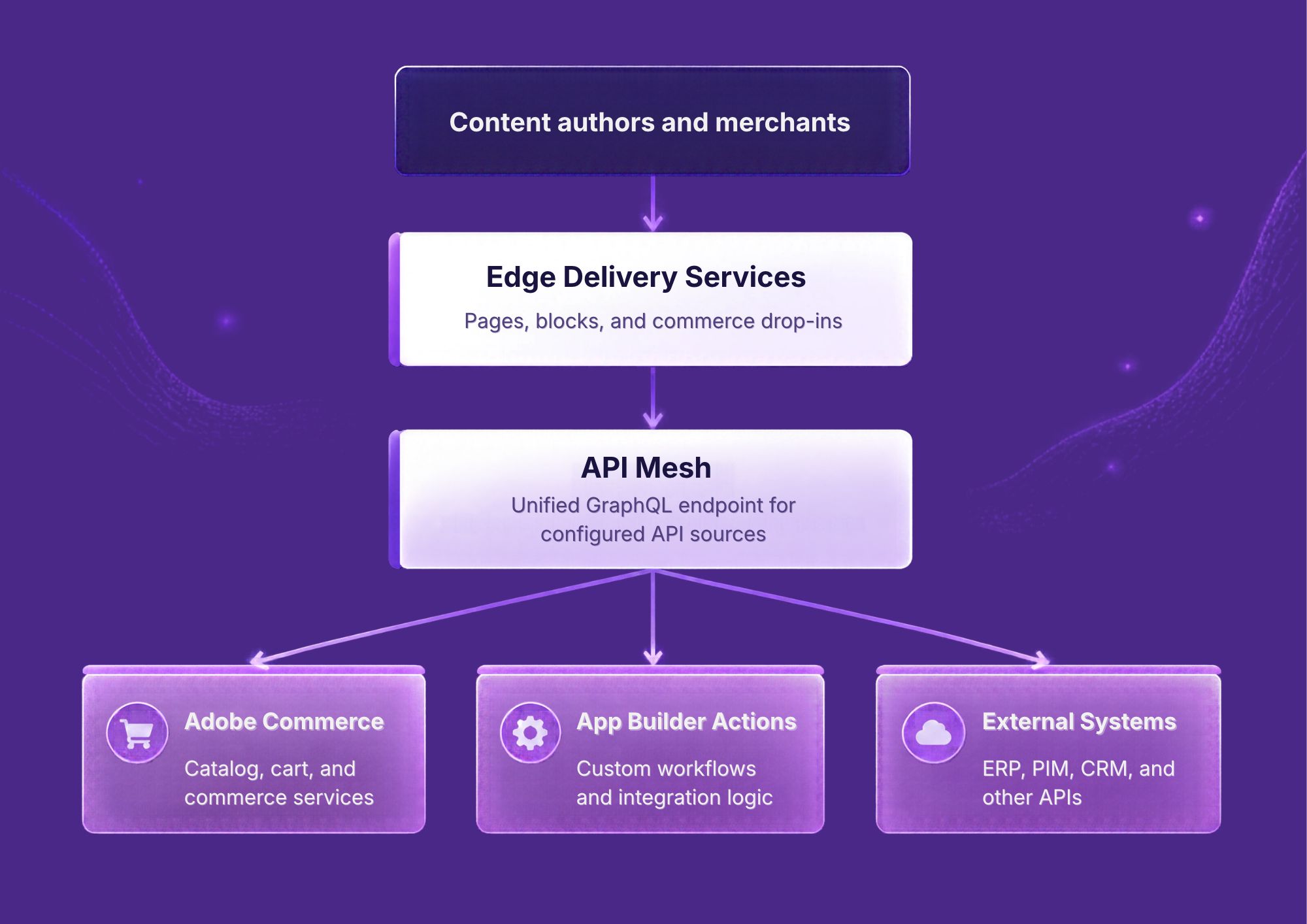
Event-driven connections: Adobe Commerce events can trigger App Builder workflows for supported use cases, such as order exports and customer or product synchronization.
The exact connections depend on the implementation. Not every request must pass through API Mesh, and asynchronous workflows do not necessarily follow the same path as storefront queries.
For businesses already using App Builder for ERP integrations and EDS for storefront delivery, this architecture provides a way to coordinate data access and custom workflows without introducing unnecessary dependencies between systems.
What API Mesh Actually Solves
API Mesh for Adobe Developer App Builder allows teams to combine multiple API sources, including GraphQL and REST APIs, behind a single queryable GraphQL endpoint.
Without a composed API layer, a storefront or application may need to coordinate requests to Commerce, ERP-related services, PIM platforms, and custom APIs independently. This can increase frontend complexity and make backend changes harder to manage.
API Mesh can simplify that interaction by providing a shared API interface for configured sources.
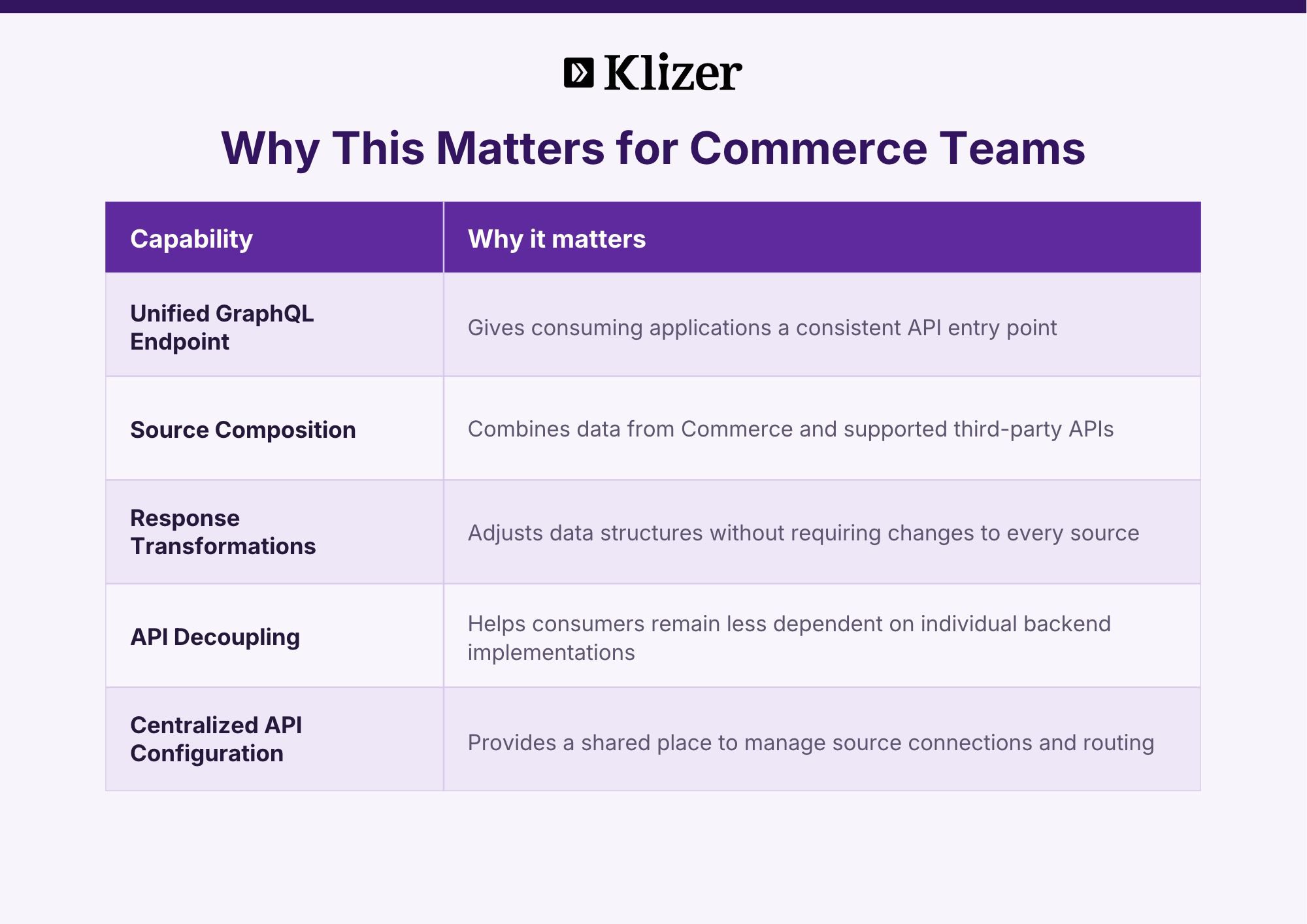
For B2B commerce, this can be useful when storefronts need product information enriched with ERP data, customer-specific availability, company information, or other external attributes.
For example, a storefront may need product details from Commerce and availability information from an external service. API Mesh can combine the relevant API sources where the schemas and integration requirements support that pattern.
However, API composition alone does not replace integration monitoring, authorization design, data synchronization, or business workflow management. Those responsibilities still need to be addressed within the overall architecture.
What Belongs in App Builder vs. What Stays in Commerce
A common mistake is treating App Builder as a complete replacement for PHP modules. A better approach is to assess each customization based on its responsibilities, dependencies, and execution requirements.
Keep in Adobe Commerce
In-process extensions may remain appropriate for:
- Checkout and order placement customizations that require supported synchronous Commerce extension points.
- Cart, quote, pricing, and tax behavior that depends on Commerce transaction processing.
- Business rules that require direct access to Commerce services or transaction boundaries.
- Customizations that depend on application-level behavior unavailable through supported external APIs.
The implementation should follow the extension points and compatibility requirements of the relevant Commerce deployment model.
Consider Moving to App Builder
Out-of-process extensibility is often a good fit for:
- ERP, PIM, CRM, and OMS integrations.
- Event-driven workflows and background processing.
- Customer or company validation through external services.
- Data enrichment and orchestration across multiple systems.
- Admin UI extensions and custom applications.
- Retry handling, batch processing, and integration state management.
For many enterprise implementations, a hybrid architecture offers the most practical path. Commerce retains the functionality that needs to run close to its transactional core, while App Builder handles suitable integration and workflow responsibilities.
The objective is to reduce unnecessary coupling without introducing network dependencies into operations that require predictable transactional behavior.
Reference Architecture: EDS + API Mesh + App Builder + Commerce
A practical implementation can follow four patterns.
1. Route Suitable Storefront Requests Through API Mesh
EDS blocks and commerce drop-ins can use API Mesh as a unified GraphQL endpoint when multiple API sources need to be composed.
Depending on the use case, the configured sources may include:
- Adobe Commerce APIs for catalog, cart, and checkout data.
- App Builder-backed APIs for data enrichment or external validation.
- Third-party APIs for ERP availability, company information, or other business data.
Not every request requires API Mesh. The decision should account for latency, caching, security, and the capabilities of the underlying APIs.
2. Preserve Commerce Transaction Integrity
Adobe Commerce should continue to manage the transactional responsibilities assigned to it by the implementation.
For example, order placement should follow the supported Commerce transaction flow. Downstream ERP updates can then be handled through an event-driven or asynchronous integration where appropriate.
This separation helps avoid making every downstream system a synchronous dependency of the checkout process.
3. Use App Builder for Integration Workflows
Adobe I/O Events and App Builder Runtime actions can support event-driven processing and integration workflows.
Examples include:
- Order creation: Trigger an ERP order export after the relevant Commerce event.
- Product updates: Initiate enrichment or publishing workflows.
- Customer changes: Synchronize relevant data with CRM systems.
- Inventory updates: Process stock changes and propagate them to connected systems.
These workflows require suitable event configuration, error handling, and monitoring. Where real-time consistency is required, the design must account for the delay between the original event and downstream processing.
4. Keep Commerce Integration Modules Focused
Some implementations still need small Commerce modules to expose supported extension points, publish events, or facilitate API-based communication.
These modules should remain focused on their specific Commerce responsibilities. Heavy data transformation, multi-system orchestration, and long-running integration workflows can be evaluated for out-of-process implementation.
Practical Use Cases Driving Adoption in 2026
1. Preparing for Adobe Commerce as a Cloud Service
Adobe Commerce as a Cloud Service supports an extensibility model built around APIs and external applications. Businesses planning a move to SaaS should review customizations that depend on direct access to the Commerce runtime or other in-process behavior.
Moving suitable functionality to App Builder can reduce dependencies on the Commerce codebase. However, migration readiness also requires checking API compatibility, authentication, extension support, and differences between deployment models.
2. Building Composable Storefronts
EDS supports modern storefront delivery, but the overall experience also depends on how efficiently storefronts retrieve and process commerce data.
API Mesh can provide a unified interface to configured data sources, while App Builder can handle suitable custom workflows and external integrations.
The resulting architecture can reduce direct dependencies between the storefront and individual backend systems. Performance still depends on API latency, query design, caching, and the number of services involved in each request.
3. Supporting B2B Connected Commerce
Manufacturers and distributors often need to coordinate ERP-backed inventory, customer-specific catalogs, company account information, and order synchronization.
App Builder can support integration workflows, while API Mesh can make data from multiple APIs available through a composed GraphQL endpoint.
Together, these capabilities can help businesses connect their commerce experiences with operational systems without placing every integration inside Commerce. The architecture should also account for customer-specific authorization, data ownership, and consistency requirements.
4. Evaluating AI-Assisted Modernization
AI-assisted development tools can help teams explore extension patterns, generate code, and accelerate selected modernization tasks.
However, migrating a PHP customization to an App Builder application requires more than converting code. Teams must understand the original business rules, identify supported APIs and events, redesign state management where necessary, and validate the resulting behavior.
AI tooling can assist with parts of this work, but architecture decisions, security reviews, and functional testing remain essential.
Implementation Blueprint
A phased migration reduces risk and allows teams to validate the architecture before expanding it.
Phase 1: Inventory and Classify Customizations
Audit existing PHP modules and classify each customization into one of three groups:
- Retain: Functionality that requires in-process execution or is best supported by existing Commerce extension points.
- Evaluate for extraction: Integration-heavy logic, background jobs, and external API dependencies.
- Retire: Redundant or obsolete customizations that no longer serve a business requirement.
Prioritize modules with frequent integration changes, complex scheduled jobs, and strong dependencies on third-party systems.
Phase 2: Establish an API Contract
Start with a clearly defined API boundary for the storefront or consuming applications.
Where API Mesh fits the requirements, begin with a configured Commerce API source and validate the existing queries. Add other sources incrementally when data composition provides a clear benefit.
This creates a more stable interface for consumers while allowing backend implementations to evolve independently where possible.
Phase 3: Extract One High-Value Workflow
Choose a workflow with clear business value and manageable dependencies. Suitable candidates may include:
- Order export to ERP.
- Inventory synchronization.
- Customer or company data validation.
- Product enrichment using PIM data.
Define retry behavior, idempotency, logging, and integration state management before production deployment. Where incremental processing is required, establish reliable checkpoints or watermarks.
Phase 4: Update the Storefront Incrementally
Introduce API Mesh for the requests that benefit from API composition. Update the relevant EDS blocks or commerce drop-ins and validate their behavior before expanding the change.
Avoid unnecessary direct calls to multiple backend services from browser code. At the same time, account for authentication, authorization, caching, and latency across the complete request path.
Phase 5: Establish Operational Controls
Before scaling the architecture, implement the operational processes required to maintain it.
Focus on:
- Environment-specific configuration and secrets management.
- Monitoring for Runtime actions, API Mesh latency, and integration failures.
- Replay and recovery procedures for failed events.
- Separate deployment and testing pipelines where appropriate.
- Ownership and incident-response processes across Commerce, API Mesh, and App Builder.
Best Practices
Design API Contracts First
Define the data contracts required by storefronts and consuming applications before implementing the associated workflows. Stable contracts reduce unnecessary frontend changes when backend services evolve.
Make Workflows Idempotent
Order synchronization, inventory updates, and customer data processing may be retried. Design integrations to handle duplicate events or repeated requests safely.
Isolate Failure Domains
External services can become slow or unavailable. Use suitable timeouts, retries, and fallback behavior for integration workflows. Avoid making checkout dependent on every external system when the business requirement does not demand synchronous validation.
Keep Commerce Customizations Focused
Before adding another PHP plugin or preference override, evaluate whether the requirement can be handled through a supported API, event, webhook, or out-of-process extension.
The decision should account for transaction integrity, performance, maintainability, and the supported extension points available in the target deployment.
Measure the Right Outcomes
Track metrics that show whether the architecture is delivering practical benefits:
- Commerce deployment frequency compared with App Builder deployment frequency.
- API Mesh and Runtime latency, including p95 response times.
- Integration failure rates and recovery success.
- Storefront Core Web Vitals and API-dependent interaction performance.
- Upgrade effort and compatibility issues before and after extraction.
These measurements help teams identify where the new architecture is reducing complexity and where further optimization is needed.
Common Pitfalls to Avoid
- Moving everything at once: Start with integration-heavy workloads and expand after validating the results.
- Recreating a monolith in Runtime actions: Keep applications modular, with clear responsibilities and manageable dependencies.
- Adding API Mesh without a clear purpose: Use it where API composition or a shared GraphQL interface benefits consumers, rather than introducing another layer by default.
- Moving transactional logic too early: Preserve business rules that require synchronous execution and Commerce transaction guarantees.
- Overlooking operational ownership: Assign responsibility for Commerce customizations, API contracts, App Builder applications, and integration monitoring.
- Assuming extraction guarantees SaaS compatibility: Validate the supported APIs, authentication methods, and extension patterns for the target Commerce environment.
Conclusion
Modernizing Adobe Commerce does not mean abandoning PHP modules. It means choosing the right place for each customization and reducing unnecessary dependencies between commerce operations and external systems.
A well-planned architecture brings together:
- EDS for storefront experience delivery.
- Adobe Commerce for core commerce capabilities and transaction processing.
- App Builder for suitable custom applications, integrations, and workflows.
- API Mesh for combining API sources behind a unified GraphQL endpoint where needed.
For manufacturers, distributors, and other businesses with complex commerce operations, this approach provides a path toward a more maintainable, flexible, and SaaS-ready architecture.
Klizer supports Adobe Commerce modernization through Adobe Commerce development services, App Builder integrations, EDS implementation, and ERP-connected commerce solutions. These services help businesses evaluate existing customizations, connect operational systems, and build a commerce architecture aligned with their evolving requirements.
Planning to modernize your Adobe Commerce architecture? Contact Klizer to evaluate your current customizations and identify the right path toward out-of-process extensibility.
FAQs
Is App Builder replacing Magento PHP modules entirely?
No. PHP modules remain useful for supported in-process customizations. App Builder is better suited to selected integrations, external workflows, and custom applications that can run outside the Commerce process.
Do I need API Mesh if I already use App Builder?
Not necessarily. API Mesh is useful when applications need a unified GraphQL endpoint that combines multiple API sources. App Builder can also support integrations and workflows without requiring every request to pass through Mesh.
Does this architecture support Adobe Commerce as a Cloud Service?
Yes. App Builder and API Mesh are part of Adobe’s extensibility ecosystem for Adobe Commerce as a Cloud Service. Individual applications must still follow the APIs, authentication requirements, and extension patterns supported by the target environment.
Where should ERP synchronization live in this architecture?
App Builder can handle suitable ERP synchronization workflows, particularly event-driven order exports and scheduled or incremental catalog and inventory updates. The implementation should include reliable error handling, duplicate-safe processing, and recovery procedures.
Can businesses adopt this architecture without rebuilding the entire storefront?
Yes. A phased approach can start with an integration workflow, introduce API Mesh where it provides value, and update storefront components incrementally. The migration path depends on the existing architecture, API compatibility, and business requirements.