
If you’re a distributor running Epicor Prophet 21 (P21) on premises, you’ve probably already heard the news. Epicor has officially announced that on-premises P21 is moving toward end of life, and the timeline is now clear. The good part is that you still have time to plan. But it is important to understand what is going to change, when it will happen, and what choices you have.
ON THIS PAGE
What Epicor Actually Announced
The final on-premises feature releases for all ERP platforms including Prophet 21 will occur in January 2026 according to Epicor’s announcement.
Here is what that means for P21 users:
- The final on-premises version of Prophet 21, version 2028.1, will be released in May 2028. After this, there will be no new features, improvements, or updates for on-premises customers.
- Epicor will continue Active Support through June 30, 2029. This includes security updates and bug fixes together with compliance updates and access to use technical support and knowledge base resources.
- The system will shift to Sustaining Support on July 1, 2029. At this stage, there are no updates, no patches, and no compliance changes.
It is important to understand that this is not a shutdown. The system will continue to function after 2029. But the level of support and safety will undergo significant transformation.
Why This Matters More Than You Think
Prophet 21 operates as a primary system which supports multiple distribution companies. The system provides complete control over inventory management, order processing, customer relationships, pricing strategies, and financial operations. The system serves as the foundation for all business operations.
A large number of distributors rely on P21 every day. Many of these businesses have used it for years. Over the years, they have developed essential custom features, reports and integrations that support their business operations.
This makes any change more complex.
At the same time, staying on an outdated system has risks. Once the support period ends, there are no security updates. That means any known issues stay unresolved. The system remains unchanged even though there are new rules and regulations. The system becomes more difficult to integrate with modern tools.
As a system becomes older, its maintenance needs require more resources, which result in increased expenses. In some cases, the cost of maintaining an outdated system becomes greater than the expense of adopting a modern system.
Your Technology Stack Also Matters
Many distributors focus only on the ERP system, but the surrounding technology is just as important.
Prophet 21 depends on tools like SQL Server and Windows Server. These also have their own support timelines.
For example:
- SQL Server 2016 support ends in July 2026
- SQL Server 2017 support ends in October 2027
If your system runs on these versions, you are already close to important deadlines.
The same applies to reporting tools like SSRS. Since SSRS is linked to SQL Server, when SQL Server support ends, your reporting system is affected too.
This means you are not just dealing with an ERP upgrade. You are looking at your full technology setup.
What Happens If You Stay On Premises After 2029
You can continue using your system after 2029. It will still work. But there are several limitations that you must understand.
Here is what you will not get:
- No new features or updates
- No security patches
- No compliance updates
- Limited or no vendor support
- More difficulty connecting with modern tools
- Higher internal IT effort
At the same time, Epicor is focusing on cloud solutions. New features, AI tools, and improvements are being built for cloud users.
So if you stay on premises, your system will stay the same while the rest of the market moves forward.
What Are Your Options
You have three main paths to choose from.
1. Move to Epicor Cloud
This is the most direct option.
In this approach, your existing system is moved to the cloud. Your data is backed up and restored in a cloud environment. You can then continue working with your system in a new setup.
Benefits include:
- Regular updates
- Better security
- Less infrastructure to manage
- Access to new features
However, some work may be required. If you have custom scripts or integrations that directly use the database, they may need to be updated to work with cloud tools like APIs.
For most distributors, this is the simplest and most practical path.
2. Move to a Different ERP
Some companies may use this moment to evaluate their existing systems.
If your business has changed or if P21 no longer fits your needs, you should explore other new ERP options.
This approach takes more time and effort. Businesses need to follow three steps, which include process assessment, system selection and system implementation.
But for some businesses, it can be the right long term decision.
3. Stay On Premises for Now
You can continue using your current setup until 2029 with full support.
This allows you more time to plan and prepare.
However, this should not be seen as a way to delay action. It should be used as a planning period.
If you choose this path, you should start preparing early as it will lead to better outcomes.
How to Start Planning Today
You do not need to rush, but you should start now.
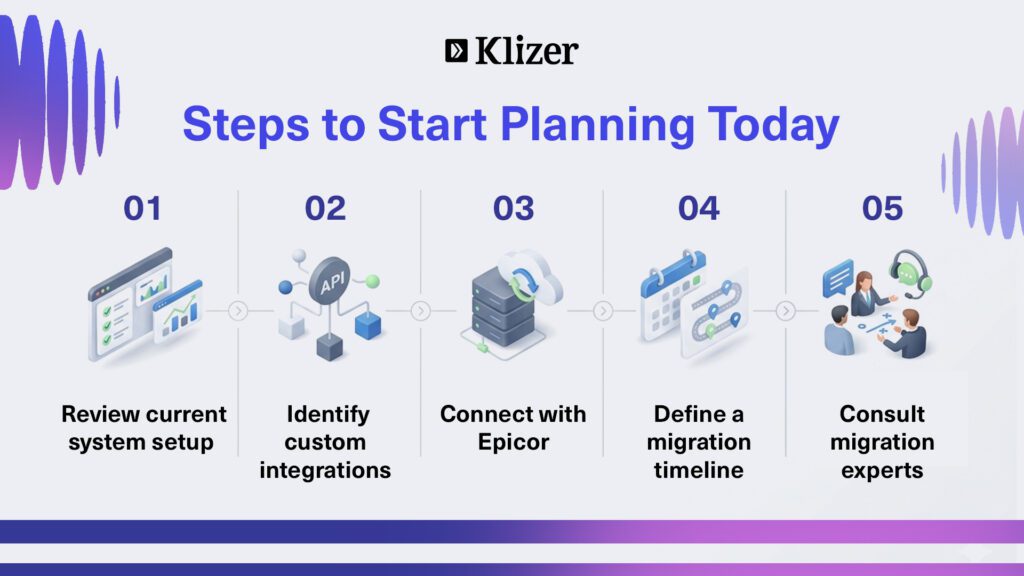
Here are some simple steps to begin.
1. Review your current system
Understand your current setup. Check your P21 version, SQL Server version, and all integrations.
This helps you see how complex your migration might be.
2. Identify custom integrations
Look for tools or scripts that directly interact with your database.
These may not work in the cloud and may need to be updated.
Knowing this early helps avoid surprises later.
3. Talk to Epicor
Connect with your Epicor account manager.
Ask about your current contract, pricing, and migration options. Understand what support is available.
This will help you plan your budget and timeline.
4. Consider expert help – partner with Klizer
If your system is complex, working with an experienced partner can help.
This is where working with a team like Klizer can make a big difference. We specialize in helping distributors smoothly migrate their Prophet 21 systems to the cloud. From assessing your current setup to handling custom integrations and ensuring minimal disruption, we guide you through the entire process in a structured and practical way.
5. Build a timeline
ERP changes take time. A well planned migration can take several months or more.
If you wait too long, you may have to rush. That increases risk and cost.
Starting early gives you more control and better outcomes.
Conclusion
The Epicor P21 end of life timeline gives you time, but it also sets a clear deadline. The earlier you start planning, the easier and smoother things will be. Whether you decide to move now or later, the important thing is to not wait until the last moment.
If you need help with your move, Klizer is here for you. We are one of the best P21 cloud migration service providers and can guide you step by step, making the process simple and stress free.