Composable commerce and rising customer expectations have transformed how businesses approach digital commerce. Shoppers no longer settle for slow websites or disconnected experiences. They expect fast, personalized, and consistent interactions across every channel.
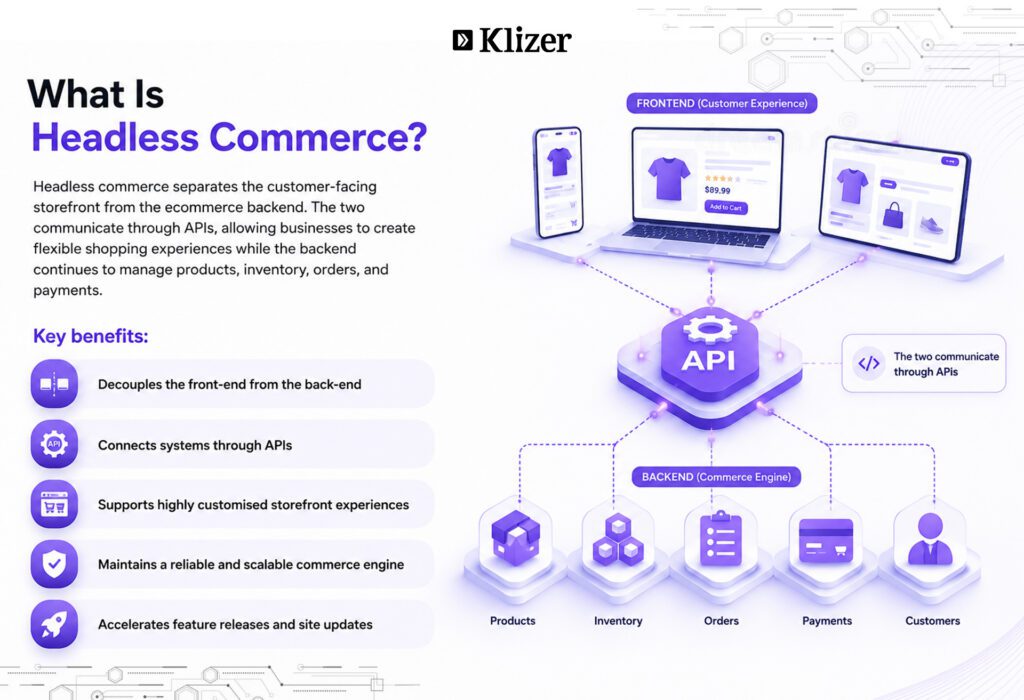
Brands are choosing headless commerce migration to separate the frontend from the backend, enabling faster development, better performance, and greater scalability.
However, deciding to migrate to headless commerce is only the first step. Without a clear strategy, businesses run into SEO complexities, integration issues, and costly delays. That is why following a structured headless migration guide is essential for minimizing risks and ensuring a smooth transition.
ON THIS PAGE
Why Businesses Choose to Migrate to Headless Commerce
Businesses migrate to headless commerce to improve performance, accelerate innovation, and create customer experiences that support long-term growth.
Faster storefront performance
A headless architecture improves performance by separating the frontend from the backend, allowing teams to build lightweight, faster storefronts. According to Google’s Think with Google research, when a page’s load time increases from 1 second to 3 seconds, the probability of a visitor bouncing rises by 32%. As load time reaches 5 seconds, that probability jumps to 90%. Headless storefronts consistently outperform coupled platforms on Core Web Vitals, delivering up to 35% faster page loads and development cycles up to 3x faster than teams on monolithic stacks.
Faster time-to-market
Launching a new feature should not require changes across your entire ecommerce platform. With headless commerce, frontend and backend teams can work independently, reducing development bottlenecks and speeding up releases. Businesses can quickly launch seasonal campaigns, localized storefronts, or new customer experiences without waiting for backend deployments.
Greater design flexibility and personalization
A headless commerce migration gives developers complete control over the frontend, making it easier to create custom user journeys without changing backend operations.
Flexible integrations and future-ready architecture
Headless commerce follows an API-first approach, allowing you to integrate or replace tools such as CMS platforms, payment gateways, search solutions, ERPs, and CRMs without rebuilding your storefront.
Signs Your Business Needs a Headless Commerce Migration
Most businesses recognize the need to migrate when platform limitations start costing more than the migration itself. These are the most common trigger signals:
- Your website delivers poor speed and Core Web Vitals
- Frontend updates and campaign launches take too long
- Mobile performance and conversion rates have plateaued
- Your platform limits frontend customization and personalization
- Integrating new tools or APIs requires extensive development
- Your developers struggle with rigid templates and legacy architecture
- Managing multiple sales channels has become inefficient
- Your platform cannot scale with growing traffic, catalogs, or markets
- Legacy technology slows innovation and feature releases
- High maintenance costs reduce your ability to invest in growth
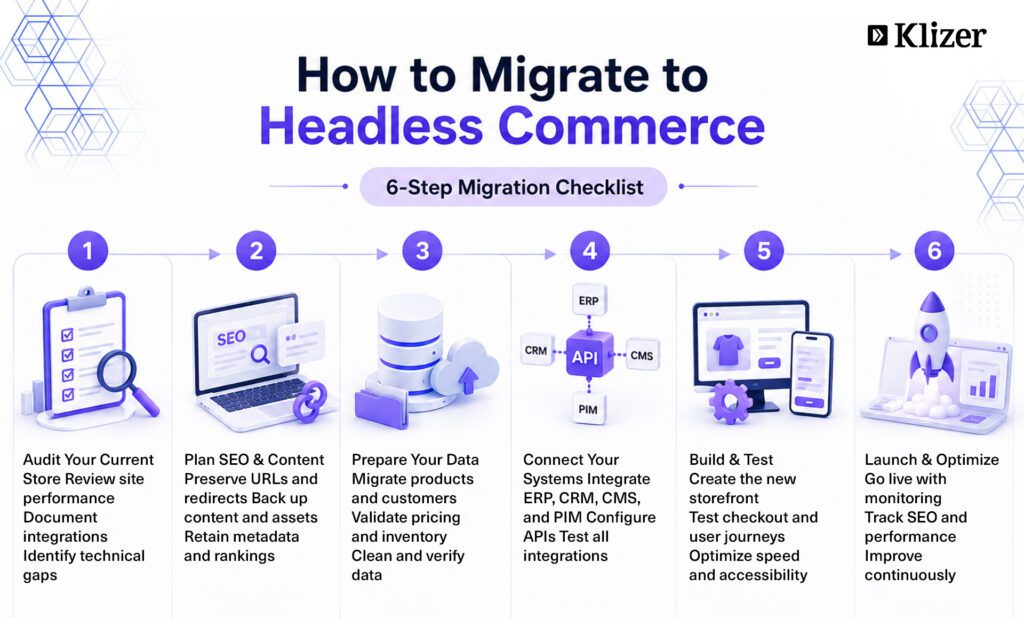
How to Migrate to Headless Commerce: A 6-Step Migration Checklist
A dedicated migration checklist is a structured roadmap that outlines every stage of the migration process, from auditing your existing ecommerce platform and preserving SEO to migrating data, validating integrations, and optimizing performance after launch.
1. Audit Your Existing eCommerce Ecosystem
Before you migrate to headless commerce, understand your current environment. A comprehensive audit helps identify performance gaps, technical debt, and integration challenges before they become migration risks.
Checklist:
- Audit website performance and Core Web Vitals
- Crawl your website to export URLs, metadata, and canonical tags
- Review your product catalog, customer data, and order history
- Document all third-party integrations, including ERP, CRM, CMS, payment gateways, and shipping providers
- Identify platform limitations and technical debt
- Define business goals and migration success metrics
- Select the appropriate rendering strategy (SSR, SSG, or ISR)
Do not limit your audit to the storefront. Review backend workflows, custom integrations, and operational processes to uncover hidden dependencies that could delay the migration.
2. Create an SEO and Content Migration Plan
SEO should be part of your migration strategy from day one, not an afterthought. Preserving existing search equity helps maintain rankings, organic traffic, and user experience after launch.
Checklist:
- Create one-to-one 301 redirects for existing URLs
- Back up website content, media, and downloadable assets
- Categorize content into keep, update, merge, or remove
- Preserve title tags, meta descriptions, canonical tags, and structured data
- Review internal linking and XML sitemaps
- Benchmark keyword rankings before migration
Freeze major content updates before migration to reduce inconsistencies between your old and new storefronts.
3. Prepare and Validate Business Data
Data migration directly affects customer experience and business continuity. Clean, accurate data reduces errors, improves operational efficiency, and ensures a smoother transition to your new architecture. Migrate data in order of stability: static catalog data first, then customer records, then live order data last. Moving live transactional data too early is one of the most common causes of post-launch data integrity issues.
Checklist:
- Migrate product catalogs, SKUs, categories, and attributes
- Transfer inventory, pricing rules, and promotional data
- Securely migrate customer accounts and order history
- Validate images, documents, and other digital assets
- Back up all business-critical data
- Verify migrated data before launch
Clean duplicate records, outdated products, and incomplete customer data before migration. Moving only high-quality data reduces post-launch issues and improves platform performance.
4. Configure APIs and Third-Party Integrations
The strength of a headless architecture lies in its API-first approach. Every integration should work reliably before deployment to ensure uninterrupted business operations.
Checklist:
- Connect ERP, CRM, PIM, CMS, and inventory systems
- Configure payment gateways, tax engines, and shipping providers
- Integrate search, analytics, and marketing automation tools
- Validate REST or GraphQL APIs
- Configure middleware for secure frontend-backend communication
- Test every integration in a staging environment
Document every API dependency before development begins. Even a single overlooked integration can delay launch or disrupt critical business processes.
5. Build, Test, and Optimize the Storefront
A modern storefront should deliver speed, accessibility, and a consistent shopping experience across every device. Thorough testing helps identify issues before customers encounter them.
Checklist:
- Build a responsive storefront
- Test navigation, search, filtering, and product pages
- Validate checkout and payment workflows
- Verify accessibility compliance
- Test across browsers and devices
- Measure Core Web Vitals and page speed
- Resolve bugs before deployment
Test real customer journeys, not just individual features. Complete tasks such as product discovery, account creation, checkout, and order confirmation to ensure every touchpoint performs as expected.
6. Launch, Monitor, and Continuously Improve
Going live marks the beginning of the optimization phase. Continuous monitoring helps maintain SEO performance, improve customer experience, and maximize the return on your headless commerce migration investment.
Checklist:
- Validate redirects before and after launch
- Prepare a documented rollback plan
- Monitor keyword rankings and crawl errors
- Track Core Web Vitals, page speed, and API performance
- Measure conversion rates and user engagement
- Monitor server health and application logs
- Optimize continuously using analytics and customer feedback
Monitor your website closely during the first few weeks after launch. Fixing crawl issues, broken links, or performance bottlenecks early can prevent long-term SEO and revenue losses.
How Long Does a Headless Commerce Migration Take?
A typical headless commerce migration timeline ranges from 3 to 9 months, depending on your ecommerce platform, catalog size, integration complexity, customization requirements, and testing scope.
| Migration Phase | Estimated Timeline |
| Discovery and Planning | 2 to 4 weeks |
| SEO and Data Preparation | 2 to 3 weeks |
| API and Backend Integration | 3 to 6 weeks |
| Frontend Development | 4 to 8 weeks |
| Testing and Quality Assurance | 2 to 4 weeks |
| Launch and Post-Migration Optimization | 2 to 4 weeks |
Plan for adequate testing instead of rushing the launch. Identifying SEO, integration, or checkout issues before deployment reduces business disruptions and improves the chances of a successful migration.
Headless Commerce Migration vs eCommerce Replatforming
Headless commerce migration focuses on decoupling the frontend from the backend to create a flexible, API-first architecture. eCommerce replatforming involves moving from one ecommerce platform to another to improve functionality, scalability, or performance. While both strategies modernize ecommerce operations, their scope and objectives differ.
| Factor | Headless Commerce Migration | eCommerce Replatforming |
| Definition | Separates the frontend from the backend using APIs | Moves your store to a new ecommerce platform |
| Primary goal | Improve flexibility, speed, and customer experience | Improve scalability, features, and platform capabilities |
| Platform change | Optional — you can keep your existing backend | Required — a new platform replaces the old one |
| Architecture | API-first, decoupled architecture | Monolithic, headless, or composable |
| Frontend | Fully customizable with modern frameworks | May or may not be redesigned |
| Complexity | High due to custom frontend development and API integrations | High due to platform, data, and SEO migration |
| Timeline | 4 to 9 months | 3 to 12+ months |
| Best for | Businesses modernizing the storefront without replacing the backend | Businesses replacing an outdated or limited ecommerce platform |
A headless commerce migration changes how your storefront works, while ecommerce replatforming changes where your commerce operations run. If both your architecture and platform limit business growth, combining the two strategies can deliver the best long-term results.
Best Practices for a Successful Headless Commerce Migration
A successful migration depends on strategic planning, phased execution, robust security, and continuous optimization.
- Adopt the strangler pattern: migrate page types one at a time rather than launching every component at once, keeping rollback scope narrow at each stage
- Select a flexible, API-first technology stack that supports future business growth
- Secure APIs with strong authentication, encryption, and Web Application Firewalls
- Keep business, marketing, and development teams aligned throughout the migration
- Validate every integration under real-world conditions before going live
- Document your architecture and workflows to simplify future updates and maintenance
- Train internal teams on the new platform before launch to speed up adoption
- Monitor user behavior and business KPIs to uncover optimization opportunities after deployment
- Continuously update your technology stack to support new channels, features, and customer expectations
The most successful businesses treat headless commerce migration as a continuous improvement initiative, regularly optimizing performance, security, and customer experiences as their business evolves. A properly built headless stack also positions the business to serve AI procurement agents as that purchasing channel matures in 2026 and beyond.
Conclusion
A successful headless commerce migration depends on a structured roadmap that includes planning, platform auditing, SEO preservation, secure data migration, API integration, rigorous testing, and post-launch optimization.
Klizer helps businesses migrate to headless commerce with tailored migration strategies, platform integrations, and performance-focused implementations that prioritize scalability, customer experience, and business continuity. Whether you are planning a complete ecommerce replatforming or exploring a headless architecture, partnering with the right experts can help you achieve a faster and more successful migration.
Ready to modernize your ecommerce experience? Connect with Klizer to discuss your migration goals and build a future-ready commerce solution tailored to your business.
FAQs
1. Is headless commerce suitable for small and medium-sized businesses?
Yes, but it depends on your business goals and technical requirements. If your business needs greater design flexibility, faster storefront performance, or omnichannel capabilities, headless commerce can be a worthwhile investment.
2. Can you migrate to headless commerce without changing your ecommerce platform?
Yes. One of the biggest advantages of headless commerce migration is that you can often keep your existing ecommerce platform and replace only the frontend. As long as your platform supports APIs, you can modernize the storefront without disrupting backend operations.
3. What technologies are commonly used in a headless commerce architecture?
Most headless commerce solutions use modern frontend frameworks such as React, Next.js, or Vue.js, which communicate with the backend through REST or GraphQL APIs. Businesses also integrate CMS, ERP, CRM, payment gateways, and search solutions to build a flexible commerce ecosystem.
4. Does headless commerce improve SEO?
Headless commerce can improve SEO when implemented correctly. Faster page load times, better Core Web Vitals, server-side rendering, optimized metadata, and structured data all contribute to better search visibility.
5. What are the biggest challenges of a headless commerce migration?
The most common challenges include managing API integrations, migrating large datasets, preserving SEO rankings, maintaining security, and coordinating multiple systems during implementation.
6. How much does a headless commerce migration cost?
The cost of a headless commerce migration typically ranges from $50,000 to $250,000+, depending on the size of your ecommerce store, platform complexity, custom frontend development, API integrations, data migration, and testing requirements.