Checkout is where all the work of getting a buyer to your store comes together. But for B2B businesses, completing an order is not always as simple as entering a shipping address and paying by card.
A distributor may need to apply negotiated pricing, offer payment terms, validate minimum order quantities, or let an authorized buyer place an order against a company account. A manufacturer may need to collect a purchase order number or show different shipping options based on the order.
A standard checkout may not cover every requirement. This is where Shopify Plus checkout customization becomes useful.
Shopify Plus gives businesses more control over the checkout experience through Checkout Extensibility, Shopify Functions, checkout UI extensions, and supported apps. These tools allow businesses to add specific functionality without modifying Shopify’s core checkout code.
However, not every checkout element can be changed, and not every B2B requirement belongs inside checkout.
ON THIS PAGE
Why Does Checkout Customization Matter for B2B Businesses?
B2B buyers have different expectations from individual consumers. They may place repeat orders, purchase products in bulk, follow internal approval processes, and work with agreed pricing and payment terms.
If the checkout does not support these requirements, buyers may need to contact sales representatives, request manual changes, or complete parts of the process outside the website.
These extra steps create work for both the buyer and the business.
The demand for a more convenient digital buying experience is also growing. According to DHL’s 2025 B2B E-Commerce Trends Report, 58% of global B2B retailers sell on at least three ecommerce platforms. The report also highlights buyers’ expectations for flexible delivery, transparent order tracking, and simpler digital purchasing.
For manufacturers and distributors, this makes checkout an important part of the overall buying experience. It needs to work with existing pricing rules, fulfillment processes, and account requirements rather than treating every order the same way.
Shopify Plus offers several ways to address these needs. The key is understanding which changes are possible and how they should be implemented.
Understanding Shopify Plus Checkout Customization
Shopify Plus checkout customization means adapting the checkout experience to match your brand, business rules, and customer requirements using Shopify’s supported customization tools.
Shopify uses Checkout Extensibility as its framework for extending checkout functionality. Instead of relying on direct edits to the underlying checkout code, businesses can use apps, UI extensions, branding tools, and backend logic to introduce specific changes.
According to Shopify’s checkout customization documentation, these tools can support changes to checkout branding, buyer information collection, payment and shipping logic, post-purchase experiences, and checkout analytics.
For enterprise stores, this creates room to build a checkout that better supports how the business sells.
It is important to distinguish between three types of customization:
- Visual customization: Adjusting checkout branding, including supported colors, fonts, and logos.
- Functional customization: Adding fields, messages, and other supported interface elements to collect information or guide buyers.
- Business logic customization: Applying rules that determine which discounts, payment methods, shipping options, or order conditions are allowed.
These changes serve different purposes. A branding update may be handled through Shopify’s checkout editor, while account-specific checkout rules may require Shopify Functions, an app, or custom development.
What Can Enterprise B2B Stores Customize on Shopify Plus Checkout?
Let’s look at the main customization options and how they apply to real B2B scenarios.
1. Checkout Branding and Appearance
Your checkout should feel like a natural extension of your storefront. A sudden change in colors, fonts, or branding can make the experience feel disconnected from the rest of your website.
Shopify Plus allows businesses to customize supported checkout branding through the checkout and accounts editor and the Checkout Branding API.
Depending on the configuration, you can customize elements such as:
- Your company logo
- Brand colors and color schemes
- Supported fonts and typography settings
- Background colors and images
- Supported layout and styling options
For example, an industrial equipment manufacturer can use its brand colors and logo throughout the checkout experience to maintain consistency from product discovery to order completion.
What to remember: Shopify Plus does not provide unlimited control over every checkout element. Branding changes must use the options Shopify makes available through its supported tools and APIs.
2. Custom Fields for B2B Order Information
B2B orders often require information that a typical consumer checkout does not need.
A buyer may need to provide a purchase order number, delivery instructions, a project reference, or another business-specific detail.
With Shopify Plus checkout UI extensions, businesses can add supported interface elements to collect additional information at designated checkout locations.
Common use cases include:
- Collecting a purchase order reference
- Asking for project or job-site details
- Displaying instructions for commercial deliveries
- Collecting additional information required by the sales or fulfillment team
For example, a distributor supplying HVAC contractors may need a job reference for each order. A custom field can help collect that information during checkout instead of relying on follow-up emails.
However, collecting information is only part of the process. The business must also ensure that the information is saved correctly and made available to the relevant systems and teams.
If a field is mandatory, developers must also determine whether the requirement can be enforced through supported validation tools and whether the chosen extension can access the necessary data.
3. Payment Methods and Payment Terms
Payment flexibility is one of the most important parts of B2B checkout.
Some customers pay by card, while others use approved payment terms, manual payment methods, or other arrangements agreed upon with the supplier.
Shopify’s B2B capabilities support payment terms and different payment methods, depending on the store’s configuration and eligibility. Shopify Plus also provides additional customization options for payment methods.
Businesses can use supported payment customization tools to:
- Hide payment methods that do not apply to an order
- Change the order in which payment methods appear
- Rename or sort supported payment options
- Apply payment method rules based on order or customer conditions
- Configure eligible B2B payment terms
Consider a distributor that offers approved business customers payment terms but requires new customers to pay upfront. The checkout can be configured to present appropriate payment options based on the business’s supported rules and account setup.
The important distinction is that hiding a payment method does not create a new payment capability. Credit approval, payment terms, and customer eligibility must be supported by the underlying Shopify configuration or connected systems.
For the latest plan and feature requirements, refer to Shopify’s B2B checkout and order documentation.
4. Shipping Options and Delivery Rules
Shipping can become complicated when B2B businesses manage bulk orders, multiple warehouses, commercial delivery requirements, and customer-specific arrangements.
Showing every shipping option to every buyer may create confusion or lead to orders that the fulfillment team cannot process as expected.
Shopify supports delivery customization tools that can help businesses hide, rename, reorder, or sort eligible shipping options. Shopify Functions and supported apps can also apply business rules to shipping methods.
Depending on the requirements and available integrations, businesses can use these tools to:
- Show relevant shipping methods based on order conditions
- Hide delivery options that do not apply
- Present shipping methods in a more useful order
- Apply supported rules to available delivery options
For example, a distributor may want to prevent buyers from selecting a delivery option that cannot accommodate a large or heavy order. Another business may need to distinguish between eligible delivery services and pickup options.
There is one important limitation: checkout customization does not automatically solve complex freight planning, warehouse allocation, or carrier integration requirements. These may require shipping applications, Shopify Functions, external services, or integration with the business’s ERP or warehouse management system.
5. Minimum Order Requirements and Checkout Validation
Minimum order quantities, order-value thresholds, and product restrictions are common in wholesale commerce.
A distributor may require a minimum order value, while a manufacturer may sell certain products only in specified quantities. Some businesses also need to prevent customers from ordering restricted combinations of products.
Shopify provides cart and checkout validation capabilities that can enforce supported rules before an order is completed.
Depending on the implementation, businesses can use validation to:
- Enforce minimum or maximum order values
- Apply quantity restrictions
- Prevent checkout when required conditions are not met
- Display a message explaining what the buyer needs to correct
For example, if a wholesale customer must purchase at least a specified quantity, a validation rule can prevent the order from proceeding when that requirement is not satisfied.
This is particularly useful when the business needs to enforce its sales policies consistently rather than relying on the sales team to correct orders afterward.
However, not every rule can be implemented in the same way. Developers must identify whether the requirement belongs in the cart, checkout validation, pricing logic, or another part of the ordering process.
6. Checkout Messages Based on Customer or Order Details
Not every buyer needs to see the same information.
A business customer may need instructions about payment terms, delivery arrangements, or the next step in an approval process. A direct-to-consumer customer may not need those details at all.
Shopify Plus checkout UI extensions can display supported content at designated checkout locations. With the appropriate logic and access to relevant data, a business can tailor messages to different customer or order conditions.
For example:
- A wholesale buyer could see a reminder to include a purchase order reference.
- An eligible business account could see a message about its payment arrangements.
- A buyer placing a large order could receive relevant delivery instructions.
- A customer could see information about what happens after submitting an order for review.
The exact behavior depends on the extension’s supported data access, available extension points, and business logic.
The aim should be to provide useful information at the right time. Adding too many messages can make checkout harder to navigate, so each one should address a genuine buyer need.
7. Thank You and Order Status Pages
Checkout customization does not have to stop once the customer places an order.
The Thank You and Order Status pages provide opportunities to share relevant information after checkout and help buyers understand what happens next.
Shopify supports extensions for these pages on eligible plans, including Shopify Plus.
Businesses can use supported extensions and apps to:
- Display order-related information
- Provide helpful post-purchase instructions
- Collect customer feedback
- Present relevant product recommendations
- Guide buyers toward additional account or support resources
For B2B businesses, these pages can also help set expectations around order processing, shipment updates, and the next steps in the purchasing process.
For example, a distributor could provide a clear message explaining how customers can track an order or contact the team if they need help.
Keep in mind that displaying live shipment information or ERP-generated order details may require a suitable app or integration. The checkout extension alone does not create or synchronize that information.
Shopify Plus Checkout Customization: Which Tools Do You Need?
Different requirements call for different development approaches. Shopify Plus provides several tools, each designed for a particular purpose.
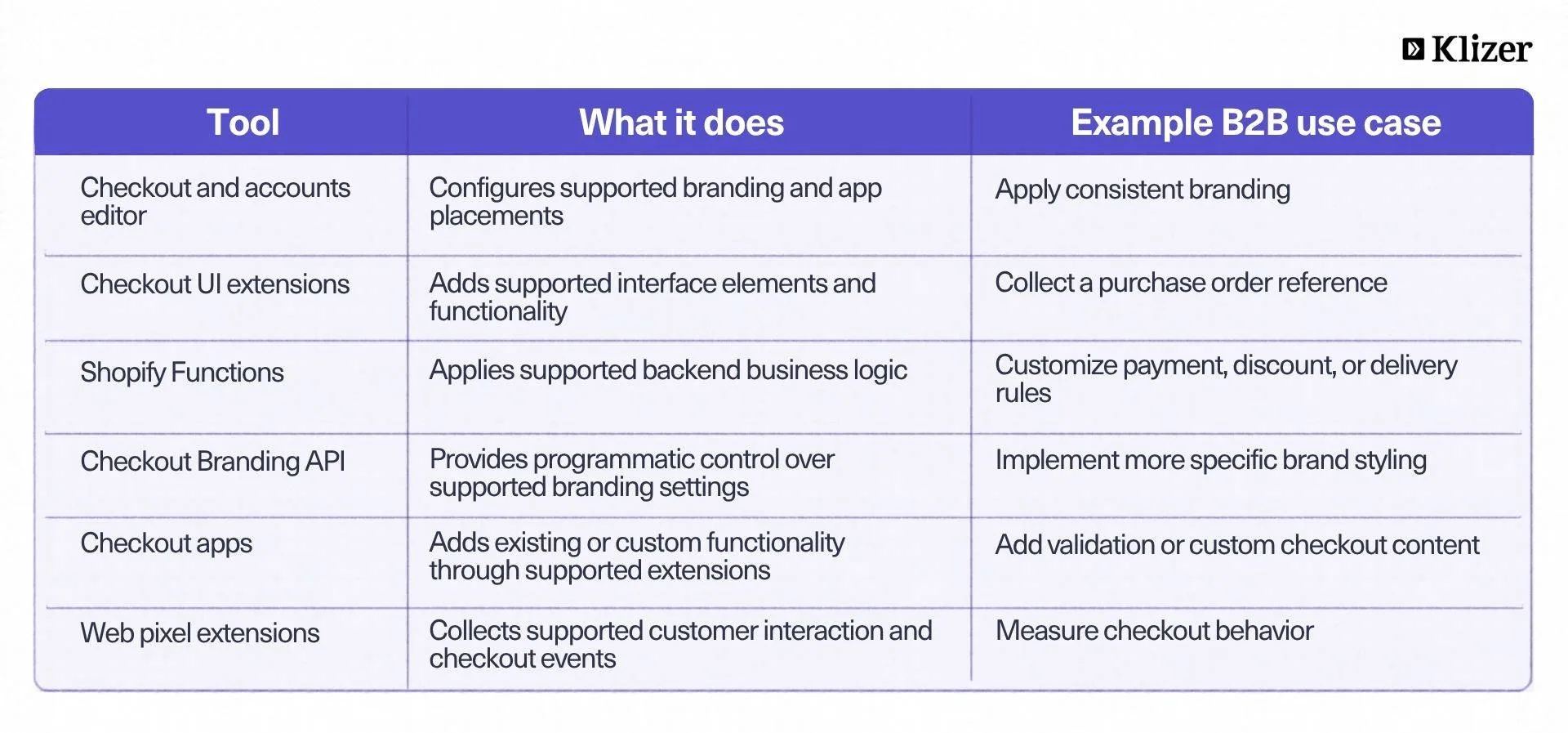
Shopify Plus Checkout Extensibility vs. Traditional Checkout Customization
The main difference is how checkout functionality is added and maintained.
Traditional approaches often depended on direct edits to checkout code. Shopify Plus Checkout Extensibility uses supported APIs, extensions, and apps to add functionality while keeping the underlying checkout managed by Shopify.
This approach has practical benefits for enterprise businesses:
- Easier maintenance: Supported extensions reduce dependence on custom code tied to the underlying checkout implementation.
- More controlled development: Developers can build functionality around specific extension points.
- Better compatibility with platform updates: Extensibility is designed to work with Shopify’s managed checkout, although individual apps and extensions still require maintenance.
- More focused customization: Businesses can add the functionality they need without rebuilding the entire checkout.
Shopify has also reported improvements associated with its checkout technology. In its checkout customization guide, Shopify states that Checkout Extensibility supports checkout interactions and page transitions that are twice as fast, with an average conversion improvement of over 1%.
These are Shopify-reported platform-level results, not a guarantee that every store will achieve the same outcome. Actual performance depends on the store, its customizations, buyer behavior, and implementation quality.
Best Practices for Shopify Plus Checkout Customization
Before building a custom checkout experience, businesses should establish what needs to change and why.
Start with the buying process
Map how customers currently place orders. Identify where they encounter errors, contact sales for assistance, or need manual intervention.
This helps separate genuine checkout problems from issues that should be solved elsewhere in the commerce system.
Prioritize the changes that matter most
Start with requirements that directly affect order completion or create repeated work for your team.
For example, enforcing a minimum order value or collecting a required purchase order number may be more important than adding extra promotional content.
Check native Shopify B2B features first
Shopify already supports several B2B capabilities, including company accounts, customer-specific catalogs and pricing, payment terms, and other business purchasing features.
Check whether the existing platform configuration can meet the requirement before investing in custom development.
Plan ERP and other system integrations
Checkout must work with the information used by your business. Pricing, inventory, customer eligibility, and order details should remain consistent between Shopify and the systems that manage your operations.
If a custom checkout rule depends on ERP data, define how that data will be accessed and validated before development begins.
Test real buying scenarios
Testing should cover more than a successful payment.
Include different customer types, company locations, payment methods, order values, shipping conditions, and validation failures. Also test mobile checkout and any relevant accelerated checkout flows.
Monitor results after launch
Track checkout completion, validation errors, payment failures, and support requests related to ordering. These indicators help show whether a customization is solving the original problem.
Review the experience periodically as your business rules, customer expectations, and Shopify’s available features change.
Conclusion
Shopify Plus checkout customization gives enterprise B2B businesses more control over how customers complete their orders. From payment methods and delivery options to custom fields and validation rules, the available tools can support many of the requirements that make wholesale checkout different from consumer purchasing.
The key is knowing what Shopify supports natively, where checkout extensions can help, and when a requirement needs a broader application or integration.
For businesses planning these improvements, the right development approach can make the difference between a checkout that simply processes orders and one that supports the entire B2B buying process.
Explore Klizer’s Shopify Plus Development Services to see how checkout customization, B2B functionality, and system integrations can support your business. If you’re looking for a Shopify Plus development partner with experience in manufacturing and distribution, book a consultation with Klizer to discuss your requirements.
FAQs
1. What is Shopify Plus checkout customization?
Shopify Plus checkout customization allows businesses to adapt supported checkout branding, interface elements, payment and delivery options, and business rules using Shopify’s Checkout Extensibility tools, apps, and APIs.
2. Can Shopify Plus checkout be customized for B2B buyers?
Yes. Businesses can use supported customization tools alongside Shopify’s native B2B capabilities to support requirements such as payment terms, custom order information, delivery rules, and order validation. The exact options depend on the workflow and technical requirements.
3. What is Shopify Plus checkout extensibility?
Shopify Plus checkout extensibility is Shopify’s framework for adding checkout functionality through supported UI extensions, apps, branding tools, and backend logic. It replaces the need for many legacy checkout code customizations.
4. Can I add custom fields to Shopify Plus checkout?
Yes, supported checkout UI extensions can collect additional information at designated locations. The implementation must also ensure that the information is stored and made available to the relevant business systems.
5. Can Shopify Plus checkout show different payment methods to different B2B customers?
Supported payment customization tools can hide, reorder, or otherwise customize eligible payment options based on business rules. Payment terms and customer eligibility must also be configured correctly in Shopify or the relevant connected systems.
6. Do I need a developer for Shopify Plus checkout customization?
Not always. Basic branding and some app configurations can be managed through Shopify’s editor. Custom checkout UI extensions, complex validation rules, advanced branding, and integrations typically require development support.