Ask three agencies what a Magento headless migration involves and at least one will tell you to export your catalog and import it somewhere new.
That answer is wrong, and it is the fastest way to spot who has never done one.
A headless commerce migration decouples your storefront from Magento’s PHP rendering layer while the backend, database, and ERP connections stay exactly where they are.
That is what separates this from ecommerce replatforming, where data physically changes systems and customer accounts and identity have to be migrated. Magento keeps running as your commerce engine, and only the presentation layer is rebuilt.
This headless migration guide breaks down the four architecture layers, the six migration phases, and what has to be built before the frontend starts.
ON THIS PAGE
How Does Headless Architecture Work on Magento?
A headless Magento stack has four layers:
1. The Backend
Magento stops rendering HTML and is consumed by the storefront through APIs. It still runs admin, cron, indexers, and queues, and it owns the catalog, cart logic, order management, customer groups, tax rules, and every ERP connection you have built.
Two API surfaces do the work:
- GraphQL handles storefront reads and cart operations: product data, categories, search, quotes, and checkout mutations
- REST handles admin operations and system-to-system writes, including most ERP order and inventory sync jobs
2. The Frontend
The storefront is rebuilt as an independent application, usually Next.js or Nuxt. Indexable routes such as category and product pages need server-side rendering or incremental static regeneration, since client-only rendering costs crawl reliability on a large catalog. The performance gain is measurable: headless Magento with SSR delivers LCP of 1.0 to 1.5 seconds compared to 2.8 to 3.5 seconds on a Luma-based monolith.
3. The API Layer (BFF or Middleware)
Magento’s GraphQL schema covers B2B features such as company credit, negotiable quotes, and requisition lists. What it does not solve is query volume and ERP merge latency at distributor scale.
A Backend for Frontend layer, typically Node.js, sits between the storefront and Magento to batch queries, merge ERP responses with catalog data, enforce timeouts, and shape payloads per channel.
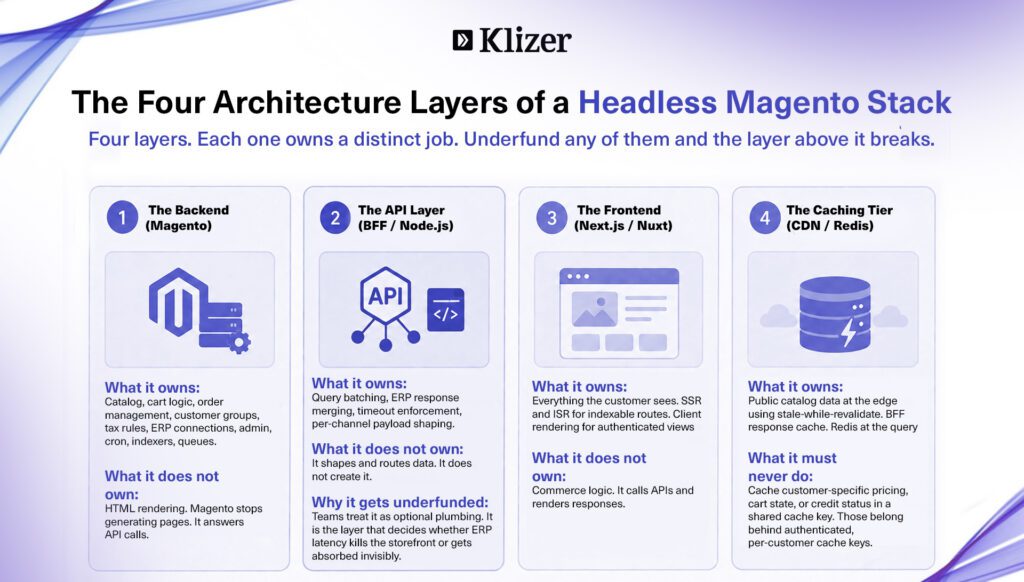
4. The Caching Tier
Varnish full-page caching stops applying once Magento stops rendering pages, though GraphQL responses can still be cached using Adobe’s supplied Fastly VCL configuration. The primary caching layer shifts to the CDN edge, the BFF response cache, and Redis at the query level.
In a monolith, you cache the whole page and punch holes in it with ESI tags to keep the cart and pricing live. Headless flips this: the frontend fetches those fragments directly. Public catalog data can use stale-while-revalidate at the edge, but customer-specific pricing, carts, and credit status must never be shared-cacheable and belong behind authenticated, per-customer cache keys.
Traditional Magento vs Headless Magento
Unlike ecommerce replatforming, nothing about your data model changes here. As this headless migration guide shows, the differences are mainly mechanical.
| Layer | Traditional Magento | Headless Magento |
| Page rendering | PHP renders HTML server-side | Frontend app renders via API responses |
| Page caching | Varnish full-page cache | CDN edge plus BFF and Redis caching |
| Customer pricing | Resolved in the render cycle | Resolved as an authenticated API call |
| Deployment | Frontend and backend ship together | Frontend deploys independently |
| SEO control | Magento templates and meta config | Managed in the frontend framework |
| ERP timeout behavior | Page hangs or degrades | Defined fallback per API contract |
The last row matters most for distributors. In a monolith, an unresponsive ERP call degrades a page, but in a decoupled stack you decide in advance what the storefront shows when live inventory or a credit check does not return in time.
The Six-Phase Migration Process
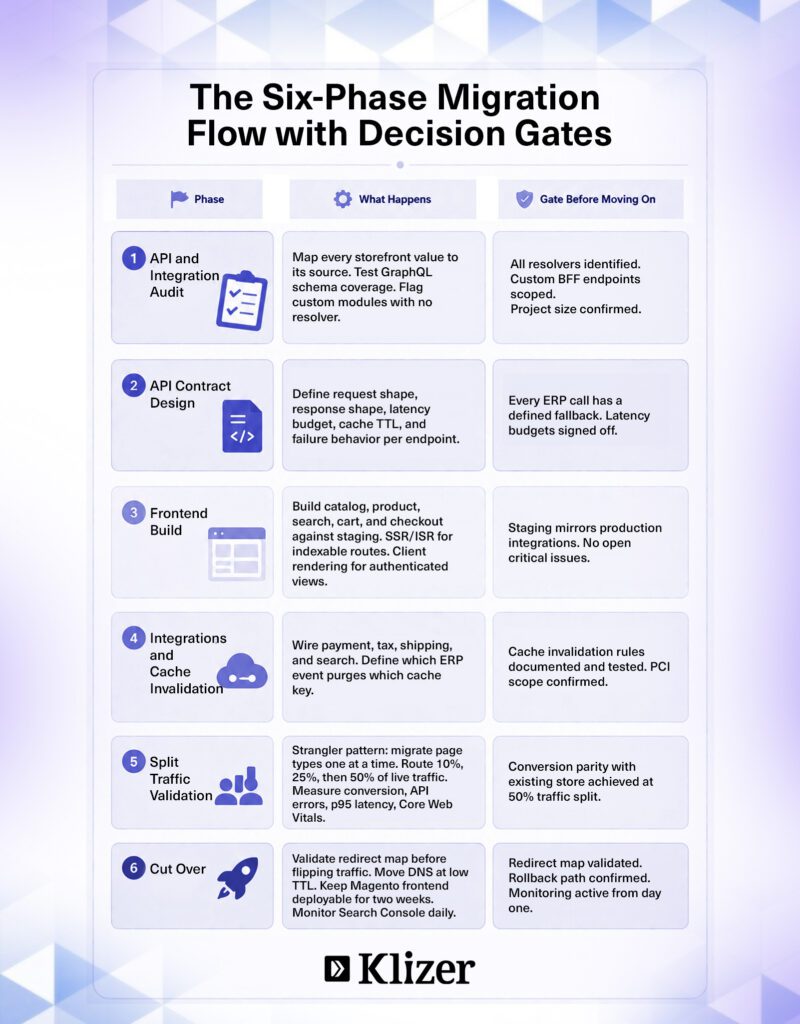
A headless commerce migration runs in six phases:
Step 1: API and Integration Audit
Map every value your storefront renders back to its source, then test whether Magento’s GraphQL schema exposes it. This is the ecommerce migration checklist step most teams rush.
Audit for:
- Customer-specific and contract pricing tiers
- Restricted catalog visibility by customer group
- Real-time inventory across branches or warehouses
- Credit limits, holds, and payment terms from the ERP
- Quote, approval, and reorder workflows
- Custom module output with no GraphQL resolver
Anything without a resolver needs a custom one written or a BFF endpoint built. This audit sizes the project.
Step 2: Design the API Contract Layer
Before frontend work starts, define each contract: request shape, response shape, latency budget, cache TTL, and failure behavior. Decide now what happens when the ERP is slow, because that belongs in architecture, not in a bug ticket after launch.
Step 3: Build the Frontend
Build catalog, product, search, cart, and checkout against a staging environment that mirrors production integrations. Use SSR or ISR for indexable routes, and client rendering for authenticated views such as account dashboards and order history.
Step 4: Wire Integrations and Cache Invalidation
Wire up payment, tax, shipping, and search, keeping payment and tax mediated by Magento or a provider SDK rather than called directly from the storefront, which would widen your PCI scope.
Then define invalidation rules: which ERP event purges which cache key. An ERP price update that leaves a stale price cached at the edge is the failure mode that costs real money.
Step 5: Validate on Split Traffic
Route 10%, then 25%, then 50% of live traffic to the new storefront, measuring conversion, API error rates, p95 latency, and Core Web Vitals against the existing store before proceeding. Your post-launch ecommerce migration checklist should track the same metrics at 30 and 90 days.
Step 6: Cut Over with Rollback Ready
Move DNS with a low TTL so you can revert within minutes, and keep the Magento frontend deployable for two weeks. Monitor Search Console daily for crawl and indexing changes on the new render path.
How Much Does a Magento Headless Migration Cost and How Long Does It Take?
| Project Type | Timeline | Estimated Cost |
| MVP headless (core catalog and checkout) | 6 to 8 weeks | $50,000 to $80,000 |
| Full rollout with B2B workflows | 12 to 20 weeks | $80,000 to $150,000 |
| Enterprise with ERP integration and multi-store | 20 to 28 weeks | $150,000 to $250,000+ |
The biggest driver of timeline overrun is the ERP integration audit, not the frontend build. Projects that treat the integration layer as one workstream among six consistently run long. However, an accurate estimate is only possible when the audit teams analyse your requirements better.
Why Do Headless Magento Projects Really Fail?
When you migrate to headless commerce, every value the ERP owns becomes a network call with a latency budget and a failure mode. Pricing, availability, credit status, and order history all cross a boundary that used to be a function call inside the same process.
Distributors who migrate to headless commerce rarely fail on the frontend. They fail because the integration layer was scoped as one workstream among six instead of the foundation the storefront now depends on.
Plan Your Magento Headless Migration
Getting the frontend right is the easy part. The harder part is making sure pricing, inventory, and credit checks still hold once Magento stops rendering the page, and that is what most headless projects get wrong.
If you are planning to migrate to headless commerce on Magento, Klizer starts with the ERP integration audit, not the wireframes, because it decides whether your project runs six weeks or six months.
Book a FREE Consultation with Klizer today to map your headless migration timeline.
Frequently Asked Questions About Headless Commerce Migration
What is the difference between headless migration and ecommerce replatforming?
Headless migration keeps Magento as the commerce backend and rebuilds only the presentation layer. Ecommerce replatforming moves data to an entirely new system, including customer accounts, order history, and catalog. Headless migration is lower risk because the backend and ERP connections stay in place.
How long does a Magento headless migration take?
An MVP build covering core catalog and checkout takes 6 to 8 weeks. A full rollout with B2B workflows takes 12 to 20 weeks. Enterprise projects with ERP integration and multi-store requirements run 20 to 28 weeks. The biggest variable is how long the API and integration audit takes, which depends on how many custom modules exist and how many ERP connections need resolver work.
What is the strangler pattern in headless migration?
The strangler pattern migrates page types one at a time rather than cutting over the entire storefront at once. Category pages go first, then product pages, then cart and checkout. Each page type is validated before the next one starts, keeping the rollback scope narrow at every stage.
When does headless migration make sense for a Magento store?
When your catalog exceeds 20,000 SKUs with complex attributes, when platform maintenance costs exceed 8 to 12% of annual GMV, when LCP is consistently above 2.5 seconds, or when you have active omnichannel, multi-storefront, or complex B2B workflow requirements that the monolith cannot support cleanly.