A checkout flow that breaks during peak traffic. A product filter that returns wrong results after a catalog update. A payment gateway integration that stops working after a platform upgrade. In ecommerce, software defects do not just frustrate users. They cost revenue in real time.
Script maintenance alone consumes a significant portion of every QA team’s time. Change a button’s ID and half your automated tests break. Add a new feature and the regression suite doubles in size. For ecommerce teams shipping updates weekly or daily, manual testing cannot keep pace, and traditional automation is too brittle to absorb constant UI and integration changes.
This guide explains how AI is used in ecommerce software testing today, where it delivers the most value, and how to integrate it into existing QA workflows without disrupting what already works.
ON THIS PAGE
The Role of AI in Ecommerce Software Testing
Artificial intelligence helps in improving the software testing process by automating repetitive tasks, analyzing large amounts of data, using complex algorithms, and providing the best results based on predictions. Integrating AI into the test process significantly improves the efficiency, accuracy, and test coverage. It also includes the benefits of predictive analytics, self-healing test automation, enhanced test reporting, and improved collaboration.
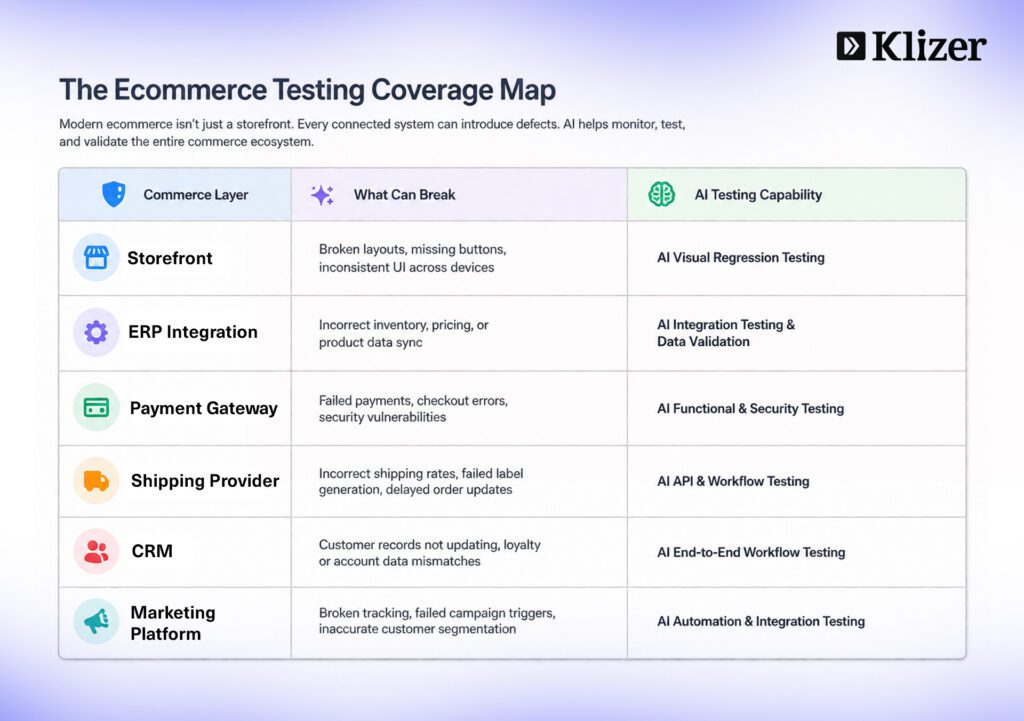
In ecommerce, these capabilities matter more than in most software contexts. A single broken integration between a storefront and an ERP, a payment gateway, or a shipping provider can halt order processing entirely. AI-driven testing catches these failures earlier and keeps critical workflows stable through constant platform changes.
AI does not replace QA engineers. According to the ThinkSys QA Trends Report 2026, 77.7% of organizations now use or plan to use AI in their QA processes. The adoption data points to task-level augmentation: AI automates test data creation, script generation, and log analysis, while humans own exploratory testing, risk decisions, and release readiness judgment.
Types of AI Algorithms and Techniques
There are various AI algorithms and techniques available to enhance software testing.
Machine Learning
Machine Learning (ML) is a subset of AI that enables systems to learn from data and make predictions or decisions without explicit programming. In ecommerce software testing, ML is used for:
Predictive Analytics
Analyze historical data, such as code changes, test results, and bug reports, to identify patterns and predict potential failures. For ecommerce platforms, this means flagging high-risk areas like checkout, payment processing, and inventory sync before a release goes live.
Test Case Prioritization
Prioritize test cases based on risk assessment and historical data, which optimizes testing efforts and focuses on critical areas. In ecommerce, this means checkout flows, product search, and account management get tested first after every release.
Anomaly Detection
Detect unusual behavior in software systems, such as unexpected performance degradation or security vulnerabilities, to identify anomalies and alert teams to potential issues. For ecommerce, this catches payment processing anomalies, unusual cart abandonment spikes, and unexpected API response times before they affect buyers.
Self-Healing Tests
Automatically adapt test scripts to changes in the application, reducing maintenance effort. ML-powered tools can analyze code changes and UI modifications to automatically update test scripts, ensuring their continued effectiveness. In ecommerce environments where themes, templates, and storefronts change frequently, this is one of the highest-value AI capabilities available.
Test Data Generation
Generate realistic and diverse test data to improve test coverage and identify edge cases. ML algorithms can learn from existing data to generate synthetic data that mimics real-world scenarios. For ecommerce, this means generating realistic order histories, customer profiles, pricing scenarios, and inventory states for testing.
Key Areas to Use AI in eCommerce Software Testing
What is AI Test Case Generation and Its Benefits
Creating test cases based on requirements is the primary process and time-consuming phase in ecommerce testing activities. Ecommerce applications are complex: a single checkout flow touches the storefront, cart engine, payment gateway, tax calculation, inventory system, and order management system simultaneously. Instead of relying on human effort to manually map every path through that flow, testers use AI-powered tools to generate test cases based on project requirements, user stories, or system behavior.
AI analyzes existing data, such as requirements documents, previous test cases, or application logs, using machine learning (ML), algorithms, and natural language processing (NLP) to identify patterns, edge cases, and potential test scenarios. This method helps to ensure wide test coverage across the full commerce stack.
Benefits: Faster test case creation, better test coverage, reduced manual effort, improved regression testing, and scalability as catalog size and integration complexity grow.
Types of Test Cases in eCommerce QA
Different types of test cases are crucial for delivering a reliable ecommerce product. Understanding these test case types helps in organizing and structuring tests to ensure comprehensive coverage.
1. Functional Test Cases
Functional test cases verify that features work according to requirements and expected behavior. In ecommerce, this means verifying that add-to-cart works correctly, discount codes apply at the right point in the checkout flow, and order confirmation emails are sent after a successful purchase.
- Validate input and output behavior
- Ensure requirements are correctly implemented
2. Integration Test Cases
Integration test cases check whether different modules or components work together properly. In ecommerce, integration testing is critical because storefronts connect to ERPs, payment gateways, shipping providers, CRMs, and marketing platforms simultaneously.
- Verify interaction between components
- Validate data flow across modules
3. System Test Cases
System test cases verify the complete system as a whole to ensure it meets all specified requirements. For ecommerce, this means end-to-end order flow testing from product discovery through fulfillment confirmation.
- Test complete end-to-end functionality
- Ensure all integrated components work correctly
4. Acceptance Test Cases
Acceptance test cases verify that the system meets user and business requirements before release. In ecommerce, this includes verifying that the checkout experience matches agreed UX standards and that B2B-specific flows like account-specific pricing and approval workflows function correctly.
- Validate system against user and business needs
- Confirm readiness for release
5. Regression Test Cases
Regression test cases ensure that new changes or updates do not negatively affect existing functionality. In ecommerce, regression testing is critical after every platform update, theme change, or plugin addition because any of these can break existing checkout or integration behavior.
- Re-test previously working features
- Detect bugs introduced after changes
How to Use AI in Test Case Generation
Several types of AI tools are available to use as open source. The following factors need to be considered for selecting the right tool for your ecommerce stack:
- Pricing
- Tool complexity
- Compatibility and integration with your existing commerce platform and CI/CD pipeline
- Ease of maintenance
- Community support
Popular AI testing tools for ecommerce QA teams in 2026 include:
- Testim — best for AI test authoring with self-healing capabilities and no-code test creation, well suited for ecommerce teams managing frequent UI changes
- Mabl — best for end-to-end AI testing with intelligent test maintenance across complex user flows like checkout
- Applitools — best for visual regression testing, particularly useful for ecommerce teams validating storefront appearance across browsers and devices
- Playwright with AI codegen — best for engineering-led ecommerce teams who need open-source flexibility with AI-assisted test generation for complex multi-step flows
- Katalon — best free option covering web, mobile, API, and desktop testing from a single platform, practical for ecommerce teams managing both storefront and mobile app testing
Self-Healing Test Automation
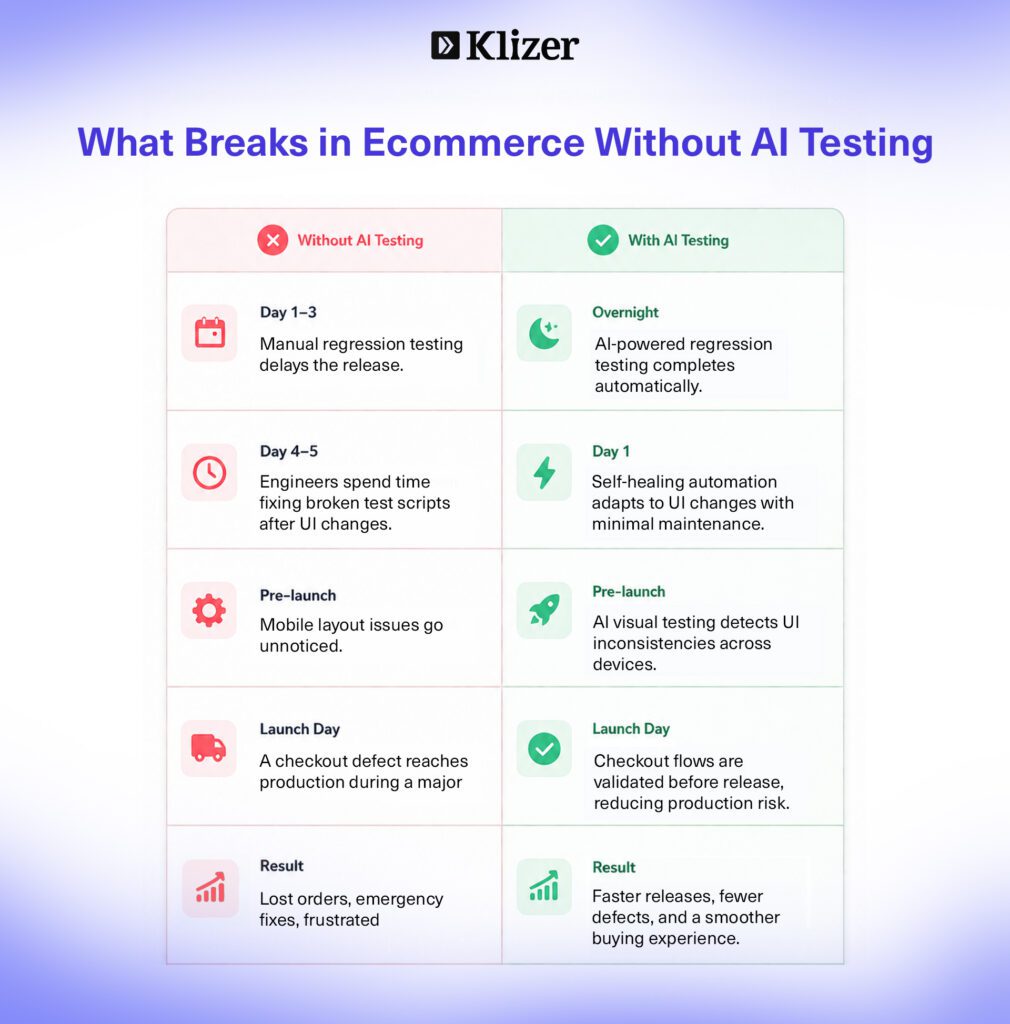
Self-healing tests are one of the highest-impact applications of AI in ecommerce software testing. Ecommerce storefronts change constantly: themes update, UI components shift, and third-party apps inject new elements. Traditional automated tests break every time these changes occur because they rely on fixed selectors and hardcoded paths.
AI-powered testing tools reduce test maintenance by 60 to 80% by detecting when application changes break tests and automatically updating test scripts or suggesting fixes. For an ecommerce team managing a Magento or Shopify Plus storefront that ships weekly updates, this is the difference between a test suite that stays current and one that requires constant manual repair.
Self-healing capability does not eliminate maintenance entirely, but it shifts the work from reactive firefighting to exception handling. Tools like Testim achieve self-healing success rates of 85% or higher for common UI changes. Applitools applies deep learning models trained on millions of UI screens to handle visual regression without pixel-by-pixel comparison, significantly reducing false positives that waste QA time on non-issues.
Shift-Left Testing in eCommerce
Shift-left testing means moving quality checks earlier in the development lifecycle rather than treating testing as a final checkpoint before release. In ecommerce, the cost of catching a defect late is high: a broken checkout discovered after a release to production during a promotional event costs revenue that cannot be recovered.
AI makes shift-left practical at scale by generating test cases from requirements documents before development begins, flagging high-risk code changes before they reach the test suite, and running predictive analysis on historical defect data to surface problems when they are cheapest to fix.
For ecommerce teams, shift-left means checkout flows, payment integrations, and ERP sync workflows are validated earlier in every sprint rather than discovered broken during UAT or, worse, after go-live.
Visual Regression Testing for Ecommerce Storefronts
Visual regression testing verifies that UI changes do not introduce unintended visual defects across browsers, devices, and screen sizes. In ecommerce, this matters because a broken product page layout, an overlapping price label, or a misaligned checkout button on mobile directly affects conversion.
Traditional pixel-by-pixel comparison tools generate excessive false positives because minor rendering differences across environments trigger failures that have no real impact on the buyer experience. AI-powered visual testing tools like Applitools use deep learning models to compare semantic layout rather than exact pixels, flagging changes that affect usability rather than surface-level rendering noise. This makes visual regression testing practical across an entire ecommerce catalog without generating hundreds of false alerts per run.
Testing AI-Powered Ecommerce Features
Ecommerce platforms increasingly ship AI-powered features: product recommendation engines, AI-driven search ranking, personalized content, and conversational commerce agents. QA teams face a new testing surface that traditional methods were not built to handle.
Testing a recommendation engine or a search feature powered by a machine learning model requires validating output consistency, response latency, relevance of results, and model behavior after catalog or pricing changes. For ecommerce teams building conversational AI or agentic commerce features, testing also needs to cover prompt injection resistance and the accuracy of pricing and inventory responses the agent returns to buyers.
Tools like DeepEval, Promptfoo, and LangSmith are the 2026 standard for teams validating AI model behavior as part of their QA process.
What is a Bug Report and Its Types?
A bug report is a critical document that provides a detailed account of the issue, defect, or flaw identified within the software application. The primary objective of this report is to inform developers and all relevant stakeholders about the identified problem that requires investigation and resolution.
An effective bug report clarifies all relevant details regarding the bug, making it easier for developers to record, submit, and fix the issue swiftly and efficiently. It must include essential information such as the description of the problem, steps involved in reproducing it, expected and actual outcomes, and specific details about the environment in which the bug was identified.
Types of Bug Reports in Ecommerce
- Functional Bugs: These occur when a feature does not work as intended. In ecommerce, common examples include a discount code that does not apply correctly, a product filter that returns wrong results, or an order status that does not update after fulfillment.
- UI/UX Bugs: These relate to design or user experience issues. In ecommerce, this includes product images not loading on mobile, checkout buttons misaligned on specific screen sizes, or form fields that are difficult to interact with on touch devices.
- Performance Bugs: These appear when the software is slow, freezes, or consumes too many resources. In ecommerce, a product listing page that takes more than three seconds to load or a checkout that times out under peak traffic are performance bugs with direct revenue impact.
- Security Bugs: These involve vulnerabilities that could compromise data or system security. In ecommerce, examples include being able to access another user’s order history, bypassing payment authentication, or exposing customer PII in API responses.
- Compatibility Bugs: These happen when software does not work correctly across devices, browsers, or operating systems. In ecommerce, a checkout flow that works on Chrome but fails on Safari, or a product page that renders correctly on desktop but breaks on mobile, are common compatibility failures.
Elements of an Effective Bug Report
To create an effective bug report in software testing and development, it should include the following key elements:
- Clear Title: A concise and meaningful summary that quickly explains the issue.
- Description of the Issue: A detailed explanation of the problem, its behavior, and impact on the system.
- Steps to Reproduce: Exact steps required to consistently recreate the defect.
- Expected Result: The correct behavior the system should show under normal conditions.
- Actual Result: The actual behavior observed, highlighting the mismatch with expectations.
- Environment Details: Information such as OS, browser, device, and software version where the issue occurred.
- Severity and Priority: Defines the impact of the bug and the urgency of fixing it. In ecommerce, any bug affecting checkout or payment should be treated as critical regardless of how rarely it reproduces.
- Attachments / Evidence: Screenshots, logs, or recordings that help explain the issue clearly.
- Comments / Updates: Additional notes or clarifications added during investigation or discussion.
How to Use AI Tools for Bug Reporting
Creating an efficient bug report is important for effective communication and collaboration with our teams. However, this process can be time-consuming and error-prone, especially when dealing with complex ecommerce applications or large test suites spanning multiple integrated systems.
AI-powered bug reporting tools streamline this process by automatically creating defect reports, potentially saving time and improving accuracy. AI will provide the structured bug report in a few minutes based on the given prompts. This includes the following benefits:
- Faster documentation
- Improved clarity in defect reporting
- Smoother communication between QA and Dev teams
- Quicker sprint issue tracking
For ecommerce teams, faster bug documentation means faster resolution of checkout and integration failures that are actively costing revenue while they remain open.
How to Start With AI Testing Without Disrupting Existing Ecommerce Workflows
The most common mistake teams make is trying to overhaul their entire QA process at once. Start narrow instead.
For ecommerce teams, the highest-friction starting points are usually checkout regression testing and integration testing between the storefront and connected systems like ERP or payment gateways. These are high-volume, high-risk workflows where AI-generated test cases and self-healing automation deliver measurable ROI quickly.
Pilot one tool against that use case, measure the impact on maintenance time and test coverage, and expand once the value is proven.
The AI QA maturity model gives teams a useful framework for sequencing that expansion:
- Level 0: Ad-hoc manual testing
- Level 1: Scripted automation
- Level 2: CI-integrated automation
- Level 3: AI-augmented test generation and self-healing
- Level 4: Continuous AI evaluation and failure triage
- Level 5: Autonomous test authoring and remediation agents
Most ecommerce QA teams in 2026 sit at Level 1 or 2. The path to Level 3 and 4 is achievable without a full infrastructure overhaul: identify your specific coverage gaps, add AI capability in the area of highest friction, and build from there.
For expert help regarding ecommerce QA and testing, you can also book an audit with our team.
FAQ
What is AI in ecommerce software testing?
AI in ecommerce software testing is the application of machine learning, NLP, and predictive analytics to automate, accelerate, and improve testing across the commerce platform. It handles repetitive tasks like regression testing and script maintenance so QA teams can focus on complex exploratory testing and risk decisions.
Does AI replace QA engineers?
No. AI replaces specific repetitive tasks, not the tester. It handles test data creation, script generation, and log analysis while humans own exploratory testing, risk decisions, and release readiness judgment. The ThinkSys QA Trends Report 2026 points to task-level augmentation, not role replacement.
What are self-healing tests and why do they matter for ecommerce?
Self-healing tests are automated test scripts that detect when application changes have broken a test and automatically update to reflect the new UI or behavior. For ecommerce teams managing storefronts that update frequently, self-healing automation keeps test suites current without requiring manual fixes after every theme or template change.
Which AI testing tools should an ecommerce QA team start with?
It depends on your tech stack and QA maturity. Testim and Mabl suit no-code AI-augmented testing for ecommerce flows. Playwright with AI codegen suits engineering-led teams. Applitools leads in visual regression testing for storefront validation across browsers and devices. Katalon offers a broad free tier covering web, mobile, API, and desktop from one platform.
What is shift-left testing and how does it apply to ecommerce?
Shift-left testing moves quality checks earlier in the ecommerce development lifecycle. For ecommerce teams, it means checkout flows, payment integrations, and ERP sync workflows are validated earlier in every sprint rather than discovered broken during UAT or after a production release during a promotional event.
How do you test AI-powered ecommerce features?
Testing AI features like recommendation engines, personalized search, or conversational commerce agents requires validating output consistency, response latency, relevance, and model behavior after catalog or pricing changes. Tools like DeepEval, Promptfoo, and LangSmith are the 2026 standard for this work.
What is the AI QA maturity model?
A five-level framework ranging from ad-hoc manual testing at Level 0 to autonomous test authoring and remediation agents at Level 5. Most ecommerce QA teams in 2026 sit at Level 1 or 2. Levels 3 and 4, which include AI-augmented test generation, self-healing, and continuous AI evaluation, are achievable without a full infrastructure overhaul.