Checkout is the least forgiving page in any ecommerce store. It is where hesitation costs the most, and where a shopper who was ready to buy will pause over something that looks wrong.
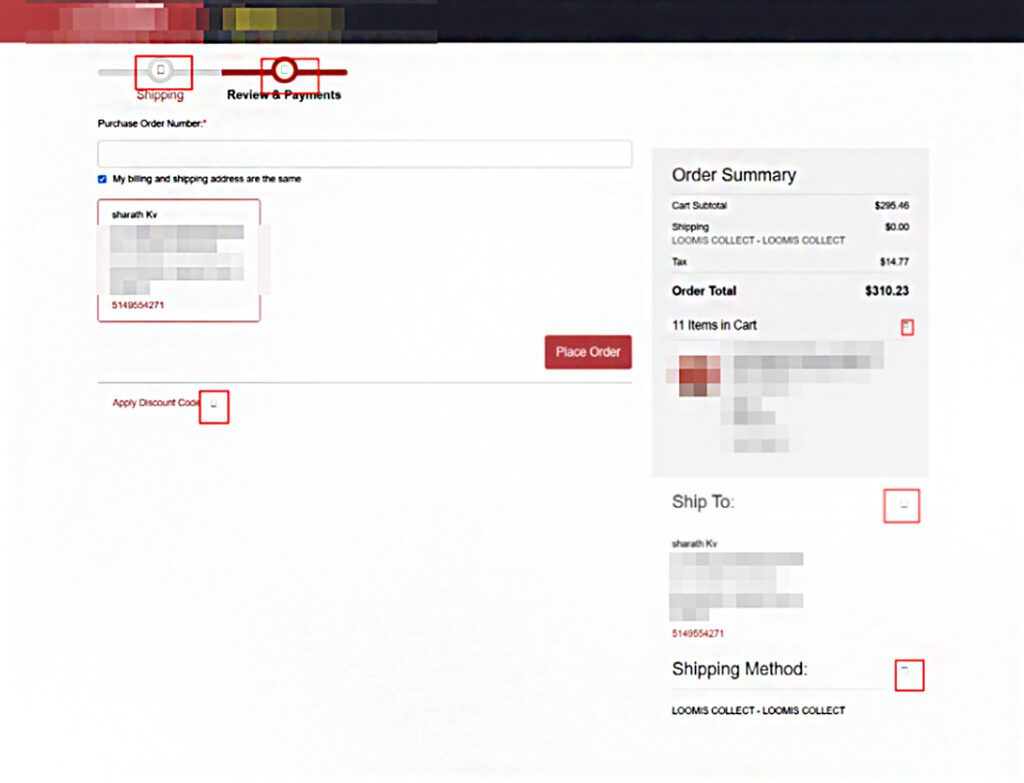
During a recent Magento 2.4.8-p4 upgrade, several checkout icons on a custom Luma-based storefront stopped rendering. They appeared as empty boxes or raw Unicode values such as U+E610. Checkout still worked. Orders still went through. But the most sensitive page in the store now looked broken.
At first the problem appeared to be related to Magento 2.4.8-p4 itself. A deeper investigation revealed that the actual cause was hidden inside the interaction between Magento’s frontend asset loading mechanism and Amasty Page Speed Optimizer.
This article explains what happened, why it happened, how we identified the root cause, and the steps we took to permanently resolve the issue.
ON THIS PAGE
What Problem Did We Encounter After Upgrading to Magento 2.4.8-p4?
Immediately after upgrading to Magento 2.4.8-p4, several icons disappeared from the checkout page.
The affected components included:
- Checkout progress step checkmarks
- Address selection icons
- Dropdown arrows
- Various checkout indicators and glyphs
Instead of displaying the expected icons, the browser showed:
- Empty square placeholders
- Missing symbols
- Unicode values such as U+E610
Although customers could still complete their purchases, the visual experience suffered, making this issue a high priority.
Who Is Most Likely to Encounter This Issue?
Not every Magento store will experience this problem. It is more likely to affect stores that:
- Use the default Luma theme or custom themes based on Luma.
- Have Amasty Page Speed Optimizer installed.
- Enable the Move Font optimization feature.
- Upgrade from Magento 2.4.x to Magento 2.4.8-p4.
- Rely heavily on icon fonts during checkout.
The same conditions apply to Adobe Commerce, since the frontend asset pipeline is identical. Stores running Hyvä are not affected, as Hyvä replaces icon fonts with inline SVG and does not depend on a deferred @font-face declaration at render time.
If your store matches these conditions, it is worth verifying the font loading behavior after an upgrade.
Why Did We Initially Suspect Magento 2.4.8-p4?
Because the issue appeared immediately after the upgrade, our initial assumptions focused on:
- Magento frontend changes
- Static content deployment issues
- Luma theme modifications
- Asset generation differences
These assumptions were reasonable because upgrade-related frontend issues are commonly caused by changes in Magento itself.
However, after carefully analyzing the generated assets, we discovered that Magento was behaving correctly. The upgrade had simply exposed a dependency on font loading timing that had previously gone unnoticed.
How Did We Begin Troubleshooting the Missing Icons?
The first step was inspecting the affected elements using browser developer tools.
The CSS definitions appeared normal:
content: ‘\e610’;
font-family: ‘luma-icons’;
We then confirmed that the required font files existed:
pub/static/frontend/<Vendor>/<Theme>/en_US/fonts/Luma-Icons.*
Everything appeared to be present:
- Font files existed.
- Static content deployment had completed successfully.
- No JavaScript errors appeared.
- Browser network requests returned HTTP 200 responses.
Despite all these checks, the icons still failed to render.
This indicated that the problem was not missing assets, but rather when those assets became available to the browser.
Where Was the Missing Font Declaration?
While analyzing Magento’s merged CSS file, we noticed something unexpected.
The following declaration was missing:
@font-face {
font-family: ‘luma-icons’;
}
Without this declaration, the browser could not map icon codepoints to the actual font files.
This raised another question: where has the @font-face definition gone?
The answer led us to Amasty Page Speed Optimizer.
How Did Amasty Page Speed Optimizer Cause the Issue?
The store had the Move Font optimization enabled. This feature improves performance by:
- Extracting font declarations from CSS files.
- Moving them into a separate stylesheet.
- Loading those fonts later to reduce render-blocking resources.
Deferring fonts is a legitimate technique, and one we use deliberately on Magento store performance optimization work. The problem is not the technique. It is applying it to a font the page needs before the deferred stylesheet arrives.
During our investigation, we discovered that Amasty had moved the missing luma-icons declaration into a separate file:
fonts_xxxxxxxxx.css
That file was loaded only after:
window.load
By that time, Magento’s checkout components had already rendered. As a result, the browser displayed placeholder characters instead of icons.
Why Was Checkout the Only Page Affected?
One interesting observation was that the issue primarily appeared on the checkout page.
Pages such as the home page, category pages, and product detail pages continued to function normally.
Checkout exposed the issue because:
- It relies heavily on icon fonts.
- Many components are rendered immediately.
- KnockoutJS dynamically generates UI elements during initialization.
- Icons are required before the deferred stylesheet becomes available.
This timing mismatch caused the visual problem. On a B2B storefront, the exposure is wider still, since customer-specific pricing, account selection, and quick order components all render through the same initialization path.
How Can Developers Identify Similar Issues?
When dealing with frontend issues after an upgrade, it is important to inspect the entire asset-loading lifecycle.
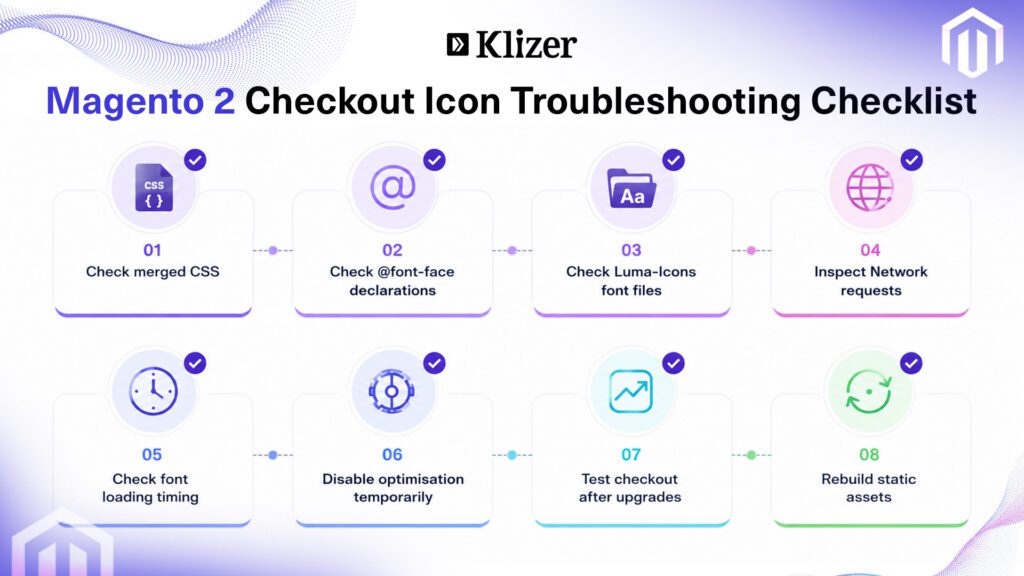
Useful troubleshooting steps include:
Verify CSS content. Ensure that @font-face declarations exist in the merged CSS output.
Inspect network requests. Confirm there are no 404 responses, that MIME types are correct, and that font downloads complete.
Temporarily disable optimization modules. Performance modules sometimes introduce unexpected side effects. Testing with optimizations disabled helps isolate the root cause.
Compare asset loading timing. Frontend issues are often caused by timing rather than missing files. Ask yourself: when does CSS load, when do JavaScript components initialize, and when do fonts become available?
How Did We Fix the Problem?
Once we identified the root cause, the solution was short.
Amasty provides a configuration setting called font_ignore_list, exposed in the admin panel as Do Not Defer Fonts That Contain under the Defer Fonts Loading settings. Fonts listed here remain inside the critical CSS loaded during initial page rendering.
Step 1: Configure the Default Value
File:
etc/config.xml
Configuration:
xml
<?xml version=”1.0″?>
<config xmlns:xsi=”http://www.w3.org/2001/XMLSchema-instance” xsi:noNamespaceSchemaLocation=”urn:magento:module:Magento_Store:etc/config.xsd”>
<default>
<amoptimizer>
<css>
<font_ignore_list>luma-icons</font_ignore_list>
</css>
</amoptimizer>
</default>
</config>
Why Did We Need a Data Patch for Existing Installations?
After deploying the configuration, we expected the issue to be resolved across all environments. However, some existing stores continued to display broken checkout icons.
Further investigation revealed that Magento configuration values stored in the database take precedence over module defaults. Since the following configuration already existed:
amoptimizer/css/font_ignore_list
the value defined in config.xml was ignored.
This raised an important question: how can existing installations be updated without overwriting their current configuration?
To address this, we created a Data Patch that preserved existing values, prevented duplicate entries, automatically appended luma-icons, and updated existing environments safely.
Step 2: Create a Data Patch
File:
app/code/Klizer/CheckoutCustomisation/Setup/Patch/Data/AddLumaIconsToFontIgnoreList.php
Implementation:
php
<?php
declare(strict_types=1);
namespace Klizer\CheckoutCustomisation\Setup\Patch\Data;
use Magento\Framework\App\Config\ScopeConfigInterface;
use Magento\Framework\App\Config\Storage\WriterInterface;
use Magento\Framework\Setup\Patch\DataPatchInterface;
class AddLumaIconsToFontIgnoreList implements DataPatchInterface
{
private const CONFIG_PATH = ‘amoptimizer/css/font_ignore_list’;
private const IGNORE_FONT = ‘luma-icons’;
public function apply(): self
{
$current = trim((string)$this->scopeConfig->getValue(self::CONFIG_PATH));
$fonts = array_filter(array_map(‘trim’, explode(‘,’, $current)));
if (!in_array(self::IGNORE_FONT, $fonts, true)) {
$fonts[] = self::IGNORE_FONT;
$this->configWriter->save(
self::CONFIG_PATH,
implode(‘,’, $fonts)
);
}
return $this;
}
}
This patch updates existing stores automatically without impacting existing configuration values.
Step 3: Rebuild Assets
After deployment, execute:
bash
rm -rf pub/static/_cache/merged/*
php bin/magento setup:upgrade
php bin/magento cache:flush
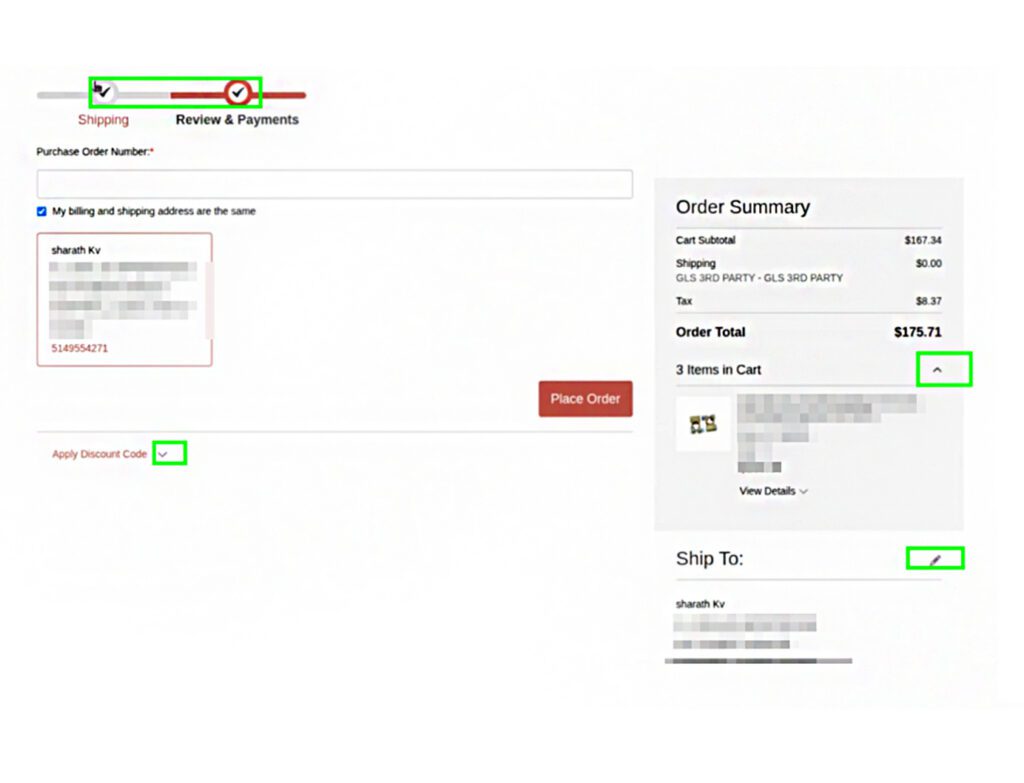
Once the merged CSS was rebuilt, checkout icons rendered correctly again.
What Best Practices Can Prevent Similar Problems?
This issue highlighted several lessons that are useful for future Magento upgrades.
Always inspect generated CSS. Missing declarations inside merged files can reveal the root cause much faster than debugging JavaScript.
Test third-party optimizations. Modules responsible for CSS merging, font optimization, JavaScript deferral, and asset bundling should always be validated after upgrades. This applies equally to ERP-connected storefronts, where an Epicor Prophet 21 integration or a PIM sync can add further modules to the same frontend stack.
Maintain a staging environment. A staging environment helps catch visual regressions before they affect customers. Our Magento 2.4 upgrade work for IDentiphoto followed the same pattern: audit the existing setup, validate platform readiness, then roll out with zero downtime.
Perform regression testing. Verify checkout, product pages, customer account pages, search, and navigation after every major upgrade.
Understand asset loading timing. Many frontend issues occur because resources load too late rather than because they are missing.
Frequently Asked Questions
Why do icons show Unicode values like U+E610?
Because the browser receives the icon code before the luma-icons font becomes available.
Does Magento 2.4.8-p4 itself cause the problem?
No. The upgrade simply exposed an existing dependency on font loading behavior.
Can disabling Amasty solve the issue?
Yes, but adding luma-icons to font_ignore_list allows you to preserve performance optimizations while fixing the problem.
Does this affect Adobe Commerce as well as Magento Open Source?
Yes. The asset pipeline is the same, so any Adobe Commerce store on a Luma-based theme with font deferral enabled can hit the same timing mismatch.
Will the fix survive future upgrades?
The config.xml default covers new installations and the data patch covers existing ones, so the setting persists. It is still worth re-checking the merged CSS after each major upgrade, since optimization modules change behavior between releases.
Conclusion
While upgrading a Magento storefront to Magento 2.4.8-p4, we encountered broken checkout icons that initially appeared to be caused by Magento itself. A detailed investigation revealed that Amasty Page Speed Optimizer’s Move Font feature had deferred the luma-icons font declarations until after checkout components had already rendered.
By adding luma-icons to the font_ignore_list, creating a Data Patch for existing installations, and rebuilding the merged assets, we resolved the issue permanently without sacrificing performance optimizations.
The wider lesson is about ownership. Speed tooling, theme layer, and checkout logic are usually treated as separate concerns, maintained by different people and evaluated against different metrics. This defect lived in the gap between them: nothing was misconfigured in isolation, and every layer was doing exactly what it had been asked to do. Stores that treat performance as a bolt-on rather than part of the storefront architecture will keep finding these gaps the hard way, usually in production.
That is the reasoning behind Klizer’s Connected Commerce approach. Foundation, Storefront, Integration, and Intelligence are treated as one system rather than four workstreams, so an optimization decision made for Core Web Vitals is evaluated against what checkout actually needs to render. For industrial B2B manufacturers and distributors running Adobe Commerce or Magento alongside ERP systems such as Prophet 21, Epicor, or NetSuite, that coordination is what keeps an upgrade from turning into a customer-facing defect.
If your last Magento or Adobe Commerce upgrade left behind visual regressions, unexplained checkout behavior, or performance settings nobody has revisited since go-live, our team can audit the storefront and asset pipeline for you. Talk to Klizer about Magento support and maintenance to get a clear picture of what your upgrade actually changed.