

File uploads are a common feature in Magento stores. Customers upload artwork, documents, images, and other files when placing orders. While this functionality is useful, it can also create security risks if uploads are not properly validated.
One such risk is the PolyShell attack, a vulnerability class highlighted in Adobe’s security bulletin APSB25-94. If left unaddressed, attackers may be able to upload malicious files disguised as images and potentially execute code on your server.
To help address this issue, Klizer designed Klizer_PolyshellPatch, an open-source Magento module that adds additional file extension validation to Magento’s image upload process.
In this blog, we’ll explain the vulnerability, where Magento’s default validation falls short, and how the module helps reduce the risk.
ON THIS PAGE
What Is a PolyShell Attack?
A PolyShell attack takes advantage of weak file upload validation. The attacker uploads a file that appears to be an image but actually contains executable code.
In Magento, common upload entry points include:
- Cart line items with file upload custom options
- Image uploads submitted through REST API requests
Adobe officially addressed this vulnerability class in APSB25-94 because successful exploitation can lead to Remote Code Execution (RCE). This means an attacker may be able to run commands on your server, access sensitive data, or gain control of the application.
Where Magento’s Default Validation Falls Short
Magento processes uploaded images using two core classes:
- ImageContentValidator
- ImageProcessor
These classes perform several validation checks, but there are still gaps that attackers can exploit.
Gap 1: MIME Type Validation Alone Is Not Enough
Magento checks the file’s MIME type to determine whether it appears to be an image.
For example, an attacker can upload a file named:
test.php
while setting the MIME type to:
image/gif
If the content passes Magento’s MIME validation, the file may be accepted even though the filename has a dangerous extension.
Gap 2: Extension Restrictions Are Not Enforced
Magento’s uploader supports extension allowlisting through:
setAllowedExtensions()
However, this method is not called during the default API image upload flow.
As a result, dangerous extensions such as .php, .phtml, or .phar may not be blocked before files are written to disk.
How Klizer_PolyshellPatch Helps
The module adds two Magento plugins that work together to validate uploaded files.
Layer 1: Restrict Extensions Before Saving
The ImageProcessorRestrictExtensions plugin runs before Magento saves the uploaded file.
private const ALLOWED_EXTENSIONS = [‘jpg’, ‘jpeg’, ‘gif’, ‘png’];
public function beforeProcessImageContent(…) {
$this->uploader->setAllowedExtensions(self::ALLOWED_EXTENSIONS);
}
Only approved image extensions can be uploaded. Any other extension is rejected before the file reaches storage.
Layer 2: Validate Extensions During Content Validation
The ImageContentValidatorExtension plugin runs after Magento’s standard validation.
if ($extension && !in_array($extension, self::ALLOWED_EXTENSIONS, true)) {
throw new InputException(…);
}
This adds a direct filename extension check and helps stop polyglot files designed to bypass MIME validation.
Together, these plugins provide protection at both the validation and storage stages.
Module Structure
app/code/Klizer/PolyshellPatch/
├── composer.json
├── registration.php
├── etc/
│ ├── module.xml
│ └── di.xml
└── Plugin/
├── ImageContentValidatorExtension.php
└── ImageProcessorRestrictExtensions.php
| File | Purpose |
| registration.php | Registers the module with Magento |
| module.xml | Defines module configuration and load order |
| composer.json | Package metadata and dependencies |
| di.xml | Registers both plugins |
| ImageProcessorRestrictExtensions.php | Restricts extensions before file save |
| ImageContentValidatorExtension.php | Validates file extensions after Magento validation |
Compatibility: Magento 2.4.x and PHP 7.4+
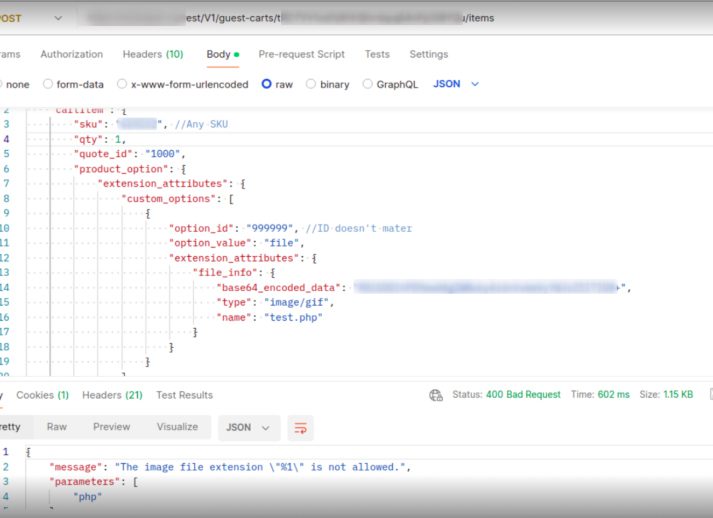
Example Attack Scenario
Magento’s REST API allows file uploads through custom product options using:
POST /rest/default/V1/guest-carts/:cartId/items
Without the patch, an upload request may look like this:
{
“file_info”: {
“base64_encoded_data”: “…”,
“type”: “image/gif”,
“name”: “test.php”
}
}
Because the MIME type appears valid, Magento may accept the file and store it in a web-accessible directory.
An attacker could then attempt to access the file directly and execute the embedded code.
After installing Klizer_PolyshellPatch, the same request returns:
{
“message”: “The image file extension \”php\” is not allowed.”
}
The upload is blocked before the file is saved.
Installation
bin/magento module:enable Klizer_PolyshellPatch
bin/magento setup:upgrade
bin/magento cache:flush
To confirm the module is enabled:
bin/magento module:status Klizer_PolyshellPatch
Use This Alongside Adobe Security Updates
Klizer_PolyshellPatch is designed as an additional security layer.
It should not replace Adobe’s official APSB25-94 patch or regular Magento updates. The best approach is to combine Adobe’s security fixes with additional safeguards that reduce risk even further.
Conclusion
Klizer_PolyshellPatch helps strengthen Magento security by adding file extension validation to the image upload process, reducing the risk of malicious file uploads through REST APIs. The module is lightweight, easy to install, and requires no Magento core modifications.
For the best protection, use it alongside Adobe’s official security patches and regular Magento updates.
If you need help securing your Magento store, applying security patches, or optimizing your Magento environment, contact Klizer, a Magento Solution Partner for expert guidance and support.
Explore our Magento development Solutions!
FAQs
Does this module replace Adobe’s official APSB25-94 patch?
No. This module is additional hardening, not a substitute for Adobe’s official security patches. You should apply Adobe’s patches and keep Magento up to date. Klizer_PolyshellPatch adds an extra validation layer on top of those measures.
What file types are allowed after installing the module?
JPG, JPEG, PNG, and GIF. These are the four formats recognized as safe for image uploads via the REST API.
Is this compatible with my Magento version?
The module supports Magento 2.4.x with PHP 7.4 and above. Run bin/magento module:status Klizer_PolyshellPatch after installation to confirm it is active.
What happens if someone tries to upload a .php or .phtml file after the patch?
The API returns a validation error: “The image file extension ‘php’ is not allowed.” The file is never written to disk.