Magento can handle complex enterprise commerce. But as a business grows, the same flexibility that once made Magento attractive can also make the platform harder to manage.
More extensions get added. Custom code piles up. Integrations become harder to manage. Simple changes start requiring developer support. And every upgrade brings another round of testing.
At some point, the question changes from “How can we improve our Magento store?” to “Is Magento still the right platform for our business?”
That is where a Magento to Shopify Plus migration comes into the picture.
Shopify’s enterprise business has continued to grow alongside the broader platform. In 2025, Shopify processed $378.4 billion in GMV, up 29% year over year, while revenue reached $11.6 billion, up 30%. Shopify also states that the majority of its GMV comes from merchants on Shopify Plus and enterprise offerings.
For enterprise businesses, though, migration is not simply about moving products and customers from one platform to another.
It is about deciding what should move, what should be redesigned, what should be replaced, and what should be integrated differently.
ON THIS PAGE
Why Are Enterprise Businesses Moving From Magento to Shopify Plus?
Magento is a powerful platform for businesses that need extensive customization. Its B2B capabilities include company accounts, shared catalogs, quotes, quick orders, requisition lists, and customer-specific pricing.
The bigger question is how much effort it takes to keep everything running.
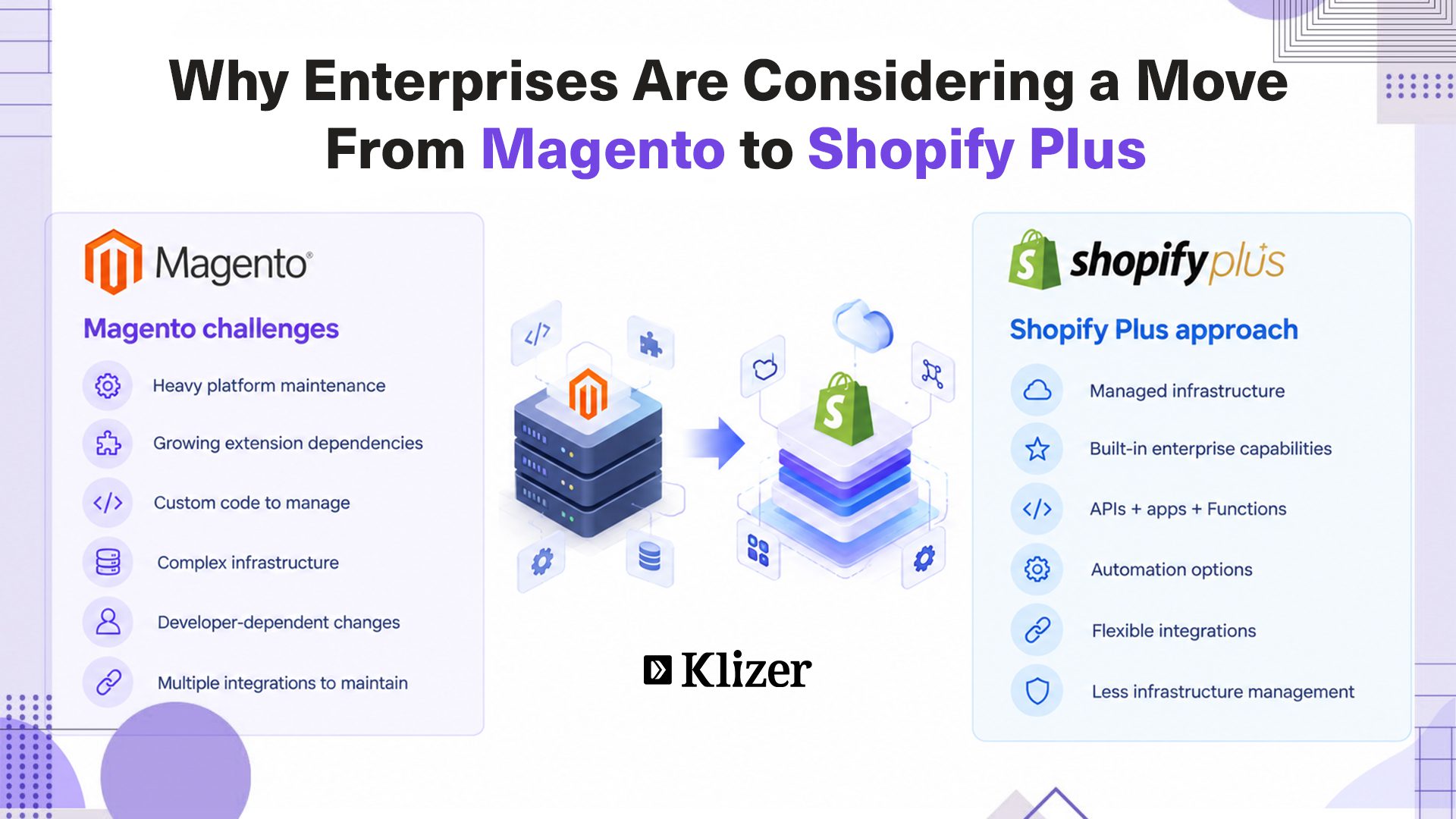
An enterprise Magento store may involve:
- Third-party extensions
- Custom modules and business logic
- Multiple integrations
- Complex hosting infrastructure
- Platform and security updates
- Custom checkout functionality
- ERP, PIM, CRM, OMS, and payment integrations
As this stack grows, so can the cost and effort required to maintain it.
Shopify Plus takes a different approach. Shopify manages the core infrastructure, hosting, security, and platform updates, while enterprise teams can use APIs, apps, Shopify Functions, and automation tools to extend the platform.
For businesses looking to reduce platform maintenance and move faster, this can make Shopify Plus worth evaluating.
Magento to Shopify Plus Migration Process
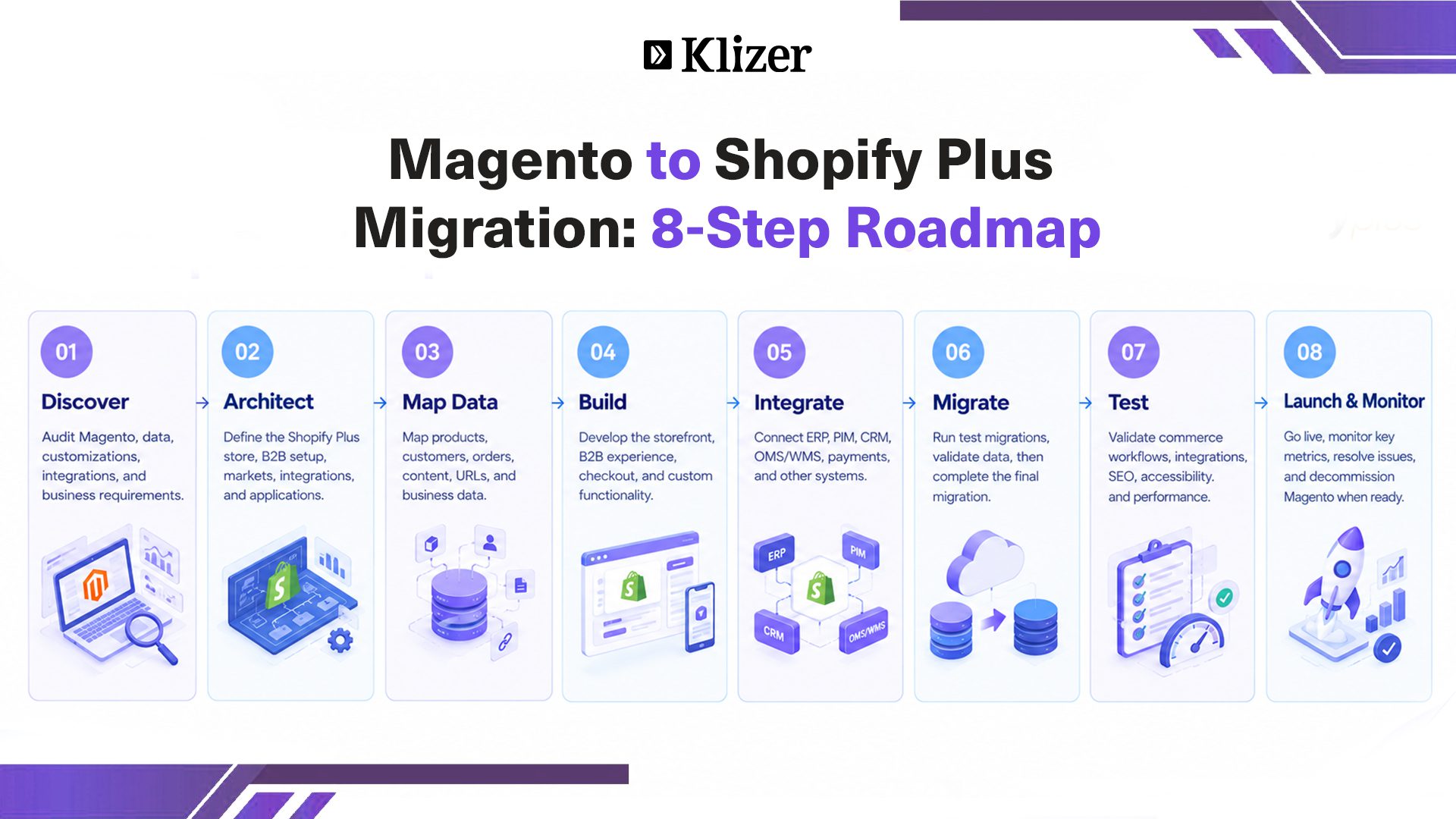
Step 1: Discovery and Assessment
Document the existing Magento environment.
Review the store architecture, catalog, customers, orders, customizations, extensions, integrations, SEO structure, B2B requirements, markets, performance, analytics, checkout, and business workflows.
The goal is to understand what exists today before deciding what the new environment should look like.
Step 2: Define the Shopify Plus Architecture
Design the future-state architecture around your business requirements.
This includes store structure, markets, B2B configuration, product and customer models, ERP/PIM/OMS integrations, payments, search, analytics, automation, and custom applications.
This is where you decide what should change instead of simply reproducing Magento.
Step 3: Map and Clean Your Data
Map Magento data to its Shopify destination before migration.
For example:
Magento Attribute → Shopify Product Data
Magento Customer Group → Shopify B2B Structure
Magento Category → Shopify Collection
Magento URL → Shopify URL
Clean duplicate, outdated, and unnecessary data before moving it.
Step 4: Build the Shopify Plus Store
Build the new storefront based on the approved architecture.
This may include:
- Storefront development
- Theme customization
- Headless development
- B2B experiences
- Checkout customization
- Customer accounts
- Search and navigation
- Content
- Market-specific experiences
Step 5: Rebuild and Test Integrations
Do not wait until the end of the project to connect your ERP, PIM, OMS, or other critical systems.
Validate product synchronization, inventory, pricing, customers, orders, fulfillment, returns, refunds, payments, and error handling.
Step 6: Migrate and Validate Data
Run test migrations before the final migration.
Compare product, customer, order, pricing, inventory, image, URL, metadata, and B2B data between the two platforms.
A successful import does not automatically mean the migration worked. The data also needs to behave correctly after migration.
Step 7: Test the Store
Test real business scenarios, not just individual pages.
Key areas include:
- Search and filtering
- Cart and checkout
- Payments
- Discounts
- B2B pricing
- Company accounts
- Inventory
- Shipping and tax
- ERP synchronization
- Mobile experience
- Accessibility
- Analytics
- SEO
- Third-party integrations
For B2B businesses, UAT should include real purchasing workflows and customer-specific requirements.
Step 8: Handle SEO and Launch
Create a URL mapping between Magento and Shopify and configure 301 redirects for important URLs.
Also review metadata, canonical URLs, sitemaps, structured data, internal links, product URLs, collection URLs, and blog URLs.
Then launch during a period that gives your team enough room to monitor the new environment.
Track traffic, conversion rate, revenue, checkout errors, inventory, order processing, integration errors, and 404s after launch.
Is Shopify Plus Ready for Enterprise B2B eCommerce?
Enterprise B2B commerce often requires company-specific pricing, purchasing permissions, payment terms, approval workflows, bulk ordering, and self-service account management.
The demand for digital B2B buying experiences is also growing. Shopify cites research estimating the global B2B ecommerce market at $19.34 trillion in 2024, with projections reaching $47.5 trillion by 2030. Shopify also cites McKinsey research showing that 39% of B2B buyers are now willing to place self-service orders above $500,000, up from 28% two years earlier.
Shopify Plus supports capabilities such as:
- Company profiles and locations
- Customer-specific catalogs and pricing
- Volume pricing and quantity rules
- Payment terms
- Self-service ordering
- B2B markets
- Custom checkout experiences
- Automated workflows
It also allows businesses to manage B2B and D2C operations within the same commerce environment.
For manufacturers, distributors, wholesalers, and brands serving both business and consumer buyers, that can be a strong reason to consider Shopify Plus.
When Should You Consider a Magento to Shopify Plus Migration?
Migration should have a clear business reason behind it. Here are some common signs that it may be time to evaluate a move.
1. Your Magento Store Requires Too Much Maintenance
If your development team spends more time maintaining the platform than improving the customer experience, that is a warning sign.
Upgrades, extension conflicts, security work, infrastructure management, and custom code can consume valuable resources.
Shopify Plus removes much of the infrastructure management from your internal team’s responsibilities.
2. Simple Changes Take Too Long
Launching a promotion, adding a market, changing checkout, or updating a B2B catalog should not always require a development project.
Shopify Plus provides configuration, automation, and extensibility options that can help business teams move faster while still giving developers control when custom work is required.
3. Your Extension Stack Has Become Difficult to Manage
Enterprise Magento stores can accumulate extensions over years.
One may handle search, another pricing, another checkout, and another ERP connectivity.
Migration gives you an opportunity to review every extension and ask:
Do we still need this capability, and what is the best way to provide it on Shopify Plus?
Not every Magento customization needs to be rebuilt.
4. You Want to Simplify Infrastructure
Traffic spikes, seasonal campaigns, product launches, and international expansion can put additional pressure on ecommerce infrastructure.
Shopify Plus is a hosted enterprise platform, with Shopify managing the underlying infrastructure. Shopify states that its platform offers unlimited bandwidth and 99.99% uptime.
For enterprise teams, this can mean less time spent managing infrastructure and more time focused on commerce operations.
5. You Are Expanding Into New Markets
International expansion adds complexity around currencies, domains, catalogs, pricing, taxes, languages, and inventory.
Shopify Markets provides tools for localized experiences and market-specific currencies, domains, products, pricing, taxes, and shipping.
For businesses managing multiple regions, this can simplify how international commerce is handled.
Magento vs. Shopify Plus: What Changes After Migration?
A migration is more than moving the same store onto another platform.
| Area | Magento / Adobe Commerce | Shopify Plus |
| Hosting | Merchant-managed or managed cloud | Shopify-managed |
| Updates | Merchant/development responsibility | Shopify-managed |
| Extensions | Extensive extension ecosystem | Apps, APIs, and native capabilities |
| B2B | Strong B2B capabilities | Native B2B with Plus-specific features |
| Checkout | Highly customizable | Extensible checkout |
| Infrastructure | Requires planning and management | Managed infrastructure |
| Automation | Custom development and extensions | Shopify Flow, Functions, and apps |
| Global commerce | Multi-store configurations | Shopify Markets |
| Maintenance | Often development-heavy | Lower infrastructure overhead |
Magento can still be the right choice for businesses that depend heavily on platform-level customization.
For others, Shopify Plus can provide a simpler operating model.
What Should You Migrate From Magento to Shopify Plus?
Your Magento store may contain years of products, customers, orders, content, configurations, and custom business rules.
Not everything needs to move.
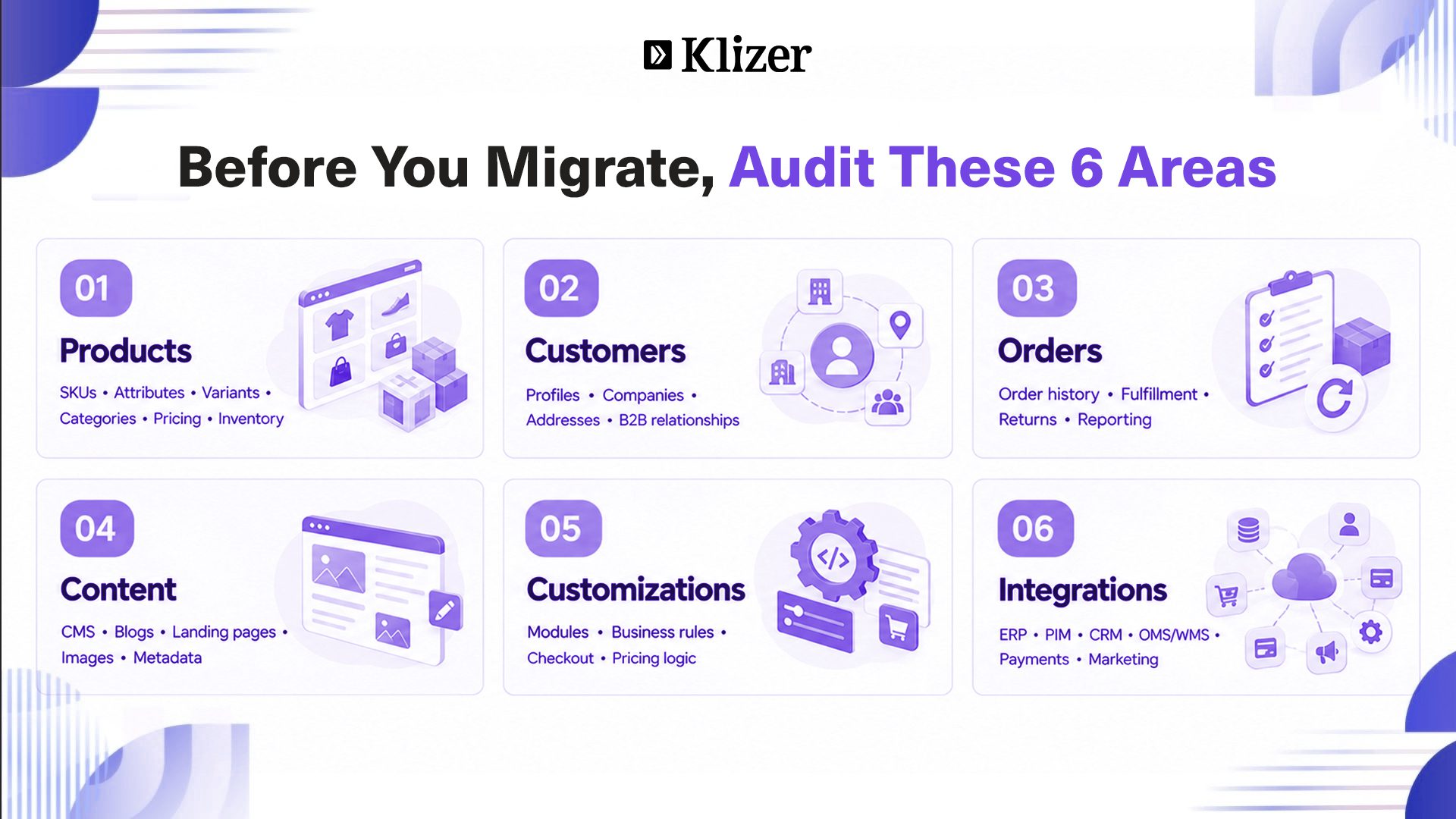
Product Data
Review:
- Product names and SKUs
- Descriptions and images
- Variants and attributes
- Categories
- Inventory
- Pricing
- Metadata
- Product relationships
Magento and Shopify use different product data models, so attribute mapping needs to be planned before migration.
Customer Data
Customer migration may include:
- Customer profiles
- Addresses
- Company information
- B2B relationships
- Customer tags
- Order history
Password migration also needs planning because authentication systems differ between platforms.
Order History
Decide whether historical orders need to be migrated or retained in an accessible legacy system.
The decision should consider reporting, customer service, compliance, analytics, and operational requirements.
Content
Do not forget your content.
Review CMS pages, blog posts, landing pages, navigation, FAQs, policies, images, and metadata.
Migration is also a good time to remove outdated content and simplify your information architecture.
What About Magento Extensions and Customizations?
Do not simply create a list of Magento extensions and find a Shopify app for each one.
Start with the business requirement.
For every extension or customization, ask:
- What problem does it solve?
- Is the functionality still required?
- Can Shopify Plus handle it natively?
- Can Shopify Flow or Functions handle it?
- Is an existing app enough?
- Do we need a custom app or integration?
- Can the functionality be removed?
For example, a custom Magento pricing module may not need to be rebuilt exactly as it was. Some requirements may be handled through Shopify B2B catalogs, company-level pricing, or custom functionality.
This is one of the biggest opportunities in a migration: simplify the architecture instead of carrying technical debt into the new platform.
Enterprise Integrations: The Part You Cannot Ignore
Your ecommerce store is only one part of the commerce ecosystem.
Typical integrations include:
- ERP: Products, inventory, pricing, customers, orders, fulfillment, and financial data
- PIM: Product attributes, descriptions, specifications, and media
- CRM: Customer records, accounts, and sales activity
- OMS/WMS: Inventory, order routing, fulfillment, and shipping
- Payment systems: Payments, refunds, and transaction data
- Marketing platforms: Email, segmentation, loyalty, analytics, and automation
This is why enterprise migration should begin with an integration inventory, not a development sprint.
Map every integration, identify the data moving in each direction, document dependencies, and decide whether each connection should be retained, replaced, redesigned, or removed.
Common Magento to Shopify Plus Migration Mistakes
Rebuilding Magento on Shopify
If you recreate every customization and workaround, you may simply transfer your technical debt to a new platform.
Ignoring Integrations
A storefront can look perfect while an ERP or inventory integration is failing in the background.
Treating SEO as an Afterthought
Changing URLs without a redirect strategy can lead to traffic and ranking losses.
Migrating Everything
Old products, duplicate customer records, outdated content, and unnecessary configurations do not need to follow you to Shopify Plus.
Skipping UAT
Internal teams should test real business scenarios before launch, especially B2B pricing, company accounts, payment terms, approvals, and ordering workflows.
How Much Does Magento to Shopify Plus Migration Cost?
There is no single migration price for enterprise businesses.
Cost depends on factors such as:
- Number of SKUs and stores
- Markets
- Customer and order volume
- B2B complexity
- Integrations
- Custom applications
- Headless requirements
- Design and development
- Data cleanup
- SEO migration
- Testing and support
A straightforward store can have a very different budget from a global B2B business with multiple ERP, PIM, and OMS integrations.
The best way to estimate cost is to complete a technical and business discovery before development begins.
How Long Does a Magento to Shopify Plus Migration Take?
A straightforward migration may take a few months, while complex enterprise migrations can take considerably longer.
The timeline depends less on product count and more on integrations, customizations, data complexity, B2B requirements, markets, testing, and approvals.
For example, Shopify reports that Gresham Blake moved from Adobe Commerce to Shopify Plus in about two weeks and later reported a 68% increase in online sales in the first four months of 2024 compared with the same period in 2023.
That is a specific case study, not a benchmark for every enterprise migration.
The right timeline depends on your architecture.
Final Thoughts
Magento has helped many enterprise businesses build highly customized commerce operations. But as those businesses grow, maintaining that level of customization can become expensive and time-consuming.
Shopify Plus offers another approach with managed infrastructure, enterprise B2B capabilities, global commerce tools, and strong extensibility.
If you are evaluating an ecommerce migration, Klizer can help you assess your current architecture, plan the migration, rebuild integrations, migrate your data, and launch a scalable Shopify Plus experience.
Explore Klizer’s Shopify Development Services or get in touch to discuss your migration.