A distributor may manage tens of thousands of SKUs, but buyers still depend on sales teams to identify the correct part, verify technical specifications, confirm compatibility, check account-specific pricing, and process bulk or repeat orders. When this information is spread across ERP systems, PIM platforms, spreadsheets, and legacy applications, even routine B2B purchases can become slow and error-prone.
Shopware B2B Commerce for distributors is a digital commerce solution that enables distributors to manage complex B2B purchasing requirements through a centralized online platform. Shopware for distributors can handle structured product data, customer-specific catalogs and pricing, company accounts, buyer permissions, bulk ordering, technical product search, and inventory visibility.
The distributor ecommerce experience should help a buyer find the exact product, confirm that it will work with existing equipment, view the right price, and place the order without waiting for manual assistance.
ON THIS PAGE
What Are the Key Shopware B2B Features and Benefits for Distributors?
Digital channels accounted for roughly 30% of total distributor sales by early 2025, according to McKinsey. Shopware’s B2B features address the pricing, ordering, and account requirements behind these purchases.
Feature availability depends on the plan, version, and configuration. B2B Components require the Shopware Commercial extension and are available from Evolve upward. Check the requirements for each component before committing to the implementation scope.
Distributor-Specific Pricing
Shopware for distributors supports pricing models based on customer relationships, order quantities, negotiated contracts, and purchasing conditions.
Individual Pricing Rules
Apply fixed or percentage discounts using supported pricing rules. Shopware’s Individual Pricing component requires version 6.7.8.0 and active Employee Management and Organization Unit components. It supports rules for company-related targets or customer tags.
Tiered Volume Pricing
Set quantity thresholds that automatically adjust unit prices, making B2B distribution software more effective for high-volume purchases.
ERP-Synchronized Contract Pricing
Connect Shopware with ERP systems such as SAP or Microsoft Dynamics to bring negotiated customer rates into the storefront and keep pricing aligned with backend records. The separate customer-specific pricing feature requires Beyond and the Commercial extension; prices are maintained through its API.
B2B Net Pricing
Configure customer groups to display the appropriate net prices and support tax requirements for business transactions.
Faster Ordering for B2B Buyers
A distributor ecommerce platform needs to support buyers who already know their SKUs and frequently place large or repeat orders.
Quick SKU Ordering
Let buyers enter product numbers directly rather than searching through the entire catalog. Gartner found that 67% of B2B buyers prefer a rep-free experience, highlighting the demand for self-service purchasing.
Bulk Order Entry
Support bulk item entry or file-based imports to help customers build large orders faster.
Shopping Lists
Save frequently purchased products for replenishment, recurring procurement, and faster reordering.
Quote Management
Manage RFQs and negotiated pricing, then convert approved quotes into orders without restarting the purchasing process.
Multi-User Customer Accounts
B2B purchasing often involves procurement teams, branches, departments, and managers with different responsibilities. Shopware distributor solutions can structure these relationships through organization units, user roles, permissions, and approval rules.
Corporate Account Hierarchies
Organize parent companies, branches, divisions, and employee accounts within a structured business relationship.
Role-Based Permissions
Assign different access levels to buyers, procurement managers, finance users, and administrators.
Budget and Approval Controls
Set spending limits or approval requirements for high-value purchases before an order moves forward. Budget Management requires Shopware 6.7.4.0 or later and an eligible plan.
Customer-Specific Catalogs
Show each account the products, assortments, and SKUs relevant to its commercial relationship. Check catalog feature availability and the access rules needed for the selected setup.
Controlled Product Access
Restrict specialized equipment, replacement parts, or other products based on customer permissions or distribution agreements.
How Do You Build an Ecommerce Store for Distributors with Shopware?
Building an ecommerce store for distributors with Shopware requires a connected setup for complex catalogs, customer-specific pricing, ERP data, inventory, and high-volume B2B ordering. Follow these steps to define the implementation.
1. Define Your Shopware Architecture and Deployment Model
Start by selecting a Shopware setup that fits your infrastructure, customization, integration, and scalability requirements.
- Choose the appropriate Shopware hosting and commercial setup for your IT environment.
- Define API, integration, security, and deployment requirements.
- Identify the B2B capabilities required by buyers and sales teams.
- Plan for future regions, brands, storefronts, or sales channels.
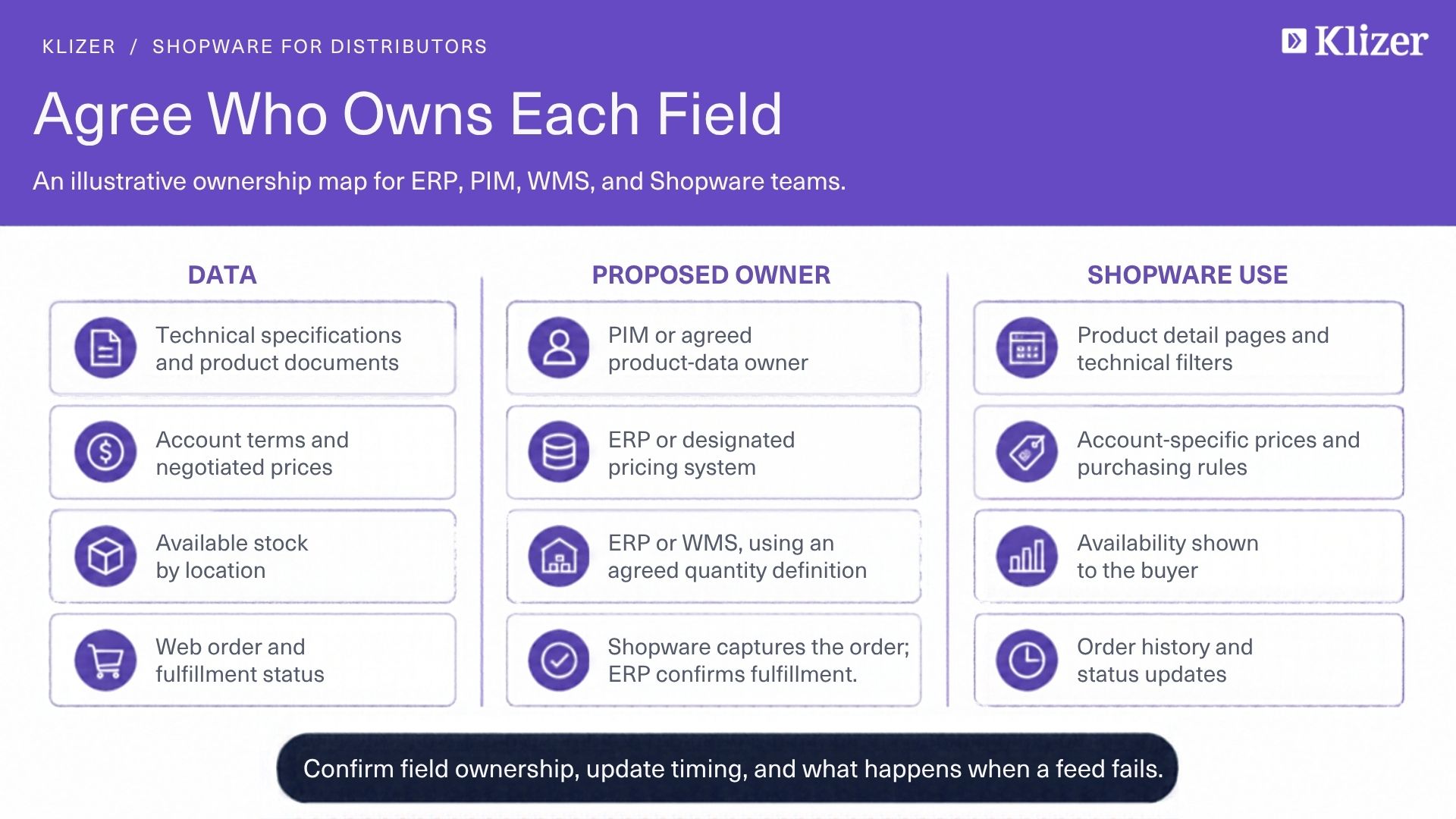
2. Connect Your ERP and Core Business Systems
Your Shopware B2B Commerce implementation should exchange data with the ERP and operational systems that already manage your distribution operations. Establish these data flows:
- Product and SKU information
- Customer and company records
- Customer-specific pricing
- Inventory and availability
- Orders and order status
- Fulfillment information
- Relevant account and purchasing data
3. Structure Your Product Catalog for Technical Buyers
Large distributors often manage thousands of SKUs with similar names, variants, specifications, and compatibility requirements. Structure the following product data:
- SKUs and manufacturer part numbers
- Product variants and attributes
- Technical specifications
- Dimensions, materials, and units
- Compatibility and replacement information
- Brand and manufacturer details
- Packaging and minimum-order information
4. Configure Customer-Specific Pricing and Catalog Access
Different customers may have different negotiated prices, discounts, and product assortments. Configure these commercial rules:
- Individual customer pricing
- Customer-group pricing
- Quantity-based pricing
- Contract-specific rates
- Customer-specific assortments
- Restricted product visibility
- Regional or market-specific pricing
5. Set Up Company Accounts, Roles, and Approval Rules
B2B purchasing often involves several employees across departments, branches, and management levels. Configure these account controls:
- Parent and subordinate organization units
- Employee accounts
- Role-based permissions
- Purchase approval rules
- Spending or order-value limits
- Department or branch structures
- Customer-specific payment options
6. Build Fast Ordering for Distributor Procurement
A distributor ecommerce platform should let experienced buyers place recurring and high-volume orders without browsing every product page. Prioritize these ordering capabilities:
- Quick ordering by SKU or product number
- Bulk item entry or supported file uploads
- Saved shopping lists
- Repeat and reorder functionality
- Quote requests and negotiated orders
- Approval-based purchasing
- Sales-assisted ordering
7. Optimize Search for SKUs and Technical Specifications
Technical buyers often search by part number, specification, model, or compatibility rather than a product’s marketing name. Prioritize these search capabilities:
- SKU and part-number search
- Technical attribute filters
- Manufacturer and brand filters
- Specification-based discovery
- Variant-level search
- Compatibility-based navigation
- Faceted filtering
8. Configure Multi-Store and Multi-Channel Commerce
Distributors operating across regions or brands may need different storefront experiences while maintaining centralized administration. McKinsey reports that 57% of B2B buyers now rank digital as their primary purchasing channel, up from 33% in 2022. Consider these multi-channel requirements:
- Regional storefronts
- Multiple languages and currencies
- Market-specific catalogs
- Separate customer segments
- Brand-specific storefront experiences
- Regional pricing and tax rules
- Distinct B2B commerce requirements by market
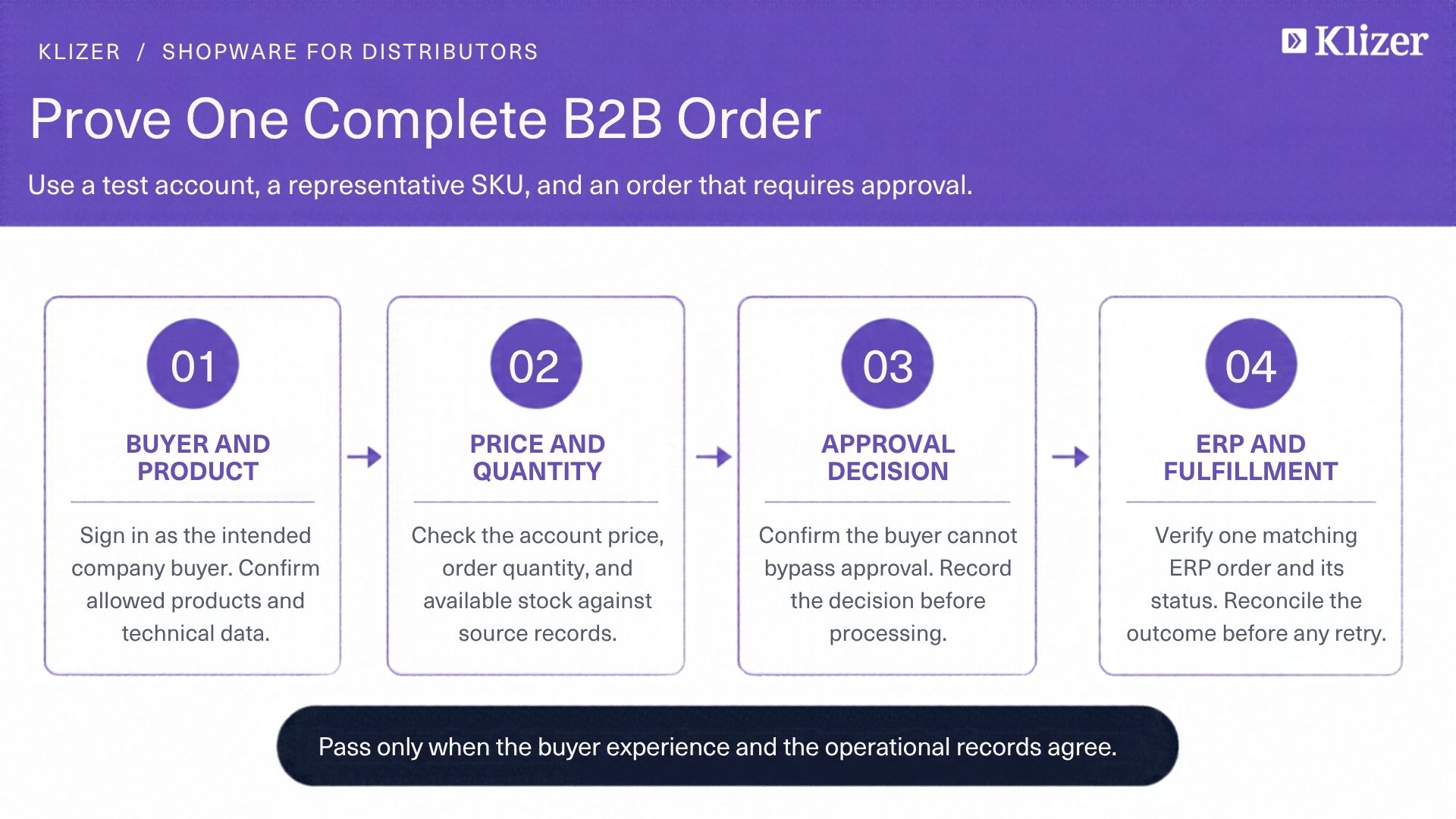
9. Test the Complete B2B Order Lifecycle
Ecommerce testing should cover the complete purchasing journey rather than individual features in isolation. Validate these workflows before launch:
- Customer-specific pricing
- Product and SKU synchronization
- Inventory updates
- User permissions
- Approval and budget rules
- Quick and bulk ordering
- Quote-to-order workflows
- ERP order transmission
- Multi-store catalog and pricing rules
10. Monitor the Store After Launch
Once your Shopware B2B platform goes live, use customer and operational data to identify purchasing friction and improve the digital channel. Monitor:
- Zero-result searches
- Frequently searched SKUs
- Order and checkout completion
- Repeat-order activity
- Cart abandonment
- Integration and synchronization failures
- Customer support requests
- Product-data quality
Common Challenges in Shopware B2B Commerce for Distributors
Plan for these operational risks before launch:
- Integration failures: define retry, reconciliation, and escalation procedures.
- Conflicting pricing: agree which system owns negotiated rates and when the storefront refreshes them.
- Legacy data migration: reconcile product, customer, and company identifiers before importing records.
- Inventory freshness: specify how often availability updates and what buyers see if a feed is delayed.
- Performance at scale: test representative catalogs and order sizes under expected traffic.
Build Your Shopware B2B Commerce Solution with Klizer
A successful Shopware B2B Commerce implementation connects complex pricing, customer accounts, product data, ERP systems, and purchasing workflows. Before launch, confirm that a buyer sees the agreed price and available stock, that approvals hold an order when required, and that the ERP receives the approved transaction.
Klizer combines 20+ years of commerce experience, 300+ implementations, and Shopware Gold Partner expertise to help businesses build and scale Shopware solutions. Its services cover Shopware development and integration with ERP, PIM, CRM, OMS, WMS, and EDI systems, helping distributors create a connected distributor ecommerce platform that supports efficient operations and better B2B buying experiences.
Through Connected Commerce, the Foundation holds operational data, the Storefront supports buyers, and Integration keeps transactions aligned. Intelligence can use those records once the data and workflows are dependable.
Discuss your Shopware B2B requirements with our team.