B2B commerce rarely follows a simple add-to-cart and checkout model. A single business customer may have multiple buyers, approval rules, negotiated pricing, contract-specific catalogues, credit terms, and purchasing workflows that need to stay connected to the ERP.
Shopware supports these requirements through its B2B Components, APIs, and extensibility framework. For developers, the challenge is not simply enabling B2B features. It is connecting those capabilities to the systems, data, and business rules that already run the business.
This guide covers the core Shopware B2B Components, ERP integration considerations, development approaches, performance and security best practices, and what developers should consider as B2B commerce becomes increasingly AI-enabled.
ON THIS PAGE
What Is Shopware B2B Commerce?
Shopware B2B Commerce provides capabilities for businesses that need more control over how customers purchase, manage accounts, and interact with their commerce platform.
Key B2B capabilities include:
- Company and employee account management
- Roles and permissions
- Approval workflows
- Quote management
- Quick ordering
- Order lists
- Customer-specific pricing
- Integration with ERP, CRM, and PIM systems
Shopware’s B2B Components take a modular approach, allowing businesses to address specific B2B requirements while extending Shopware through its API-first architecture.
For developers, this means the implementation should start with the business process rather than the feature list. The important question is not only whether Shopware supports a capability, but how that capability connects to customer data, pricing, inventory, orders, and other systems.
Shopware B2B Suite vs B2B Components
The B2B Suite and B2B Components take different approaches to B2B commerce.
The B2B Suite was designed as a more bundled B2B solution. B2B Components take a modular approach, allowing individual capabilities to be implemented and extended based on business requirements.

Shopware introduced B2B Components as a modular framework and has continued expanding the offering across capabilities such as quick ordering, employee management, quote management, approval rules, rights management, and order lists.
For new implementations, development teams should evaluate the current Shopware product and roadmap before selecting an approach. The B2B Components are the direction Shopware is actively developing, so teams planning a new B2B implementation should assess the Components first rather than assuming the older Suite is the default option.
The exact availability of individual Components can also vary by Shopware plan and version.
Core Shopware B2B Components
The value of Shopware B2B Components becomes clearer when each capability is considered in the context of a real purchasing process.
1. Company Accounts
B2B buyers rarely operate as isolated individual customers. One organisation may have purchasing managers, sales users, finance teams, and other employees accessing the same company account.
Shopware B2B Components support company structures with roles and contacts, allowing businesses to represent organisational relationships within the commerce platform.
For example, a manufacturing company could assign separate access to purchasing managers, sales teams, finance users, and warehouse staff.
For developers, the important consideration is how these company structures map to the customer’s existing ERP or CRM data. If the ERP already manages organisations, contacts, or account hierarchies, the integration should define which system owns each piece of information.
2. Employee Roles and Permissions
Different employees should not necessarily have the same purchasing rights.
| Role | Typical permissions |
| Administrator | Manage company account and users |
| Buyer | Create and manage orders |
| Approver | Review and approve purchases |
| Accountant | Access invoices and financial information |
| Warehouse | Access fulfilment and shipment information |
The implementation should map permissions to actual business responsibilities rather than creating roles based only on job titles.
This also has a security implication. Permissions need to be enforced server-side across storefront and API requests. A headless frontend should never be treated as the authority for deciding what a user can access.
3. Order Approval Workflows
Many B2B organisations require purchases to be reviewed before they are submitted.
A typical workflow may require an employee to create an order, have it reviewed by a manager, pass through finance approval, and then be submitted for processing.
The actual workflow may depend on order value, department, product category, customer account, or purchasing policy.
Developers should therefore define approval rules before implementation. The goal is not simply to reproduce an approval diagram in the storefront, but to make sure the same rules apply consistently across the user interface, APIs, and order processing.
4. Quote Management
B2B purchasing often involves negotiation before an order is placed.
Quote management can support processes such as:
- Requesting a quotation
- Providing negotiated pricing
- Reviewing a quote
- Accepting or rejecting a quote
- Converting an approved quote into an order
For custom products, industrial equipment, wholesale orders, and other complex purchases, this can be an important part of the digital buying journey.
Developers should also consider how quotes interact with customer-specific pricing, product availability, tax rules, and ERP processes.

5. Quick Order
B2B buyers often know the exact products they need. They may already have a list of SKUs and quantities rather than browsing the catalogue.
Quick Order can support workflows such as:
SKU: P10001 — Qty: 10
SKU: P10002 — Qty: 50
SKU: P10003 — Qty: 5
This gives repeat buyers a faster way to build orders from known product numbers.
For large catalogues, developers should pay attention to search performance, validation, API traffic, and bulk processing. A quick-order feature can generate significantly more backend activity than a simple product page, particularly when buyers submit large lists.
6. Order Lists
Repeat purchasing is common in B2B commerce. Buyers may regularly reorder the same products for maintenance, production, or operational needs.
Order lists can help customers:
- Save frequently purchased products
- Reuse previous orders
- Build procurement lists
- Manage recurring purchasing requirements
For developers, the important consideration is keeping product availability, pricing, and customer permissions current when a saved list is reused.
7. Customer-Specific Pricing
Pricing is one of the areas where B2B commerce differs most from standard B2C purchasing.
The same product may have different prices depending on the customer, contract, volume, catalogue, or negotiated terms.
For example:
| Customer | Product | Price |
| Company A | Motor | £120 |
| Company B | Motor | £110 |
| Company C | Motor | £95 |
A B2B implementation therefore needs a clear pricing model and a defined source of truth.
Customer-specific pricing may depend on the customer’s contract, catalogue, order volume, or negotiated terms.
Developers should ensure that pricing is resolved consistently across product pages, search results, carts, checkout, APIs, and any headless experiences. Customer entitlements should be validated server-side rather than assumed from information supplied by the client.
Shopware B2B ERP Integration
Shopware is rarely the only system involved in a B2B order.
The ERP may remain the source of truth for customers, inventory, product data, pricing, orders, invoices, or fulfilment. A PIM may manage product information, while a CRM may manage customer relationships.
A successful Shopware B2B implementation therefore needs a defined integration model.
Define the Source of Truth
Before development begins, determine which system owns each type of data.
| Data | Potential source of truth |
| Product master | ERP or PIM |
| Inventory | ERP or WMS |
| Customer account | ERP or CRM |
| Customer-specific pricing | ERP or commerce platform |
| Orders | Shopware and ERP |
| Shipment status | ERP or WMS |
| Product content | PIM or Shopware |
The exact ownership depends on the business architecture. The important point is to define it before building integrations.
Customer and Account Synchronisation
B2B integrations may need to synchronise:
- Company accounts
- Employee contacts
- Addresses
- Roles
- Credit terms
- Customer status
- Account identifiers
The integration should also define how changes are handled. For example, what happens when an employee leaves the organisation or when a customer account is placed on hold?
When a customer registers or is created in the commerce platform, their information can be synchronised with the ERP or CRM, linked to the appropriate company structure, and assigned the relevant permissions and approval rules.
Product and Catalogue Data
Product synchronisation may include:
- Product information
- SKUs
- Categories
- Availability
- Product attributes
- Customer-specific catalogues
- Pricing
For large catalogues, these synchronisations should not rely on repeated synchronous requests. Batch processing, queues, incremental updates, and appropriate caching can help keep the storefront responsive.
Order and Fulfilment Synchronisation
Once a buyer creates an order in Shopware, the order can be synchronised with the ERP for processing. Fulfilment and shipment updates can then be sent back to Shopware so customers can track the order through the B2B portal.
The implementation should account for failed synchronisations, duplicate requests, retries, status changes, and partial updates rather than assuming every API call will succeed on the first attempt.
Building a Connected Shopware B2B Architecture
A B2B storefront is only one layer of the overall commerce architecture.
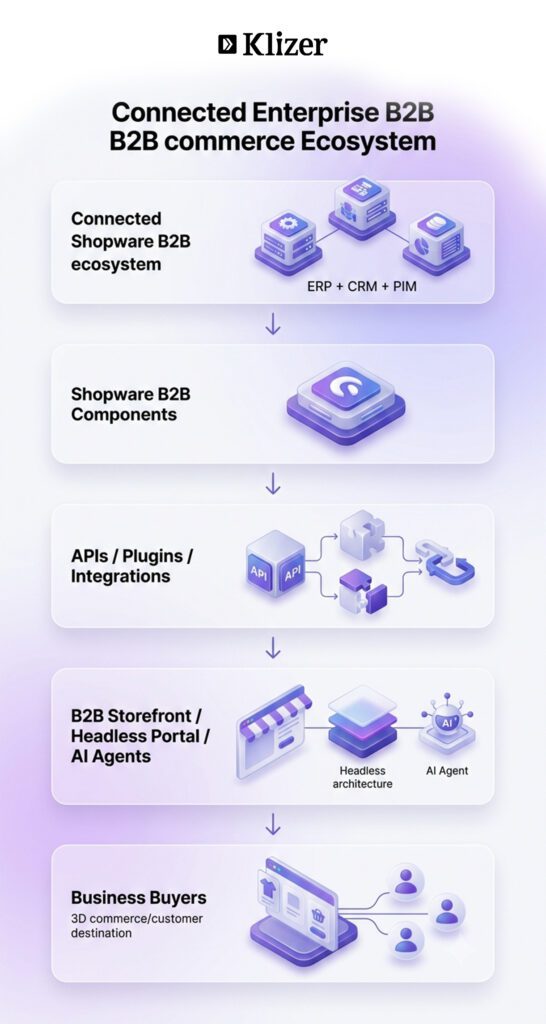
A connected Shopware B2B environment can bring together ERP, CRM, and PIM systems with Shopware B2B Components, APIs, plugins, and integration services. These systems can then support B2B storefronts, headless portals, and AI-driven commerce experiences.
The architecture should allow information to move between these layers without duplicating business rules unnecessarily.
For example, customer-specific pricing should not be implemented separately in the storefront, mobile application, and AI experience. The underlying commerce and API layers should provide a consistent way to determine what a particular customer can see and buy.
This becomes especially important in headless implementations, where multiple frontend experiences may consume the same commerce backend.
Explore more about our Shopware development services.
Extending Shopware for B2B
Shopware’s extensibility model gives developers several ways to adapt the platform to business requirements.
Use Plugins Instead of Core Modifications
Custom requirements may include:
- ERP connectors
- Shipping integrations
- Payment integrations
- Approval workflows
- Inventory synchronisation
- Procurement automation
- Customer-specific business rules
Avoid modifying Shopware’s core code directly. Use plugins, services, decorators, event subscribers, and other supported extension mechanisms instead.
This keeps custom functionality easier to maintain and reduces upgrade-related risk.
Use Events for Business Processes
Events can help connect business processes without tightly coupling custom code to platform classes.
For example, when a customer is registered, an event can trigger the required business processes, such as sending customer data to the ERP, assigning the customer to the appropriate company structure, and applying the relevant approval rules.
The exact implementation depends on the business process, but event-driven patterns can make integrations and custom workflows easier to maintain.
Keep Business Logic Separate
A clean architecture should separate responsibilities across layers, with controllers handling requests, services managing business logic, repositories handling data access, and the database storing application data.
This makes individual components easier to test and reduces the risk of business logic becoming embedded directly into controllers or frontend code.
Headless B2B Commerce
Shopware can also serve as the commerce backend for headless storefronts, mobile experiences, and dedicated B2B portals.
The main architectural consideration is consistency.
A buyer accessing the business portal, a sales representative using an internal application, and another channel consuming the same commerce APIs should receive data according to the same underlying rules for:
- Customer identity
- Permissions
- Pricing
- Product availability
- Catalogue access
- Order authority
The API should therefore be treated as a core part of the commerce architecture, not simply a connection between the frontend and backend.
Shopware B2B Performance Best Practices
B2B portals can generate significant backend activity because buyers may work with large catalogues, complex filters, customer-specific pricing, order histories, and bulk orders.
Use Asynchronous Processing
Move resource-intensive operations away from synchronous requests where possible.
Examples include:
- Product imports
- Customer imports
- ERP synchronisation
- Price updates
- Large catalogue updates
Message queues can help process these operations without blocking the user-facing experience.
Optimise API Traffic
Avoid unnecessary API requests.
Use:
- Batch operations
- Pagination
- Server-side filtering
- Incremental synchronisation
- Appropriate field selection
- Efficient caching
The goal is not simply fewer requests. It is making each request return the data required for the task without unnecessary processing.
Cache Frequently Accessed Data
Caching can reduce repeated database and API operations for data such as:
- Navigation
- CMS content
- Product information
- Product listings
- Appropriate Store API responses
Caching strategy should account for dynamic B2B data. Customer-specific pricing, availability, permissions, and other personalised information should not be cached in a way that exposes one customer’s data to another.
Optimise Product Search
Large B2B catalogues can make search a critical part of the purchasing experience.
Depending on the implementation, developers may use Elasticsearch or OpenSearch and optimise:
- Indexing
- Search relevance
- Product filters
- Attribute queries
- Catalogue performance
Search performance should be tested using realistic catalogue sizes and B2B purchasing scenarios rather than a small development dataset.
Shopware B2B Security Best Practices
Standard ecommerce security practices still apply to B2B commerce, but B2B implementations introduce additional risks because accounts may have purchasing authority, credit terms, negotiated pricing, and access to sensitive business information.
Protect High-Value Accounts
A compromised B2B account may be able to place large orders against credit terms.
Use appropriate authentication controls, including MFA where supported, and monitor unusual activity such as high-value orders or activity outside established purchasing patterns.
Review Roles and Permissions
Buyer, approver, administrator, and other roles can have very different levels of access.
Permissions should be reviewed as employees change roles or leave the organisation. Inactive accounts and outdated permissions should be removed rather than left indefinitely.
Enforce Entitlements at the API Level
Customer-specific pricing, catalogue visibility, credit terms, purchasing limits, and order permissions must be resolved server-side.
A frontend should never be trusted to determine whether a user is entitled to a product, price, or action.
This is particularly important for headless B2B commerce, where multiple applications may consume the same APIs.
Designing Shopware B2B for Agentic Commerce
AI is becoming another interface through which customers can discover and interact with commerce systems.
Shopware is actively expanding its agentic commerce capabilities, including MCP support and Universal Commerce Protocol (UCP) readiness. Its current documentation allows merchants to control which sales channels are available to compatible AI agents, which functions agents can use, and how requests are secured.
For B2B developers, this introduces an important architectural consideration: AI does not remove B2B complexity. It makes structured data, permissions, and business rules even more important.
An AI-driven purchasing experience may need to understand:
- Product attributes
- Availability
- Customer-specific pricing
- Contract terms
- Catalogue access
- Purchasing limits
- Approval requirements
- Order status
These rules should already exist in the underlying commerce and integration architecture.
The Shopware MCP Server is designed to connect Shopware stores with AI tools and workflows, giving developers a way to build custom AI integrations and automate commerce-related tasks.
For B2B implementations, the principle is simple: make the underlying commerce APIs accurate, secure, and well-structured before adding an AI interface.
Read More: Scaling Your eCommerce Business with Shopware: From Startup to Enterprise
Shopware B2B Development Checklist
Before launching a Shopware B2B implementation, development teams should confirm:
- Company account structures are defined
- Buyer roles and permissions are mapped
- Approval rules are documented
- Customer-specific pricing logic is established
- The source of truth is defined for customer, product, inventory, and pricing data
- ERP, CRM, and PIM integrations have clear ownership and data flows
- Integration failures and retries are handled
- Large synchronisations use asynchronous processing where appropriate
- APIs enforce customer entitlements server-side
- Search and catalogue performance are tested at realistic scale
- Caching does not expose customer-specific information
- Automated tests cover critical B2B workflows
- Core platform modifications are avoided
- Custom functionality follows Shopware’s extension patterns
- Security and access controls are reviewed before launch
- The architecture can support additional storefronts, APIs, and AI-driven experiences
Conclusion
A successful Shopware B2B implementation is about more than enabling a set of commerce features.
Company accounts, approval workflows, quick ordering, quotes, order lists, and customer-specific pricing provide the capabilities buyers need. But those capabilities become much more valuable when they are connected to the ERP, CRM, PIM, fulfilment systems, and APIs that support the wider business.
For developers, that means starting with the business architecture, defining sources of truth, keeping business logic maintainable, enforcing entitlements at the API level, and designing for performance and security from the beginning.
As B2B commerce expands into headless and agentic experiences, the same principle becomes even more important. The commerce foundation needs to provide consistent data, pricing, permissions, and business rules regardless of how a buyer interacts with it.
Klizer helps manufacturers and distributors design and implement connected commerce architectures on Shopware, including B2B commerce, ERP integration, custom development, and AI-ready commerce experiences.
Ready to build a connected Shopware B2B experience? Book a free consultation with Klizer.