Most P21 teams assume their DynaChange rules are safe. They have survived every version upgrade for a decade, and a cloud migration feels like one more. That assumption is where the trouble starts.
An upgrade changes the version of Prophet 21 sitting on top of your database. Moving to Epicor Cloud changes what your rules are allowed to reach. A rule that queries a custom production table on every order save may hit a restriction that did not exist on your own servers.
That gap matters in ERP data migration, and it has almost nothing to do with what the rule does on screen.
ON THIS PAGE
What Are Epicor P21 DynaChange Business Rules?
DynaChange is the extensibility suite inside Prophet 21, covering screen, tab, menu, navigation, metrics, and portal customizations, alongside Business Rules.
Epicor P21 DynaChange business rules run custom logic within the P21 workflow without modifying the core application. A rule receives data from P21, runs your logic against it, and returns a result.
Epicor’s public sample repository illustrates validation rules, OnDemand rules, and OnEvent rules associated with events such as OrderUpdated, MessageBox, and FormDatastream. The rule type identifies its trigger, but does not establish whether its dependencies are cloud-compatible.
Why Is Prophet 21 Moving to the Cloud?
In January 2026, Epicor published its on-premises release schedule. The final on-premises feature release of Prophet 21 will be 2028.1, tentatively scheduled for May 2028, with Active Support for that release through June 30, 2029, and Sustaining Support beginning July 1, 2029. The announcement also states that Epicor Cloud serves more than 20,000 businesses.
That is not a shutdown date. The announcement moves future feature innovation to Epicor Cloud. Confirm the support entitlements for your release with Epicor rather than treating the published milestones as a mandatory cutover deadline.
Self-hosting P21 on Azure or AWS is not the same deployment model as Epicor-operated public cloud. Hosting location alone does not establish your support position. We covered the wider timeline in our P21 end-of-life breakdown for distributors.
What Changes for DynaChange Rules in the Cloud?
On your own servers, a rule may use a SQL connection subject to the permissions you grant. Epicor’s Prophet 21 Public Cloud Buyer Guide FAQ describes restricted direct production SQL access, API-based updates, and a read-only replica accessible through ODBC. Its August 2024 edition describes an approximate five-second refresh, not a guaranteed freshness target.
The guide supports DynaChange and the SDK in public cloud, but restricts production custom tables and SQL jobs. It also places the replica outside the SaaS SLA and recommends current P21 APIs for business-critical integrations. Confirm these arrangements for your target environment.
So the question that matters is which layer of the stack each rule reaches into.
Which DynaChange Rules Are Candidates for Migration?
Rules with fewer external dependencies are better candidates for migration with limited rework. They operate on data P21 has already loaded and return a result through the supported rules framework.
Examples to assess include:
- Field validators checking date formats, URLs, or required entries.
- Default-setting rules, such as adjusting a required date.
- Credit-hold validators reading order-line values already supplied to the rule.
- MessageBox event rules that select or suppress a P21 prompt.
- FormDatastream rules that change invoice output using supplied data.
Screen, tab, and menu changes also need testing in the target version and browser interface. None of these categories should be labeled compatible before their code and dependencies are inspected. Epicor’s FormDatastream examples include a rule that looks up additional data, illustrating why the trigger alone is not enough.
Which DynaChange Dependencies Need Rework?
1. Direct Production SQL Access
Rules opening connections to the live database, calling custom stored procedures, or writing records need a supported replacement path. Read-only reporting may move to the replica; transactional logic needs to be assessed against API capabilities and freshness requirements.
Rerouting that logic through the Epicor P21 API can require redesign. Our guide to common Prophet 21 API integration mistakes covers mapping, authentication, and failure handling.
2. Local File-System Dependencies
Epicor’s OrderUpdated sample writes a text file to C:\temp. A rule that assumes access to a local disk or UNC path needs its execution location, permissions, and output destination reviewed. Do not assume an on-premises path will be available in the cloud tenant.
3. Legacy Libraries and Frameworks
Rules referencing Activant.P21.Extensions or older .NET frameworks need compatibility review against the target P21 environment. Confirm the required library, framework, and deployment method before deciding whether to recompile or rewrite. A cloud migration does not, by itself, prove that every legacy rule requires a complete rewrite.
4. Desktop-Client Assumptions
Review rules that depend on desktop windows, local rules folders, or user-machine resources. Test their behavior in the browser-based target environment and confirm the supported deployment method.
5. Database-Wired Reporting and Integrations
Assess reporting separately from operational integrations. SSRS may need a separately hosted reporting server connected to the replica. Any Prophet 21 integration built on direct production database access needs its migration path reviewed, including ecommerce connectors.
What Should Your ERP Data Migration Assessment Classify?
| Customization type | Initial assessment | What it needs |
| Screen, Tab, and Menu Designer changes | Candidate for migration | Target-version and browser regression testing |
| Form-level validators and default rules | Candidate if dependencies are supported | Code review and compatibility testing |
| FormDatastream and MessageBox event rules | Conditional | Dependency, output, and browser testing |
| Direct production SQL reads or writes | Access redesign required | Supported API or reporting path |
| Local disk or UNC-path output | Environment-dependent | Confirm permissions and output destination |
| Activant.P21.Extensions legacy rules | Compatibility review required | Confirm framework and library requirements |
| Custom production tables and scheduled SQL jobs | Restricted in the cited public-cloud guide | Replatform or retire |
| ODBC and SSRS reporting on the live database | Reporting redesign required | Validate replica access and report hosting |
Where Do P21 Cloud Migrations Run Into Trouble?
Overruns can come from work teams did not know to plan for. Data volume matters, but customization dependencies can add API rebuilds and testing that were never scoped.
The inventory problem sits underneath everything. Rules accumulate across years of staff turnover, and you cannot estimate work you have not found. A short validator can be easy to overlook and still block an order.
Authentication is another dependency to test. Identify the account under which each rule or integration executes and validate its access in the target environment. Credentials and permissions that work on-premises should not be assumed to carry over.
Then there is timing. Use Pilot to test complete workflows early enough to remediate failures. Klizer’s P21 cloud migration services include environment discovery, customization classification, validation, and post-migration support.
An ERP Migration Checklist for Your DynaChange Rules
Work through this ERP migration checklist before you set a cutover date. It runs alongside data cleansing and change management, and complements our P21 cloud migration checklist.
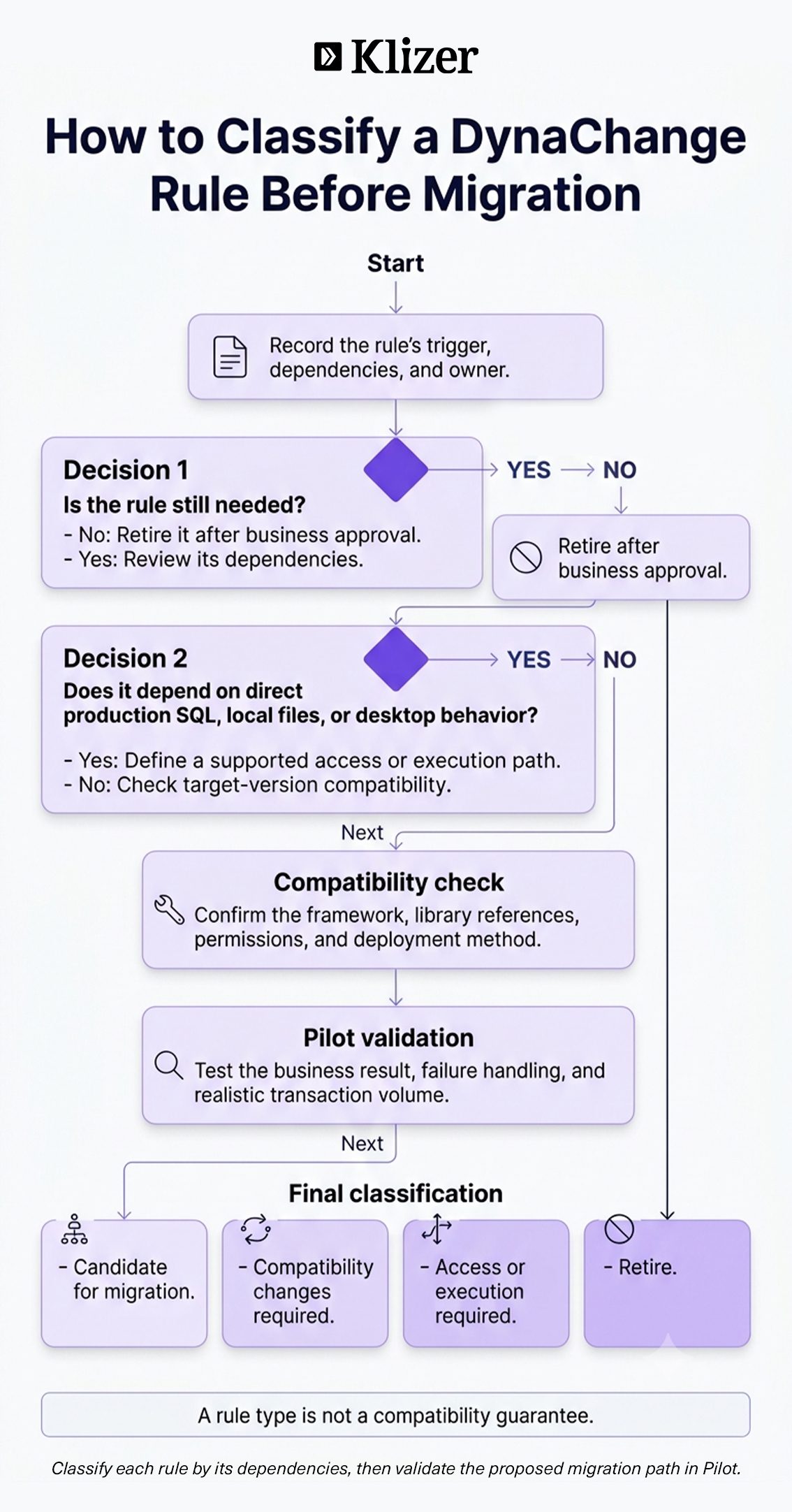
- Inventory every rule. List each DLL with its trigger, screen, dependencies, and owner.
- Classify data access. Identify SQL, file-system, and external-service dependencies.
- Assign a migration path. Separate candidates for migration, compatibility changes, access redesign, and retirement. Validate each classification through testing.
- Audit every Prophet 21 integration. Catalog EDI feeds, WMS links, reporting tools, and Adobe Commerce, Shopware, or BigCommerce storefront connectors. Record direct database dependencies.
- Review legacy references early. Confirm target requirements for rules using Activant.P21.Extensions or older frameworks.
- Validate reporting freshness. Assess replica availability and observed lag against the business’s reporting requirements.
- Test in Pilot. Run realistic workflows and transaction volumes, then document the cutover and rollback procedures.
- Plan post-launch support. Assign owners for errors, monitoring, and remediation after go-live.
A disciplined ERP data migration treats rules as a workstream with their own budget. Making them a footnote to the data load leaves their dependencies outside the plan.
Frequently Asked Questions
Do DynaChange Rules Work in Epicor Cloud?
Epicor’s public-cloud guide supports DynaChange Rules and the SDK. Each rule still needs compatibility and dependency testing; support for the engine does not guarantee support for every customization.
Does Self-Hosting P21 on Azure Count as Epicor Cloud?
Self-hosting on Azure or AWS is different from Epicor-operated public cloud. Confirm how the release roadmap and support policy apply to your deployment with Epicor.
How Long Does a P21 Cloud Migration Take?
It depends on data volume, customization depth, integration changes, and testing requirements. The rule audit belongs early in planning because it helps establish the scope.
What Makes ERP Data Migration from Prophet 21 Difficult?
Undocumented customization dependencies can be difficult to scope. Data migration and validation remain essential, while SQL-dependent rules need a supported access path and testing before cutover.
Conclusion
The strategic mistake is treating this as an IT project with a single support deadline. It is a review of the custom logic your business depends on. Starting early gives teams time to retire unnecessary rules and redesign essential ones before cutover pressure takes over.
Klizer brings ERP, B2B ecommerce, integrations, and Operational AI together through Connected Commerce. For a P21 migration, that means preserving the Foundation’s business rules, validating the Storefront’s prices and orders, rebuilding supported Integration paths, and giving Intelligence dependable operational data.
If your rules are undocumented and your timeline is tightening, book a Connected Commerce consultation to discuss your P21 readiness assessment and Epicor P21 integration solutions.