Dynamics 365 Business Central runs B2B and B2C on the same customer, item, and G/L tables. B2B behaviour is driven by configuration, customer price groups, payment terms, credit limits, approval workflows, blanket orders, and EDI. B2C behaviour is driven by throughput, the Shopify connector or an ecommerce API pushing high-volume orders, item variants, and automated returns. The difference is not two systems. It is master-data setup, dimensions, and posting rules on one system.
Most companies do not sit neatly in one bucket. A manufacturer sells pallets to distributors on 45-day terms and also sells single units through its own Shopify store. A cosmetics brand runs a marketplace storefront and supplies 200 salons on credit. The instinct is to run two systems and reconcile in a spreadsheet. That instinct is expensive.
This article looks at what actually changes inside Business Central when you serve both audiences, functionally and technically, and where teams usually get it wrong.
ON THIS PAGE
What Business Central Actually Is
Business Central is the SaaS successor to Dynamics NAV. Knowing the architecture matters, because it explains why one tenant can carry two selling models without collapsing.
- Single normalised data model: Customer (18), Item (27), Sales Header (36), Sales Line (37), G/L Entry (17). Every channel writes into the same tables. There is no “retail customer table” and “wholesale customer table”, there is Customer, segmented by Customer Posting Group, Price Group, and Dimensions.
- Extension-based customisation (AL): You do not modify base objects. You write extensions that subscribe to events, add table extensions and page extensions. This is what makes monthly Microsoft updates survivable.
- OData v4 and REST APIs out of the box: The /api/v2.0 endpoints cover customers, items, sales orders, and more. Custom API pages let you expose exactly the payload your storefront needs, with ETag-based concurrency.
- Job Queue for asynchronous work: Order import, posting batches, and integration syncs run on scheduled Job Queue Entries rather than blocking a user session.
- Dimensions instead of a bloated chart of accounts: Channel, Region, Salesperson, Brand, these are dimensions, not account codes. This single design choice is what lets you report B2B and B2C P&L separately without duplicating the ledger.
How Business Central Serves a B2B Business
B2B selling is about relationships encoded as rules. Few orders, high value, negotiated terms, long tails of approval and credit. Business Central B2B integration handles this in configuration rather than code.
Pricing and Contracts
Customer Price Groups and Customer Discount Groups let you attach a negotiated price list to a segment of customers. Sales Prices carry a starting date, ending date, minimum quantity, and unit of measure, which means volume-break pricing and time-boxed promotions are data, not development. The newer Price Lists feature consolidates this into a single, auditable structure with draft and active states.
Blanket Sales Orders cover the classic B2B commitment: a customer commits to 10,000 units across the year and releases 800 at a time. Business Central keeps the blanket order as the parent and creates sales orders against it, tracking quantity shipped versus quantity committed.
Credit, Risk, and Terms
- Credit Limit (LCY) on the Customer card, with a warning or hard block on order entry
- Payment Terms Code driving due date and settlement discount calculation
- Customer Ledger Entries with automatic application, so aged debt is live rather than a month-end reconstruction
- Cash Flow Worksheet pulling from open sales orders, purchase orders, and ledger entries
Approvals and Control
Native workflow, built on Power Automate or the built-in approval engine, gates a sales order above a threshold to a manager. The record status moves Open → Pending Approval → Released. Nothing ships on a released order until approval fires. For a B2B business, this is usually the first thing that pays for the implementation.
EDI and Trading-Partner Exchange
Larger B2B customers will not use your portal. They will send an EDI 850 purchase order and expect an 855 acknowledgement, an 856 ASN, and an 810 invoice. Business Central supports this through the native Electronic Document Exchange framework (PEPPOL) or, more commonly, an EDI ISV or middleware layer that maps X12/EDIFACT into API calls or configuration packages.
Projects and Service
Where B2B involves installation, commissioning, or service contracts, the Jobs (Projects) module tracks WIP, job planning lines, and resource usage against a budget, and posts recognised revenue correctly rather than at invoice date.
How Business Central Serves a B2C Business
B2C is the mirror image. Thousands of orders, low value, instant payment, high return rates, no negotiation, and a hard requirement for speed.
eCommerce as a First-Class Channel
The Business Central Shopify integration ships in the box and is genuinely two-way: it syncs customers, items and variants, inventory levels, orders, fulfilment, and refunds. Setup is a Shop card, sync mappings, and Job Queue entries, no custom code for a standard scenario. For other platforms (Magento, WooCommerce, BigCommerce, a headless front end), you build against the API pages, with an integration table to hold the external ID and last-modified stamp.
For distributors and manufacturers already running Magento or Adobe Commerce, Klizer’s Business Central ecommerce integration connects the API layer between Business Central and the storefront, handling order import, inventory sync, and pricing without custom AL code on the ERP side.
Item Variants and SKU Explosion
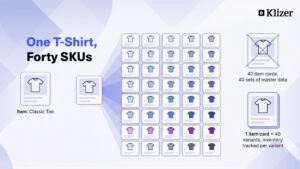
A B2C catalogue explodes: one T-shirt becomes 40 SKUs. Item Variants, Item Attributes, and Item Categories keep the item master manageable and the storefront filterable. Variants carry their own inventory, so availability is accurate per size and colour without 40 item cards.
Volume Order Handling
- Post Batch and Job Queue-driven posting so 2,000 orders post overnight rather than one at a time
- Cash Receipt Journal or a payment-gateway ISV to apply Stripe, PayPal, or Razorpay settlements in bulk, netting gateway fees to a dedicated G/L account
- Warehouse Shipment and pick worksheets, or a WMS integration, once volume outgrows manual picking
- Sales Return Orders with a reason code and item charge handling, returns in B2C are a workflow, not an exception
Reporting the B2C Way
Contribution per order, per channel, per campaign. This is where the Channel dimension earns its keep: the same Sales Analysis reports and Power BI model split D2C from wholesale on a dimension filter, not a separate dataset.
Same Platform, Different Levers
| Requirement | B2B Configuration | B2C Configuration |
| Pricing | Customer Price Groups, negotiated Price Lists, quantity breaks, blanket orders | Single list price, campaign pricing, discount codes passed from the storefront |
| Payment | Payment Terms Code, credit limit, aged debt, dunning | Prepaid via gateway; cash receipt applied on import |
| Order entry | Manual, EDI 850, or customer portal; approval workflow | API / Shopify connector; auto-release, no approval |
| Customer master | Named account, bill-to/ship-to hierarchy, contact roles | Often a single “Web Customer” with ship-to per order, or auto-created card |
| Fulfilment | Full/part shipment, ASN, consolidated invoicing | Single shipment, immediate invoice, label at pick |
| Returns | RMA with inspection and credit note | High-volume Sales Return Orders, automated refund |
| Reporting | Margin per account and per contract | Margin per channel, per SKU, per campaign |
| Key risk | Credit exposure and pricing leakage | Throughput, stock accuracy, return rate |
The Techno-Functional Design Decisions That Decide the Outcome
Four decisions separate implementations that work from implementations that get re-done in eighteen months.
1. Decide Your Dimension Strategy Before Go-Live
Set Channel as a mandatory Shortcut Dimension, with default dimension values on the customer and on the source-code setup. Retrofitting dimensions in Business Central onto three years of posted entries is possible and painful. Doing it on day one is a Setup page.
2. Do Not Create a Customer Card Per Web Order
Most B2C models are better served by a small number of anonymous web customers per country, with the actual buyer stored on the Ship-to and in a CRM or the storefront. If you truly need a card per consumer, for loyalty, or GST/VAT compliance in some jurisdictions, plan for the volume and the data-retention obligation.
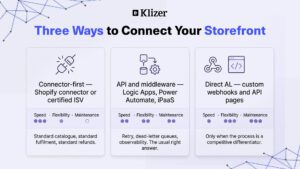
3. Choose the Integration Pattern Deliberately
- Connector-first: Business Central Shopify integration or a certified ISV. Fastest, lowest maintenance, least flexible.
- API and middleware: Azure Logic Apps, Power Automate, or an iPaaS calling BC API pages. Best balance; gives you retry, dead-letter, and observability.
- Direct AL webhook/API: Most control, most code, most ownership. Justified only when the process is a differentiator.
Whatever you choose, store the external system’s ID on the BC record and make every call idempotent. Duplicate orders on a retry are the most common and most damaging integration defect.
4. Separate the Posting Groups
Give B2B and B2C their own Customer Posting Groups and General Business Posting Groups where the tax or revenue treatment differs. This keeps VAT/GST posting clean and makes the P&L split defensible in an audit.
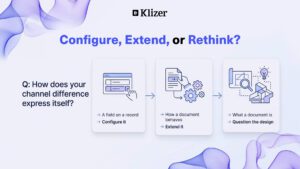
The rule of thumb is, if the difference between your two channels can be expressed as a field on a record, configure it. If it changes how a document behaves, extend it. If it changes what a document is, question the design.
What the Business Actually Gets
- One inventory position: Wholesale and D2C draw from the same Item Ledger. Overselling stops being a weekly incident.
- One P&L, sliceable: Channel margin from the same ledger, not two systems reconciled by hand.
- One month-end: No inter-system reconciliation line. Close compresses from weeks to days.
- One customer truth: The salon that buys wholesale and orders samples online is one relationship, visible in one place.
- One upgrade path: Microsoft ships two major waves a year. Extensions carry forward; bolt-on systems do not.
A Realistic Phasing
Phase 0, Data model workshop
Agree dimensions, posting groups, item master structure, and customer segmentation. Two weeks. Skipping this is the single biggest cause of re-implementation.
Phase 1, Core finance and the dominant channel
Go live on the channel that carries the revenue. Prove the ledger.
Phase 2, Second channel and integration
Add the storefront or the EDI partners. The data model is already correct, so this is plumbing, not redesign.
Phase 3, Warehouse, approvals, and analytics
Layer control once transactions are flowing.
Phase 4, Optimise
Job Queue tuning, telemetry via Application Insights, and retiring the spreadsheets that survived.
Conclusion
Map your current order-to-cash for both channels on one page. Wherever the same data is entered twice, you have found the cost of not consolidating, and the business case writes itself.
Klizer builds connected commerce systems for manufacturers and distributors, connecting ERP, ecommerce, integrations, and Operational AI under one roof. If your Business Central ecommerce integration is still a gap in your architecture, book a free consultation to map where the duplicate data lives and what closing it would take.
Frequently Asked Questions
Can Dynamics 365 Business Central handle both B2B and B2C in one tenant?
Yes. B2B and B2C are handled as configuration on one data model, customer price groups, posting groups, and dimensions instead of separate systems. The practical limit is transaction volume, not the mix of models.
How many B2C orders can Business Central handle per day?
A well-configured environment handles thousands of order lines a day using batch posting and Job Queue. Beyond roughly tens of thousands of orders a day, the usual pattern is to aggregate or summarise web orders rather than post each one individually. The constraint is almost always posting design, not the platform.
Do I need a separate CRM for B2B?
Business Central has Contacts, Opportunities, and Segments built in, enough for a straightforward pipeline. If you need multi-touch marketing attribution, complex territory management, or a large field-sales team, Dynamics 365 Sales integrates natively and shares the customer record.
Is the Business Central Shopify integration enough, or do I need custom development?
For a standard catalogue with variants, standard fulfilment, and standard refunds, the native connector is enough and should be your default. Custom development is warranted for bundles, subscriptions, complex tax, or a marketplace layer.
How do I keep B2B pricing from leaking into B2C?
Price Groups are assigned on the Customer card, and web customers should never carry a B2B price group. Enforce this with a default on the customer template and a validation in the order-import extension.
What does a dual-channel Business Central ecommerce integration typically take?
For a mid-market business with one storefront and a defined B2B process, three to six months is realistic, the variable is data quality and the number of integrations, not the software.