Many distribution businesses still rely on phone orders, spreadsheets, disconnected sales channels, and legacy ERP systems to manage daily operations. When a customer places a bulk order, sales teams often verify inventory manually, confirm pricing over email, and enter the order into the ERP. These fragmented processes delay order fulfillment, create duplicate work, and increase the risk of costly errors.
Buyers now expect real-time inventory, contract pricing, and self-service purchasing. Against those expectations, manual workflows become increasingly difficult to scale. This is where dedicated distribution commerce software earns its place.
ON THIS PAGE
What Does Shopware Distribution Commerce Mean?
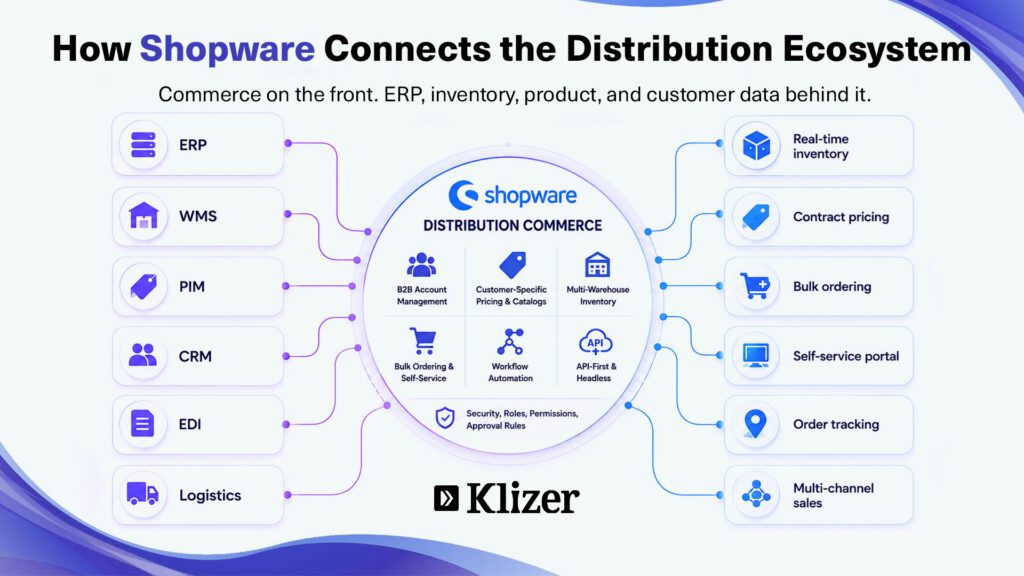
Shopware distribution commerce describes using Shopware as the commerce layer for a distribution business rather than a retail one. It is a way of applying the platform, not a separate product.
In practice, that means using Shopware’s B2B capabilities to manage company accounts, organizational structures, customer-specific catalogs and pricing, approval workflows, bulk purchasing, and multi-channel sales while ERP, CRM, PIM, and warehouse systems continue to own the underlying operational data.
Shopware’s B2B Components are available from the Evolve plan and include capabilities such as employee roles, approvals, quote management, quick ordering, and shopping lists.
For a deeper technical look at these capabilities, read Klizer’s Shopware B2B Commerce Developer Guide.
Used this way, a digital distribution platform helps distributors automate workflows, reduce data silos, and maintain more consistent operational visibility.
Why Do Distribution Businesses Need Modern Distribution Software?
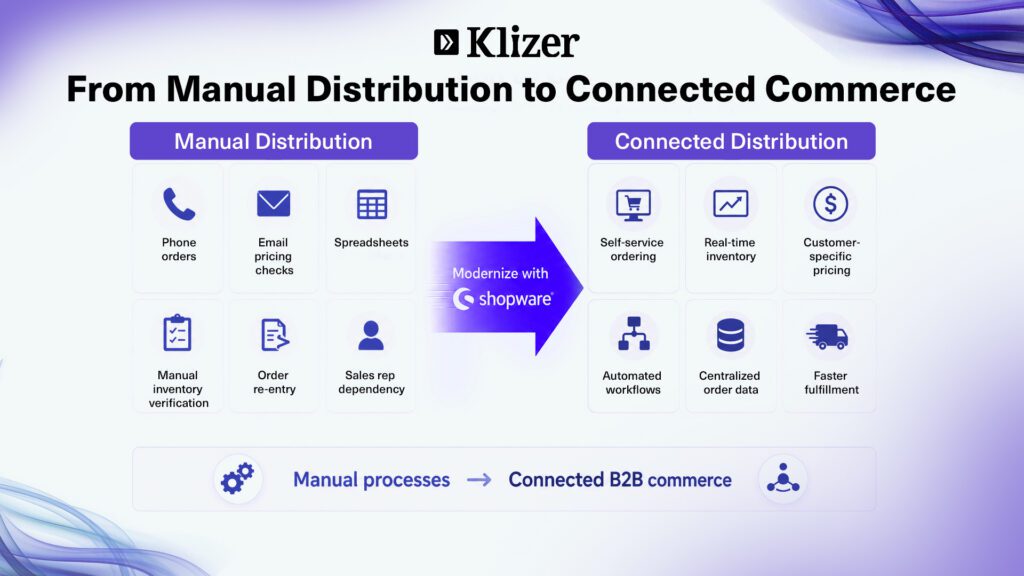
Distribution businesses use modern distribution software to connect sales channels, inventory, ERP systems, and customer data into a more coordinated commerce environment.
The U.S. International Trade Administration estimates the global B2B ecommerce market at approximately $36 trillion by 2026, highlighting the scale of digital B2B purchasing.
1. Real-Time Inventory Visibility
Track inventory across warehouses and sales channels through connected systems. Distribution ecommerce software can help reduce stale stock information and improve availability visibility for buyers.
2. Faster Order Processing
Automate order capture and connected fulfillment workflows to reduce manual entry, improve accuracy, and shorten the time between order placement and downstream processing.
3. Self-Service B2B Ordering Portals
Let customers browse catalogs, view account-specific pricing, place bulk orders, reorder products, and manage purchasing through a B2B commerce platform without depending on sales teams for every transaction.
For more on distributor-specific buying journeys, see Klizer’s guide to Shopware for B2B distributors.
4. Improved Supply Chain Coordination
Connect commerce, warehouse, ERP, and logistics systems to improve inventory movement, fulfillment visibility, and order coordination.
5. Better Operational Data
Connected commerce data gives teams a clearer view of buying patterns, inventory movement, and channel performance. More advanced forecasting still depends on the quality of the data flowing between these systems.
What Are the Key Shopware Features Distributors Actually Use?
Shopware offers a broad feature set, but six capabilities carry much of the weight in a distribution build.
B2B account management: Company accounts, organizational units, employee roles, permissions, and approval rules help distributors reflect complex buyer structures inside the commerce platform.
- Customer-specific catalogs and pricing: Product access and pricing can be adapted to specific companies, organizational units, and purchasing arrangements.
- Multi-warehouse inventory: Shopware Multi-Inventory supports inventory management across multiple stock locations. This capability is part of the Shopware Beyond plan, not Evolve.
- Bulk ordering and self-service: Quick ordering, shopping lists, repeat purchasing, approvals, and quote management reduce routine manual order activity.
- Workflow automation: Shopware’s Rule Builder and Flow Builder can support pricing conditions, notifications, status changes, and other business rules.
- API-first and headless architecture: The commerce layer can support storefronts, customer portals, sales tools, and other channels while integrating with enterprise systems behind them.
Businesses considering a decoupled frontend can also review Klizer’s Shopware headless commerce implementation guide.
One planning detail can materially change project scope. B2B Components are available from Shopware Evolve, while Multi-Inventory requires Shopware Beyond. Shopware’s current Commercial feature matrix also separates these capabilities by plan (Shopware Commercial feature overview).
Separately, Shopware’s older B2B Suite is no longer in active development and will no longer be supported from Shopware 6.8. Businesses already using it should treat migration to B2B Components as a defined project rather than a routine version upgrade.
For distributors, omnichannel may include the web store, field sales team, branch counter, EDI trading partners, marketplaces, and customer procurement systems. Shopware itself positions its wholesale and distribution offering around connected sales channels, customer-specific assortments, pricing, inventory visibility, and procurement environments (Shopware Wholesale and Distribution).
What Integrations Are Required for a Scalable Distribution Commerce Platform?
Integrating Shopware with ERP, WMS, PIM, CRM, EDI, and logistics systems is what turns a storefront into a connected distribution platform.
ERP Integration
Connect ERP systems to centralize financial data, purchasing, sales records, pricing, inventory, and customer information.
Depending on the distributor’s existing environment, this may involve systems such as Epicor Prophet 21, SAP, NetSuite, or Microsoft Dynamics.
Klizer’s work with distributor environments reinforces why field mapping, sync direction, retry handling, monitoring, and ERP business logic need to be defined before development begins. Its guide to common Prophet 21 API integration mistakes covers these issues in more detail.
Warehouse Management System Integration
Synchronize stock levels, warehouse locations, picking processes, and fulfillment workflows.
PIM Integration
Centralize product descriptions, specifications, attributes, and digital assets so catalogs remain accurate as they grow.
CRM Integration
Connect buyer information, sales activity, and account history with the wider B2B commerce environment.
EDI and API Integration
Automate purchase orders, invoices, shipping notices, and other data exchanges with suppliers and trading partners.
For many established distributors, EDI remains an important order channel, so it should be included in architecture planning from the beginning.
Logistics, Payment, and Shipping Integration
Connect carrier selection, freight rates, shipment tracking, purchase orders, credit terms, and other fulfillment requirements.
This integration-first approach supports Klizer’s Connected Commerce model, where Foundation, Storefront, Integration, and Intelligence work as connected layers rather than separate technology projects.
How to Implement Shopware Distribution Commerce
Implementation works best as a sequence where each stage depends on the one before it.
1. Define the Architecture and Shopware Setup
Select the Shopware plan based on actual B2B and inventory requirements.
Set up hosting for performance, security, and expected transaction volume.
Decide early whether the implementation will use a traditional storefront or headless architecture.
2. Configure Shopware B2B Components
Create company accounts and organizational units.
Configure employee roles and permissions.
Enable quote management and approval workflows where required.
3. Set Up Multi-Warehouse Inventory Management
For Beyond implementations using Multi-Inventory, configure warehouses and stock locations and determine how availability should be presented to buyers.
4. Configure Custom Catalogs and Pricing Rules
Create customer-specific catalogs by buyer group, region, account, or organizational unit.
Configure pricing and volume rules.
Test product visibility and pricing against real customer scenarios.
5. Automate Distribution Workflows
Define triggers around orders, approvals, customer actions, payments, and status changes.
Automate workflows only after the underlying business rules are clearly documented.
6. Specify and Sequence the Integrations
Define what synchronizes, in which direction, and how often, field by field.
Decide what happens when a synchronization fails, because it will. Silent failures are how portals end up quoting prices the ERP changed months earlier.
Test integrations against realistic production data rather than sample records.
Businesses moving from an older commerce platform should also account for data, integrations, SEO, and operational dependencies during ecommerce migration.
For projects where the current platform itself is the constraint, Klizer also covers the broader ecommerce replatforming process.
7. Test, Launch, and Optimize
Test customer accounts, pricing rules, inventory synchronization, approvals, and order processing end to end.
Validate integrations under realistic volumes.
After launch, monitor buyer behavior, integration failures, self-service adoption, and commerce performance.
What Are the Common Challenges During Implementation?
Legacy system integration: Older ERP deployments may require middleware, scheduled data exchanges, or custom connectors when modern APIs are limited.
Data migration and quality: Duplicate SKUs, inconsistent attributes, incomplete customer records, and undocumented pricing exceptions often surface during implementation.
Inventory accuracy across channels: Stock that is accurate in the ERP but stale on the storefront quickly erodes buyer trust. The fix is usually better synchronization and reservation logic rather than a better inventory display.
B2B pricing complexity: Contract pricing, volume breaks, customer-specific exceptions, and overlapping rules deserve a dedicated test plan.
Self-service adoption: A portal creates value only when customers use it. Buyers accustomed to phone and email ordering need a reason to change, while sales teams need to support the digital process.
Building a Future-Ready Distribution Ecosystem with Shopware
The platform decision is only one part of a distribution commerce project. What determines whether the implementation works is whether pricing, inventory, product, customer, and order data remain consistent across every system involved in a transaction.
Get that architecture right, and the storefront becomes easier to change as requirements evolve. Get it wrong, and additional storefront development will not solve the underlying operational problem.
That is the basis of Klizer’s Connected Commerce approach. Klizer works with manufacturers and distributors across Foundation, Storefront, Integration, and Intelligence, treating the ERP, commerce platform, integrations, and operational intelligence as one connected system.
Once the foundation and integrations are reliable, the same connected data can support analytics, forecasting, intelligent product discovery, and other Operational AI use cases.
Talk to Klizer about your distribution commerce roadmap, starting with your data and integrations.
Frequently Asked Questions
Why do manufacturers and wholesalers choose Shopware for B2B commerce?
Shopware supports B2B requirements through B2B Components, including company structures, permissions, approvals, quotes, quick ordering, and shopping lists. Its API-first architecture also supports enterprise integrations.
Can Shopware handle large product catalogs and high order volumes?
Yes, but performance depends on product-data architecture, integrations, infrastructure, caching, and expected transaction volumes. These requirements should be addressed during architecture planning.
How long does a Shopware implementation take for a distribution business?
Timelines vary based on customization, integrations, data quality, pricing complexity, customer hierarchies, and ERP dependencies.
What should distributors evaluate before migrating to Shopware?
Evaluate existing APIs, data readiness, ERP and WMS dependencies, B2B workflows, integrations, expected transaction volumes, and the Shopware plan required for the features you need.
Can Shopware replace legacy distribution systems?
Shopware can replace a legacy storefront or digital ordering system, but it does not automatically replace an ERP. In most distribution architectures, Shopware acts as the commerce and buyer-experience layer while the ERP remains responsible for operational and financial data.