Security updates are an essential part of maintaining a modern ecommerce platform. This becomes even more important for B2B and enterprise Shopware stores that handle customer accounts, pricing, orders, product catalogs, administration users, APIs, ERP integrations, and external services.
The latest Shopware security releases address vulnerabilities across several important areas, including Store API processing, custom entities, media handling, administration permissions, Twig templates, webhooks, password recovery, and document downloads.
Shopware 6.7.13.1, released on August 25, 2026, contains nine security fixes and two general bug fixes. The corresponding patched 6.6 release is 6.6.10.23.
For example, one high-impact issue involved Store API aggregation handling that could allow SQL injection using a valid Sales Channel access key (CVSS 8.1, High). Another high-severity issue involved media file extension handling that could potentially allow files to be written outside the intended media directory (CVSS 7.6, High).
Because these changes can affect custom plugins, integrations, APIs, media imports, and administration workflows, applying the update should be treated as a controlled deployment rather than simply running a Composer command on production.
The Shopware Security Plugin provides backported security fixes for older Shopware versions that are no longer receiving core updates. If your installation is on an older minor version, check whether the Security Plugin is installed and current before assuming your store is protected.
ON THIS PAGE
What Does the Security Update Address?
The security update strengthens several areas of Shopware.
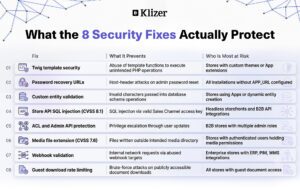
1. Stronger Twig Template Security
Twig templates can no longer use unauthorized PHP functions through certain callable checks such as find, has some, and has every.
String-based PHP callables must be explicitly permitted through the Shopware allowlist.
This reduces the possibility of abusing template functionality to execute unintended application-level operations.
2. Safer Password Recovery URLs
Administration password recovery URLs now use APP_URL when trusted hosts are not configured.
This helps reduce the risk of host-header-based password-reset attacks.
Before updating, administrators should verify that the configured APP_URL represents the correct public shop URL.
For example:
APP_URL=https://www.example.com
Do not rely on an automatically detected host value for a production environment.
3. Custom Entity Validation
Shopware now validates custom entity and field names before database schema changes are created.
This is particularly important for stores using Apps or custom integrations that dynamically create entities and fields.
Invalid characters, whitespace, and unsupported identifiers are rejected instead of being passed directly into database schema operations.
4. Store API Security
The Store API has received additional protection against SQL injection.
This is especially relevant for headless storefronts and B2B integrations because Store API access keys are normally exposed to clients and should not be treated as secret credentials.
One of the security advisories specifically affects Store API aggregation handling and is fixed in Shopware 6.7.13.1 and 6.6.10.23.
5. Administration API and ACL Protection
Administration API writes have been hardened to prevent unauthorized modification of protected ACL roles and system-only administration fields.
This is particularly important for B2B implementations where multiple users and administration roles may have different permissions.
A separate advisory describes a privilege-escalation scenario involving ACL role assignment through user updates.
6. Improved Media Security
Media handling has received several security improvements.
For example, Shopware addressed a high-severity issue involving writable media file extensions. In affected configurations, an authenticated user with the required media permission could potentially write files outside the intended media directory.
Media URL imports have also received stronger URL and IP validation to reduce SSRF and DNS rebinding risks.
7. Safer Webhooks
Webhook targets are validated before requests and redirects.
This reduces the possibility of abusing webhook functionality to make requests to internal or private network resources.
This is particularly important for enterprise stores that integrate Shopware with ERP, PIM, WMS, CRM, payment, fulfillment, and other external systems.
8. Guest Download Rate Limiting
Guest document downloads now have rate limiting protections.
This makes repeated invalid authentication attempts more difficult and provides another layer of protection around publicly accessible document functionality.
Before Updating Shopware: What Should You Do?
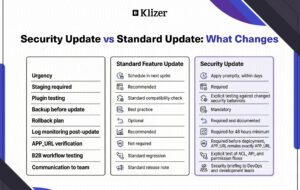
A security update should be handled like a production deployment.
Do not immediately run the update on production without first understanding your current environment.
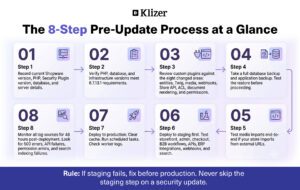
Step 1: Identify the Current Shopware Version
Start by identifying exactly which version is running.
Run:
bin/console --version
You can also check the installed Shopware Core package:
composer show shopware/core
Record the following information:
- Shopware Version
- PHP Version
- Security Plugin Version
- Environment
- Server
- Operating System
- Database
- Database Version
- Web Server
- Search Engine
For example:
Shopware: 6.7.x

PHP: 8.x

Environment: Production

Database: MySQL 8

Search: Elasticsearch

Web Server: Nginx
Do not assume that two Shopware installations are identical simply because they use the same Shopware version.
Step 2: Check Your PHP and Database Versions
Before updating Shopware, verify that the server meets the requirements of the target release.
For the 6.7.13.1 release, Shopware lists testing against PHP 8.2, 8.4, and 8.5, and MySQL 8 and MariaDB 11.
Check PHP:
php -v

Check Composer:

composer --version
For MySQL:
SELECT VERSION();
Also verify the versions used by:
- Elasticsearch/OpenSearch
- Redis
- RabbitMQ
- Node.js
- npm/pnpm
- Web server
- CDN
- Container image
- Operating system
This is especially important for enterprise deployments where Shopware is only one component of a larger architecture.
Step 3: Check Your Custom Plugins for Compatibility
Do not assume that a security patch cannot affect custom code.
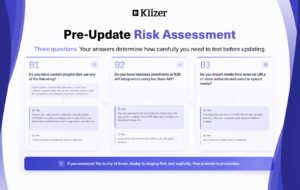
For example, if a custom plugin:
- Creates custom entities
- Generates database fields dynamically
- Uses custom Twig functions
- Imports media from external URLs
- Creates webhooks
- Modifies administration permissions
- Uses Store API aggregations
- Extends document rendering
Then it should be specifically tested against the new version.
A security improvement may intentionally reject something that previously worked.
That is not necessarily a bug.
It may mean that the existing implementation was relying on behavior that is no longer considered safe.
Read More: Scaling Your eCommerce Business with Shopware: From Startup to Enterprise
Step 4: Take a Complete Backup
Never perform a production security update without a rollback strategy.
At minimum, create a database backup.
For MySQL:
mysqldump -u USER -p DATABASE > shopware-before-security-update.sql
Verify that the backup was actually created:
ls -lh shopware-before-security-update.sql
Do not assume that a successful command automatically means that you have a usable backup.
If possible, test restoring the backup in a non-production environment.
Application Backup
Preserve the important application configuration and custom code.
Depending on your deployment architecture, this may include:
.env

composer.json

composer.lock

custom/

config/

public/media/

public/thumbnail/
Also preserve deployment artifacts and infrastructure configuration where applicable.
If your hosting provider supports it, create a VM Snapshot or Server Snapshot before the production deployment.
Step 5: Test Media Imports
If your business imports images or other media from external systems, test the complete media workflow.
Pay particular attention to custom integrations that dynamically construct media URLs.
Shopware has strengthened media URL and file validation as part of this security work.
Step 6: Test Search and Reindexing
If the store uses Elasticsearch or OpenSearch, perform search validation after the update.
Test:
- Product search
- Category search
- Filters
- Sorting
- Aggregations
- Search suggestions
- Product indexing
Also check the index status and scheduled reindex jobs.
The 6.7.13.1 release includes a fix related to automatically scheduling reindexing when search analysis settings change.
Step 7: Clear Cache and Run Scheduled Tasks
After deployment, clear the Shopware cache where appropriate:
bin/console cache:clear
Then verify scheduled tasks:
bin/console scheduled-task:list
Check worker logs for errors after the deployment.
Step 8: Monitor Logs After Deployment
Do not stop monitoring immediately after the update finishes.
Review:
- Shopware logs
- PHP logs
- Nginx/Apache logs
- Database logs
- Elasticsearch/OpenSearch logs
- Queue/worker logs
- Application monitoring
- Security/WAF logs
Look for:
- HTTP 500 errors
- Authentication failures
- API errors
- SQL errors
- Permission errors
- Plugin exceptions
- Twig errors
- Media import failures
- Webhook failures
- Queue failures
- Search indexing failures
Read More: Shopware Multi-Company Accounts: How to Build a Multi-Company B2B Portal
A Practical Production Deployment Checklist
Before production deployment, confirm:
- Current Shopware version recorded
- Target Shopware version confirmed
- PHP compatibility checked
- Database compatibility checked
- Plugins reviewed
- Custom plugins reviewed
- APP_URL verified
- Trusted hosts reviewed
- Database backup completed
- Application backup completed
- Server/VM snapshot created
- Staging environment updated
- Storefront tested
- Administration tested
- Customer login tested
- Checkout tested
- Payment tested
- B2B workflows tested
- APIs tested
- ERP/PIM integrations tested
- Webhooks tested
- Media import tested
- Search tested
- Queue workers tested
- Scheduled tasks tested
- Rollback plan prepared
Final Recommendation
For Shopware development and DevOps teams, security updates should become part of a repeatable deployment process rather than an emergency activity.
For Shopware 6.7 installations, the 6.7.13.1 security release is particularly important because it addresses vulnerabilities affecting Store API processing, custom entities, media handling, ACL permissions, and other application components.
The key lesson is simple:
Do not treat a security patch as just a version upgrade. Treat it as a controlled production change.
A secure Shopware store requires more than an updated core. It requires updated plugins, reviewed integrations, secure infrastructure, tested deployments, backups, monitoring, and a clear rollback strategy.
Security updates are not just technical maintenance. They are part of protecting your customers, business data, revenue, and enterprise integrations.
If your Shopware store handles B2B commerce, ERP integrations, or custom workflows, Klizer can help you plan and execute security updates as part of a managed Shopware support engagement.