

BigCommerce empowers 37,228 live stores globally. Yet businesses at scale keep moving away from it.
The answer becomes clear when you look at scale, flexibility, and enterprise capability.
Magento (now Adobe Commerce) is built for handling complex ecommerce ecosystems, including multi-currency setups, multi-storefront architectures, and large-scale corporate structures. Unlike SaaS-first platforms, it is designed for merchants who need full control over infrastructure and customization. Thus, businesses are preferring Magento migration.
- Magento powers over 250,000 businesses globally.
- Magento boasts a plugin marketplace of over 5,800 options and has a huge community of over 260,000 developers across the globe.
- Unlike BigCommerce, Magento offers powerful and scalable tools for large catalogs, including Multi-Store Inventory and an Integrated Order Management System.
If you’re planning a BigCommerce to Magento migration, this post will provide an in-depth guide to help you make the right decision.
ON THIS PAGE
What is BigCommerce to Magento Migration?
As ecommerce businesses grow, many discover that the platform that worked in the early stages no longer supports their long-term goals. Custom workflows, large product catalogs, B2B operations, and multi-store management often require greater flexibility than a SaaS platform can provide.
BigCommerce to Magento migration is the process of moving your ecommerce store, including products, customers, orders, categories, and content, from BigCommerce to Magento (Adobe Commerce), giving you complete control over your store’s infrastructure, customization, and scalability.
Unlike BigCommerce, where hosting and platform updates are managed for you, Magento allows you to control the underlying codebase, choose your own hosting environment, and build custom functionality without platform limitations. This makes it a preferred choice for businesses with complex operational requirements or ambitious growth plans.
The migration is more than transferring data, it involves rebuilding integrations, preserving SEO, mapping URLs, configuring extensions, and ensuring a seamless customer experience after launch.
But is migrating to Magento the right decision for every business? Not necessarily. Before investing in a migration project, it’s important to understand whether your store’s size, complexity, and growth plans actually justify the move.
Why Do Merchants Move from BigCommerce to Magento?
Businesses rarely migrate from BigCommerce to Magento on a whim. Most migrations happen when growth exposes platform limits that were not visible in the early stages. Below are the five most common and practical reasons merchants make the switch.
1. Revenue growth and rising platform costs
As your revenue grows, BigCommerce pricing scales quickly. BigCommerce Pro has a revenue cap of around $400K annually. Once you cross that, you pay additional fees of about $150 per month for every extra $200K in sales.
For example, a store generating $1M per year can end up paying around $849 per month, before adding apps or integrations. It makes scaling more expensive over time, especially for fast-growing brands.
A packaging distributor generating $1.2M annually came to Klizer after their BigCommerce bill crossed $1,000/month, and that was before factoring in three paid apps for quoting, customer pricing, and ERP sync. The math was straightforward: the cost of migration was less than 18 months of the gap between what they were paying and what Magento’s total cost of ownership would be. They moved. Hosting, extensions, and all.
2. Customization limitations
BigCommerce works well for standard ecommerce setups, but it starts to feel restrictive when you need advanced logic. Magento, on the other hand, supports these use cases natively through its flexible architecture.
Common limitations include:
- Custom approval workflows for B2B orders
- Advanced checkout flows with server-side validation
- Customer-specific pricing or catalog visibility
3. Large catalog scalability
Magento is built to handle 100,000+ SKUs with complex attribute sets, variants, and category structures without major performance issues when properly hosted. On the other hand, BigCommerce can manage mid-sized catalogs well, but very large or highly structured catalogs often require careful optimization and external tooling.
A safety equipment distributor had 85,000 SKUs, each with multiple variants, compliance attributes, and region-specific availability flags. BigCommerce handled the catalog, but search slowed under load, filters broke on large attribute sets, and adding new product types required workarounds. After migrating to Magento with proper hosting and indexing configuration, faceted search worked cleanly across the full catalog without the performance compromises they had accepted as normal.
4. B2B and multi-store complexity
Modern ecommerce is not always a single storefront. Magento supports advanced B2B and multi-store setups, including:
- Multiple storefronts under one backend
- Shared product catalogs across stores
- Store-specific pricing rules
- Separate inventory allocation per region or store
- Centralized order management across all channels
5. Full code and data ownership
One of the biggest reasons businesses migrate is ownership. With BigCommerce, you operate within a managed SaaS environment. This means limited access to backend systems and platform-defined constraints. Magento gives you:
- Full access to source code
- Complete database control
- Freedom to choose hosting providers
- No vendor lock-in
When Should You Not Migrate from BigCommerce to Magento?
Not every store needs to move from BigCommerce to Magento. In many cases, staying on your current setup saves both time and money. Avoid migration in these situations:
- Do not migrate just to replace features that BigCommerce apps already solve. In most cases, a $200/month app is far cheaper than a migration project that can cost $100,000+ and take months to complete. Industry reports show that ecommerce migrations often run 2.3x over budget and take 60% longer than planned.
- Avoid migrating during peak sales periods. Migration projects can introduce delays, and even a short disruption can affect revenue during high-traffic seasons.
- Do not migrate without a clear technical owner. Magento requires ongoing responsibilities such as server maintenance, security patching, performance optimization, and extension updates.
- Do not migrate based only on developer preference. Platform decisions should come from business needs like revenue scale, catalog complexity, and operational goals, not personal tool choices.
BigCommerce vs. Magento: 2026 Side-by-Side Comparison
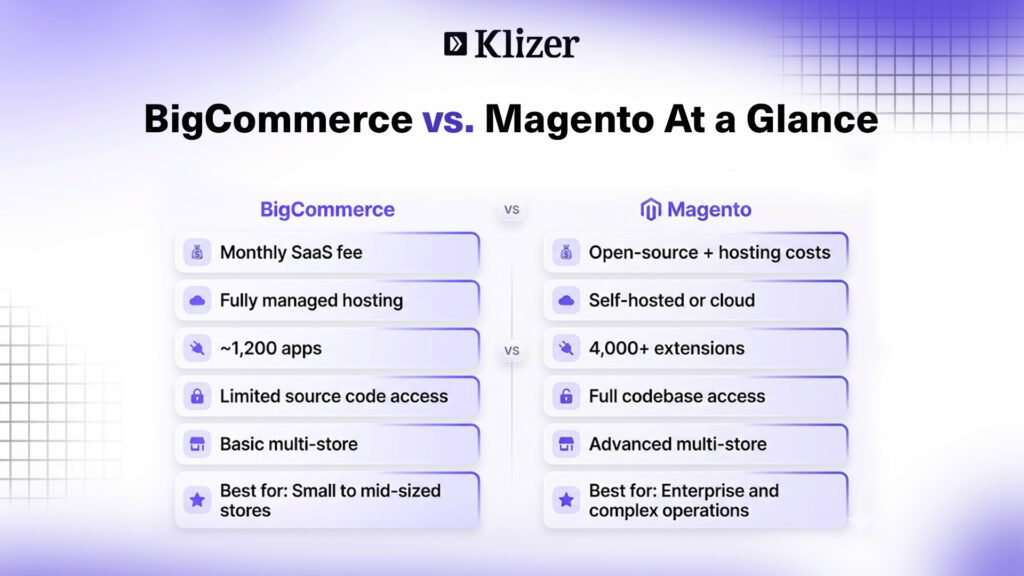
| Feature Area | BigCommerce | Magento |
| Pricing model | Monthly SaaS subscription | Open-source software + hosting costs |
| Hosting | Fully managed by the platform | Self-hosted or cloud-hosted |
| Catalog limits | Best for small to mid-sized catalogs | Handles 100,000+ SKUs with proper setup |
| Extensions | ~1,200 apps | 4,000+ extensions and modules |
| Source code access | Limited (platform-controlled) | Full access to the codebase |
| Multi-store support | Basic multi-store setup | Advanced multi-store architecture |
| B2B features | Limited native B2B tools | Strong native B2B functionality |
| PCI compliance | Platform-managed compliance | Merchant-controlled compliance setup |
| Updates | Automatic updates | Manual or managed updates |
| Developer flexibility | Moderate, SaaS constraints | Very high, full customization |
What Actually Needs to Move in a BigCommerce to Magento Migration?
Migrating from BigCommerce to Magento is a structured data and system rebuild, not a simple export-import process. Research shows that around 83% of data migration projects face delays, budget overruns, or functional issues due to incomplete planning and poor data mapping.
1. Product Catalog
- Simple products usually migrate with minimal changes
- Variant products must be rebuilt in Magento as configurable products
- Each variant becomes a separate simple product linked under a parent
- Product images, media files, category structure, product relationships, and custom attributes also need to migrate
BigCommerce supports up to 600 variants per product, but large variant sets often need restructuring during migration to avoid performance and indexing issues.
2. Customer Data
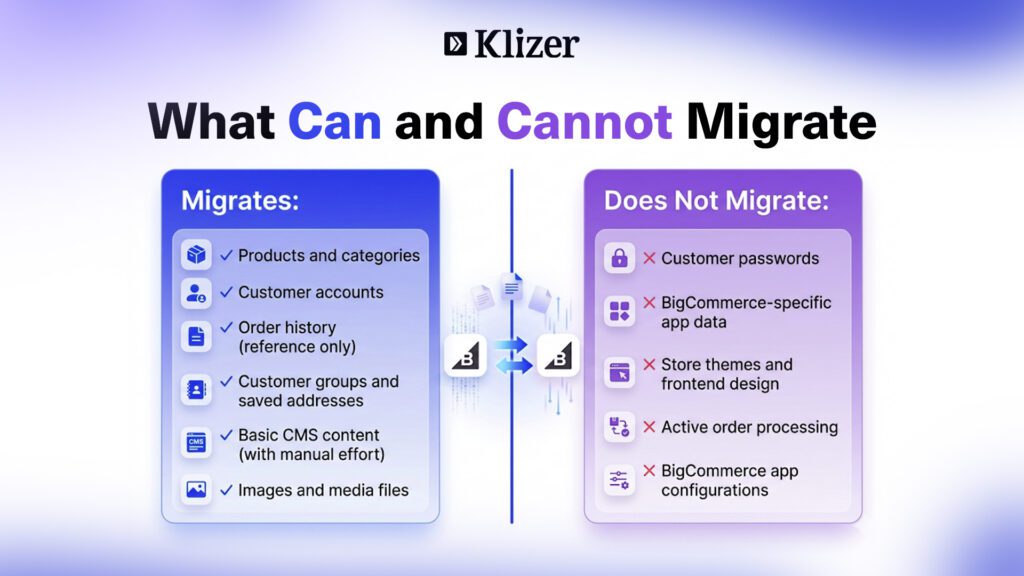
- Customer accounts migrate into Magento
- Passwords do not transfer due to different encryption systems — every customer must reset their password after migration
- Customer groups, saved addresses, and wishlists should also be migrated
3. Orders and Order History
- Orders import for reference and reporting only
- They do not function as active transactions in Magento and cannot be edited or re-processed
4. CMS and Content Pages
CMS content does not migrate automatically. You must rebuild blog posts, landing pages, static pages, and header/footer content blocks.
5. Integrations and Extensions
Audit every BigCommerce app, identify Magento equivalents, and rebuild missing functionality using extensions or custom development.
6. What Cannot Migrate
- Password hashes (security limitation)
- BigCommerce-specific app data
- Store themes and frontend design
Which Migration Method is Right for Your Store?
| Method | Cost | Best For |
| Automated Tool (e.g. LitExtension) | $79–$299 | Small stores under 5,000 SKUs |
| Manual CSV Import | Low tool cost, high dev effort | Simple catalogs, limited budget |
| Agency / Managed Service | $5,000–$50,000+ | Mid-market and enterprise stores |
What is the Pre-Migration Checklist for BigCommerce to Magento?
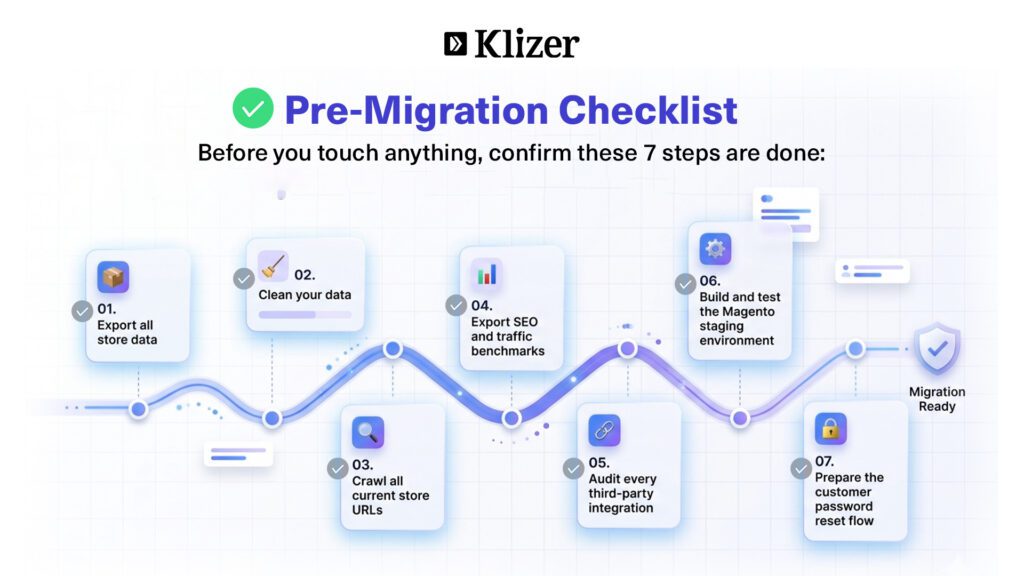
Most ecommerce migration problems start before the migration itself. Before moving from BigCommerce to Magento, complete this checklist first.
- Export all store data: products, categories, customers, orders, CMS pages, images
- Clean your data: fix encoding issues, duplicate attributes, broken image URLs, empty fields
- Crawl your current store URLs using Screaming Frog, Ahrefs, or Semrush and export all product, category, CMS, and blog URLs
- Export SEO benchmarks like top 100 keyword rankings, 12 months of GA4 data, top landing pages
- Audit every third-party integration including payment gateways, shipping, CRM, email, ERP, analytics
- Build and test the Magento staging environment before touching production
- Prepare the customer password reset flow like draft emails, support responses, and login help docs
What Hosting Does Your New Magento Store Need?
Unlike BigCommerce, Magento does not manage hosting for you. Magento 2.4.8 minimum requirements:
| Component | Minimum Requirement |
| PHP | PHP 8.4 |
| Database | MySQL 8.4 |
| Search Engine | OpenSearch 2 |
| Cache Storage | Valkey 8 |
| Page Caching | Varnish 7.6 |
| Memory | Minimum 8GB RAM |
| Web Server | NGINX or Apache |
Most mid-market Magento stores spend between $150 and $800 per month on hosting, depending on traffic volume, catalog size, infrastructure complexity, and support level.
What is the Step-by-Step BigCommerce to Magento Migration Process?
Step 1: Audit and plan
Review catalog size, audit integrations, identify custom workflows, assign a technical owner, create a timeline, and define SEO goals.
Step 2: Set up the Magento environment
Install Magento, configure hosting and server stack, set up staging and production environments, install core extensions, configure caching and security, connect payment and shipping modules.
Step 3: Map the data
Map product attributes, customer groups, category structure, configurable product relationships, order statuses, tax settings, and all custom field behavior.
Step 4: Run a test migration
Import a sample dataset into staging. Validate products, customers, images, relationships, and category navigation. Identify missing or corrupted data.
Step 5: Build the 301 redirect map
Export all existing URLs, map them to new Magento URLs, create 301 redirect rules covering products, categories, and CMS pages. Test and fix redirect chains.
Step 6: Migrate all data
Run the full migration into staging. Migrate products, customers, orders, CMS content, and media. Revalidate imported data accuracy.
Step 7: QA and test thoroughly
Test checkout, payment gateways, shipping calculations, mobile responsiveness, customer login, third-party integrations, and tax and pricing rules.
Step 8: Performance and SEO checks
Test all 301 redirects, validate canonical tags and structured data, identify broken links, and confirm LCP under 2.5 seconds and TTFB under 400ms.
Step 9: Go live
Update DNS, point domain to Magento hosting, keep BigCommerce live for 48 hours, verify checkout and payment systems, confirm redirects work in production.
Step 10: Post-launch monitoring
Monitor Google Search Console daily, track organic traffic, monitor server logs and uptime, test order processing, watch checkout conversion rates.
Ready to Move from BigCommerce to Magento Without the Risk?
Whether you’re migrating a large catalog, expanding globally, or upgrading your ecommerce capabilities, our Magento experts help you preserve SEO, protect customer data, and minimize downtime throughout the transition.
How Much Does a BigCommerce to Magento Migration Cost in 2026?
The biggest mistake businesses make is budgeting only for data migration while ignoring hosting, design rebuilds, development work, SEO protection, and post-launch support.
| Cost Component | Estimated Range |
| Automated migration tool | $79–$299 |
| Magento Open Source | Free |
| Magento hosting (monthly) | $150–$800 |
| Theme and design rebuild | $2,000–$20,000+ |
| Agency migration services | $5,000–$50,000 |
| Custom development | $5,000–$50,000+ |
| Adobe Commerce license | Custom pricing (typically five to six figures/year) |
How Long Does a BigCommerce to Magento Migration Take?
| Store Size | Timeline |
| Small (under 500 SKUs) | 2–4 weeks |
| Mid-market (500–5,000 SKUs) | 4–8 weeks |
| Enterprise (5,000+ SKUs, custom work) | 3–6 months |
What Are the Most Common Mistakes to Avoid in a BigCommerce to Magento Migration?
1. Skipping staging and migrating directly to live
Broken product imports, failed checkout flows, missing images, and live site downtime.
2. Not informing customers about password resets
Login failures, drop in repeat purchase rate, increased support tickets, reduced trust.
3. Not building a complete 301 redirect map
Loss of organic traffic, broken backlinks, 404 errors, drop in keyword rankings.
4. Importing large CSV files without cleaning data
Duplicate products, missing attributes, broken category mapping, slow or failed imports.
5. Migrating during peak season
Lost sales during downtime, reduced marketing performance, poor customer experience.
What is the Post-Migration Checklist for BigCommerce to Magento?
- Confirm all data transferred — products, categories, customers, orders, CMS pages, images
- Test checkout and payment gateways — cart flow, payment processing, shipping, tax, order confirmation emails
- Verify 301 redirects — no 404 errors on product, category, CMS, or blog pages
- Reconnect integrations — GA4, email platforms, CRM, ERP, shipping, payment services
- Send password reset emails — clear instructions, support ready for login issues
- Monitor Google Search Console — crawl errors, index coverage, ranking changes, redirect issues
- Review performance at 30 and 90 days — traffic, rankings, conversion rates, site performance, revenue trends
Conclusion
Migrating from BigCommerce to Magento is a strategic move, not just a platform switch. It gives you full control over your codebase, hosting, and storefront experience, but it also introduces higher responsibility for performance, security, and ongoing maintenance.
If done correctly, Magento can unlock stronger scalability, deeper customization, and better support for complex business models such as B2B commerce, multi-store operations, and large catalogs. However, the success of the migration depends on careful planning, clean data handling, strong SEO protection, and disciplined execution at every stage.
If you want a structured, low-risk migration from BigCommerce to Magento, Klizer can help you manage the entire process end-to-end. From planning and data migration to SEO preservation, hosting setup, and post-launch optimization, our team of BigCommerce to Magento migration experts focuses on a smooth, hassle-free migration to reduce downtime and protect revenue during the transition.
Ready to migrate without losing traffic or sales? Contact us & get a tailored migration plan for your store.
FAQs
How long does the BigCommerce to Magento migration take?
It usually takes 2–4 weeks for small stores, 4–8 weeks for mid-market stores, and 3–6 months for enterprise setups.
Will I lose my SEO rankings?
Not if migration is done correctly. Proper 301 redirects and metadata preservation help maintain most rankings, though short-term fluctuations are normal.
Can customer passwords be migrated?
No. Passwords cannot be transferred due to different encryption systems. Customers must reset their passwords after migration.
What happens to my order history?
Order history moves as reference data only. It is available for reporting and support, but cannot be processed as live orders in Magento.
Should I choose Magento Open Source or Adobe Commerce?
Choose Magento Open Source for full control and lower cost. Choose Adobe Commerce if you need enterprise features, managed hosting, and advanced support.
What is the total cost of ownership after migration?
It depends on hosting, development, and maintenance needs. Magento has no license fee, but ongoing costs include hosting, extensions, and technical upkeep, which increase with store complexity.