

Magento Performance Optimization enhances the speed and efficiency of a Magento 2 store to improve user experience, increase website conversion rates, and ultimately drive higher revenue. Customers often abandon purchases due to website issues, causing significant revenue losses for ecommerce firms. Online retailers, especially those on Magento should prioritize performance optimization.
ON THIS PAGE
10 Steps For Magento Performance Optimization
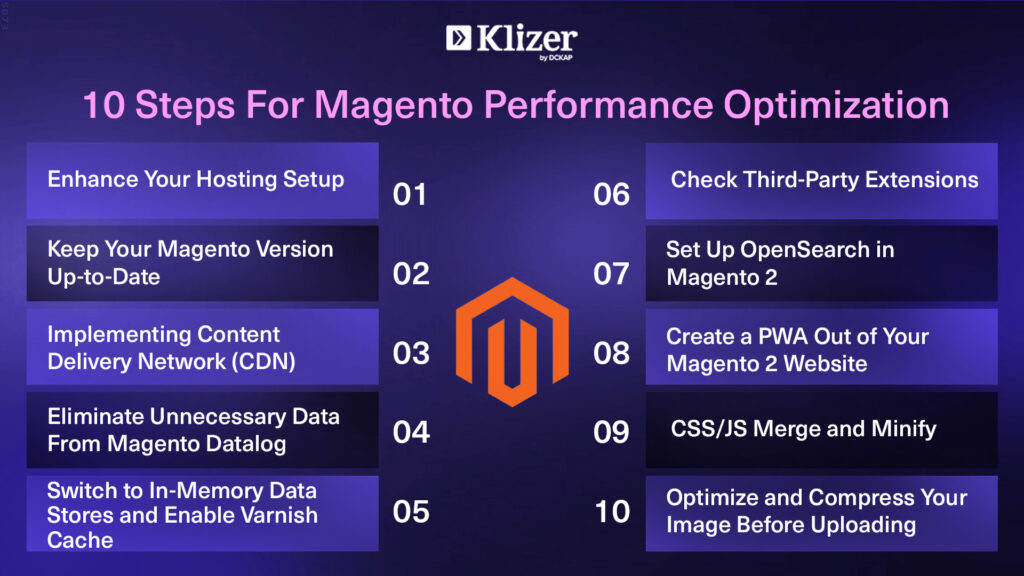
1. Enhance Your Hosting Setup
A solid hosting environment lays the groundwork for a Magento store. Opting for a fast, secure, and dependable hosting provider guarantees that your store runs smoothly, offering customers a seamless shopping experience. Consider cloud hosting solutions for scalability and dependability, ensuring that your hosting arrangement meets your company’s needs.
Here’s a simple checklist to keep in mind when picking a Magento hosting provider:
- Please verify if the hosting provider aligns with the system requirements of your Magento version. Confirm compatibility with MySQL 5.6 or higher and PHP 7.0 or later. Additionally, ensure support for Apache 2.x, NGINX, or Litespeed.
- Verify compatibility with essential components such as Elasticsearch or OpenSearch, Redis, and RabbitMQ to meet the standards for optimal performance and functionality. Additionally, validate adherence to PCI Compliance standards for secure transactions.
- Ensure that the server is updated with the latest software, follows PCI standards, and guarantees a safe shopping experience for your customers.
- Choose a server location close to your target audience to improve response times and enhance user experience.
- Consider the storage space you need and ensure that the hosting provider offers regular backups to keep your data secure.
- Look for robust security features like firewalls, intrusion detection systems, malware scanning, and protection against DDoS attacks.
- Consider advanced security measures such as regular debugging, free SSL certificates, and 24/7 support for quick security assistance.
- Check if the hosting provider has backups and a reliable way to retrieve your data if anything goes wrong.
2. Keep Your Magento Version Up-to-Date
Magento constantly releases updates that include performance improvements and security patches. Upgrading to the current version ensures that your store has the most recent features. Furthermore, maintaining current helps to resolve potential vulnerabilities and compatibility concerns with third-party extensions.
If you’re currently using Magento 1, we recommend you migrate to Magento 2. It comes with many features that help you with your business and meet customer demands, all while offering much-improved security.
Reach out to our Magento developers if you require assistance initiating the upgrade process for your ecommerce store. They can guide you through a tailored migration plan that suits your needs, even if you have complex setups and extensive customizations.
Read Also: Magento Features (Open-Source & Commerce)
3. Implementing Content Delivery Network (CDN)
Implementing a Content Delivery Network (CDN) significantly improves Magento’s performance. A content delivery network (CDN) distributes your website’s static assets over several servers worldwide, lowering latency and speeding up content delivery. It leads to faster page loading times, particularly for users who are remote from your server’s geographical proximity.
- A CDN copies your website’s resources to a network of interconnected servers, strategically located based on your potential customers’ locations.
- When users access your website, the CDN identifies the closest server and delivers files such as images, JS and CSS files, videos, and other resources to their browser efficiently. It reduces server response time and improves the speed of your Magento website.
- Many reputable hosting providers now include CDN connections as part of their services. However, if your current hosting doesn’t offer this feature, you can explore separate CDN provider services to complement your hosting plan.
4. Eliminate Unnecessary Data From Magento Datalog
Over time, your Magento database accumulates unnecessary data, which can slow down your website. It’s essential to regularly clean up the database by removing outdated entries like logs and client information. It helps reduce database size and improve query efficiency, resulting in faster response times.
- Magento 2 stores product data in a component called Magento Datalog. However, it’s crucial to delete unused data, such as information on discontinued products or deleted product reviews, to free up disk space and speed up the loading time of product pages and search results.
- Managing Magento store databases can be complex, but there’s a simple way to clean up your Magento Datalog.
- Go to System > Configuration > Advanced > System in the Magento Admin Panel
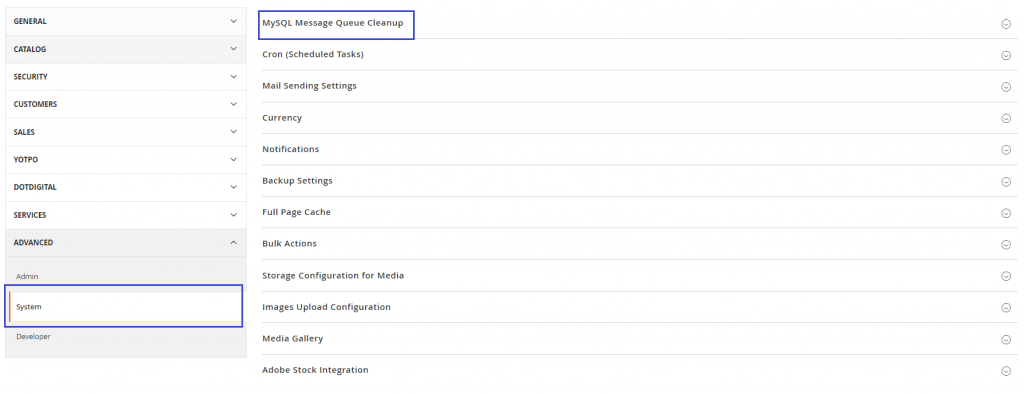
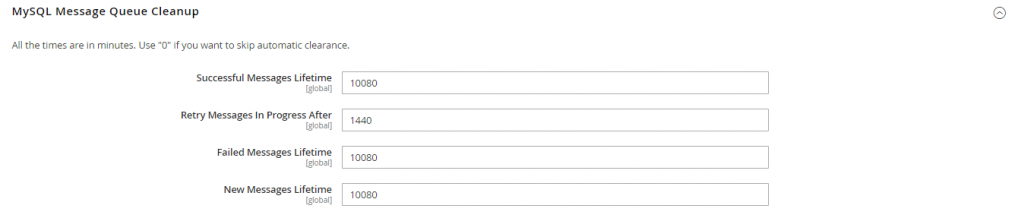
- expand MySQL Message Queue Cleanup. Set the values for all attributes and save the configuration after entering the necessary information.
5. Switch to In-Memory Data Stores and Enable Varnish Cache
In-memory data stores like Redis or Memcached offer faster data retrieval compared to Magento’s default cache. They also offer data backup capabilities for recovery during power outages or server restarts.
Using these in-memory data stores instead of storing files on the hard disk can significantly enhance data processing speed through caching, saving valuable time for data retrieval from RAM. Optimizing data retrieval is crucial to meet the expectations of ecommerce customers who prefer swift page loading times.
Enable Varnish Cache
- Varnish is a strong HTTP accelerator that can improve Magento 2 speed.
- Varnish minimizes server load by caching HTTP requests, which accelerates content delivery.
- Configure Varnish to interact with Magento, ensuring that content is refreshed as needed.
6. Check Third-Party Extensions.
Third-party extensions in Adobe Commerce can cause various issues leading to performance degradation in your Magento store. Therefore, it’s crucial to keep these extensions up-to-date with their latest versions or consider alternative options if you encounter any causing increased load time.
It’s advisable to download or purchase third-party extensions from trusted sources to ensure reliability. In addition to the optimization steps mentioned earlier for your Magento 2 store, it’s essential to evaluate the installed third-party modules.
With Magento updates, some extensions may become incompatible and cease to function correctly. Remove unnecessary ones or update to versions compatible with your current Magento version to optimize performance.
Review all critical CMS pages such as the homepage, categories, products, and checkout. If disabling the module improves loading speed, you have successfully addressed an additional issue affecting Magento’s performance.
Also Read: Magento Multi-store Guide
7. Set Up OpenSearch in Magento 2
OpenSearch enhances the search functionality of your Magento store by enabling efficient retrieval of large volumes of data. This indexing service operates on the server, streamlining the search process and improving the user experience for product searches.
- Before configuring OpenSearch in Magento 2, ensure that your server hosts a compatible version of OpenSearch, which is installed and operational.
- Refer to the OpenSearch documentation for precise compatibility requirements. Additionally, verify that your Magento installation meets the necessary technical prerequisites for integrating OpenSearch. Ensure that OpenSearch is accessible and running before its configuration within Magento.
- For specific configuration details such as authentication or index prefix usage, consult the OpenSearch documentation. If required, consider adjusting advanced OpenSearch settings within the configuration options.
Following these steps diligently will lead to successful OpenSearch configuration in Magento 2, ultimately improving the efficiency of product searches and enhancing the overall user experience.
8. Create a PWA Out of Your Magento 2 Website
A progressive web app (PWA) is a web application built using standard web technologies like HTML, JavaScript, and CSS. It offers functionality similar to that of a native mobile app, providing users with an app-like experience.
Converting your Magento 2 website into a PWA can lead to notable improvements in customer experience. Pages load faster, typically two to four times quicker, leading to an increased conversion rate of up to 33%.
Updates on Schedule Under Index Module
Indexes are necessary for Magento to obtain and display data. Set the indexing option to “Update on Schedule” to prevent real-time index updates with every change. Faster response times are the outcome of this setup, which reduces the impact on performance during client interactions.
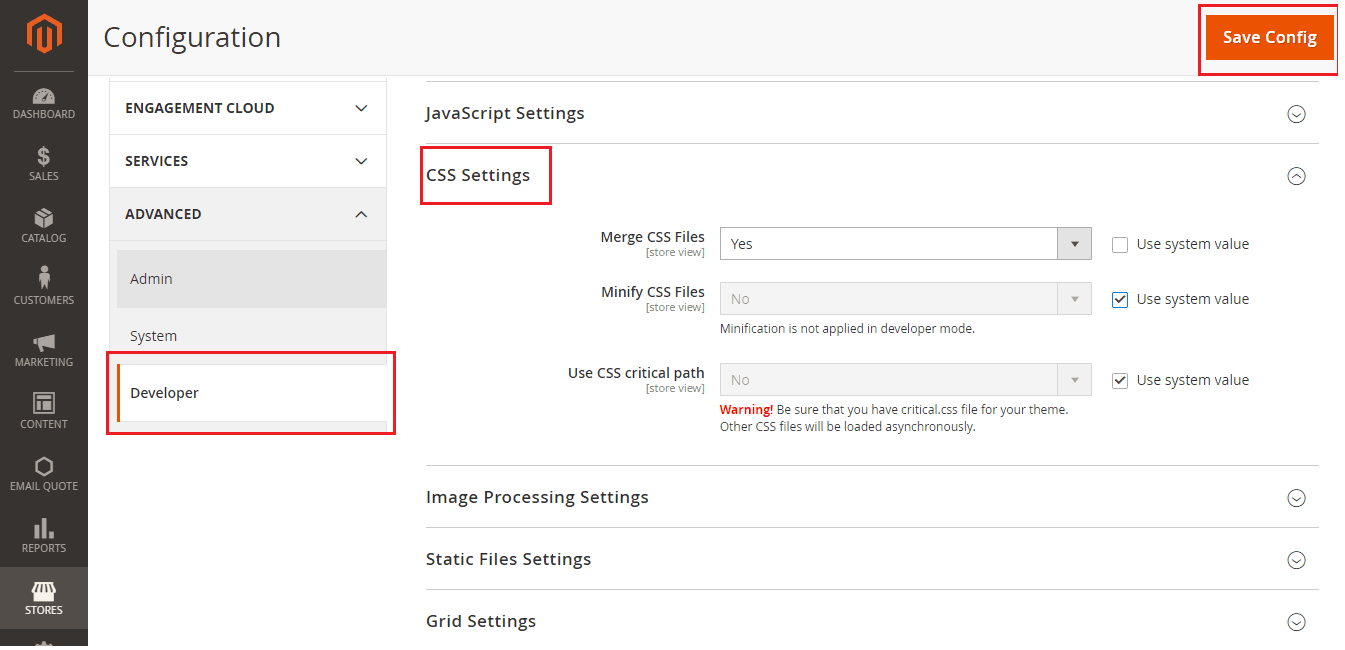
9. CSS/JS Merge and Minify
Combining and compressing CSS and JS files reduces webpage load times. Minification removes unnecessary characters like spaces and tabs, resulting in smaller file sizes that enhance speed.
Merging consolidates code into single files, reducing the number of file requests. You can activate CSS/JS minification in the Magento Admin panel.
To enable JavaScript minification:
- Switch Magento to production mode
- Navigate to Stores > Configuration > Advanced > Developer
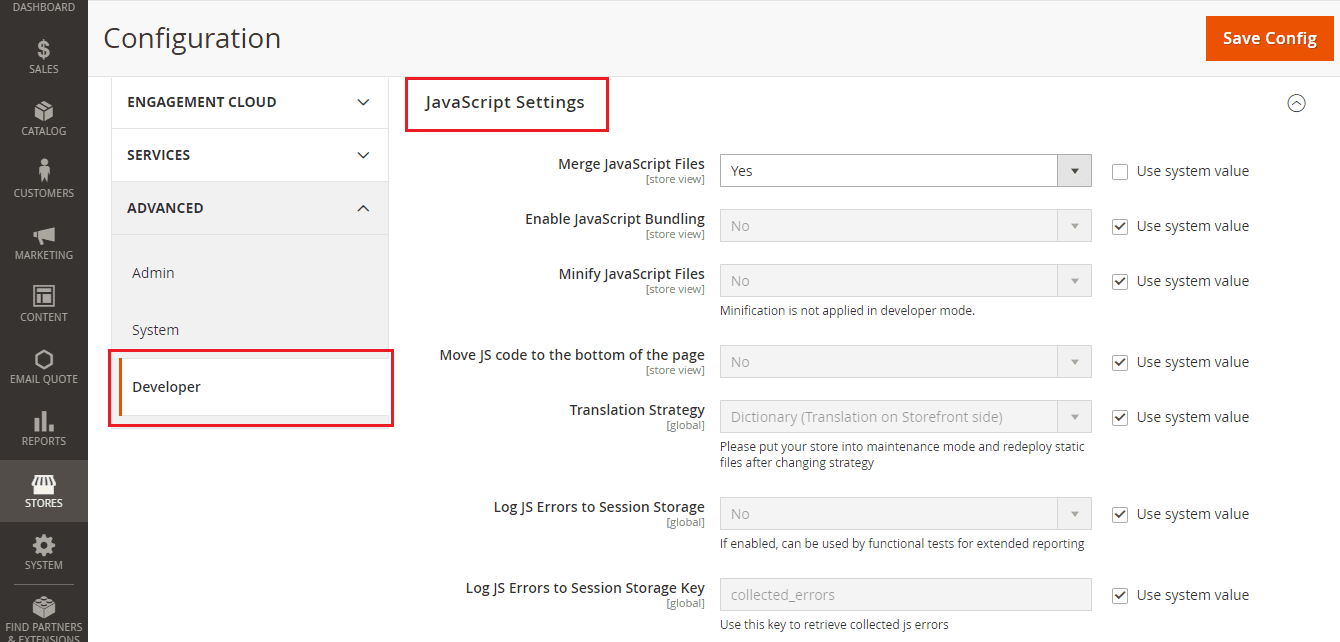
- Set Minify JavaScript Files to Yes
- Save the Configuration
- Flush Cache under System > Cache Management.
To activate CSS minification, follow these steps:
- Set your Magento site to production mode
- Navigate to Stores > Configuration > Advanced > Developer > CSS Settings
- Set the Minify CSS Files option to Yes
- Save the Configuration
- Flush Cache at System > Cache Management page
10. Optimize and Compress Your Image Before Uploading
Excessive and uncompressed image sizes can slow the speed of your website. Optimize your product photos for the web by compressing them without compromising quality before posting. Reduce the file size to ensure quicker download times without sacrificing aesthetic appeal by using online services or product image compression software.
Allow compressions on the server side, like Gzip or Brotli, to minimize the size of files sent from the client web browser to the server. The website loads more quickly when compressed files are used. Verify the server setup or your appropriate hosting company to allow compression for your Magento 2 store.
Recommended Read: Magento Website Development
The Best Magento 2 Store Speed Outcome
It’s critical to evaluate your fast site speed and pinpoint areas for development if you want to maximize Magento store performance. Variables, measurements, and instruments are employed to assess the success of your website’s performance.
- Time Spent Loading Page: To ensure optimal user experience, the time it takes for a page to load completely should be less than three seconds.
- Time to First Byte (TTFB): TTFB calculates the latency between a request and the server’s response. A more responsive server has a lower TTFB.
- Page Size: It’s important to evaluate the overall size of each page, considering the size of stylesheets, scripts, and graphics. Smaller page sizes often result in faster load speeds.
- Number of Requests: Monitoring the number of HTTP requests made to load a page is crucial. Reducing the number of queries can significantly improve the loading time.
Tips for Magento 2 Speed Optimization
The process of improving the speed of your Magento 2 involves taking calculated steps to remove certain performance bottlenecks.
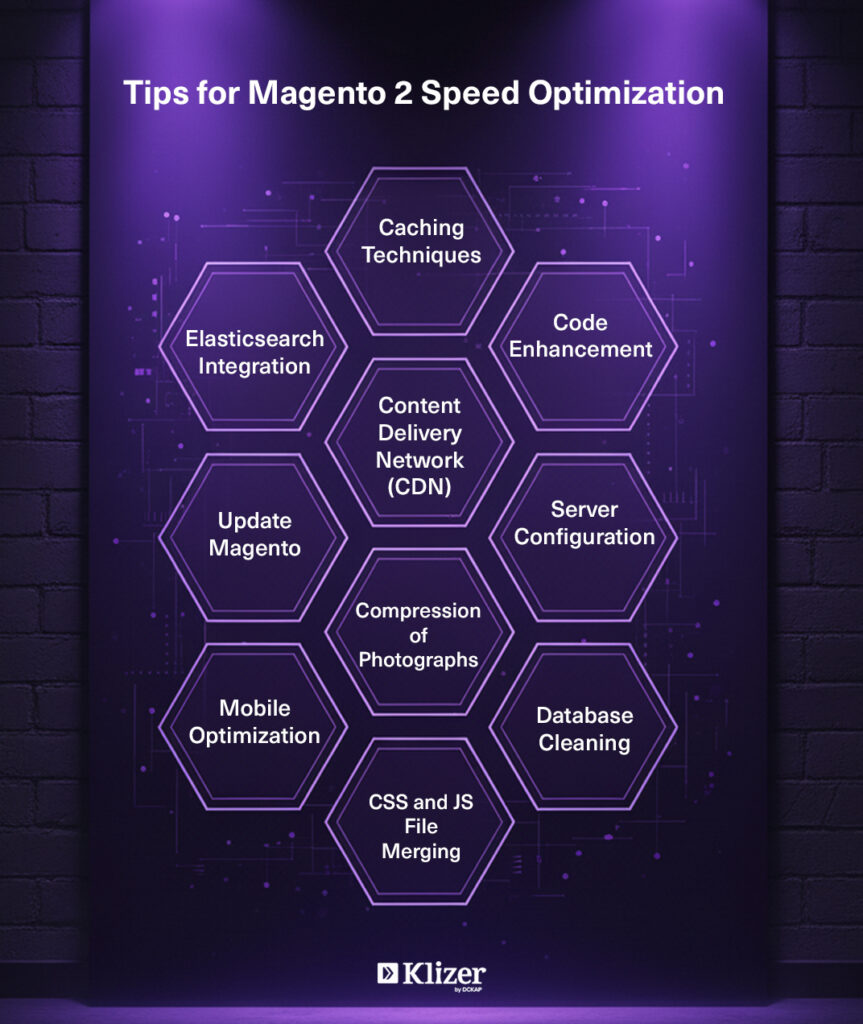
Content Delivery Network (CDN)
To lower latency and speed up content delivery, use a CDN to disperse static assets among several servers worldwide.
Caching Techniques
Use in-memory data stores for caching such as Redis or Memcached. For faster response times and HTTP acceleration, use Varnish caching.
Code Enhancement
Review and improve your codebase regularly. Use best practices for effective coding, and don’t use any extraneous or repetitive code.
Server Configuration
Make sure your server configuration satisfies Magento 2 criteria by optimizing it. For reliability and scalability, think about cloud hosting.
Database Cleaning
Frequently purge unnecessary data from the database. Optimize indexes and tables in the database to improve query performance.
Compression of photographs
Before uploading, optimize your photographs by compressing them without sacrificing quality. Quicker loading times are a result of smaller picture sizes.
CSS and JS File Merging
Combining CSS and JavaScript files will reduce the amount of HTTP requests. Set up Magento to merge these files to achieve faster rendering.
Elasticsearch Integration
Make Elasticsearch the default search engine to improve search performance. Elasticsearch provides precise and quick search results.
Update Magento
Keep up with the most recent releases of Magento to take advantage of security updates, speed improvements, and positive and good news features.
Mobile Optimization
Make sure your Magento 2 is mobile-friendly by checking its optimization. Use responsive design and think about making your website a Progressive Web App (PWA) for a better mobile experience.
5 Extensions for Magento Speed Optimization
Magento extensions deal with caching, image optimization, and code minification, among other performance-enhancing techniques. Here are a few noteworthy additions:
1. Amasty Full Page Cache
Amasty Full Page Cache has been at the forefront of the Magento extension industry, enabling thousands of retailers with innovative solutions. Amasty offers 280+ extensions to meet the retail needs. Leveraging extensive ecommerce expertise, Amasty collaborates with industries like Canon, eBay, Blizzard, and Nestle, prioritizing partnerships regardless of size or specialty. Currently partnering with over 280 businesses globally, Amasty continues to expand its network daily.
Key Features
- Full-Page Caching: This technique reduces the requirement for content creation with each user request by storing complete pages in a reliable cache.
- Automated Cache Management: This feature ensures that users always receive the most recent material without compromising speed by automatically removing and recreating low-level file system caches.
- Configurable Cache TTL: This feature enables administrators to customize the cache time-to-live (TTL) and set the cache duration for individual pages.
Pricing: $219
Established In: 2009
Specialties: Magento, Magento Services, Magento Extensions, Magento Custom Development, Magento Extension Development, PHP, Magento Performance Optimization, Magento Services, E-commerce Solutions, and Shopify.
2. Fooman Speedster
Fooman has evolved into a prominent developer in the Magento Marketplace since its inception alongside the first iteration of Magento in 2008 and has been recognized as an expert on Magento 2. Fooman’s extensions allow developers and retailers to enhance productivity and Magento experience for potential customers. Developers and Magento business owners approve of Fooman for its clever functionality, intuitive administration, and high-quality code. Fooman’s reputation for dependability positions it as the preferred choice for reliable solutions in the Magento community.
Key Features:
- File Minification: Optimizes the loading of web pages by reducing the size of CSS and JS files.
- File Combination: Reduces the amount of HTTP requests needed for page rendering by combining several CSS and JavaScript files into a single file.
- Versioning automatically: This technique uses versioning of minified files to ensure that browsers get the most recent versions when the updates are made.
Pricing: Access Pricing
Established In: 2008
Specialties: Magento extensions and Magento development
3. Magento 2 Rocket JavaScript / Deferred JavaScript by Magefan
A robust solution to maximize JavaScript file loading on your Magento 2 store is Magefan’s Magento 2 Rocket JavaScript / Deferred JavaScript plugin. It improves the overall efficiency of your online store by delaying the execution of non-essential JavaScript, which leads to faster page loads and better customer satisfaction and experience.
Key Features:
- Deferred JavaScript Loading: This extension speeds up the initial page display by postponing the loading of non-essential JavaScript files and prioritizing the loading of essential content.
- Asynchronous Execution: JavaScript files load in an asynchronous manner so as not to obstruct the page’s presentation. Faster page loads and better-perceived performance are the results of this.
- Smart Loading Strategy: The plugin uses a smart loading approach that defers JavaScript files intelligently to preserve compatibility with different Magento themes and third-party extensions.
- Enhanced Page Speed Insights: The addon helps raise performance testing results on Google PageSpeed Insights and GTmetrix by streamlining JavaScript loading.
- Improved SEO Ranking: Quicker page loads have a beneficial effect on search engine rankings. Rocket JavaScript prioritizes material to make a website more search engine friendly.
Pricing: Free
Established In: 2015
4. Image Optimizer for Magento by Apptrian
Apptrian’s “Image Optimizer for Magento” is a feature-rich plugin that simplifies the picture optimization procedure for Magento 2 stores. This plugin speeds up page load time, improving overall website performance, with an importance on lowering picture file sizes without sacrificing quality. Because photos are essential to an online store’s aesthetic appeal, optimizing them is essential as it delivers a smooth and effective customer experience.
Key Features:
- Automatic Image Compression: The plugin automates the image compression process, ensuring the photos are prepared for online use without human intervention. This function is very helpful for online retailers who possess a large number of product photos.
- Lossless Compression: Apptrian’s Image Optimizer uses lossless compression methods to drastically reduce file sizes without sacrificing image quality. It guarantees quicker loading times while keeping your store’s aesthetic standards high.
- Bulk Optimization: You can optimize already existing photographs in your media library by using the bulk optimization feature of the plugin. Those who want to optimize their photographic assets in the past will find this function convenient.
- Adjustable Compression Parameters: Users can alter compression parameters to suit their tastes and requirements for quality. It makes it possible to customize picture optimization to meet the demands of certain businesses.
- Supported Image Formats: This extension supports popular image formats such as JPEG, PNG, and GIF, commonly utilized in ecommerce, allowing efficient optimization of all picture formats due to its wide compatibility.
Pricing: Free
Established In: 2022
5. Magento 2 Page Speed Optimization Extension by Weltpixel
Weltpixel’s Magento 2 Page Speed Optimization Extension focuses on several factors that lead to quicker page loads to improve the functionality of Magento 2 stores. The main optimization components of this addon provide a more responsive and seamless user experience.
Key Features:
- Browser Caching: Enable browser caching to save static files locally and decrease load times for repeat users.
- Lazy Loading: Reduce initial page load times by using lazy loading for pictures. This ensures that new images are loaded only when they enter the user’s viewport.
- JavaScript and CSS minification: Minify JS and CSS files to make them smaller and faster for users to download.
- Image compression: Reduce file sizes for faster loading by automatically optimizing and compressing high-resolution images while preserving visual quality.
- Optimization of HTML and CSS Delivery: To expedite the rendering process, optimize the delivery of HTML and CSS resources.
Pricing: $199.00E
Established In: 2014
Specialties: ecommerce, Magento, Magento responsive themes, custom development, integrations, analytics, SAP, ERP, and Enterprise
Enhancing Magento Performance Optimization
You may improve your Magento 2 ecommerce platform’s responsiveness, sluggish performance, and general user experience by methodically putting the above crucial measures into practice, as described in this thorough guide. Maintain a proactive approach in the ecommerce space to track the performance and adjust to changing industry best practices to keep your online business competitive.
FAQ
What role does a full-page cache play in improving the speed of a Magento website?
A vital strategy for improving the speed of a Magento website is full-page caching. It improves user experience and speeds up server response times by saving completely rendered pages. Full-page caching reduces the need to create pages dynamically, which speeds up websites—a critical component of ecommerce success.
How can I prioritize CSS file optimization for Magento website speed, and what is the significance of doing so?
CSS file optimization is essential for a fast Magento website. By indicating which should load first in your HTML, you can make sure that the most important styles are applied first. Enhancing the initial page load is prioritized for a smooth user experience.
How to enable GZIP compression and is it effective for speeding up my Magento site?
Yes, using GZIP compression to optimize Magento site speed is a good idea. GZIP compression speeds up website page loading times by reducing the amount of data sent between the server and the browser. In the setup of your web server, you can enable GZIP compression.