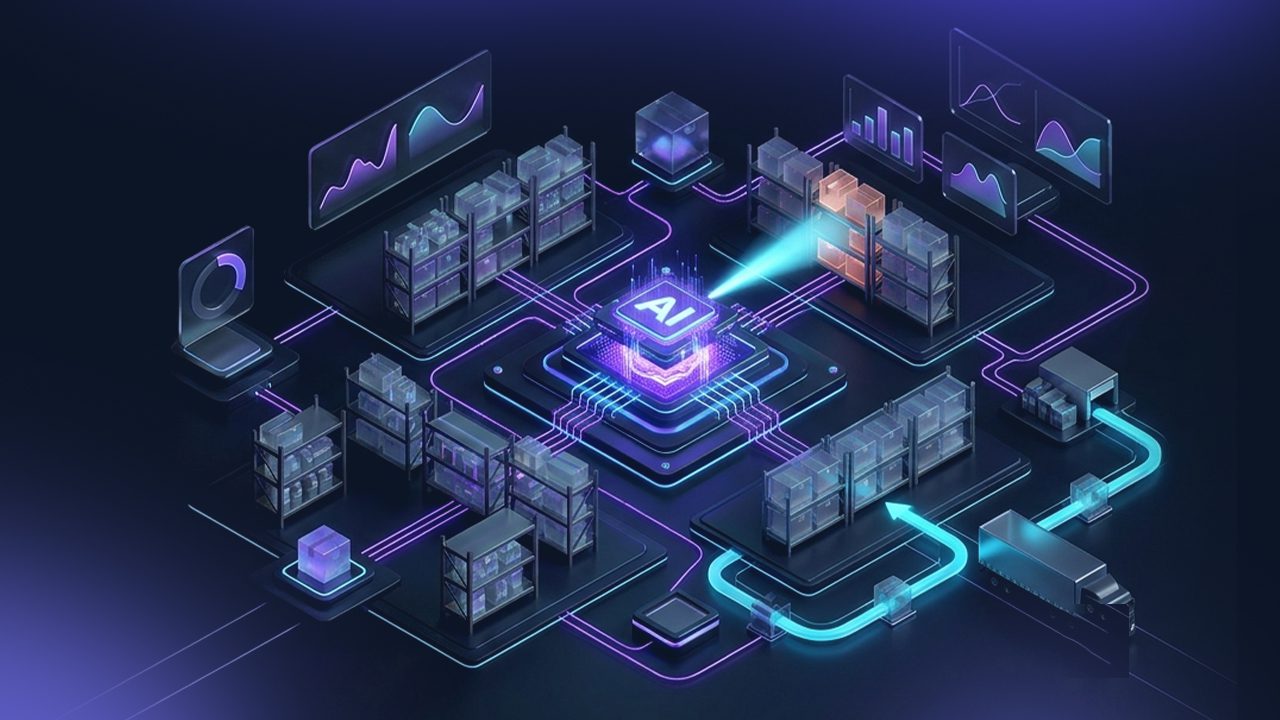

Most Magento stores aren’t really connected. They look connected. But somewhere between the order confirmation and the warehouse, a human being is copying data from one system into another.
That person is your integration.
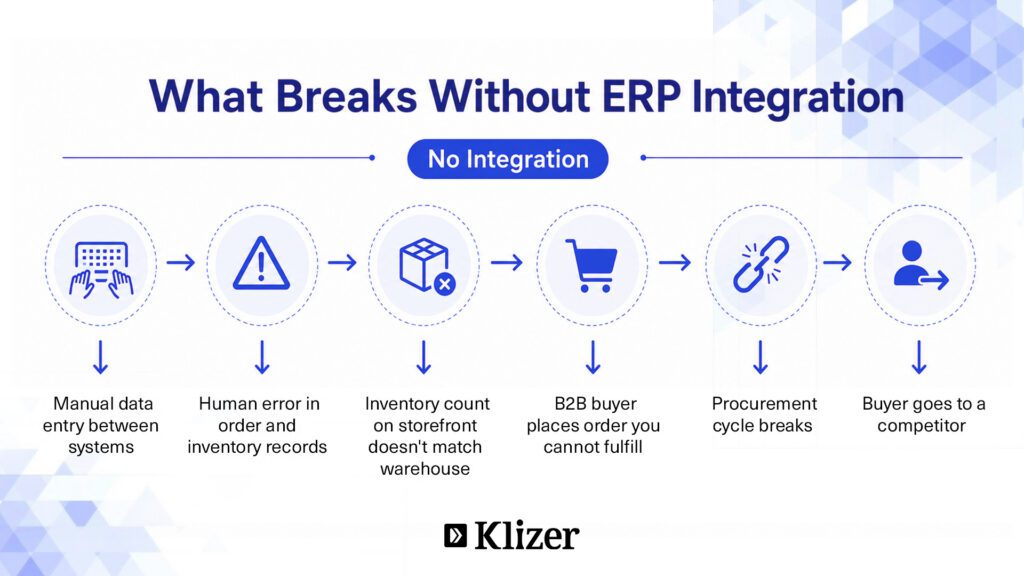
It works until it doesn’t. Until order volumes spike. Until that person is out sick. Until the ERP and the storefront disagree on how many units are actually in stock and a B2B buyer places an order you can’t fulfill.
This is what Magento ERP integration is designed to fix. Not just technically, but operationally.
Getting ERP integration with Magento right means your orders route automatically, your inventory stays accurate, and your team stops bridging two systems by hand. Every ERP integration Magento teams get right starts with one decision: choosing the right ERP for Magento and connecting it to your storefront properly.
By the end of this guide, you will know exactly how to evaluate, plan, and build a Magento ERP connection that your ops team will actually trust.
ON THIS PAGE
What Is Magento ERP Integration?
Magento ERP integration is the process of connecting your Adobe Commerce storefront to an enterprise resource planning system so that data flows automatically between them.
When done right, it means an order placed on Magento triggers fulfillment in the ERP. Inventory changes in the warehouse reflect instantly on the storefront. Pricing, customer data, and financial records stay consistent across both systems without manual intervention.
This is not a one-time sync. It is a live connection between your commerce layer and your operational backbone.
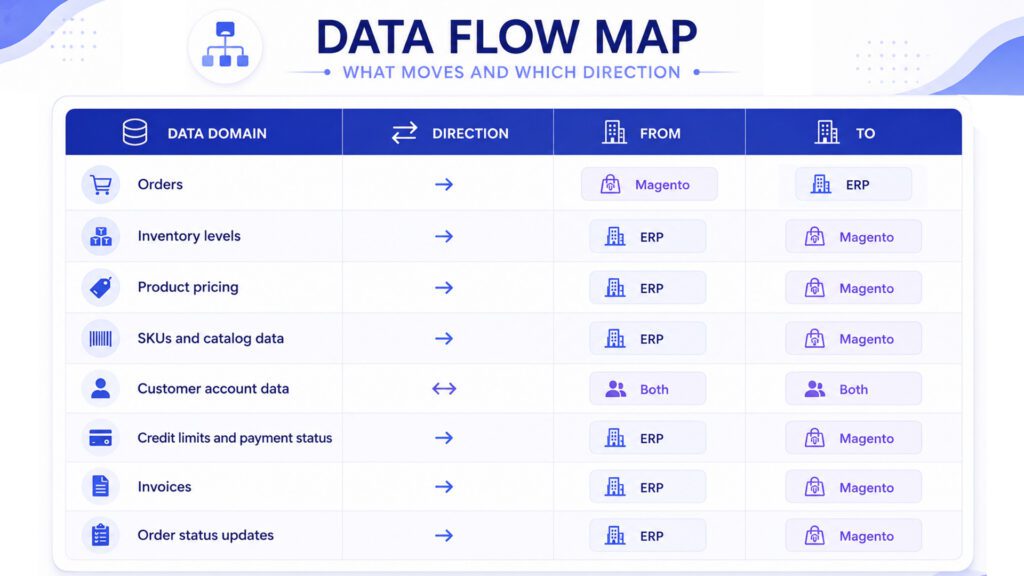
Magento integration with ERP typically covers these data domains:
- Orders: New orders pushed from Magento to the ERP for processing and fulfillment
- Inventory: Stock levels pulled from the ERP and reflected in real time on the storefront
- Products: SKUs, pricing, and catalog attributes managed in the ERP and synced to Magento
- Customers: Account data, credit terms, and purchase history shared between systems
- Invoices and payments: Financial records kept aligned across both platforms
Why B2B Businesses Need Magento ERP Integration
For industrial manufacturers and distributors, the stakes are different than in B2C retail. Orders are larger. Pricing is contractual. When something breaks between the storefront and the back office, it doesn’t just cause a return. It breaks a procurement cycle.
Here is what ERP Magento integration solves at the operational level.
1. Real-Time Inventory Accuracy
Overselling in B2B is a supply chain problem, not a customer service one. Connected systems keep stock levels aligned so what a buyer sees on the storefront matches what actually exists in the warehouse.
2. Automated Order Processing
Without integration, someone is manually re-entering Magento orders into the ERP. Every day. For every order. With Magento ERP system integration, orders route directly into the ERP the moment they’re placed. Fulfillment starts immediately.
3. Consistent, Contract-Accurate Pricing
Tiered structures, volume discounts, customer-specific rates. The ERP holds all of that logic. Integration makes it the single source of pricing truth. The storefront reflects it automatically.
4. Centralized Financial Data
Invoices, credit limits, payment status. When Magento is connected, that data surfaces on the storefront. Buyers manage their own accounts without calling your sales team.
5. Scalability Without Adding Headcount
Manual data handling has a ceiling. An ERP system for Magento automates the repetitive work, including syncing inventory, routing orders, and updating pricing. Your operation scales without the headcount scaling with it.
Four Ways to Integrate Magento with Your ERP
The right approach to Magento integration with ERP depends on three things: which ERP you’re running, how customized your workflows are, and how much internal technical capacity you have. Get that wrong and you’ll either over-engineer a simple problem or under-build a complex one.
1. Custom API Integration
Magento and most ERPs expose APIs. Custom integration means your developers build a direct connection between the two with full control over what data moves, when, and what happens when something fails.
Right call when your ERP has configurations no prebuilt connector will account for. Approval chains, custom order statuses, industry-specific fulfillment logic. Costs more, takes longer, needs maintenance when either system updates. But for complex B2B operations, it often holds up best long-term.
2. Adobe Commerce ERP Integration Module
A Magento ERP integration module is a prebuilt connector for a specific ERP. Install it, configure field mappings through the admin panel, get working sync for orders, inventory, and product data without custom code.
Faster to deploy, lower upfront cost. The ceiling is real though. Customized ERP configurations and non-standard pricing logic will push a module past its limits quickly.
3. iPaaS (Integration Platform as a Service)
Celigo, Workato, and Jitterbit are cloud-based platforms that sit between Magento and your ERP. Prebuilt connectors, visual mapping, retry logic, monitoring built in. You configure rather than build. It’s a good fit for growing distributors who need more flexibility than a module but want to avoid full custom development.
4. Enterprise Middleware
A central architectural layer connecting Magento, your ERP, and every other system through one managed hub. Full data transformation, orchestration, and deep governance. Examples are MuleSoft and Dell Boomi.
The complexity and cost match the capability. You need dedicated technical resources to run this properly. Right for large enterprises where a broken integration carries serious operational consequences.
Four Ways to Integrate Magento with Your ERP: At a Glance
| Custom API | Integration Module | iPaaS | Enterprise Middleware | |
| Best for | Complex B2B with custom workflows | Standard ERP configs | Growing distributors | Large enterprise |
| Setup time | Long | Fast | Medium | Long |
| Cost | High | Low | Medium | High |
| Flexibility | Full control | Limited | Moderate | Full control |
| Technical resources needed | High | Low | Low to medium | High |
| Handles custom pricing logic | Yes | Rarely | Partially | Yes |
| Maintenance burden | High | Low | Low to medium | High |
| Examples | Custom build | ERP-specific connectors | Celigo, Workato, Jitterbit | MuleSoft, Dell Boomi |
Why Magento ERP Integration is the Foundation for Operational AI
AI tools for ecommerce are only as good as the data feeding them. Demand forecasting, pricing engines, and recommendation systems. None of these work reliably if your storefront and ERP are still exchanging data through manual processes or delayed batch syncs. The integration layer is not a prerequisite you check off before the interesting work starts. It is what makes the interesting work possible.
When Magento and your ERP are properly connected, every AI capability tied to your operations gets a clean, real-time data foundation to work from.
- Demand forecasting needs historical order data, current inventory positions, and supplier lead times in one place. With integration, your forecasting model draws from actual ERP records, not exports someone ran last Tuesday.
- Inventory optimization requires knowing what is in stock, what is committed, and what is on order across every location at the same time. A disconnected store gives you none of that. A connected one gives the AI exactly what it needs to flag overstock risks, prevent stockouts, and rebalance inventory before the problem shows up in a customer order.
- Customer-specific recommendations in B2B are not about browsing behavior. They are about purchase history, contract terms, and catalog access. That data lives in the ERP. Without integration, your recommendation engine is working from an incomplete picture and surfacing products that may not even be available to that buyer.
- Automated replenishment only works when the AI can see actual stock depletion in real time and trigger purchase orders against supplier data in the ERP. A sync that runs every few hours is not real time. By the time the replenishment logic fires, the stockout may already be live.
- Pricing intelligence in B2B means tiered structures, volume thresholds, and customer-specific rates. The ERP holds that logic. An AI pricing layer that cannot read from it will either surface the wrong price or require manual overrides that defeat the purpose entirely.
The pattern is the same across every use case. The AI is not the hard part. Getting it accurate, consistent data in real time is. That is what Magento ERP integration actually enables.
Popular ERPs for Magento Integration
The ERP solution for Magento that fits your business depends on your size, industry, and operational complexity.
- SAP Business One / S/4HANA: Common in mid-market to enterprise manufacturing. Deep functionality for procurement, production, and finance. Integration complexity is high, but the operational payoff is significant.
- Oracle NetSuite: Cloud-native ERP with strong order management and multi-entity support. Popular with distributors operating across multiple locations or legal entities.
- Microsoft Dynamics 365: Widely adopted in B2B environments. Flexible architecture and strong integration tooling through Azure. Good fit for businesses already in the Microsoft ecosystem.
- Odoo: Open-source ERP with modular architecture. Works well for mid-sized manufacturers that want flexibility without enterprise licensing costs.
- Epicor (Eclipse, Prophet 21): Built specifically for industrial distribution. If you distribute electrical, HVAC, or MRO products, these are purpose-built ERP software for Magento integrations is worth considering.
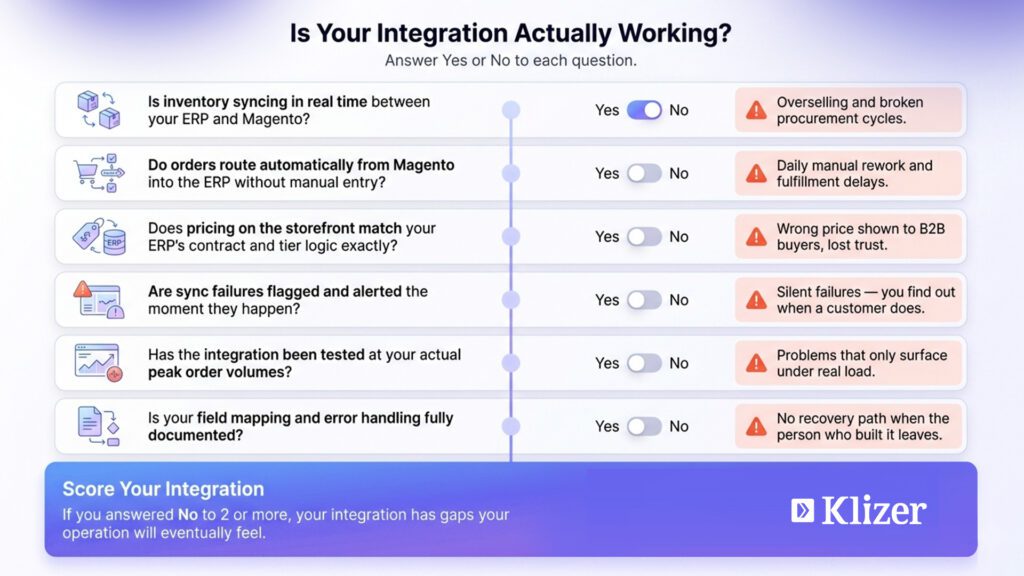
Is your integration actually ready for AI?
Most errors in demand forecasting, pricing, and recommendations trace back to the integration layer, not the AI tool. Before adding more on top, it’s worth knowing where the gaps are.
Step-by-Step Integration Process
Magento and ERP integration does not happen in a single sprint. Most projects that go sideways don’t fail because of bad technology. They fail because the groundwork wasn’t done before anyone opened a code editor.
Here’s what the process actually looks like.
Step 1: Requirements Mapping
Before writing a single line of code, document what data needs to move, in which direction, and how often. Orders flowing one way. Inventory the other. Pricing pulled on a schedule or on demand. Every successful Magento integration ERP project starts here.
Step 2: Data Audit and Cleanup
ERP data is almost always messier than people expect. Duplicate SKUs, inconsistent customer records, and pricing tables nobody has touched in three years. Clean it before integration starts. Those problems don’t disappear when you connect two systems. They just show up as errors on your storefront instead.
Step 3: Architecture Decision
Pick your integration method based on what the requirements actually show, not on what’s cheapest or fastest. Most Magento ERP integrations fail here, not because of bad technology, but because the method didn’t match the operation. Define how failed syncs get flagged, logged, and retried. Error handling is not an afterthought.
Step 4: Build and Configure
Map the fields, build the connection, and configure the business logic. Partial fulfillments, returns, credit holds, order status updates. The edge cases matter as much as the main flow.
Step 5: Staging and Load Testing
Test with real data volumes, not sample records. Simulate peak order periods. Run concurrent inventory updates. Staging with clean, low-volume data will not surface the problems that production will.
Step 6: Go-Live and Monitoring
Launch with active monitoring on both sides from day one. Sync failures, latency spikes, data mismatches. The first few weeks after go-live will surface edge cases that staging never caught. That’s normal. What matters is catching them fast.
Best Practices for a Stable Magento ERP Integration
1. Define data ownership clearly.
The ERP is the system of record. Pricing, inventory, customer master data. Magento reads from it. It does not override it. Ambiguity here causes data conflicts that are painful to untangle after the fact.
2. Build error handling from day one.
Every sync needs a retry mechanism and a failure alert. Silent failures are the most dangerous kind. An order that didn’t route, an inventory update that didn’t land. You won’t know until a customer does.
3. Version your integration.
When the ERP updates or Magento upgrades, the integration layer needs maintenance too. Treat it like a production codebase, not a one-time project. It will need to evolve.
4. Test with production-scale data.
Sample data hides volume problems. Test with real SKU counts, real order volumes, real concurrent updates. The issues that will hit you in production will not show up in a clean staging environment with 50 test records.
5. Monitor continuously after go-live.
Integration health is not a launch milestone. Build dashboards for sync status, error rates, and latency before you go live. The first few weeks will surface edge cases. Catch them fast.
6. Document everything.
Field mappings, business rules, sync schedules, edge case handling. The person who built the integration will not always be available. The documentation is the integration’s long-term memory.
How Klizer Approaches Adobe Commerce ERP Integration
Klizer is a connected commerce firm built for industrial B2B manufacturers and distributors.
We don’t treat ERP integration as a side project. We build it as part of a connected commerce system: storefront, integrations, and operational AI running together under one roof.
That means we map your business rules before touching any API. We build to your ERP’s actual data structure. And we stay accountable for the connection as both systems evolve. No handoffs to a separate integration vendor. No gaps between layers.
If your current Magento 2 ERP integration isn’t performing, or you’re starting fresh and want it built right the first time, start with a conversation.