Moving Epicor Prophet 21 (P21) to the cloud is no longer just a technology upgrade. For distributors, it is becoming a business necessity. Cloud environments offer better scalability, easier access to data, stronger disaster recovery, and lower infrastructure maintenance.
But here is the part many migration plans miss entirely: the ERP is rarely the hardest thing to move. The real challenge lies in everything connected to it.
Your Epicor P21 ecommerce platform, CRM, WMS, EDI systems, B2B portal, and custom applications all depend on P21 data. If these integrations are not audited before migration, they will break after the move. And when they break, so does your business.
This checklist will help you evaluate your current environment, identify integration risks, and move to the cloud easily.
ON THIS PAGE
Why P21 Migrations Fail
Most P21 migration projects do not fail because of the ERP migration itself. They fail because of the integrations around it.
The most common cloud migration blockers are undocumented SQL jobs, custom Epicor P21 reports built on local SQL Server, and ecommerce integrations dependent on direct database access. These are rarely flagged in the initial project scope. They surface mid-migration, when timelines are tight and pressure is high.
Here is what typically goes wrong:
- Teams assume integrations will just work in the cloud
- SQL-based connections are incompatible with cloud-hosted P21 and need redesign
- Automation workflows built on Windows Scheduled Tasks have nowhere to run
- Third-party vendors have not yet released cloud-compatible versions
- Undocumented integrations are discovered only after migration is underway
Most of these problems are avoidable with a proper integration audit before migration begins. That is the difference between a clean go-live and weeks of post-migration firefighting.
What an Integration Audit Reveals
Most distributors have spent years building connections between P21 and other systems. Over time, those connections multiply, and the documentation rarely keeps pace.
A structured integration audit surfaces four things:
- Every system connected to P21 — including the ones no one has documented
- How those connections work — direct SQL, APIs, file-based, middleware
- Which ones will break in the cloud — and why
- What needs to be rebuilt, replaced, or left alone
Without this visibility, you are making migration decisions based on incomplete information.
What Happens When Integrations Are Not Audited
Skipping the audit does not eliminate the risk. It just moves it later into the project, where it is harder and more expensive to fix.
These are the most common post-migration failures we see:
- Inventory sync failures: An Epicor P21 ecommerce integration relying on direct database access stops working after migration. Customers see incorrect stock levels. Orders are placed for items that are out of stock.
- Incorrect customer pricing: A CRM pulling contract pricing from P21 via a SQL query loses connectivity. Sales reps quote the wrong prices. Finance has to manually reconcile orders.
- Order processing delays: A custom order automation built on a Windows Scheduled Task does not run in the cloud environment. Orders that used to flow automatically now require manual intervention.
- Broken EDI transactions: EDI connections configured for an on-premise environment fail to authenticate in the cloud. Supplier and customer orders stop processing.
- Epicor P21 reports going dark: SSRS reports built on local SQL Server access stop running. Executives lose visibility into daily operations. Teams revert to spreadsheets.
- B2B portal failures: A B2B portal that integrates to Epicor P21 for customer-specific pricing, account history, and order tracking loses its data connection. Customer self-service goes down entirely.
Each of these is avoidable. But only if you find the problem before migration, not after
P21 Integration Audit Checklist
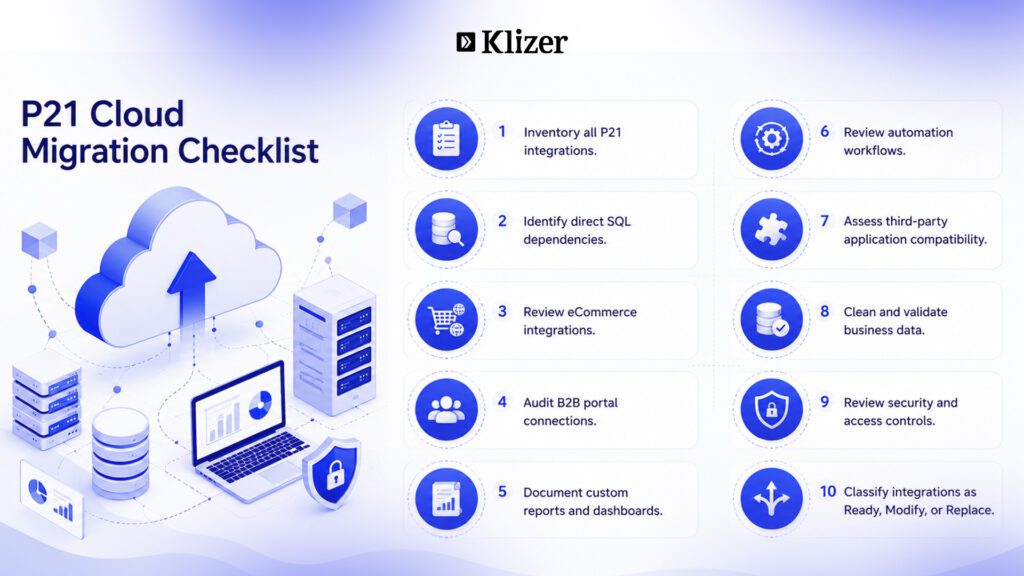
1. Create a Complete Integration Inventory
Start by documenting every system connected to P21. This step alone consistently surprises distributors. In almost every environment we audit at Klizer, we find integrations running quietly in the background with no owner, no documentation, and no one who remembers setting them up.
For each integration, record:
- System name and business purpose
- Integration owner
- Data being exchanged
- Frequency of synchronization
- Integration method used
Key questions to ask:
- What systems send data to P21?
- What systems receive data from P21?
- Which integrations are business-critical?
- Which ones are no longer actively used?
2. Identify Integration Methods
How each integration communicates with P21 determines whether it will work in the cloud. Direct database connections are the most common problem. They work fine on-premise. In a cloud-hosted P21 environment, they often need to be rebuilt using the Epicor P21 API.
Common integration methods to identify:
- Direct SQL database access
- REST APIs — refer to Epicor P21 API documentation for supported endpoints
- Flat file imports and exports
- Middleware platforms
- Custom applications
Flag every direct SQL connection as a migration risk. These will need the most attention during remediation.
3. Review Custom SQL Queries and Stored Procedures
This is one of the most consistent migration blockers we encounter. Distributors build SQL customizations over years, often tied to Epicor P21 reports, pricing logic, and order automation. When they move to cloud-hosted P21, those customizations either stop working or require significant redesign.
Audit every:
- Stored procedure
- SQL job
- Database trigger
- Custom view
- Reporting query
For each one, ask:
- Is this still needed?
- Can it be replaced with a supported API call per the Epicor P21 API documentation?
- Can the reporting move to a modern BI platform?
4. Evaluate Epicor P21 eCommerce Integrations
Epicor P21 ecommerce is typically the highest-priority integration for distributors. Customers expect real-time inventory and accurate pricing. Any disruption in these data flows directly impacts revenue and customer trust.
Review how P21 handles:
- Product synchronization
- Inventory updates
- Customer pricing and contract pricing
- Order creation and confirmation
- Shipment tracking
- Customer account information
Check whether your ecommerce integration is built on direct database access or API-based communication. The former will not survive a cloud migration without changes. See section 8 for a deeper look at ecommerce migration risks.
5. Audit B2B Portal and Third-Party Applications
If you run a B2B portal that integrates to Epicor P21, it needs to be at the top of your audit list. B2B portals depend on P21 for customer-specific pricing, account history, order tracking, and product availability. A direct database connection here is a migration-day failure waiting to happen.
Beyond the B2B portal, most distributors rely on a range of third-party tools that quietly connect to P21:
- CRM systems
- Marketing automation platforms
- Shipping software
- Tax engines
- Procurement solutions
For each application, confirm:
- How it currently connects to P21
- Whether the vendor supports cloud deployment
- Whether an API is available
- What version updates may be needed before migration
6. Review Automation Workflows
Automation is one of the most overlooked areas in cloud migration planning. Most distributors have built automation over the years using Windows Scheduled Tasks, batch scripts, or locally hosted services. None of these run naturally in a cloud environment without redesign.
Look for:
- Scheduled jobs and batch processes
- Automated order notifications and emails
- Inventory alerts
- Workflow triggers connected to P21 data changes
Document every automated process before migration begins. These need cloud-compatible alternatives in place before go-live.
7. Assess Data Quality
Cloud migration is the right time to clean your data. Bad data does not get better in the cloud. It just becomes a cloud problem.
Review for:
- Duplicate customer records
- Inactive or outdated products
- Missing required fields
- Invalid records and pricing rules
Clean data leads to cleaner integrations. Every data quality issue you fix now is a support ticket you avoid later.
8. Review Security and Access Controls
Cloud environments often require different security models from on-premise setups. Authentication methods, API credentials, and data access policies all need review before migration.
Audit:
- User permissions and service accounts
- API credentials and authentication methods as defined in Epicor P21 API documentation
- Data access policies
- Compliance requirements specific to your industry
9. Evaluate Epicor P21 Reports and Reporting Dependencies
Epicor P21 reports are one of the most overlooked migration risks. SSRS reports and custom SQL-based dashboards built for on-premise environments will not automatically carry over to cloud-hosted P21. When they go dark, operations leadership loses visibility overnight.
Identify every:
- SSRS report
- Excel-based report
- Executive dashboard
- Scheduled report delivery
Determine whether each report should stay in P21 or move to a modern analytics platform. Migration is a practical moment to consolidate reporting onto a single tool.
10. Classify Every Integration for Cloud Readiness
Once you have a full integration inventory, classify each one into one of three buckets:
- Ready: Works without significant changes in the cloud
- Needs Modification: Requires API updates, security changes, or performance optimization
- Needs Replacement: Depends on unsupported architecture or outdated technology
This classification drives your migration timeline, effort estimate, and budget. It is also the clearest output you can take to leadership to explain what the project actually involves.
Common Migration Risks
Beyond integrations, a few recurring patterns tend to cause the most migration pain. Be especially careful if any of these apply to your environment:
- Most integrations rely on direct SQL access rather than the Epicor P21 API
- Integration documentation is incomplete or outdated
- Custom applications are not well understood by the current team
- Epicor P21 reports depend on local servers or SSRS
- Automation relies on Windows Scheduled Tasks
- Third-party vendors have not confirmed cloud compatibility
If three or more of these are true for your environment, plan for a longer integration remediation phase before migration begins.
Modernizing Integrations During Migration
Cloud migration is not just a lift-and-shift exercise. It is an opportunity to improve how your systems connect.
Distributors who use migration as a modernization moment typically move from:
- Direct SQL access to REST API-based communication using the Epicor P21 API
- Windows Scheduled Tasks to cloud-native automation tools
- Epicor P21 reports on SSRS to modern BI platforms with self-service dashboards
- Point-to-point integrations to middleware or integration platforms that are easier to maintain
These upgrades add time upfront. They save significantly more time over the next few years.
Why Epicor P21 eCommerce Integrations Need Special Attention
Epicor P21 ecommerce is the integration area where migration problems are most visible to customers. A broken inventory sync or a pricing error does not stay internal. It shows up on your website, in customer orders, and in your support queue.
The same applies to your B2B portal. A B2B portal that integrates to Epicor P21 carries customer-specific pricing, order history, account information, and real-time availability. When that connection breaks, your most important customers notice immediately.
Specific risks for ecommerce and B2B portal integrations during P21 cloud migration:
- Real-time data requirements: customers expect current stock and pricing, not batch-updated data from hours ago
- Database-dependent connections that need to be rebuilt using Epicor P21 API documentation as the reference
- Customer-specific pricing and account logic that can be complex to replicate in API-based flows
- Performance latency that can affect conversion rates if the integration is not optimized for cloud
eCommerce and B2B portal integrations should be tested in a staging environment before go-live, with full order-to-fulfilment testing under realistic load conditions.
Next Steps Before Moving to Cloud
If you are planning a P21 cloud migration in the next six to twelve months, here is where to start:
- Run the self-assessment above: If you score 3 or more Yes answers, a formal audit is the right next step.
- Build your integration inventory: Start with business-critical systems: Epicor P21 ecommerce, B2B portal, EDI, CRM, WMS.
- Flag every direct SQL dependency: These are your highest-risk items. They need to be mapped against current Epicor P21 API documentation to identify viable replacement paths.
- Confirm vendor cloud readiness: Check with every third-party vendor that they support cloud-hosted P21 in your required version.
- Plan for integration remediation time: Budget time and resources for rebuilds before the migration cutover date, not after.
You can end the blog with a short conclusion like this:
Conclusion
A successful P21 cloud migration requires more than moving your ERP. By auditing integrations, reports, and automations before migration, distributors can reduce risk and ensure a smoother transition.
If you need help planning or executing your migration, partner with a P21 cloud migration service provider like Klizer. Our P21 cloud migration services help distributors assess risks, modernize integrations, and migrate to the cloud with minimal disruption.