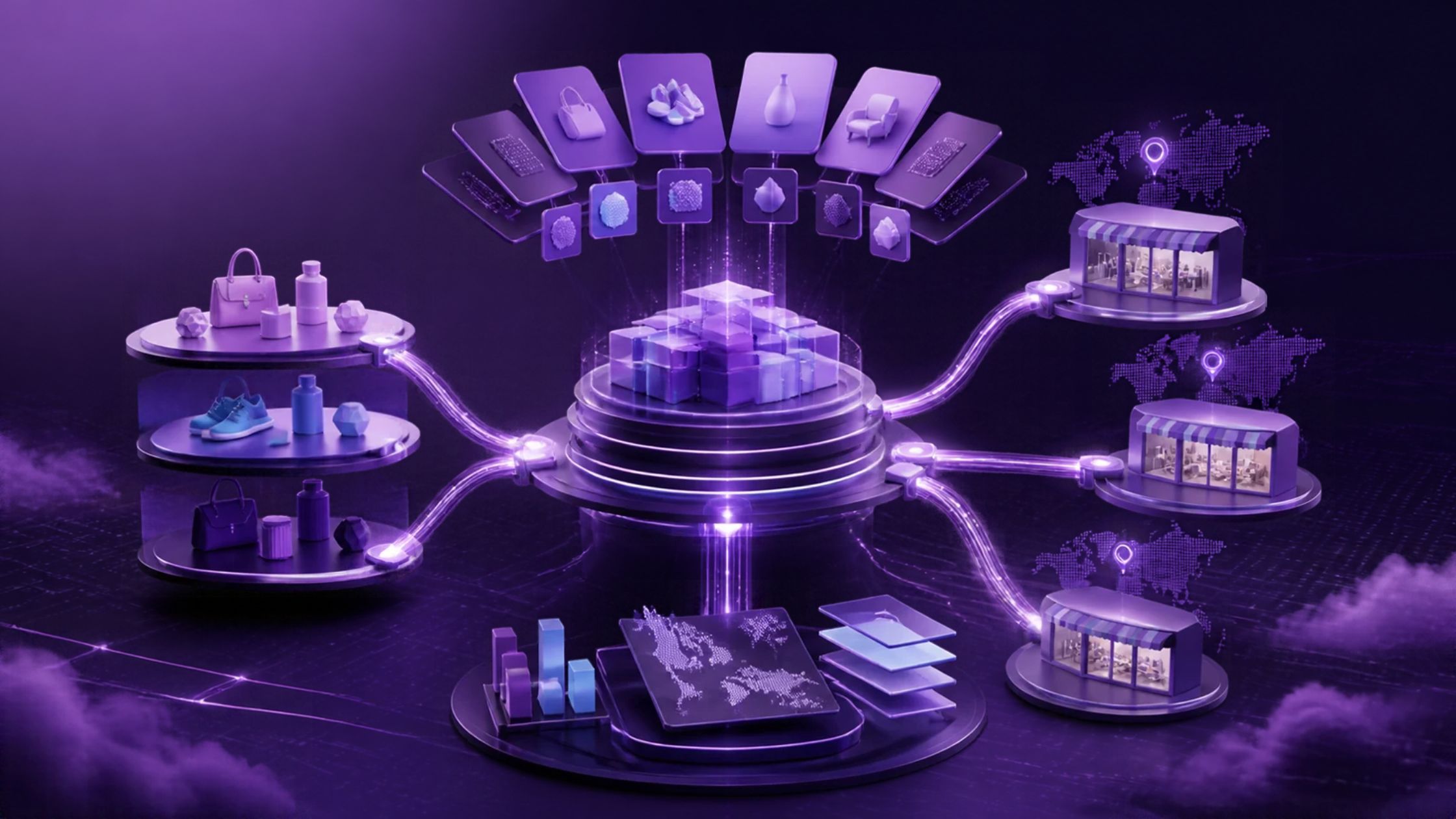

Imagine a manufacturer selling the same valves under two brand names. The company ships from warehouses in Ohio and Rotterdam and gives every distributor a negotiated price sheet that lives in the ERP.
On paper, that is one business. On Shopify it can be one store, three stores, or even six. And the difference shows up in inventory accuracy, order routing, and how many integrations the IT team has to keep alive.
For a Shopify Plus multi-store setup, a better question than store count is which boundary each requirement needs and what must be true at the data layer once you draw it.
ON THIS PAGE
What is Shopify Plus multi-store architecture?
Shopify Plus multi-store architecture is how one organization arranges its stores, markets, and catalogs. It decides which brand, region, and customer segment gets which storefront, and how product, pricing, customer, and inventory data stay consistent underneath.
One building block is the expansion store. Shopify expansion stores sit under the same organization and contract. The standard allowance is one main store and nine expansion stores at no additional platform cost; staging stores do not count toward that limit. Confirm eligibility and contract terms before adding a store.
What the organization layer does not do matters more. Store settings, products, collections, and inventory are not synced between stores. Organization-level users, roles, and billing do not replace cross-store data integration.
How Should You Separate Markets, Catalogs, and Brands?
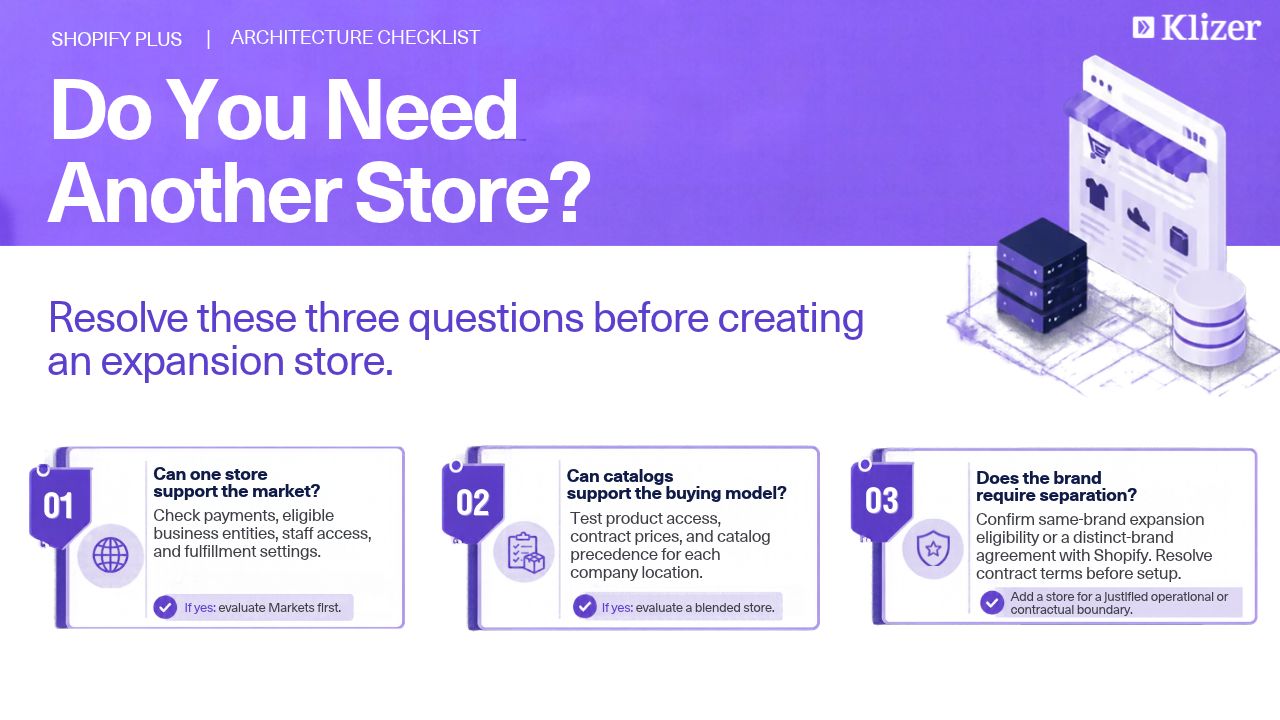
Markets, catalogs, and brands are three separate architectural questions. Each needs its own assessment of single-store capabilities, operational separation, and contract eligibility.
1. Markets
Shopify Markets lets one store sell into many regions. Country or region markets can customize currency, language, domains, and catalogs, with no limit on their number. Submarkets inherit settings and can override selected values. Multi-currency checkout requires Shopify Payments or Adyen; Markets requirements also limit staff permissions and published themes.
A separate legal entity does not automatically require another store. Eligible Plus stores can assign business entities to markets, with separate Shopify Payments accounts and payouts. Confirm supported countries, payment methods, and account eligibility.
A regional store split may be justified when:
- Required payment or entity arrangements are unsupported within one store.
- Teams need staff-access isolation that Markets does not provide.
- Fulfillment or storefront requirements cannot be met with supported single-store configurations.
If those constraints do not apply, evaluate a market before another store. Fulfillable inventory uses stock at locations that ship to the customer’s shipping zone. Configure and test shipping profiles, locations, routing, and overselling settings; a market alone is not a warehouse isolation rule.
2. Catalogs
For a distributor, “catalog” means who sees which products at which price. A Shopify catalog is a set of products with optional custom pricing, and you assign it to a market. On Plus, you can also assign it directly to a company location. Shopify’s B2B catalog guidance allows unlimited catalogs on Plus, compared with three active catalogs across B2B markets on Basic, Grow, and Advanced. Each company location can have up to 25 assigned catalogs, counting market and direct assignments together.
Pricing precedence matters when the ERP is the source. Among overlapping catalogs directly assigned to the same company location, Shopify uses the lowest price, with separate rules for quantity breaks. When a directly assigned catalog overlaps a matching B2B market catalog, the more specific company-location price takes precedence. Test both cases before publishing contract prices; a regional catalog does not automatically undercut a directly assigned contract catalog.
Catalog count alone is not a reason to add a store. Decide whether wholesale runs blended inside the DTC store or as a dedicated B2B storefront, which can qualify as a pre-approved expansion store under Shopify’s same-brand, same-product and login requirements. Shopify limits this allowance to one free B2B store per contract.
3. Brands
Brand introduces a contract boundary. Under standard expansion-store criteria, stores must extend the main brand, match its name and branding, and sell the same types of goods. A distinct brand may require a multi-brand agreement, with a separate Plus subscription for each brand. Confirm the proposed structure with Shopify.
A distinct private-label storefront and the manufacturer’s main brand therefore need a contract review before ERP integration starts. A product line within the same brand is a different case.
| Dimension | Evaluate within one store | When to consider another store |
|---|---|---|
| Markets | Markets, submarkets, eligible business entities | Unsupported payment/entity needs, staff isolation, or configuration limits |
| Catalogs | B2B markets and direct company-location catalogs | Dedicated B2B experience when operationally justified |
| Brands | Product lines under one brand | Distinct brand storefront, subject to Shopify contract review |
What Breaks at the Data Layer When You Add Stores?
Every store you add has its own product, pricing, customer, and inventory data. Shopify lets you import themes, products, and files from an existing store through the organization’s creation-time import, but that copy does not establish ongoing synchronization.
The first casualty is identity. Each store assigns its own product and variant IDs, so one ERP item number maps to a different Shopify ID in every store. The integration needs an explicit store-scoped mapping to the ERP identifier. Do not assume SKUs are unique or immutable without enforcing that rule. A distributor with accounts in two stores is likewise two company records on Shopify and one account in the ERP.
Inventory is tracked per store, and Shopify’s own guidance is that an ERP or a third-party app is needed to sync it. Without that, the Rotterdam warehouse can show as available in the US store and oversold in the EU store on the same afternoon.
Order routing is where finance notices, because orders attributed to the wrong legal entity can post to the wrong company code. Apps are generally billed per store, and each store needs its own theme license, so a Shopify Plus multiple stores rollout multiplies the app stack along with the data.
The way through is to fix ownership before the second store exists, the same discipline that governs any ecommerce ERP integration for distributors:
- The ERP or PIM owns agreed item-master fields; define which merchandising fields stores may edit.
- The ERP owns price lists and customer-specific pricing; catalogs are outputs.
- The ERP or WMS owns available-to-sell inventory per location.
- Each order maps to the correct legal entity for ERP posting, including orders from a multi-entity store.
How Should You Design the Integration Layer?
A Shopify Plus multi-store setup built on point-to-point connectors can become difficult to maintain. In a fully connected example, three stores linked separately to an ERP, PIM, WMS, and CRM create 12 store-to-system connections (3 × 4). A middleware hub can centralize mappings and reduce direct integration paths, but each store still needs authentication, configuration, and monitoring.
API capacity is per store, which works in your favor if the hub is built for it. Shopify documents a GraphQL Admin API rate of 1,000 cost points per second on Plus under a leaky bucket model, applied separately to each app-store combination. Handle throttling and use the returned capacity information rather than assuming uninterrupted throughput.
A well-designed hub treats every store as its own rate-limited endpoint, uses supported bulk operations for large loads, and consumes webhooks per store. Shopify recommends reconciliation jobs because webhook delivery is not guaranteed; verify signatures and deduplicate deliveries.
Entity synchronization should use the ERP identifier with store-scoped Shopify IDs stored as lookups, and every catalog push should be idempotent, so a retry after a rate-limit error does not create duplicate price entries. For ERP integrations such as Prophet 21, confirm endpoint behavior and recovery rules rather than assuming retries are safe.
A Shopify Plus store architecture built this way can reuse mapping and recovery logic as stores are added. Validate customer access, catalog precedence, stock allocation, refunds, and order posting through ecommerce testing before launch.
What Does a Reference Layout Look Like for a B2B Manufacturer?
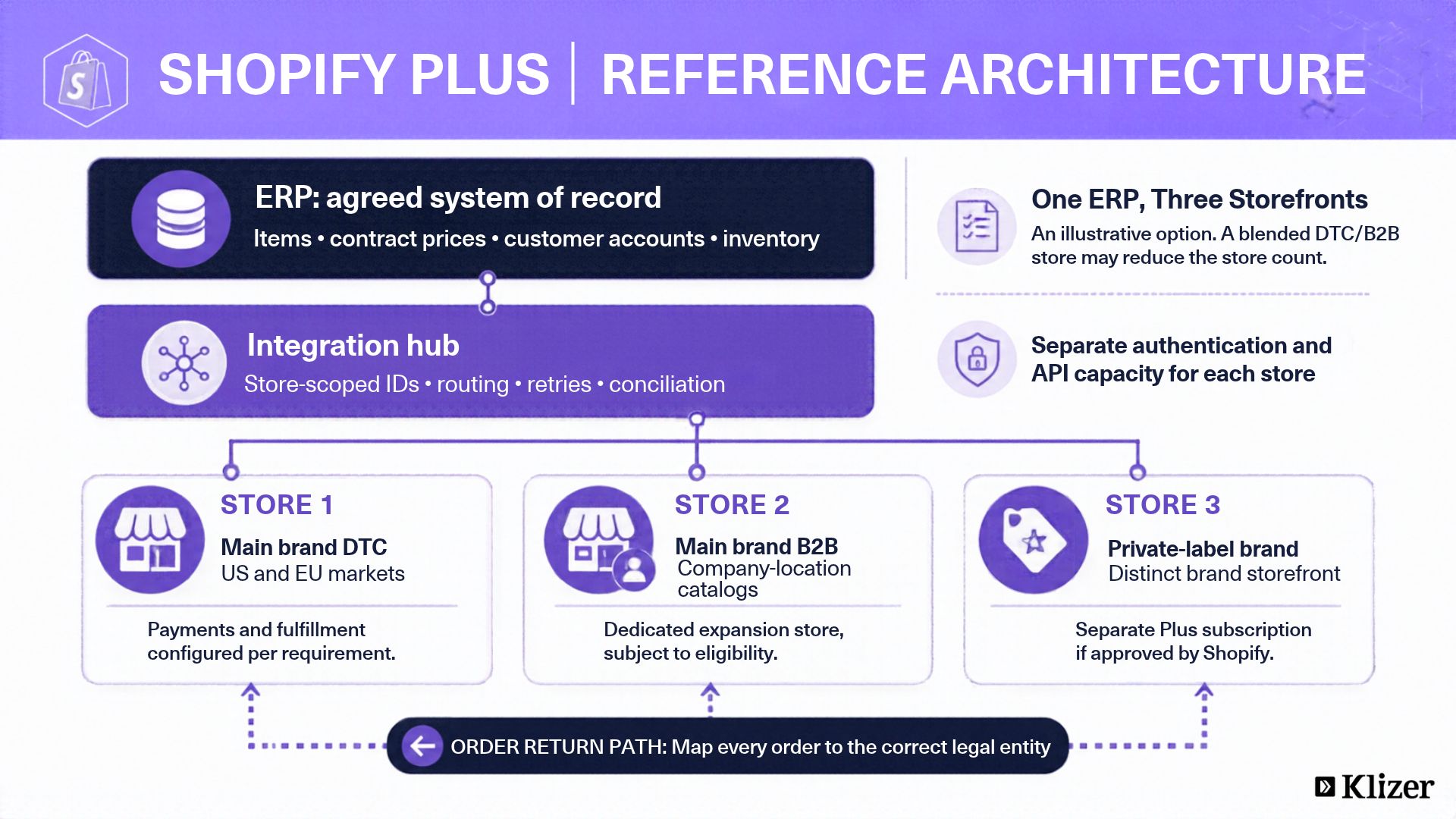
One illustrative layout for the valve manufacturer is:
- Store 1 is the main brand DTC store, with US and EU as markets, each with its own currency, and product assortment controlled by market catalogs and fulfillment eligibility by location and shipping settings.
- Store 2 is a qualifying B2B expansion store, with company locations mapped to ERP accounts and negotiated price lists pushed as directly assigned catalogs.
- Store 3 is the distinct private-label brand on a separate Plus subscription if approved under a multi-brand agreement, sharing the ERP item master through the hub.
- The integration hub connects the ERP (Prophet 21, NetSuite, or SAP), designated here as the system of record for items, pricing, customers, and inventory, with every order posting to the appropriate legal entity.
This is a three-store option, not a required minimum. A blended DTC/B2B store could reduce that count if its workflows fit. Confirm the brand agreement, payment eligibility, and operational boundaries before choosing the layout.
Frequently Asked Questions
1. Can I run two different brands as expansion stores?
Not under standard same-brand expansion criteria. Ask Shopify to confirm whether your distinct brands qualify for a multi-brand agreement and separate Plus subscriptions.
2. Does Shopify Plus sync inventory across expansion stores?
No. Inventory, products, and settings are independent per store, so cross-store sync has to come from an ERP, WMS, or middleware.
3. Should a distributor use Shopify Markets or a separate store for a new region?
Evaluate Markets first, including eligible multi-entity payments and configured fulfillment rules. Consider a separate store when payment support, access isolation, or operational requirements cannot be met in one store.
Conclusion
Store count is a downstream output, so decide who owns items, prices, customers, and inventory first. Markets and catalogs handle many regional and pricing requirements within one store. Add stores where supported configurations or commercial terms require separation, then test the shared data flows before rollout.
Klizer supports Shopify Plus architecture and integration for industrial manufacturers and distributors through Connected Commerce. The ERP Foundation, Storefront, and Integration layers need clear data ownership before Intelligence can rely on the resulting operational data.
Discuss your Shopify Plus multi-store architecture with Klizer before your next expansion store goes live.