B2B distributors rarely follow a simple product-to-checkout process. A purchase can involve multiple buyers, approval thresholds, negotiated pricing, procurement rules, and product-specific requirements. Orders can also depend on inventory and customer data across eCommerce, ERP, and other business systems. Managing these processes manually can delay purchasing and increase errors.
Shopware B2B workflows help distributors structure these processes within their commerce platform. Businesses can define purchasing rules, assign approval requirements, and automate repetitive actions as orders move through the buying cycle. With B2B eCommerce workflow automation, Shopware can support approval and procurement processes, simplify quote management, and connect order workflows with ERP and other business systems.
This makes Shopware a practical foundation for enforcing B2B purchasing rules while keeping order workflows aligned with business and ERP processes.
ON THIS PAGE
What Makes B2B and Distributor Workflows Complex?
B2B and distributor workflows become complex when there are complex pricing, approvals, bulk orders, inventory, and ERP dependencies. Here are the key aspects that make B2B and distributor workflows complex.
- Customer-specific pricing and catalogs: Contract pricing, volume discounts, product bundles, and restricted catalogs can vary by customer, region, or agreement.
- Multi-level approvals: Approval workflows may require managerial or financial authorization based on buyer roles, order value, or purchasing policies.
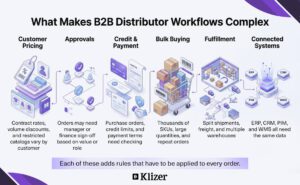
- Credit and payment controls: Purchase orders, credit limits, and deferred payment terms may require validation before order processing.
- High-volume procurement: Buyers often manage thousands of SKUs, technical specifications, bulk quantities, and repeat purchases, requiring efficient procurement workflows.
- Complex fulfillment: Split shipments, freight delivery, inventory allocation, and specialized packaging can add operational rules to order processing.
- Connected business systems: ERP, CRM, PIM, warehouse, and eCommerce platforms must exchange consistent customer, pricing, inventory, and order data. B2B eCommerce workflow automation helps coordinate these dependencies.
Read More: How Shopware’s API-First eCommerce Architecture Powers B2B
What Are the Key Benefits of Shopware for Distributors?
Shopware helps distributors manage customer-specific pricing, purchasing controls, order automation, inventory, and enterprise integrations from one commerce platform, enabling them to apply consistent business rules across complex B2B transactions. Here are the benefits of Shopware B2B workflows.
- Customer-specific pricing: Apply individual price lists, volume tiers, and negotiated rates based on customer accounts, dealer relationships, or purchasing agreements.
- Bulk and quick ordering: Let buyers enter large quantities or reorder frequently purchased SKUs without repeatedly navigating the full catalog, making procurement workflows more efficient. McKinsey’s Survey (2024 B2B Pulse) found that 42% of B2B decision-makers were comfortable spending $500,000 or more through remote or self-service channels, up from 33% in 2022.
- ERP, PIM, and CRM integration: Connect Shopware with enterprise systems to synchronize product, customer, pricing, inventory, and order data across the commerce ecosystem.
- Multi-warehouse inventory management: Coordinate stock across warehouses and regional facilities so order processing can use current inventory information.
- Automated business processes: Use B2B eCommerce workflow automation to handle routine actions such as order confirmations, customer notifications, and status changes with less manual intervention.
- Controlled purchasing: Configure customer organizations, buyer roles, and authorization requirements to support approval workflows for transactions that require internal review.
- Multi-market operations: Manage multiple brands, languages, currencies, and storefronts while maintaining centralized administrative control.
- Flexible B2B experiences: Build customer-specific portals, product pages, and purchasing experiences while keeping content and commerce within the same platform.
Read More: Shopware 6 Security Update: Important Fixes and a Practical Pre-Update Checklist
How Does Shopware Automate Core B2B and Distributor Workflows?
Shopware simplifies complex B2B and distributor workflows by combining role-based purchasing controls, approval rules, automated order processes, quote management, customer-specific pricing, and ERP integrations within the commerce platform. Here’s how Shopware automates B2B and distributor workflows.
1. Approval workflows
Distributors can assign purchasing permissions to buyer roles and require authorization when an order exceeds a defined value or budget limit. An employee can create the order while a manager reviews and approves it before processing.
2. Procurement workflows
Wholesale buyers may purchase hundreds of SKUs or repeat established orders. For example, an industrial buyer may enter specific replacement-part SKUs or product quantities directly instead of browsing individual product pages. Shopware’s quick and bulk ordering capabilities can streamline this high-volume procurement process.
3. Order automation
Shopware’s Flow Builder can trigger actions when defined order events occur. Distributors can automate notifications, status updates, and other process steps, supporting order automation between order submission, approval, and downstream processing.

4. Quote management
B2B customers often negotiate prices before committing to an order. Shopware can support quote management by allowing sales teams to review requested products, adjust commercial terms, and return an offer before the buyer proceeds.
5. Customer-specific pricing and purchasing
Distributors can apply different pricing and purchasing conditions to customer accounts or organizational units. They can also structure product access around application requirements, such as equipment compatibility, technical specifications, or approved product ranges.
6. ERP and business-system integration
B2B orders often depend on ERP data for inventory, customer accounts, pricing, and fulfillment. Shopware can connect with ERP, PIM, CRM, and other systems to keep the data required for B2B ecommerce workflow automation aligned across the order lifecycle. This integration becomes increasingly important as the global B2B ecommerce market is projected to grow from $28.0 trillion in 2026 to $105.9 trillion by 2033, according to Grand View Research.
Read More: How Shopware Distribution Commerce Helps Manufacturers and Distributors Scale
What Are the Best Practices for Implementing Shopware B2B Workflows?
Shopware B2B workflow implementation works best when distributors first map their purchasing rules, buyer permissions, approval thresholds, pricing logic, and system integrations, then configure automation around those defined processes.
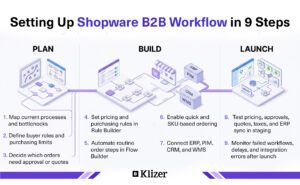
- Map B2B processes first: Identify manual order entry, approval delays, pricing issues, and other bottlenecks before configuring Shopware B2B workflows.
- Define roles and permissions: Set buyer roles, purchasing limits, and authorization levels to keep workflows clear and manageable.
- Apply rules to purchasing: Use Rule Builder for customer groups, payment terms, minimum quantities, and pricing conditions to support B2B eCommerce workflow automation.
- Automate routine orders: Use Flow Builder for confirmations, status changes, and notifications to strengthen order automation.
- Simplify high-volume procurement: Enable SKU-based and quick ordering for repeat purchases to streamline procurement workflows.
- Integrate business systems: Connect ERP, PIM, CRM, and other platforms to synchronize pricing, inventory, customer, product, and order data.
- Route exceptions separately: Automate standard transactions while sending complex pricing, high-value orders, and negotiated requests through quote management and approval processes.
- Test before deployment: Validate pricing rules, approval paths, permissions, quotes, taxes, inventory conditions, and ERP synchronization in staging.
- Monitor after launch: Track failed workflows, approval delays, integration errors, and pricing discrepancies to continuously improve Shopware B2B workflows.
How Can Klizer Help You Build and Optimize Shopware B2B Workflows?
Complex Shopware B2B implementations require more than storefront configuration. Klizer is a Shopware Gold Partner with 20+ years of experience supporting manufacturers and distributors, offering Shopware development, B2B commerce implementation, ERP and PIM integration, migration, and ongoing optimization.
Our experts configure customer-specific pricing, account hierarchies, quote workflows, bulk ordering, and approval processes, while connecting Shopware with ERP, PIM, CRM, WMS, and other enterprise systems. We build Shopware B2B workflows that help businesses reduce manual order handling, shorten procurement cycles, improve pricing accuracy, give buyers self-service control, and maintain consistent data across commerce and backend systems.
To learn more, explore our Shopware Development Services.
Frequently Asked Questions
Is Shopware suitable for wholesale distributors?
Yes, Shopware is suitable for wholesale distributors that need flexible B2B commerce capabilities and scalable digital purchasing experiences.
Can Shopware handle large B2B product catalogs?
Yes, Shopware can support large and technically detailed product catalogs when the underlying catalog architecture and integrations are properly configured.
Can Shopware support multiple B2B storefronts?
Yes, Shopware can support multiple storefronts within a centralized commerce environment.
How does Shopware support B2B customer self-service?
Shopware supports B2B self-service by giving business customers access to purchasing functions directly through the commerce platform.
Is Shopware scalable for growing B2B businesses?
Yes, Shopware can scale with growing B2B operations when businesses design the commerce, integration, and infrastructure architecture appropriately.