Modern ecommerce businesses need fast, scalable, and flexible digital experiences to support multiple sales channels and evolving customer expectations. Traditional monolithic ecommerce platforms often slow innovation because every frontend change depends on the backend. When an enterprise expands into a new international market, launching a localized storefront often requires backend modifications, extensive testing, and coordinated releases, delaying time-to-market.
Shopware headless commerce solves these challenges by separating the frontend presentation layer from the backend commerce engine. Shopware allows businesses to manage products, customers, orders, and other commerce operations while building unique storefront experiences with modern frontend technologies. Businesses can use the Shopware API to connect different applications and services, while Shopware PWA helps create fast and responsive storefronts.
ON THIS PAGE
What Is Shopware Headless Commerce?
Shopware headless commerce is an API-first ecommerce architecture that separates the frontend from the backend, enabling businesses to build faster, scalable, and highly customized shopping experiences across multiple digital channels. Instead of relying on a built-in storefront, businesses use the Shopware backend to manage products, customers, inventory, orders, and pricing, while building the customer-facing experience with a separate frontend.
According to The State of Web Vitals (Q2 2026), Shopware-powered ecommerce websites achieve a 1.9-second Largest Contentful Paint (LCP) at the 75th percentile on mobile, with 88.1% meeting Google’s recommended LCP threshold.
The Shopware API connects both layers, allowing data to move securely and efficiently between them. It gives businesses greater flexibility to create custom shopping experiences across websites, mobile apps, kiosks, and other digital channels without changing the backend commerce logic. Developers can choose modern frontend frameworks, improve website performance, and launch updates faster while continuing to use Shopware’s core ecommerce features.
How Does Shopware Headless Commerce Architecture Work?
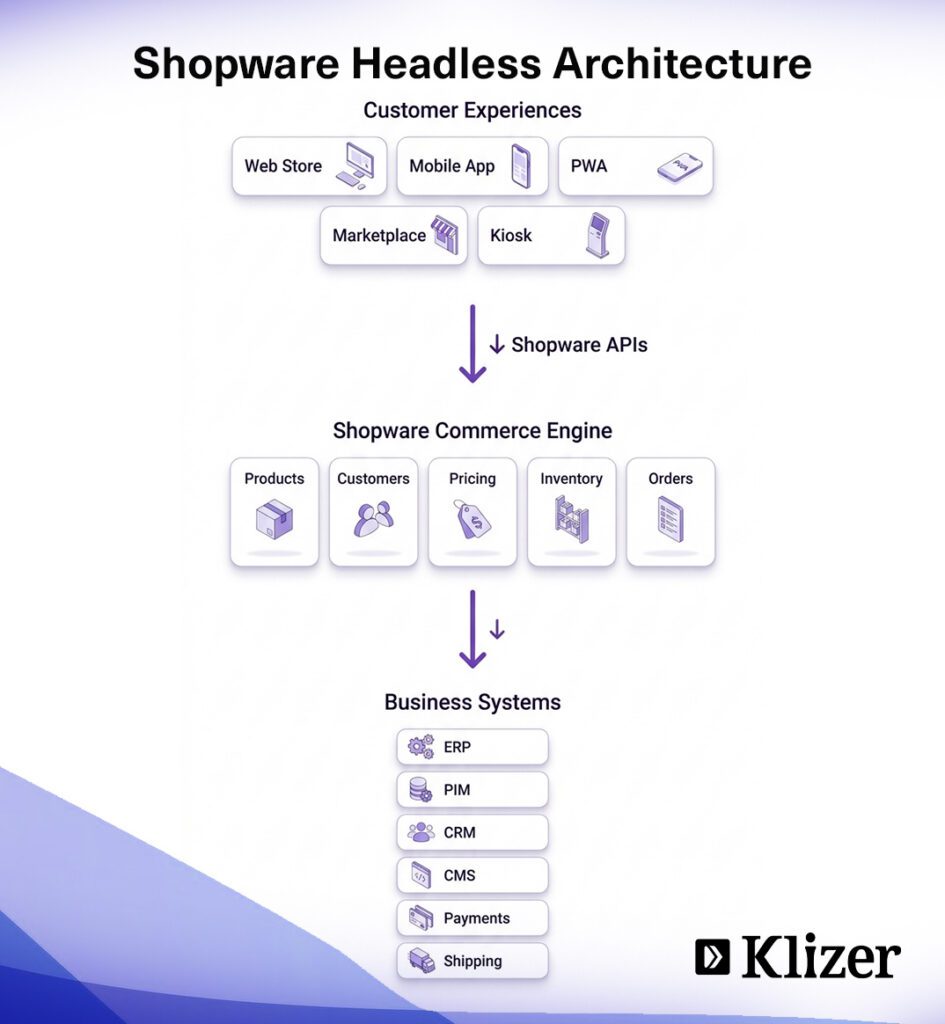
The architecture behind Shopware headless commerce enables independent frontend and backend development, helping businesses improve performance, accelerate deployment, and support omnichannel commerce.
| Component | Role |
| Backend (Commerce Engine) | Manages products, inventory, pricing, customers, orders, promotions, and business rules through a centralized admin panel |
| Shopware API | Connects the backend and frontend by securely exchanging real-time data in JSON format across websites, mobile apps, marketplaces, and other channels |
| Frontend (Presentation Layer) | Delivers the customer experience using frameworks such as Vue.js, React, Nuxt.js, Next.js, or Shopware Composable Frontends, while retrieving data through the API |
Shopware Composable Frontends is the official modern frontend framework from Shopware, built on Vue.js and Nuxt.js. It is the recommended successor to Shopware PWA for teams starting new headless implementations, offering a more modular and maintainable architecture.
Read More: Scaling Your eCommerce Business with Shopware: From Startup to Enterprise
Shopware exposes three distinct API types, each serving a different purpose:
- Store API: Used by the frontend to retrieve products, categories, pricing, inventory, carts, and checkout data
- Admin API: Used for backend operations including product management, order processing, and admin workflows
- Sync API: Used for bulk data operations and high-volume synchronization tasks such as catalog imports
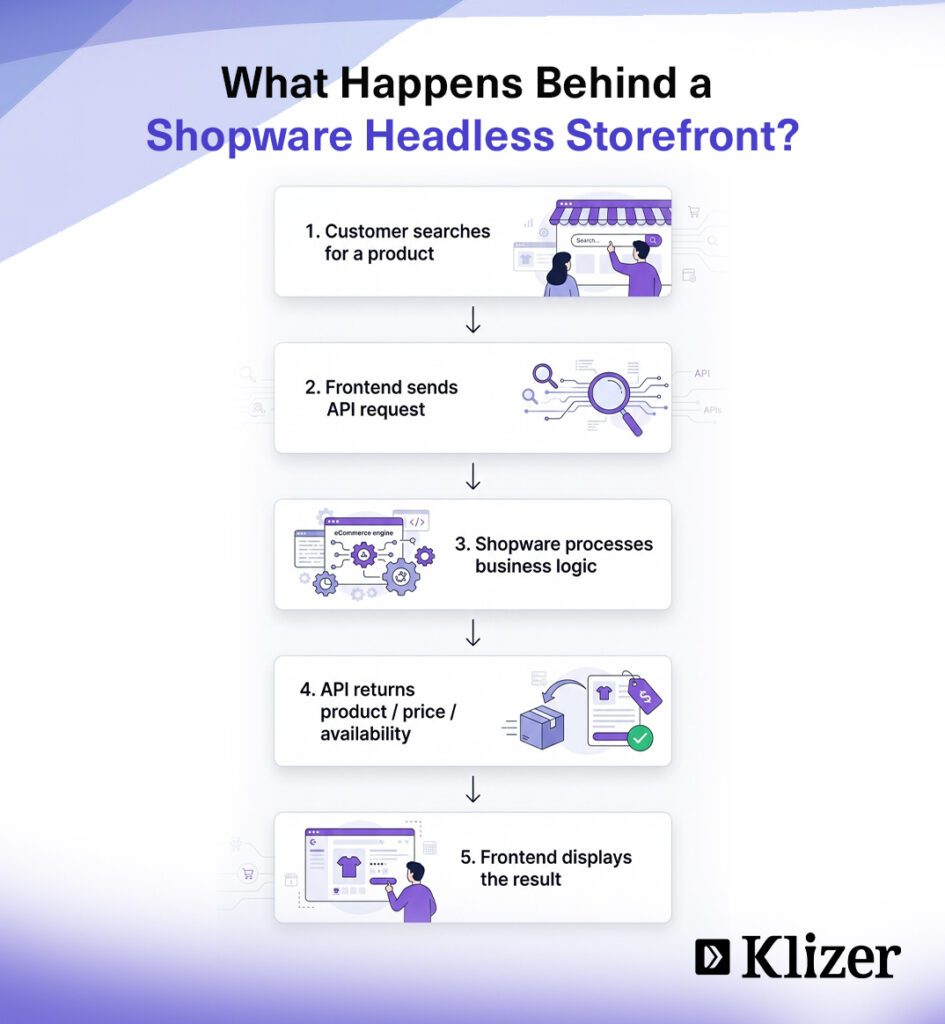
How Does Shopware Headless Commerce Process a Customer Request?
Every customer action in Shopware headless commerce follows a real-time API workflow that retrieves, processes, and displays data instantly.
- Customer initiates an action: A customer opens a product page, searches for an item, or adds a product to the shopping cart.
- Frontend sends an API request: The frontend requests the required data from the Shopware API.
- Backend executes business logic: Shopware validates inventory, applies pricing and discount rules, processes customer data, and prepares the requested information.
- API returns real-time data: The backend sends the processed data back to the frontend in JSON format.
- Frontend updates the storefront: The frontend displays the latest information instantly without refreshing the page, creating a faster and smoother shopping experience across every connected device.
Read More: Shopware B2B Commerce: Developer Guide to Features & Best Practices
What Are the Key Features of Shopware Headless Commerce?
- API-First Architecture: Uses the Shopware Store API, Admin API, and Sync API to manage products, customers, orders, and other commerce data through secure API connections.
- Decoupled Frontend and Backend: Separates the storefront from the commerce engine, allowing developers to update the user interface without affecting backend operations.
- Flexible Frontend Development: Supports modern frameworks such as Vue.js, React, Nuxt.js, and Next.js, giving developers the freedom to build custom storefronts.
- Progressive Web App (PWA) Support: Enables fast, responsive, and app-like shopping experiences with the Shopware PWA.
- Omnichannel Commerce: Powers websites, mobile apps, marketplaces, social commerce platforms, IoT devices, and other digital touchpoints from a single backend.
- Multi-Store Management: Allows businesses to manage multiple storefronts, brands, or regional ecommerce sites through one centralized Shopware administration panel.
- Real-Time Data Synchronization: Keeps product catalogs, inventory, pricing, customer information, and orders consistent across all connected sales channels.
- Third-Party Integrations: Connects with ERP, CRM, PIM, CMS, payment gateways, shipping providers, and marketing platforms through APIs.
- Scalable Infrastructure: Supports business growth by making it easy to expand storefronts, integrations, and sales channels without rebuilding the commerce platform.
What Are the Benefits of Using Shopware Headless Commerce?
- Greater Flexibility and Customization: The decoupled architecture separates the presentation layer from the commerce engine, allowing developers to redesign storefronts, launch new digital touchpoints, and introduce new features without affecting backend operations.
- Freedom to Use Modern Frontend Technologies: Businesses can build a custom Shopware frontend using frameworks such as Vue.js, React, Angular, Nuxt.js, or Next.js, giving them complete control over the customer experience.
- Progressive Web App (PWA) Support: Shopware PWA delivers fast, responsive, and app-like shopping experiences with improved mobile performance and support for offline browsing where available.
- Better Website Performance: An optimized frontend delivers faster page loads, smoother navigation, and improved responsiveness, creating a better shopping experience across desktop and mobile devices. Modern headless storefronts prioritize Core Web Vitals because loading performance, responsiveness, and visual stability directly influence user experience and search visibility. Leading commerce platforms recommend monitoring LCP, INP, and CLS throughout development and after deployment.
- Agentic Commerce Readiness: Shopware 6.7 introduced MCP (Model Context Protocol) server support, enabling AI procurement agents to query your catalog, verify pricing, and prepare orders directly through the Shopware API layer. A properly built headless Shopware stack with clean product data and well-documented APIs is agent-ready by design.
How to Implement Shopware Headless Commerce
Shopware headless commerce development requires careful planning, backend configuration, frontend development, API integration, and deployment.
Step 1: Define Your Architecture and Business Requirements
- Identify your business goals, target audience, and sales channels
- Decide whether you are building a website, Shopware PWA, mobile app, kiosk, or multi-brand storefront
- Review existing Shopware plugins to determine whether custom frontend development or API integration is required
- Document technical requirements, integrations, and scalability goals before development begins
Step 2: Configure the Shopware Backend
- Install and configure Shopware 6 on your preferred hosting environment or Shopware Cloud
- Set up products, inventory, pricing, customers, promotions, and orders
- Create a dedicated Sales Channel for the headless storefront
- Generate Shopware API credentials to securely connect the frontend with the backend
Step 3: Build the Frontend
- Select a frontend framework such as Vue.js, React, Nuxt.js, Next.js, or Shopware Composable Frontends
- Choose a framework that supports Server-Side Rendering (SSR) or Static Site Generation (SSG) to improve SEO and performance
- Design responsive storefront pages, navigation, search, and checkout experiences
Step 4: Connect the Frontend Through APIs
- Use the Shopware Store API to retrieve products, categories, pricing, inventory, carts, customer accounts, and checkout data
- Connect external PIM, ERP, CRM, or CMS platforms using the appropriate Shopware APIs
- Verify that all API endpoints exchange data securely and accurately
Step 5: Integrate Third-Party Business Systems
- Connect ERP, CRM, PIM, CMS, payment gateways, shipping providers, analytics tools, and marketing platforms
- Validate data synchronization across all connected applications
- Test integrations to ensure consistent business operations
Step 6: Deploy the Backend and Frontend
- Host the Shopware backend on a reliable server optimized for ecommerce operations
- Deploy the frontend on CDN-based hosting platforms to improve page speed and global performance
- Configure separate CI/CD pipelines for the frontend and backend to streamline future updates
Step 7: Test, Launch, and Optimize
- Test API connectivity, storefront functionality, checkout, integrations, and security
- Verify performance across desktop and mobile devices
- Launch the storefront and continuously monitor speed, user experience, and system performance
Leading headless commerce implementations monitor API response times, cache performance, and Core Web Vitals continuously after deployment to maintain performance at scale.
What Challenges Should Businesses Consider Before Adopting Shopware Headless Commerce?
Shopware headless commerce offers greater flexibility and scalability, but businesses should assess the technical, financial, and operational challenges before implementation.
| Challenge | How to Mitigate It |
| Higher implementation and maintenance costs | Plan total cost of ownership upfront including hosting, development, and ongoing maintenance |
| Requirement for skilled Shopware, API, and frontend developers | Partner with an experienced Shopware agency rather than building an in-house team from scratch |
| Longer development and deployment timelines | Use Shopware Composable Frontends to reduce custom build time on the frontend layer |
| Limited compatibility with native Shopware storefront plugins | Audit plugin dependencies before starting and identify API-compatible alternatives early |
| Custom development for frontend features and page builders | Budget for this as a fixed project cost, not a variable |
| More complex infrastructure and deployment management | Use separate CI/CD pipelines and CDN-hosted frontends from day one |
| Dependence on Shopware API performance and reliability | Implement caching at the BFF and CDN layer to reduce direct API dependency under load |
| Separate hosting and CI/CD pipelines for frontend and backend | Treat this as standard infrastructure, not added overhead |
| Additional SEO configuration including SSR and metadata management | Choose a frontend framework with native SSR support such as Nuxt.js or Next.js |
| Ongoing maintenance of frontend, backend, APIs, and integrations | Establish a maintenance retainer with your implementation partner from launch |
| More testing across devices, browsers, and sales channels | Automate cross-browser and device testing as part of the CI/CD pipeline |
| Greater operational complexity than traditional Shopware storefronts | Ensure internal teams are trained on the headless architecture before go-live |
Partner With Klizer to Build a Future-Ready eCommerce Store
If you are planning to go for Shopware headless development, Klizer can help you design, develop, and optimize a solution tailored to your business goals. From custom Shopware frontend development and API integrations to headless commerce implementation, our Shopware commerce experts deliver secure, scalable, and future-ready ecommerce solutions that support long-term growth.
Contact Klizer to build a high-performance connected commerce platform tailored to your business goals.
Frequently Asked Questions
1. Is Shopware headless commerce suitable for B2B ecommerce?
Yes, Shopware headless commerce supports complex B2B requirements through flexible APIs and customizable storefronts. It enables businesses to create role-based pricing, custom catalogs, approval workflows, and tailored purchasing experiences while integrating with ERP and CRM systems.
2. Does Shopware headless commerce support GraphQL?
Yes, Shopware supports GraphQL alongside REST APIs for selected use cases. Developers can choose the API approach that best fits their frontend architecture and performance requirements.
3. Can I migrate an existing Shopware store to a headless architecture?
Yes, you can migrate an existing Shopware store to a headless architecture without replacing the backend. The migration typically involves building a new frontend while continuing to use the existing Shopware commerce engine.
4. Is coding knowledge required to build a Shopware headless storefront?
Yes, building a Shopware headless storefront requires development expertise. Developers need experience with APIs, JavaScript frameworks such as Vue.js or React, and frontend architecture to create and maintain the storefront.
5. Does Shopware headless commerce improve mobile shopping experiences?
Yes, Shopware headless commerce can significantly improve mobile performance. Businesses can build responsive storefronts or Progressive Web Apps that deliver faster navigation and a smoother shopping experience across devices.