Wholesale distributors often manage thousands of SKUs, technical specifications, customer-specific pricing, and product compatibility requirements across disconnected systems. When buyers rely on sales representatives, spreadsheets, or static catalogs to find the right part, variant, or configuration, product discovery slows, and order errors become harder to control. A modern Shopware wholesale ecommerce solution must handle structured product data while supporting industrial search, bulk ordering, and account-specific purchasing.
Shopware provides the B2B architecture needed to connect these requirements within a unified commerce environment. Distributors can build a Shopware wholesale ecommerce platform with structured catalogs, customer-specific pricing, role-based accounts, advanced product search, and integrations with ERP, PIM, CRM, and inventory systems. With the right configuration and integrations, it helps simplify technical product discovery, automate repetitive workflows, and give buyers greater control over complex purchasing processes.
ON THIS PAGE
Why Are Wholesale Businesses Moving to Digital Commerce?
Wholesale businesses are moving to digital commerce to automate B2B ordering, improve technical product discovery, provide pricing and inventory visibility, and reduce manual processing. McKinsey’s 2026 Global B2B Pulse Survey found that 71% of respondents reported that their organizations offer ecommerce. Among those organizations, roughly one-third of total revenue comes through digital channels. Here are the key reasons wholesalers are adopting a modern wholesale ecommerce platform:
Meet buyer expectations
B2B buyers expect fast search, simple checkout, personalized pricing, and easy reordering on a modern wholesale ecommerce platform.
Enable 24/7 ordering
Buyers can check stock, review product details, and place bulk orders without waiting for sales representatives.
Improve product discovery
Digital search helps buyers find SKUs by part number, specifications, dimensions, material, application, and compatibility.
Reduce order errors
Automated workflows can reduce mistakes in product codes, quantities, pricing, and customer information.
Connect business systems
Integrating ERP, PIM, CRM, and WMS synchronizes product, inventory, customer, and order data across the B2B wholesale platform.
Expand market reach
Digital storefronts help wholesalers serve new regions without establishing a physical presence in every market.
Compete with direct sales
A streamlined wholesale ordering system helps distributors retain customers when manufacturers also sell directly to businesses.
Why Do Traditional Wholesale Processes Struggle to Scale?
Traditional wholesale processes struggle to scale because manual ordering, complex pricing, fragmented product data, and disconnected systems slow operations and increase errors. McKinsey’s 2024 B2B Pulse Survey found that more than half of respondents were likely to switch suppliers if they did not have a smooth experience across channels.
How Can Shopware Wholesale Ecommerce Modernize Distribution?
Shopware can modernize wholesale distribution by digitizing B2B ordering, automating business rules, personalizing pricing and catalogs, and connecting ecommerce with ERP, PIM, CRM, and other operational systems. These capabilities support a connected Shopware commerce implementation while improving buyer and operational workflows.
Streamline B2B account management
Support company structures, user roles, permissions, organizational units, budgets, and approval workflows for complex purchasing teams.
Accelerate bulk ordering
Let buyers enter SKUs, upload product lists, and reorder frequently purchased items through a faster wholesale ordering system.
Personalize pricing and catalogs
Apply percentage, fixed, and volume-based pricing based on individual B2B purchasing agreements. Advanced product catalogs let distributors control which products and categories each organization can access.
Improve technical product discovery
Help buyers find the right SKU using specifications, dimensions, product attributes, part numbers, and compatibility requirements across large catalogs. Search quality depends on structured product data and appropriate search configuration.
Connect business systems
Use Shopware’s API-first architecture to integrate ERP, PIM, CRM, WMS, and other systems, creating a connected wholesale ecommerce platform.
Automate wholesale workflows
Use business rules and automated flows for payment and shipping conditions, notifications, and other supported processes. Configure purchasing approvals through the relevant B2B Components.
How Should You Implement Shopware for Wholesale Distribution?
A successful Shopware implementation should align the wholesale ecommerce platform with your customer structures, product data, pricing rules, ordering processes, and back-office systems. Here are the steps to implement Shopware for wholesale distribution.
1. Define Your B2B Wholesale Requirements
Start by documenting how customers purchase, how you manage products and pricing, and where current processes create bottlenecks. Include the following requirements:
- Identify customer groups, organization structures, and purchasing roles.
- Map SKUs, product specifications, variants, and compatibility data.
- Document customer-specific prices, volume tiers, discounts, and payment terms.
- Define bulk-ordering, approval, fulfillment, and warehouse requirements.
- Determine which existing systems need integration.
2. Configure Shopware B2B Components
Shopware B2B Components provide functions for organization units, employee management, approvals, quick orders, shopping lists, quotes, advanced product catalogs, budgets, and individual pricing. Availability depends on the Shopware plan, version, and enabled components. Confirm these requirements before configuring the core B2B experience:
- Create organization units for departments, branches, or locations.
- Assign employee roles and purchasing permissions.
- Configure approval rules for controlled orders.
- Enable quick ordering for SKU-based and file-based bulk purchases.
- Create customer-specific product catalogs.
- Configure individual pricing and volume-based discounts where required.
3. Build Flexible Pricing and Commerce Rules
Shopware’s Rule Builder can apply conditions to pricing, payment, shipping, promotions, and other commerce processes. Follow these steps to establish your pricing and business rules:
- Define rules for customer groups, order values, products, and quantities.
- Configure customer-specific and volume-based pricing.
- Set payment and shipping conditions for different buyer groups.
- Apply tax and promotional rules according to business requirements.
- Test conflicting rules and priorities before deployment.
4. Connect ERP, PIM, and Other Business Systems
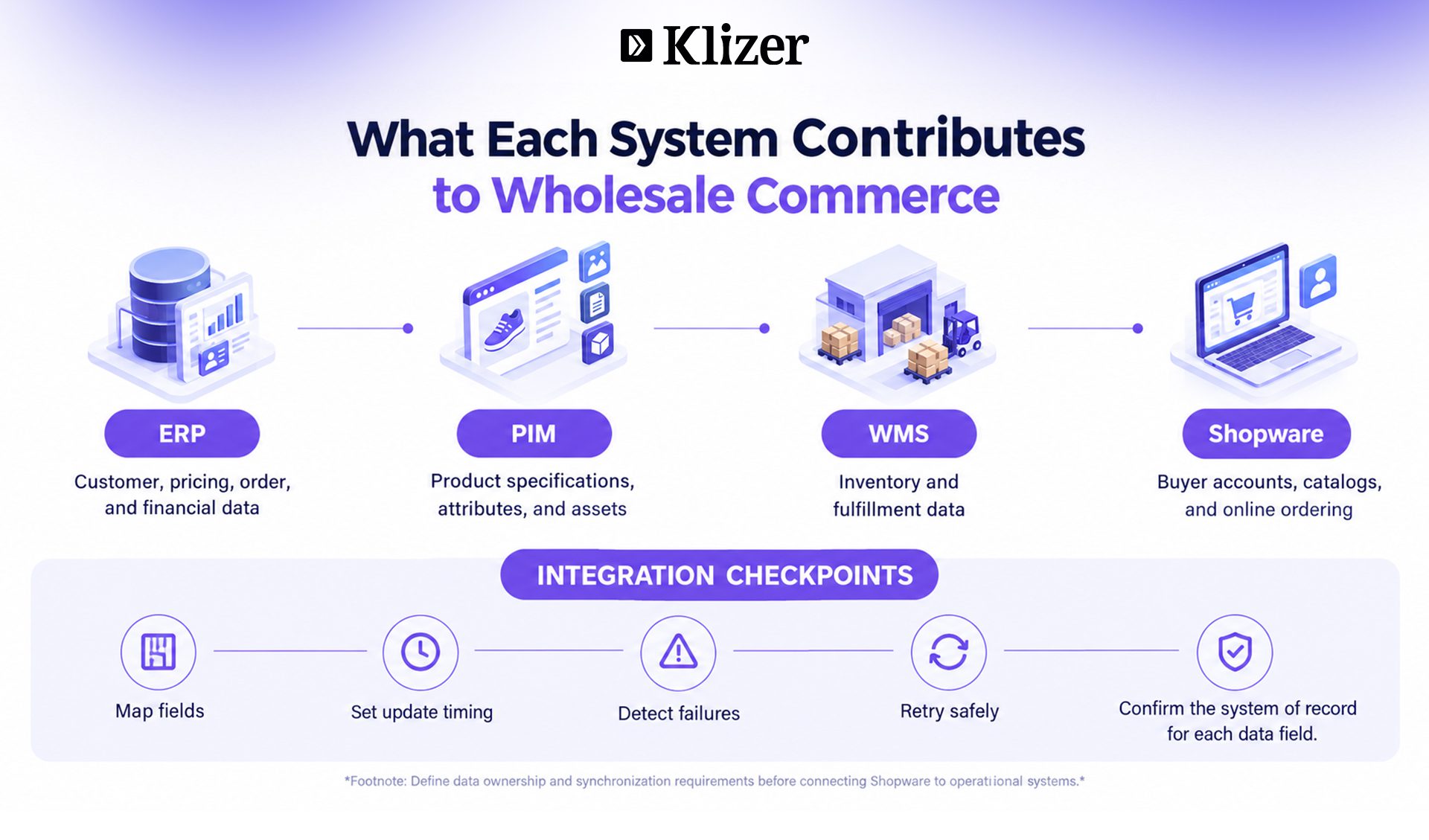
Your wholesale ordering system should not operate separately from inventory, product, customer, and fulfillment systems. Use these steps to establish the required integrations:
- Connect ERP for customer, order, pricing, and financial data.
- Integrate PIM to maintain structured product specifications and SKU information.
- Connect WMS or warehouse systems for inventory and fulfillment data.
- Synchronize relevant customer, product, stock, and order information.
- Define which system owns each data field and how failed updates are detected and retried.
- Test data mapping and synchronization before production.
5. Automate Wholesale Workflows
Once the core systems connect, automate repetitive actions across ordering and fulfillment. Apply these steps to automate daily operations:
- Automate order routing and status updates.
- Trigger approval processes for orders that meet defined conditions.
- Apply shipping and payment rules automatically.
- Send notifications based on order or customer events.
- Reduce manual intervention in repetitive administrative tasks.
6. Test and Launch the Wholesale Experience
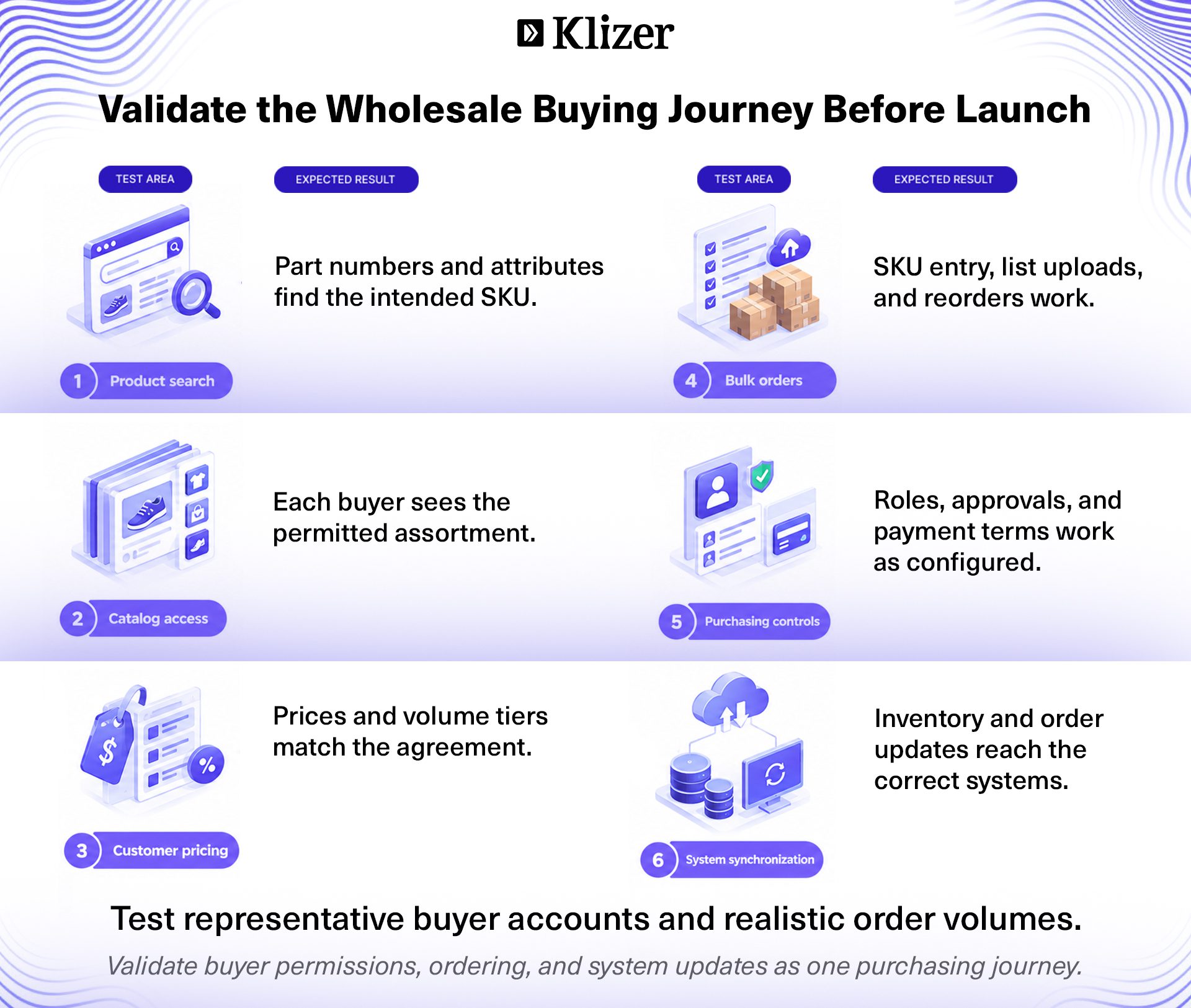
Test the complete B2B purchasing journey before launch, especially the workflows that affect product selection, pricing, ordering, and fulfillment. Complete these checks before launching:
- Test searches using SKUs, specifications, and product attributes.
- Verify customer-specific catalogs and pricing.
- Test bulk orders and repeat purchases.
- Validate approval, payment, and shipping workflows.
- Confirm inventory and order synchronization.
- Monitor buyer behavior and operational performance after launch.
What Should You Consider Before Implementing Shopware?
Before implementing Shopware, evaluate whether its architecture, technology, and maintenance requirements fit your wholesale business. These considerations help you build a sustainable B2B ecommerce platform for distributors without unnecessary customization.
Hosting and architecture
Evaluate Shopware SaaS, PaaS, and self-hosted deployment based on infrastructure control, customization, scalability, and maintenance requirements.
Customization requirements
Identify processes that need custom development and prioritize native Shopware capabilities to simplify upgrades and maintain a stable B2B wholesale platform.
Extension strategy
Evaluate third-party plugins for compatibility, security, vendor support, maintenance requirements, and their impact on future upgrades.
Headless commerce needs
Determine whether custom frontends, external applications, or a decoupled architecture justify using Shopware’s API-first approach.
Technical expertise
Ensure your internal team or implementation partner can handle Shopware development, integrations, customization, deployment, and ongoing maintenance.
Long-term costs
Account for hosting, development, extensions, upgrades, support, security, and maintenance when calculating the total cost of ownership.
Conclusion
The value of Shopware wholesale ecommerce depends on whether the buyer experience reflects the distributor’s actual pricing, product data, inventory, and purchasing rules. Prioritize that alignment before adding more features or channels.
For industrial B2B manufacturers and distributors, this is a Connected Commerce decision: a dependable ERP Foundation, a Storefront built around wholesale purchasing, reliable Integration, and Intelligence supported by trustworthy operational data.
Klizer brings more than 20 years of experience helping manufacturers and distributors build and scale B2B commerce solutions, with 300+ commerce implementations. As a Shopware Gold Partner, Klizer provides Shopware store development, B2B commerce implementation, headless architecture, ERP/PIM integrations, migration, plugin development, performance optimization, and ongoing support.
Talk to Klizer’s Shopware experts about an implementation that connects your wholesale purchasing workflows with your operational systems.
FAQs
1. Is Shopware suitable for large wholesale businesses?
Yes, Shopware can support large wholesale businesses with complex catalogs, customer structures, pricing models, and high-volume B2B transactions. Validate performance against the expected catalog size, integrations, and order load before launch.
2. Can Shopware handle thousands of wholesale SKUs?
Yes, Shopware can manage large product catalogs and support structured product data, search, variants, and technical attributes.
3. Can Shopware replace an ERP system for wholesale businesses?
No, Shopware primarily handles commerce, while ERP systems typically manage finance, inventory, procurement, and broader enterprise operations.
4. Can Shopware support multiple wholesale websites?
Yes, Shopware can support multiple sales channels and storefront configurations from a centralized commerce environment.
5. Is Shopware suitable for manufacturers selling directly to distributors?
Yes, Shopware can support manufacturer-to-distributor commerce with B2B purchasing workflows, account management, catalogs, and customer-specific pricing.