

A blind shopper opens your store with a screen reader. The menu reads as “link link link,” the product images are silent, and checkout traps the cursor halfway through. They leave. A few weeks later, you get a legal demand letter.
This plays out thousands of times a year.
Plaintiff firms run automated scanners across storefronts at scale, flag the violations, and file. For most merchants, the question is no longer whether accessibility matters. It is whether your store would survive the scan.
This guide explains what ADA compliance for ecommerce actually requires in 2026, where the legal risk sits, and how to fix it at the system level. It also covers the parts B2B manufacturers and distributors keep getting wrong.
What is Web Accessibility, and Why Does ADA Apply to Your Store?
So, what is web accessibility? In plain terms, it means building a website that people with disabilities can use independently. That includes users who are blind, have low vision, are deaf, or have motor and cognitive impairments. An accessible website works with screen readers, keyboard navigation, captions, and high-contrast settings.
The Americans with Disabilities Act was signed in 1990, long before online retail existed. The law itself says nothing about websites. The relevance comes from Title III, which prohibits discrimination in places of public accommodation.
Many courts have ruled that ecommerce stores can qualify as places of public accommodation, and the Department of Justice has taken that position for years. The interpretation is not uniform across every federal circuit, so the legal exposure varies by jurisdiction.
The practical reality is consistent: if your store is open to the public and disabled customers cannot use it, you carry compliance risk.
This may apply whether you sell to consumers or to other businesses. A B2B portal that is publicly accessible to commercial buyers may be viewed as a public-facing commercial service, depending on the circumstances and jurisdiction.
What Is WCAG Compliance?
The DOJ (Department of Justice) does not publish a technical checklist for websites. Instead, courts and regulators point to the Web Content Accessibility Guidelines — the established website accessibility standards for digital content. WCAG is published by the World Wide Web Consortium and defines measurable success criteria for accessible design. WCAG 2.1 Level AA is the standard most commonly referenced in settlements, consent decrees, and litigation. WCAG 2.2 Level AA is increasingly adopted by accessibility professionals and auditors.
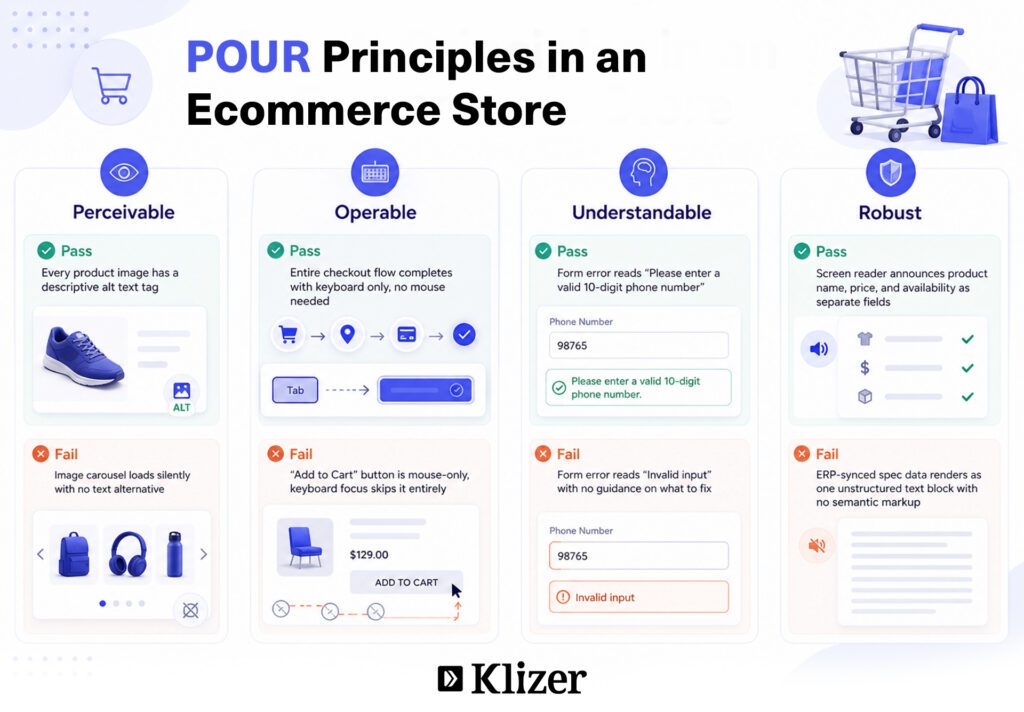
WCAG compliance is organized around four principles, often shortened to POUR:
- Perceivable. Users can detect content through more than one sense. Images need text alternatives. Video needs captions. Color cannot be the only way meaning is conveyed.
- Operable. Every action that works with a mouse also works with a keyboard. Navigation, menus, and forms must be reachable without pointing devices.
- Understandable. Content reads clearly. Error messages explain what went wrong and how to fix it.
- Robust. The underlying code is clean enough for screen readers and other assistive technology to interpret reliably.
When a plaintiff sues over an inaccessible store, these are the criteria their expert tests against. The ADA itself does not name WCAG, but for an ADA compliance website, meeting WCAG Level AA is the standard most courts and auditors expect to see.
Penalties and Legal Risks of ADA Non-Compliance
The numbers explain why ecommerce ADA compliance is urgent in 2026. By the end of 2025, more than 5,000 digital accessibility lawsuits had been filed in federal court, roughly a 20% increase over the prior year.
The April 2026 DOJ deadline for government websites has pushed Title III scrutiny higher — courts are now referencing the same WCAG 2.1 Level AA benchmark for private ecommerce stores. If you sell into the EU, the European Accessibility Act is also now in effect, mandating that ecommerce services meet accessibility standards with fines and trading restrictions for non-compliance.
The financial exposure is real:
- Civil penalties under Title III are adjusted for inflation each year. Under the current DOJ figures, a first violation can reach $118,225, and a subsequent violation can reach $236,451.
- A typical lawsuit costs $45,000-$75,000 all-in: settlement, legal defense, and required remediation. Proactive remediation usually runs 3-4x cheaper.
- Pre-litigation settlements can cost thousands of dollars, often before remediation and legal expenses are counted.
- Settling once does not protect you. Companies have been sued again over new violations after earlier settlements.
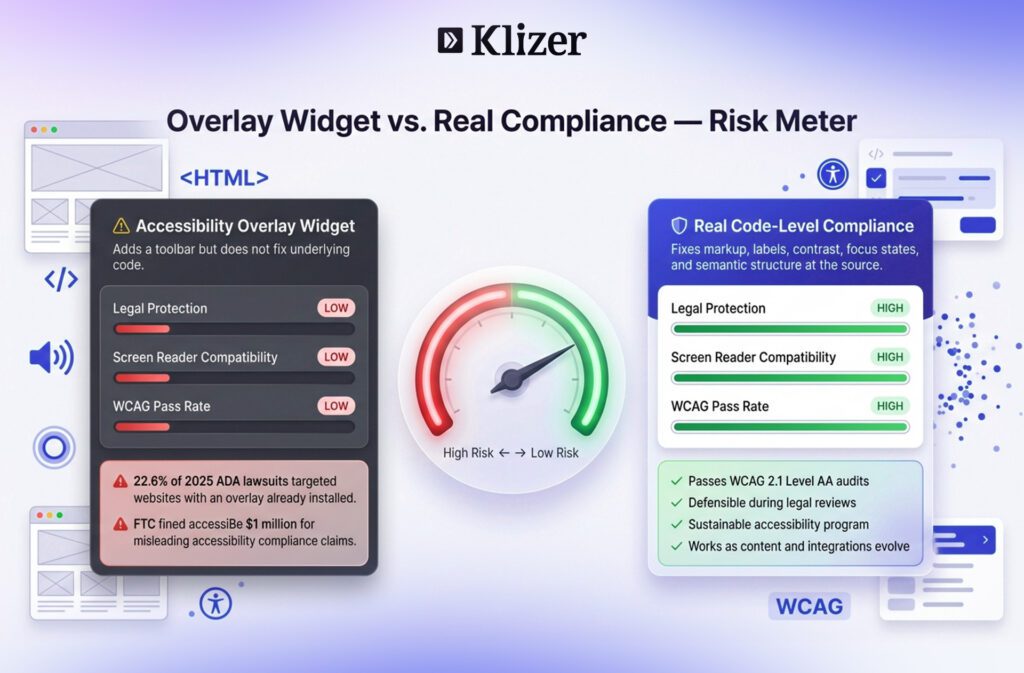
Be wary of the quick fix. Accessibility overlay widgets market themselves as a fast path to compliance for a low monthly fee. They do not address the underlying code. Surveys of disabled users rate them poorly, and they show up in litigation rather than preventing it.
In January 2025, the FTC ordered accessiBe to pay $1 million for deceptively claiming its AI product could make any website compliant with accessibility guidelines, along with misleading endorsement practices. A widget cannot rewrite broken code, fix contrast, or restructure your markup. It can also interfere with the screen readers a user has already configured. Real compliance happens at the code level.
Read more: Why is ADA Compliance Testing Important for eCommerce Websites?
How Do You Make an Ecommerce Website Accessible?
Automated scanners identify many issues, but they cannot detect every accessibility barrier and should be supplemented with manual testing with actual screen readers and keyboards. Here is how to make a website accessible in practice. These are the issues that appear in nearly every ADA complaint. Fix them first.
In audits of BigCommerce storefronts, the most common failures we find are missing alt text on product images loaded via the catalog API, focus indicators stripped by the theme’s base CSS, and checkout form fields that have visible labels in the UI but no programmatic label in the markup. These three alone account for the majority of violations flagged in accessibility demand letters.
- Alt text. Every meaningful image needs a description. Decorative images need an empty alt attribute so screen readers skip them.
- Color contrast. Normal text needs a 4.5:1 ratio against its background. Large text needs 3:1.
- Heading structure. Use heading levels consistently so the page structure is clear. A logical order helps assistive technology communicate how the content is organized.
- Keyboard support. Every step of the purchase flow must work without a mouse. Tab through it and confirm.
- Visible focus indicators. Users navigating by keyboard need a clear outline on the focused element. Many themes strip this out in CSS.
- Form labels. Every input needs a programmatic label. Placeholder text is not a label.
- Descriptive links. Replace “click here” with text like “View shipping policy.”
- Clear error messages. Tell the user what failed and how to correct it.
- Captions and motion control. Prerecorded video with audio should provide synchronized captions. Carousels and any auto-advancing content must give users a way to pause, stop, or hide the movement.
- Skip-to-content link. The first focusable element should let keyboard users bypass the header.
An accessible website is built from these fundamentals, not bolted on afterward. Note that your platform alone does not guarantee compliance — the theme you choose, the apps you install, and the content your team enters every day are what determine actual compliance.
ADA Compliance for B2B Manufacturers and Distributors
Here is where most guidance stops short. Many B2B sellers assume ecommerce ADA compliance does not apply to them. Publicly accessible B2B platforms can face the same accessibility expectations and legal scrutiny.
A publicly accessible B2B storefront may be viewed as a commercial service subject to accessibility expectations. Whether you run B2C or B2B, a public-facing site should not exclude users with disabilities. The catch is that B2B commerce runs on interfaces that retail checklists never address.
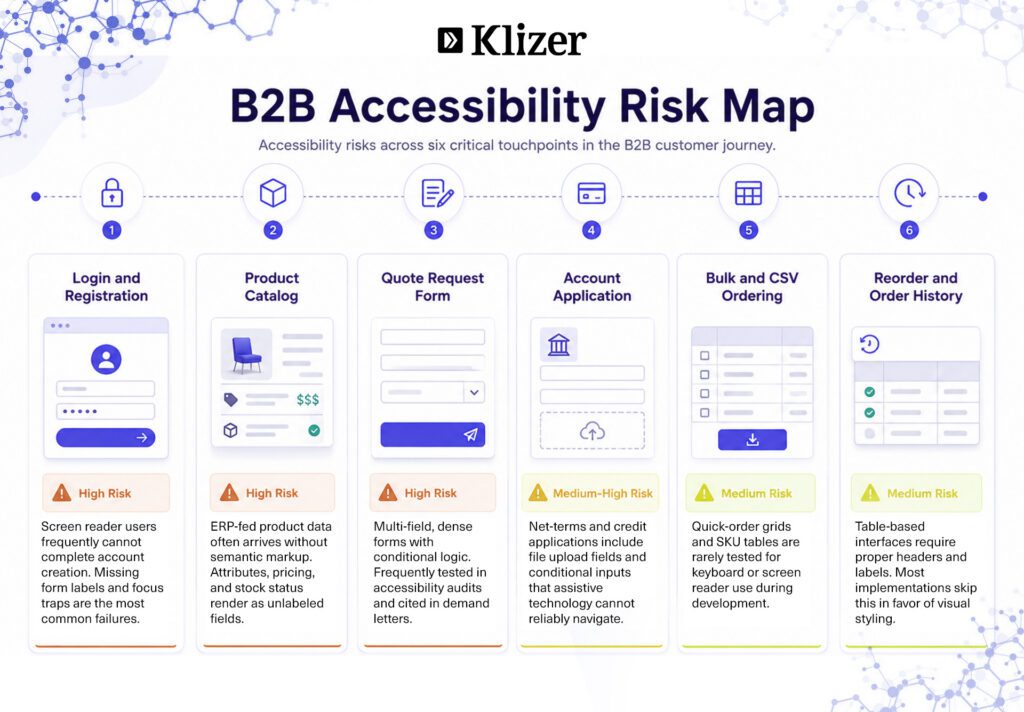
These are the high-risk areas for manufacturers and distributors:
- Gated catalogs and login walls. Account registration and sign-in forms are often the first barrier. If a screen reader user cannot create an account, they never reach your products.
- Quote-request flows. Request-a-quote forms are dense, multi-field, and frequently unlabeled. They are a common failure point.
- Account-application forms. Net-terms applications and credit forms carry the same risk, often with file uploads and conditional fields that confuse assistive technology.
- Bulk and CSV ordering. Quick-order grids, SKU entry tables, and upload tools are rarely tested for keyboard or screen reader use.
- Reorder portals and order history. Repeat-purchase interfaces depend on tables and filters that must be coded with proper headers and labels.
- ERP-fed product data. Product specs, pricing, and stock status pulled from your ERP must render in accessible markup, not as unlabeled fields or color-only indicators.
A recurring issue we see in ERP-connected storefronts: product specification data synced from systems like Prophet 21 or Epicor often arrives as unstructured text blocks or numeric fields with no semantic markup. Screen readers cannot interpret them as meaningful product attributes. The fix requires accessible markup at the integration layer, not just the storefront template.
The root cause is the same in each case. Accessibility in B2B is not a content problem. It is an architecture problem that runs across every system feeding your storefront. When pricing, inventory, and account data flow from your ERP into the storefront, each handoff is a place where accessible markup can break.
Building Accessibility into Your Commerce System
An ADA-compliant website stays compliant only through ongoing work. Every new product, template change, and integration can introduce fresh barriers. Sustainable compliance is a continuous discipline: audit, fix, document, then maintain.
That is hard to sustain when your storefront, ERP, and integrations are stitched together from disconnected tools. Product data arrives malformed. Custom code breaks focus states. A new app injects inaccessible markup. The fixes do not hold because the architecture works against them.
A manufacturer we worked with had completed an accessibility remediation on their Magento storefront. Six months later, a new product import from their ERP introduced 4,000 product pages with missing alt text and unlabeled spec fields. The storefront had not changed. The integration had. Compliance had broken silently at the data layer.
Publishing an accessibility statement on your site also matters. Courts respond more favorably when a business can demonstrate awareness, a remediation plan, and ongoing commitment.
This is why we treat accessibility as part of the commerce engine, not a layer applied on top. When Foundation, Storefront, Integration, and Intelligence run as one connected system, accessible markup, clean data, and consistent navigation are built in from the start.
Read more: ADA, Section 508, EAA & WCAG Compliance: A Developer’s Guide to Accessibility
Know more about our ADA compliance services.
End Note
Klizer builds, audits, and maintains accessible B2B storefronts for industrial sellers. We bring ERP, B2B eCommerce, integrations, and Operational AI together under one roof, so accessibility holds across the whole system rather than breaking at the seams.
If your store needs to meet WCAG and stay compliant as it scales, that is the work we do. Book a consultation with Klizer, and we will show you where your storefront stands today.