The previous article in this series described a modern Adobe Commerce architecture in three layers: Edge Delivery Services for the storefront, Adobe Commerce for transactions, and App Builder with API Mesh for extensibility and integration.
That model answers a strategic question. It doesn’t, by itself, tell a team which ERP workload to move first or how catalog sync, inventory sync, order export, and a live product page should share the work.
For manufacturers and distributors, ERP synchronization is usually the right first extraction. It changes often, it depends on systems outside Commerce, and it rarely needs to run inside the PHP request that places an order. This article describes a practical pattern for that extraction: what stays in Commerce, what runs in App Builder, and where API Mesh belongs once the integration is in place.
ON THIS PAGE
Why ERP Sync Is the Right First Extraction
Many Adobe Commerce codebases carry years of ERP logic inside plugins, observers, and cron jobs. Product imports, warehouse quantity calculations, customer lookups, and order exports all share the Commerce process, database, and release cycle.
That arrangement works until the integration becomes the busiest part of the application. A catalog refresh delays a storefront deployment. A slow ERP response shows up as a checkout timeout. A mapping change requires a full Commerce regression cycle.
ERP synchronization is a strong candidate to move first because it has three properties that fit out-of-process extensibility:
Clear Boundaries
Commerce still owns the order, the cart, and the customer session. The ERP owns inventory truth, cost, and fulfillment status. The integration moves data between those boundaries. Asynchronous tolerance. A product attribute can sync on a schedule. An order can export seconds after placement. Neither job has to finish before the shopper sees an order confirmation, unless a specific business rule requires a synchronous check.
Independent Change
ERP fields, warehouse rules, and order mappings follow a different calendar than storefront releases.
Pricing rules that must apply during quote calculation, and checkout steps that must succeed or fail as one Commerce transaction, stay in Commerce. The integration workload around them can move.
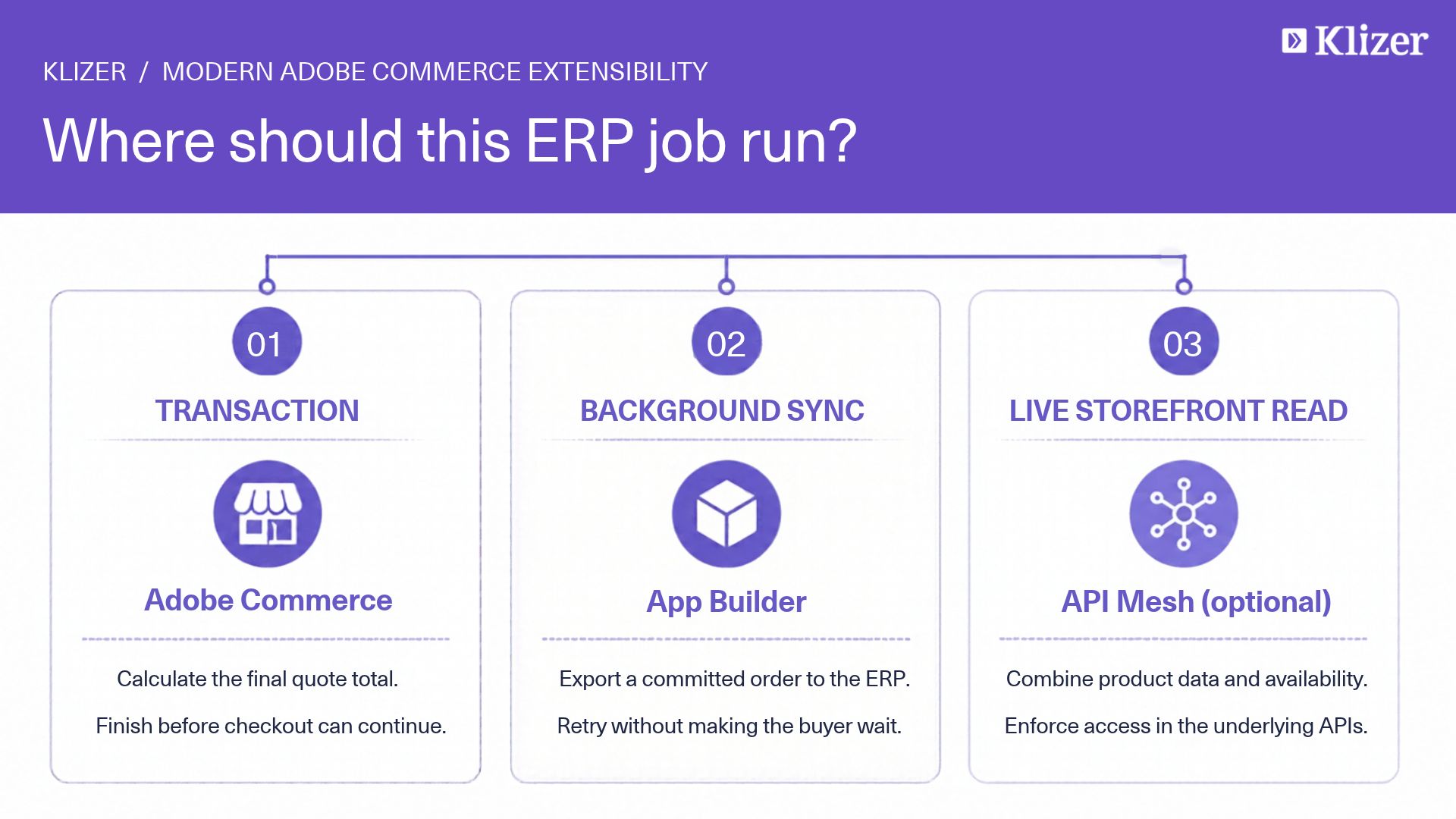
Three Jobs, Three Homes
Teams often place every ERP concern in one layer because the data originates in one system. Data origin does not determine runtime. The job does.
- Synchronize data. Move product, inventory, customer, order, and fulfillment updates between the ERP and Commerce. This is an App Builder workload: scheduled Runtime actions, event-driven actions, retries, and integration state.
- Answer a live storefront question. Show customer-specific price, warehouse availability, or order history on a product or account page. This is a read. API Mesh can compose Commerce and an App Builder API when the page needs both in one response. The mesh is not the place that runs the nightly catalog sync.
- Complete a transaction. Place an order, calculate quote totals, or enforce a rule that must succeed inside Commerce before the shopper continues. This stays in Adobe Commerce, using the extension points supported by the deployment model.
A product detail page can read ERP availability through a composed API. The job that refreshes availability every few minutes still belongs in App Builder. Checkout may require an ERP customer number resolved earlier. It should not open a new ERP session for every line while the order is being placed.
Keep a Thin Bridge on Commerce
App Builder should not absorb Magento’s catalog rules, attribute sets, store-view visibility, or order-state machine. Commerce already knows how to create a product, update stock, and move an order from processing to complete.
The durable pattern is a thin Commerce bridge:
- Bulk endpoints for product creation and update.
- A bulk inventory endpoint aligned to the stock model in use, including MSI where that is the source of stock.
- An order write-back endpoint for the ERP order number and later status changes.
- Extension attributes for the ERP identifiers checkout and order export need: customer, contact, and ship to.
App Builder decides what changed, maps ERP fields, batches the work, and records progress. The bridge decides how Commerce stores the result. Mapping changes inside Commerce can ship without redeploying every Runtime action. Mapping changes in the ERP can ship without a Commerce release.
Admin users still need a way to run a sync. An Admin UI extension can call the same Runtime action the schedule uses and return a short result: how many records were processed, how many succeeded, and how many failed. The button is for operators. The action remains the system of record for the integration.
Four Flows Distributors Actually Need
A connected distributor storefront usually needs four flows. Each one should be its own Runtime action, with shared libraries for authentication, HTTP, and logging. You can schedule, retry, and own each action independently.
1. Product sync: ERP to Commerce
Run this on a slower cadence than inventory. Query the ERP for items changed since the last successful run. Filter out items that should not appear on the web before they are transformed. Enrich only the related data the storefront needs, such as substitutes, dimensions, or warehouse attributes. Post the result to the Commerce bridge in batches.
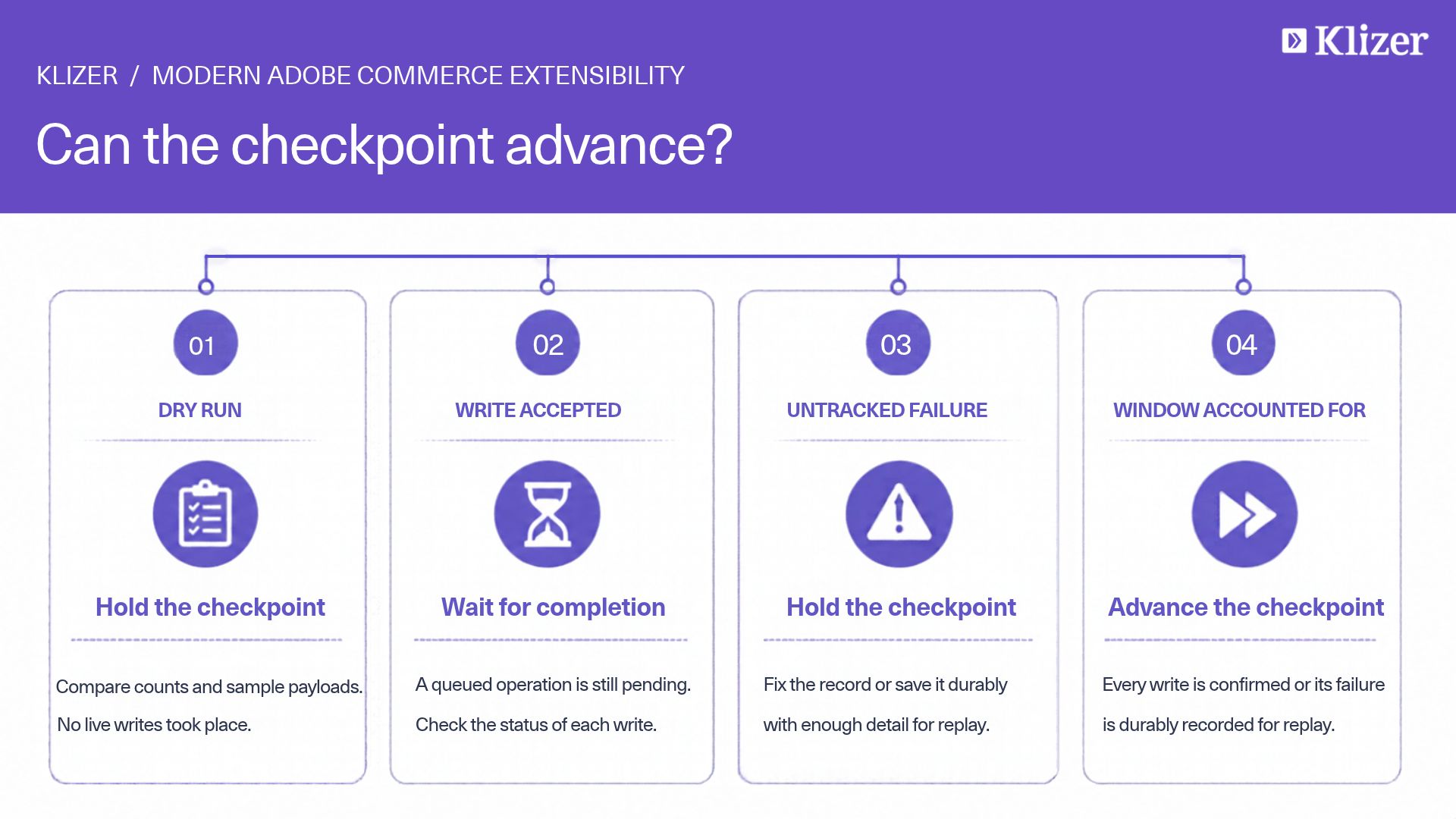
Advance the checkpoint only after a successful write. A failed batch should be safe to run again.
2. Inventory sync: ERP to Commerce
Stock changes faster than catalog attributes. Give inventory its own schedule and its own checkpoint so a long product enrichment run does not block quantity updates.
Calculate available quantity in the integration, using the ERP’s rules for on-hand, allocated, quarantined, and non-sellable stock. Publish that number to Commerce. Leave quote reservation and order decrement to Commerce’s stock implementation.
3. Order export: Commerce to ERP
Trigger this from a Commerce order event after the order is committed, with a manual replay path beside it. The action loads the order, confirms the ERP customer, contact, and ship-to identifiers are present, and checks the ERP for an order that already carries the Commerce order number.
That duplicate check matters. Events are delivered more than once. A replay after an incident will resend the same order. The ERP write should be safe to repeat: if the order already exists, return the existing ERP order number and store it on the Commerce order.
Export after checkout completes. A shopper should receive an order confirmation even when the ERP is slow or briefly unavailable. The integration retries. Operations can see the failure and replay it.
4. Fulfillment updates: ERP to Commerce
As the ERP invoices, ships, or cancels, a scheduled or incremental action reads changed ERP orders that are linked to Commerce and applies the matching lifecycle update through the bridge. Make invoice, shipment, and cancellation rules explicit. A missing tracking number or an unexpected ERP status should fail that record and continue the batch, rather than stopping the run or guessing a Commerce state.
Patterns That Keep the Integration Reliable
Checkpoints, not full reloads
Full catalog reloads do not scale for distributor catalogs. Each flow stores a checkpoint, often the last modified timestamp it successfully processed. On the next run, it asks the ERP only for rows changed since that point.
Resolve the checkpoint in a fixed order: an explicit value for backfill or support, then the stored value, then a documented default for the first run. Move the checkpoint forward only after a successful live run. Empty results can still move the checkpoint forward so a quiet period doesn’t keep scanning the same window forever.
Dry runs before live writes
Each action should support a mode that reads, filters, and transforms without writing to Commerce and without moving the checkpoint. Use it when a mapping changes, when a new warehouse is added, or before the first production run. Compare counts and sample payloads with the ERP and Commerce teams before enabling writes.
Idempotent order handling
Order export needs a stable key shared by both systems, commonly the Commerce increment ID stored on the ERP order as a web reference. Before creating an ERP order, look up that reference. Before updating Commerce, confirm the ERP order number being written belongs to that same web order.
The same discipline applies to invoices and shipments. Replaying a fulfillment run should not create a second shipment for an order that already has one.
Isolate failures
A product batch of 200 SKUs should record which SKUs failed and continue. One malformed item should not discard the checkpoint for the records that succeeded. Timeouts to the ERP should retry with a limit. Checkout, catalog browsing, and the other sync flows should keep running while that retry happens.
Secrets stay in the App Builder environment and are injected at deploy time. Credential rotation is a deployment concern for the integration, separate from a Commerce release.
Observe the run, not only the HTTP status
Every action should return a structured summary: flow name, checkpoint used, records read, records written, records failed, and duration. Log that summary where operations already watch integrations. An HTTP 200 with a failed count of zero is the success signal. An HTTP 200 with a growing failed count is an incident.
Where API Mesh Fits After the Sync Exists
API Mesh becomes useful after the integration has a stable read API. A product page that needs Commerce merchandising data and ERP availability can query one GraphQL endpoint instead of calling both systems from the browser.
That endpoint should call APIs that are safe for a shopper request: a cached price, a current availability lookup, a customer-specific order list. It should not trigger a catalog sync, and it should not become a dependency of order placement.
Cache and authorization still belong to the design. Customer-specific price and account data require the shopper’s identity to reach the API that enforces it. A composed schema does not replace that check.
Stores that are not ready for Mesh can keep EDS blocks on Commerce GraphQL and call a single App Builder read for the ERP attribute they need. Mesh is a consumer convenience. It is optional until more than one source must be queried together.
A Rollout That Limits Risk
Extract one flow, prove it, then add the next.
- Inventory the current ERP jobs. List each cron, observer, and admin button. Note the direction, the cadence, the failure behavior, and whether checkout depends on it.
- Stand up the bridge in a non-production environment. Product and inventory writes first. Confirm store-view rules and stock updates match the current module.
- Run product sync as a dry run. Validate filters and payload shape with merchandising.
- Enable product sync, then inventory sync. Inventory moves to its own schedule only after product identity is stable. A quantity update for a SKU that does not exist yet creates noise. 5. Export orders manually. Replay a set of known orders. Confirm duplicate protection and the ERP order number written back to Commerce.
- Turn on the order event. Keep the manual replay path. Document who watches failures.
- Add fulfillment updates. Agree the ERP-to-Commerce status map with operations before enabling it.
- Retire the old PHP job only after the new flow has run cleanly through a business cycle that includes retries, a credential rotation, and at least one mapping change.
Adobe Commerce as a Cloud Service planning follows the same order. The first extraction should be a supported integration boundary, with less logic that assumes an in-process PHP runtime.
Best Practices
- Split cadence by how fast the data changes. Product attributes, inventory quantities, and order status don’t share a schedule or checkpoint.
- Filter in the ERP query. Exclude non-web and discontinued items before enrichment. Transforming thousands of rows the storefront will never publish wastes the run and hides real errors.
- Scope order export by store. Export only the store views whose customers carry ERP identifiers. A store that is still on guest checkout needs an explicit exception, not a silent skip inside a shared job.
- Size batches to the slower system. Cap bulk writes to what Commerce and the ERP accept reliably. Record the batch size with the run summary so a later failure can be reproduced.
- Treat replay as a feature. Support, finance, and warehouse teams will ask to reprocess a single order or a single time window. Design the action for that request from the start.
- Assign an owner. Commerce, App Builder, and the ERP each need a named owner for incidents. A failed order export is an integration incident with a customer impact, and it needs a queue.
Common Pitfalls
- Exporting the order inside the checkout request. A slow ERP becomes a failed checkout. Export after the order exists, then retry.
- One action for every flow. A product bug fix then redeploys inventory and order export. Separate actions limit that blast radius.
- Sharing one checkpoint across flows. A successful inventory run can move a timestamp that product sync still needs, or the reverse. Keep checkpoints independent.
- Writing ERP stock directly from the storefront. Live reads and scheduled sync solve different problems. Mixing them produces quantity drift that is hard to explain.
- Removing the PHP module in the same release that enables the event. Keep the old path available, disabled, until replay and monitoring have been proven.
- Putting sync logic in API Mesh because the storefront already calls Mesh. Mesh composes reads. App Builder runs the sync.
Conclusion
Out-of-process extensibility becomes concrete when the first workflow has a home. For most distributor and manufacturer implementations, that workflow is ERP synchronization.
Adobe Commerce keeps cart, checkout, pricing, and order placement. A thin bridge accepts bulk catalog, inventory, and order updates. App Builder runs product sync, inventory sync, order export, and fulfillment updates as separate, restartable flows. When needed, API Mesh exposes composed reads to the storefront and stays out of the sync path.
The previous article described the architecture. This pattern is the first implementation step: one integration boundary, four flows, and a rollout that retires the old PHP job only after the new one has earned it.
Klizer helps Adobe Commerce teams design that boundary, connect ERP platforms such as Epicor Prophet 21, and sequence the move to App Builder without disrupting checkout or storefront delivery.
Planning the first ERP extraction from Adobe Commerce? Contact Klizer at klizer.com to review your current sync jobs and identify which flow should move first.
Frequently Asked Questions
1. Should every ERP call leave Adobe Commerce?
No. Calls that must succeed inside quote, tax, or order placement stay on supported Commerce extension points. App Builder fits workloads like scheduled sync, event-driven export, enrichment, and retry handling.
2. How is this different from using API Mesh for ERP data?
API Mesh is a read composition layer for applications that need one GraphQL response from several APIs. App Builder is where sync jobs, events, and retries run. A product page can use Mesh to read availability that an App Builder job keeps current.
3. What should the first flow be?
Inventory or product sync is usually safer than order export. Both can be dry-run, batched, and compared with the existing PHP job. Order export should follow once we’ve verified ERP customer identifiers and duplicate protection.
4. How do we stop duplicate ERP orders?
Store the Commerce order number on the ERP order and look it up before every create. Treat event replays as normal. The second delivery should find the existing ERP order and write that order number back to Commerce.
5. Can we do this before a move to Adobe Commerce as a Cloud Service?
Yes. A thin bridge and out-of-process sync reduce dependence on in-process PHP and make the later SaaS review smaller. Each flow still has to be checked against the APIs and events the target environment supports.
6. Do we have to rebuild the Edge Delivery storefront to start?
No. The sync can run while the storefront continues to read Commerce. Storefront changes come later, and only for the pages that need a live ERP read or a composed API.
Also read:
Adobe Edge Delivery Services (EDS): Building Fast, Document-Driven Storefronts for Modern Commerce
How to Connect Epicor P21 with Adobe Commerce Using Adobe App Builder