Shopware multi-company accounts help B2B distributors manage complex customer organizations, including multiple branches, buyers, pricing structures, permissions, and approval workflows within a single commerce environment.
Every time a commercial buyer picks up the phone to place an order your storefront could not handle, you are paying a sales rep to do a job the website was supposed to do.
A distributor’s largest customers are rarely a single buyer. They are organizations with head offices, regional branches, purchasing staff, and approval chains that run across departments.
When one of those buyers logs into your website, they do not expect a generic cart. They expect their negotiated prices, their assigned catalog, their branch shipping addresses, and their own spending rules. Meeting that expectation is what really separates a real B2B portal from a consumer store with a login.
This is where multi-company portal design comes in. The buying group has structure, and that structure has to live somewhere in your commerce system.
ON THIS PAGE
What Is a Multi-Company B2B Portal?
A multi-company B2B portal is a single storefront that serves many different buying organizations. Each one has its own users, pricing, catalogs, and ordering rules.
It is easy to confuse this with two things it is not.
It is not a set of separate storefronts, one per brand or region. It is not a marketplace, where third-party sellers list their products.
A multi-company portal is the opposite arrangement: one seller and many buying companies, with each buying company modeled as its own account, carrying its own internal organizational structures.
For example, a national HVAC distributor sells to a facilities-management firm. The firm has sixty branches, each placing orders, each with a different local budget, and all rolling up to one corporate agreement. Your portal has to represent that design and data accurately, or the customer will keep calling your sales desk every time instead.
How Do Shopware Multi Company Accounts Work?
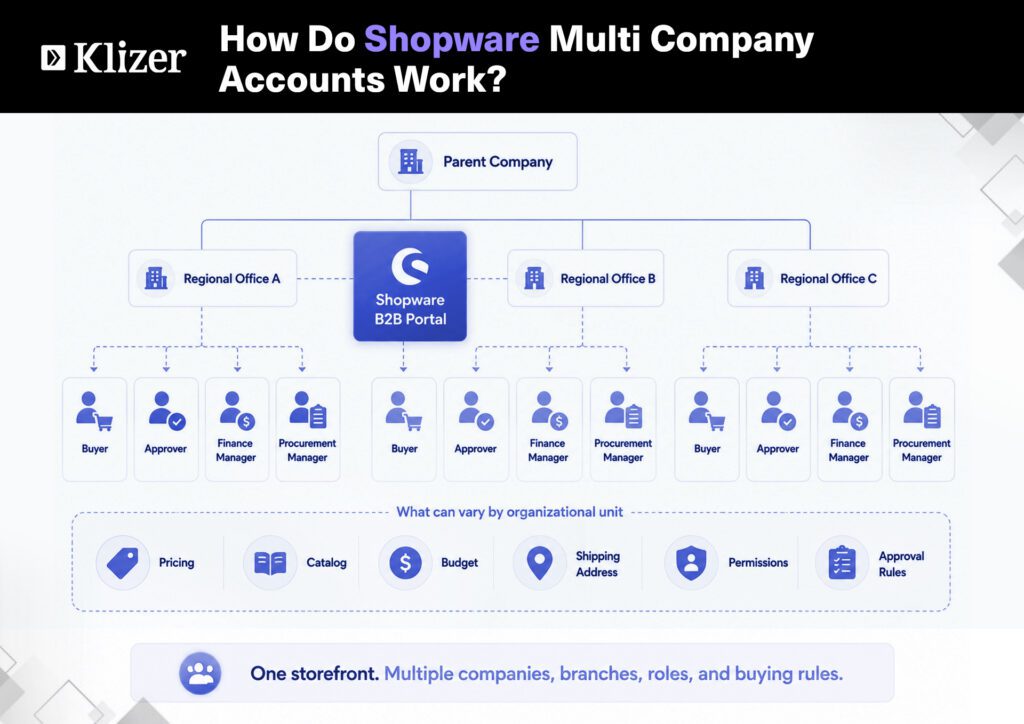
Shopware handles this through its B2B components; a modular set of features is built on the Shopware 6 core rather than mounted as a separate part.
The components that build Shopware multi-company accounts are the following:
- Employee Management: lets a business customer build multiple user accounts under one company, each with defined roles, rights, and permissions.
- Organization Units: model branches, departments, or cost centres inside a single company; each with its own shipping and billing addresses, payment methods, and budgets.
- Advanced Product Catalogs and Individual Pricing: control what each customer is shown and what they are expected to pay.
- Approval Rules: route orders above a defined threshold to the right approver before they are placed.
Together these mean a single business customer record can hold an entire organization: one parent company, its sub-units, and every employee role inside one structured account. That is the core of a multi-company B2B portal.
One capability matters more than its name suggests. An employee account can belong to several organization units, and to several separate companies, and switch between them without logging out again. For a central buyer purchasing on behalf of three branches, that removes the duplicate-login workaround most portals end up carrying.
Because Shopware is API-first with a headless core, none of this is tied to the default storefront. The same account data can drive a custom frontend, a procurement punchout, or a mobile app through the same APIs.
Which Shopware Edition Do You Need for B2B Components?
Settle the licensing question early, because it shapes everything after it. B2B Components are available from the Shopware Evolve plan upward, delivered through the Shopware Commercial extension. Lower tiers do not include them, which rules out a native multi-company build on those plans.
There is a migration question too. Shopware’s older B2B Suite is no longer in active development, and support for it ends with Shopware 6.8. Since May 2025, new Evolve installations receive B2B Components instead. If you are already running the Suite, your account, role, and approval data needs a planned migration path rather than an in-place upgrade, and that work is best scoped before it becomes urgent.
Why Company Account Management Is an ERP Problem, Not a Frontend Problem
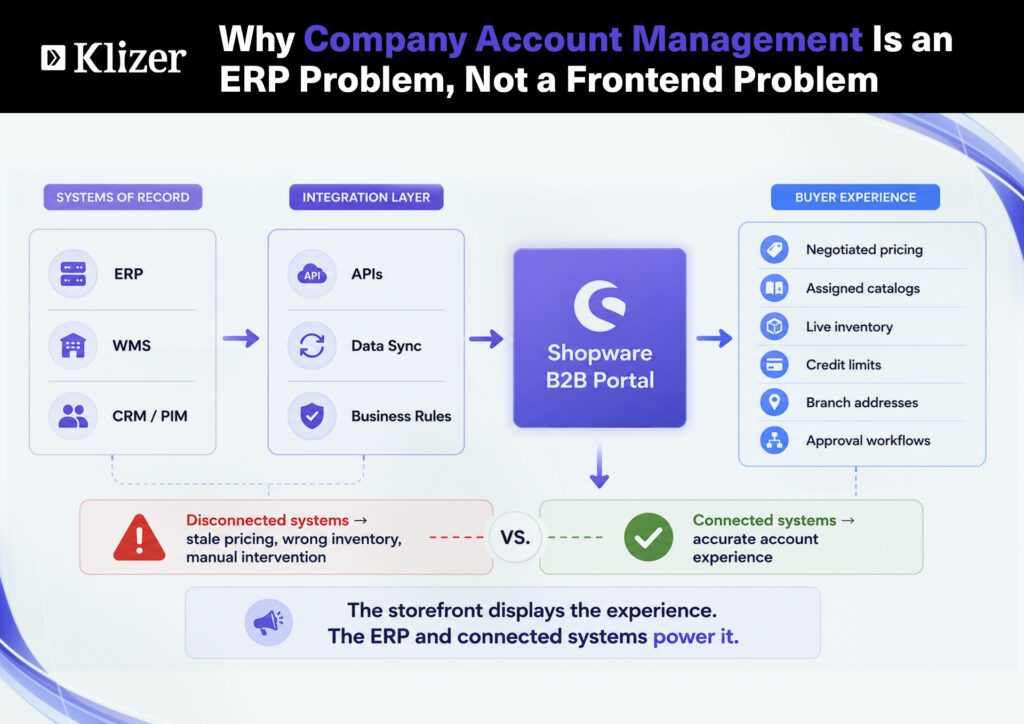
Your storefront features are the visible part of the system. They are not where a multi-company portal succeeds or fails.
Company account management works when the data behind it is correct, and that data rarely originates in the commerce platform.
Consider what actually drives a single buyer’s experience:
- The prices they see come from negotiated contract terms, usually held in the ERP.
- Catalog entitlement depends on the account and its agreements, again managed upstream.
- Stock reflects live inventory across warehouses, owned by the ERP or WMS.
- Credit limits and budgets tie back to the customer’s financial record.
Shopware can display all of this, but it is not the system of record for any of it. Individual pricing is only as accurate as the pricing feed behind it. A budget rule is only meaningful when it reflects a real credit position. For distributors running Epicor Prophet 21, SAP, or Microsoft Dynamics, the integration work is not a phase that follows the build. It is the build.
This is why enterprise account management in B2B is an integration problem first. A portal that looks complete but shows stale pricing, or stock that does not exist, erodes trust faster than no portal at all.
Buyer behavior raises the stakes. Gartner reported in 2025 that 61% of B2B buyers prefer an overall rep-free buying experience, reflecting the growing importance of digital self-service in B2B purchasing. As the portal becomes a primary buying channel, its pricing, inventory, and account data need to stay aligned with the systems your sales team already trusts.
How Do You Build a B2B Account Hierarchy?
A B2B account hierarchy is built in layers, each one depending on the layer beneath it.
- The parent company: the top-level account holding the master agreement, the contract pricing, and the overall relationship.
- Organizational units: branches, departments, or subsidiaries, each with their own delivery addresses, payment methods, and local settings.
- Employees and roles: individual users assigned to units, with permissions deciding who can browse, who can order, and who can approve.
- Entitlements: the pricing and catalog rules determining what each unit and user is allowed to see and buy.
- Approval and budget routing: the workflow that keeps spending inside agreed limits before an order is committed.
Model these organizational structures accurately, and the portal mirrors how the customer already works. Model them loosely and every exception becomes a support ticket.
The design goal is simple. Your account structure in Shopware should match the customer’s real org chart, and the data feeding it should match the ERP.
What Are the Common Pitfalls in Enterprise Account Management?
Most multi-company portal problems are traced back to a few common mistakes.
- Modeling hierarchy in the frontend. When you treat the company structure only as a display concern, rather than as a data model that should sync with the ERP. The structure drifts as soon as anything changes upstream.
- Static pricing. Loading contract prices manually instead of feeding them from the system of record, so quotes and portal prices gradually differ.
- Confusing sales channels with companies. Creating a new Shopware sales channel for each customer, which is a storefront-separation tool.
- No approval routing. Letting any of your users place any order, which works in a demo and fails the first time a branch overspends.
Each of the above looks fine when you launch. But they become expensive at scale. Because a multi-company B2B portal is assessed on the hundredth or multiple orders.
What Does It Take to Get Shopware Multi-Company Accounts Right?
Most multi-company portal problems trace back to a few mistakes.
- Modeling hierarchy in the frontend. Treating company structure as a display concern rather than a data model that syncs with the ERP. The structure drifts as soon as anything changes upstream.
- Static pricing. Loading contract prices manually instead of feeding them from the system of record, so quotes and portal prices gradually diverge.
- Confusing sales channels with companies. Creating a new Shopware sales channel for each customer. Sales channels are a storefront-separation tool, and they were never meant to model buying organizations. The approach breaks down once you are past a handful of accounts.
- No approval routing. Letting any user place any order works in a demo and fails the first time a branch overspends.
Each of these looks fine at launch and turns expensive at scale. A multi-company B2B portal is judged on its hundredth order, not its first.
What Does It Take to Get Shopware Multi-Company Accounts Right?
Model the data first, the integration next, and the storefront last.
Start by mapping the customer’s real org chart: the parent, the units, and the roles connecting them. Set out how each maps to ERP records and how changes flow between the two systems.
Only then does storefront work make sense. With the account hierarchy and the integration contracts settled, Shopware’s B2B Components have the foundation they need to behave predictably.
Get that sequence right, and the portal holds up under real purchasing volume. Build the storefront before the data model, and you rebuild the whole thing later.
Know more about Shopware development services.
Conclusion
A multi-company portal is truly an integration challenge with a storefront on top. The part your customer sees is simple to build. The part that decides whether it works is the following: getting company hierarchies, pricing, and inventory to agree with the systems that actually own those numbers.
This is the problem Klizer was built to solve. We work with industrial B2B manufacturers and distributors as their Connected Commerce partner, bringing ERP, ecommerce, integration, and operational AI all together so they run as one system rather than a set of disconnected tools.
If you’re planning a multi-company build on Shopware, the most useful conversation you can have is about your data and your integrations, well before you think of any fancy theme for your website.
Book a consultation with the Klizer team today to map out exactly what your build would involve.
Frequently Asked Questions
Can one Shopware account represent a customer with several legal entities?
Yes, in two ways. Organization units cover branches and departments inside a single company. Where the entities are separate companies rather than internal divisions, an employee account can be assigned across multiple company accounts and switch context between them without a second login.
Does a multi-company portal need a headless build?
No. Shopware’s default storefront supports B2B Components directly. Headless earns its place when the same account data has to serve a custom frontend, a punchout catalog, or a mobile ordering app alongside the web store.
What usually determines the timeline on a multi-company build?
Rarely the storefront. The pacing item is normally how cleanly customer hierarchies, contract pricing, and inventory can be pulled out of the ERP, and how much of that data needs cleaning before it can safely drive a portal.
Read also: