For wholesale distributors, running a storefront and an ERP as two separate systems has a predictable endpoint. Orders get re-keyed by hand. Stock counts go stale between syncs. A buyer logs in and sees the list price instead of their negotiated contract rate. Someone on your team bridges the gap manually until the order volume grows past what one person can absorb.
Ecommerce ERP integration closes that gap by creating a direct, automated data connection between your storefront and your back-office system. Orders flow in. Inventory, pricing, and fulfillment status flow back. The manual handoff disappears.
This guide covers what ecommerce integration with ERP actually involves for distributors, what data needs to sync, how implementation works, and what it looks like in practice across real ERP and commerce platform combinations.
ON THIS PAGE
What is eCommerce ERP Integration?
eCommerce ERP integration is the process of creating a direct, automated data connection between your online storefront and your Enterprise Resource Planning system so both platforms share the same records without manual intervention.
When a buyer places an order online, it pushes directly into the ERP as a fulfillment-ready sales order. When inventory changes in the warehouse, the storefront reflects it immediately. When a contract price is updated in the ERP, the buyer sees it the next time they log in. The ERP stays the system of record. The storefront displays what it sends.
Without integration, the gap between those two systems is filled by people. Someone re-keys web orders into the ERP. Someone manually updates pricing spreadsheets. Someone reconciles inventory counts between the warehouse and the website. B2B ecommerce ERP integration eliminates that work and replaces it with a live, automated data connection.
Why Do Distributors Need ERP and eCommerce Integration?
B2B buyers expect the same accuracy and speed from a digital channel that they get from a phone call with a sales rep. Without ERP integration, a storefront cannot deliver that. Here is where the operational gap shows up most visibly for distributors.
Automating Complex B2B Pricing Workflows
Wholesale distribution rarely runs on fixed retail prices. Contract rates, volume tiers, customer-specific discounts, and promotional group pricing all live in the ERP. Without integration, someone maintains a parallel pricing structure on the website that drifts out of sync with the ERP every time a contract changes.
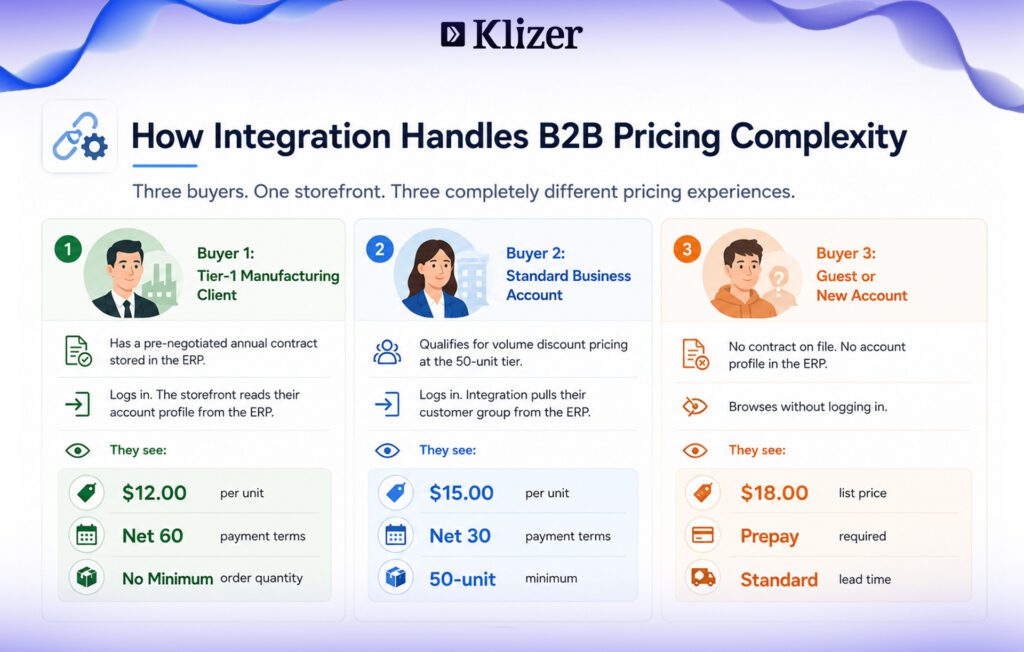
A distributor running Microsoft Dynamics 365 connected to Adobe Commerce can automatically display customer-specific contract pricing, payment terms, and credit limits to each logged-in buyer without maintaining duplicate pricing tables. A Tier-1 manufacturing client logs in and sees their pre-negotiated $12 per unit rate. A standard business account sees the $15 volume rate. A new account sees the $18 list price. The ERP controls all three. The integration surfaces the right one to the right buyer without any manual configuration.
Providing Real-Time Inventory Transparency
Operating on stale inventory counts leads to oversells, broken delivery promises, and the kind of customer service calls that damage long-term accounts. ERP and ecommerce integration synchronizes live quantities across every warehouse and fulfillment center in near real time.
A wholesale distributor running Prophet 21 across three regional warehouses can sync available-to-promise quantities to BigCommerce every five to fifteen minutes. When a regional demand spike clears out stock on a specific industrial valve, the storefront reflects the shortage before the next buyer places an order. Backorder visibility and estimated arrival dates from incoming purchase orders give buyers accurate expectations rather than a stockout surprise at checkout.
Eliminating Manual Order Transcription
Manual data entry slows fulfillment, introduces errors, and scales badly as order volumes grow. A distributor integrating Epicor with Magento eliminates the manual step entirely. Orders push from the storefront directly into Epicor as fulfillment-ready picking tickets within seconds of purchase. No one types a part number, applies a tax code, or enters a shipping address by hand. Your team shifts from data entry to exception handling.
Enabling 24/7 Buyer Self-Service
Modern B2B buyers expect to manage their accounts without calling or emailing your team. A manufacturer running SAP connected to Adobe Commerce can expose invoice history, live shipment tracking, credit limit status, and one-click reorder directly in each buyer’s account dashboard, all pulled live from SAP without any manual export or customer service involvement. Buyers get answers at 11 P.M. Your team handles the work that actually requires them.
What Are the Core Data Points That Sync in B2B eCommerce ERP Integration?
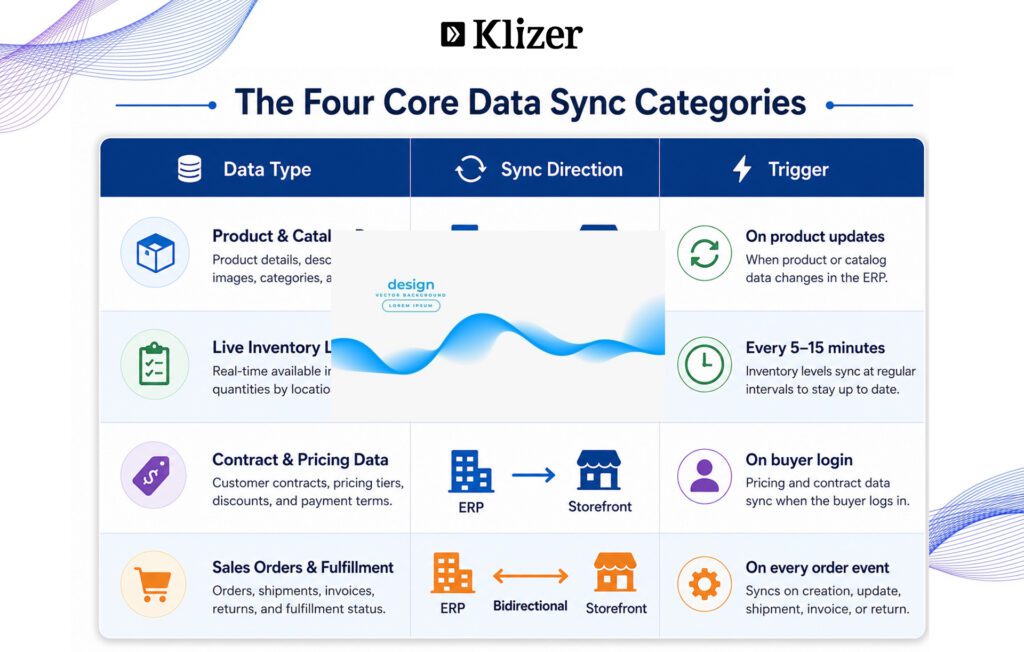
A successful b2b ecommerce ERP integration depends on four distinct data categories flowing accurately between platforms.
1. Product and Catalog Data
The ERP is the system of record for your product catalog. Manually maintaining thousands of distribution SKUs on a website in parallel with the ERP is where most catalog problems start.
Integration pushes from ERP to storefront:
- Part numbers, manufacturing SKUs, and UPCs
- Physical specs: weights, freight dimensions, material details
- Product categories, hierarchies, and language translations
2. Live Inventory Levels
B2B buyers need certainty that available stock actually exists before placing an order. ERP integration ecommerce workflows push inventory updates continuously:
- Available-to-promise quantities across every regional warehouse
- Safety stock thresholds that hide items when stock falls below a set minimum
- Estimated arrival dates for incoming purchase orders, enabling backorder visibility
3. Customer and Contract Pricing Data
When a buyer logs in, the integration reads their profile from the ERP and populates:
- Customer-specific contract pricing, volume tiers, and promotional group rates
- Credit limits, payment terms (Net 30, Net 60), and outstanding balance alerts
- Buyer permissions, so a procurement manager sees different purchasing controls than a field technician on the same account
4. Sales Orders and Fulfillment Status
This is the bidirectional stream that closes the purchasing loop.
Web to ERP: Payment confirmation, tax data, shipping address, and line items push into the ERP as an active sales order the moment checkout completes.
ERP to web: Once the warehouse picks and packs, tracking number, carrier name, and final invoice push back to the buyer’s account dashboard automatically. No follow-up email required.
Stop losing orders to disconnected systems
Klizer integrates ERP and ecommerce for manufacturers and distributors on Adobe Commerce, Magento, Shopify Plus, and BigCommerce.
What Are the Steps to a Successful Integration Strategy?
Connecting a storefront to a complex ERP is a multi-layer technical project. Without a structured approach, pricing rules break, inventory chains disconnect, and the integration becomes a problem to manage rather than a system to trust.
Step 1: Prepare Your Data Before Connecting Anything
Establish the system of record for every data category before touching integration tooling. Scrub your ERP for duplicate SKUs, inactive customer profiles, and broken category hierarchies. In Prophet 21 and Epicor implementations we have worked on, legacy data quality issues are among the most common causes of post-launch failures. Exposing messy ERP data to a live storefront does not create a data problem. It makes your existing data problem visible to buyers.
Step 2: Define Your Field Mapping and Sync Frequency
Document exactly how data fields translate between the two platforms. Create a schema mapping your ERP fields to storefront attributes. Define sync frequency per data type: inventory needs near-real-time updates every five to fifteen minutes, pricing syncs on login, catalog data syncs on change, and orders sync on event. Treating all four data types with the same sync frequency is how integrations get expensive or unreliable.
Step 3: Choose and Deploy Your Integration Method
Set up your connectivity approach: middleware iPaaS platforms like Celigo or Jitterbit for NetSuite-centric operations, custom REST or GraphQL API connections for complex B2B workflows, or native integration layers for distributors who want ERP and commerce in one system. Configure error handling alerts to catch failed syncs automatically rather than discovering them when a buyer complains.
Step 4: Test Against Real B2B Scenarios
Run end-to-end purchasing scenarios in a staging environment before go-live. Test edge cases that reflect real distributor operations: maximum credit limit orders, multi-warehouse split shipments, stacked tier discount codes, tax calculations across regional jurisdictions, and backorder scenarios. The edge cases that fail in staging are far cheaper to fix than the ones that fail in production.
How Does Klizer Approach eCommerce ERP Integration for Distributors?
Klizer builds connected commerce systems for industrial B2B manufacturers and distributors. We connect Prophet 21, Epicor, SAP, NetSuite, and Microsoft Dynamics 365 to storefronts on Adobe Commerce, Magento, Shopify Plus, and BigCommerce as a managed integration layer, not a one-time project.
Our Connected Commerce model brings Foundation, Storefront, Integration, and Intelligence together under one roof. The integration layer is not a separate vendor relationship or a middleware tool your team inherits and maintains. It is part of a live, connected system where ERP data, order history, pricing logic, and real-time inventory signals feed the same storefront and operations layer.
Backed by over 20 years of industry experience and more than 300 successful commerce implementations, Klizer bridges the gap between your frontend storefront and your back-office ERP with the expertise that distributor operations actually require.
Ready to eliminate manual data entry and connect your warehouse to your storefront? Contact Klizer to map out a scalable, secure, and fully automated ecommerce ERP integration built around how your distribution business actually operates.