Prophet 21 API integration connects P21 with ecommerce platforms, CRM systems, warehouses, marketplaces, and other business applications. When implemented correctly, it can automate data exchange and improve consistency across products, pricing, inventory, customers, and orders. Poorly designed integrations, however, can create Prophet 21 API integration errors, duplicate records, incorrect pricing, missing inventory updates, and difficult-to-trace failures.
A reliable integration requires more than sending an API request and checking whether it returned successfully. Developers need to choose the right API, understand P21 business logic, define data mappings, handle failures, prevent duplicate transactions, and monitor every synchronisation.
Not every integration requirement needs a custom API. For predictable, batch-oriented data loads, SISM (Standard Import/Synchronization Manager) may be worth evaluating. For real-time, interactive, or bidirectional processes, an API-based integration is generally more appropriate.
This guide covers the most common P21 integration problems, explains the Prophet 21 API issues that can cause them, and provides practical P21 API troubleshooting guidance for developers and integration teams. A complete Prophet 21 API integration checklist is included at the end.
ON THIS PAGE
1. Using the Wrong P21 API for the Job
One of the most common Prophet 21 API integration mistakes is assuming that one API should handle every type of operation.
P21 provides different API approaches for different integration requirements. OData is commonly used for read-oriented access, while transaction-oriented APIs are designed for creating or updating business records. Other API services support specific entity, inventory, interactive, and user-defined table operations.
The mistake is using an API for a task it was not designed to handle. For example, attempting to use a read-oriented endpoint for a transaction that requires P21 business logic can result in unsupported operations, validation errors, incomplete updates, or behaviour that differs from entering the same transaction through the P21 application.
Better approach
Choose the API based on the business requirement rather than the data object alone.
| Requirement | Typical API approach |
| Read product information | OData or appropriate read service |
| Read inventory | OData or Inventory API |
| Export customer information | OData or Entity API |
| Create business transactions | Transaction API |
| Complex business workflows | Interactive API |
| Simple entity CRUD | Entity API |
| User-defined table operations | UDT Service API |
The exact API and endpoint should always be confirmed against the client’s P21 environment and current Epicor documentation.

2. Treating P21 Like a Normal SQL Database
A common P21 integration problem is designing an integration around the assumption that P21 is simply a database that can be read and written directly.
Direct database writes can bypass business validation, transaction processing, application rules, audit behaviour, related record updates, and other required business workflows.
This becomes particularly important when moving from an on-premises P21 environment to P21 Cloud. An integration designed around direct database access may not be suitable for a cloud environment where that level of database access is unavailable.
The integration architecture should therefore be built around the APIs and data services supported by the P21 environment rather than treating P21 Cloud as a hosted version of the previous installation.
Better approach
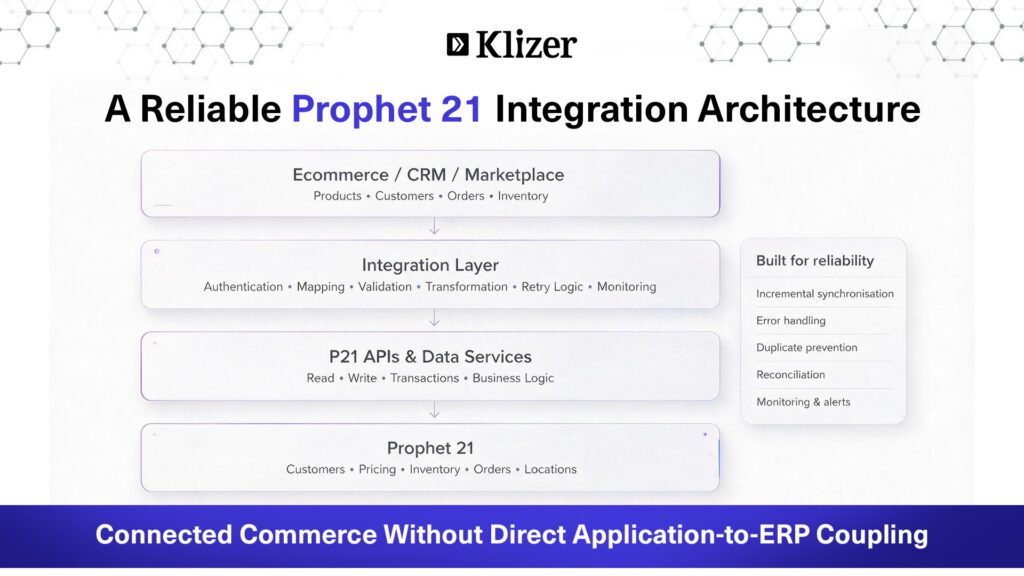
A legacy integration may connect an ecommerce platform directly to the P21 database. A more maintainable architecture places an integration layer between the ecommerce platform and P21, using the APIs and data services supported by the environment.
This approach also makes it easier to introduce data mapping, validation, error handling, retry logic, monitoring, and reconciliation without tightly coupling the ecommerce application to P21’s internal implementation.
3. Assuming Every API Response Means the Business Operation Succeeded
One of the most important principles in P21 API troubleshooting is understanding that a technically successful HTTP request does not always mean that the intended business operation completed successfully.
An integration should validate the HTTP status, response structure, error messages, transaction status, created or updated record identifiers, and business-level validation messages.
For example, an API request may return a valid HTTP response while the intended transaction is rejected by a P21 business rule. If the integration only checks whether the HTTP request completed, the failure may go unnoticed.
The integration should therefore confirm both technical success and business success before marking a transaction as complete.
Read More: eCommerce ERP Integration: A Complete Guide for B2B Distributors
4. Not Handling Prophet 21 API Integration Errors Properly
ERP integrations inevitably encounter errors. The problem is not that an API request fails. The problem is when the integration does not properly record why it failed or determine whether the failure is temporary or permanent.
Common Prophet 21 API integration errors can result from invalid data, authentication problems, unsupported operations, missing required fields, network failures, timeouts, or business-rule validation.
Good error logging should capture:
- Integration name
- Record identifier
- Request time
- Endpoint
- HTTP status
- Response or error message
- Retry count
- Final integration status
For example:
| Field | Example |
| Integration | P21 → Ecommerce Product Sync |
| SKU | ABC-123 |
| Request time | 2026-08-12 10:15:32 |
| Endpoint | P21 API endpoint |
| HTTP status | 400 |
| Error | Response message |
| Retry count | 2 |
| Integration status | Failed |
A weak integration may repeatedly retry the same failed request without recording the cause or determining whether the error is temporary.
A better approach is to classify the error, record the failure with enough context to troubleshoot it, and route permanent failures for resolution rather than repeatedly retrying them.
5. Using the Wrong Data Mapping
Data mapping issues are another common source of P21 integration errors.
ERP systems often contain multiple fields that appear similar but serve different business purposes.
A product may have a Product ID, SKU, Manufacturer Part Number, Vendor Part Number, UPC, Description, Status, Warehouse or Location, and Discontinued indicator.
The integration must define exactly which P21 field represents each business requirement.
Do not assume that similarly named fields have the same meaning across P21 environments. Custom fields, configurations, and pricing rules can vary between implementations.
Example mapping
| P21 Field | Business rule | Ecommerce attribute | Ecommerce behaviour |
| Discontinued | TRUE | Product status | Disable product |
For each integration, document the source field, transformation rule, destination field, and expected behaviour before development begins.
6. Ignoring Location-Level Data
Location-level data is particularly important for distributors operating across multiple warehouses.
A product may have different statuses or inventory levels across locations. For example:
| Location | Status |
| 111 | Active |
| 150 | Discontinued |
| 202 | Active |
The integration should not assume that one location record represents the overall product status.
The real question is which location should determine ecommerce availability.
Possible rules include:
- Primary warehouse
- Designated ecommerce warehouse
- Any location with available inventory
- Aggregated inventory across locations
- A specific set of fulfilment locations
This decision should be documented and agreed with the client before development begins.
The same principle applies to pricing, inventory, lead times, and fulfilment rules. Location-level data should be treated according to the business requirement rather than simply passed through to ecommerce.
7. Pulling Too Much Data
Pulling the entire P21 dataset every time a synchronisation runs is one of the common P21 integration problems that can affect both performance and reliability.
For example, an inefficient integration might retrieve all 100,000 products every 15 minutes, compare the entire dataset, and then update ecommerce.
A better approach is to identify records that have changed since the last successful synchronisation and process only those records.
Incremental synchronisation can reduce API traffic, processing time, and unnecessary database operations while making synchronisation easier to monitor.
8. Forgetting Pagination
Large datasets should not be assumed to fit into a single API response.
An integration that works with a small development dataset may begin losing records once the production dataset grows. This is a common source of P21 API issues when integrations move from testing to production.
The integration should retrieve large datasets in pages, process each page, and continue until all available records have been handled.
Reconciliation should then confirm that the expected number of records was received and processed.
For example:
| Metric | Result |
| Records expected | 12,450 |
| Records received | 12,450 |
| Records processed | 12,450 |
| Records failed | 3 |
If three records fail, the integration should make those records identifiable and available for reprocessing rather than requiring the entire synchronisation to run again.
9. Having No Retry Strategy
Temporary failures are common in distributed systems. They may include:
- Network timeouts
- Temporary API unavailability
- Connection resets
- Middleware restarts
- Downstream service failures
Effective P21 API troubleshooting requires distinguishing temporary failures from permanent business errors.
| Error type | Example | Recommended action |
| Temporary | API timeout | Retry with controlled backoff |
| Temporary | Connection reset | Retry with controlled backoff |
| Permanent | Invalid customer ID | Log, alert, and correct data |
| Permanent | Invalid business value | Log, alert, and resolve |
Use controlled retries with exponential backoff rather than immediately repeating a failed request.
A retry strategy should also have a defined maximum number of attempts. Once that limit is reached, the transaction should be marked as failed and made available for investigation or manual reprocessing.
Read more: How to Integrate Epicor P21 with Your B2B eCommerce Platform
10. Creating Duplicate Records
Duplicate creation is a major risk when integrations are not designed to be idempotent.
Consider an ecommerce order that is sent to P21. The P21 transaction succeeds, but the integration receives a timeout before it receives the response. If the integration blindly retries the request, the same order may be created again.
A better approach is to use a unique external reference or another idempotency mechanism that allows the integration to determine whether the original transaction already exists.
For example:
Ecommerce Order: 100025
External Reference: Ecommerce-100025
The same principle should be applied consistently to orders, customers, invoices, payments, shipments, and other records where duplicate creation could cause business or financial issues.
11. Ignoring Data Type and Formatting Differences
ERP and ecommerce platforms may represent the same information differently.
Common differences include:
- Decimal precision
- Date and time formats
- Time zones
- Boolean values
- Null values
- Empty strings
- Numeric IDs versus strings
- Currency codes
For example:
| P21 | Ecommerce |
| 12.5000 | 12.50 |
| 2026-08-12 10:15:30 | 2026-08-12T10:15:30Z |
Define explicit conversion rules for every field type before development begins.
Null handling and time zone normalisation are easy to overlook and should be explicitly defined during mapping. A field that returns null in P21 may cause an unhandled exception in the receiving system if the integration does not define the expected behaviour.
12. Not Accounting for P21 Business Logic
One of the biggest Prophet 21 API integration mistakes is assuming that an API simply exposes database fields.
ERP systems contain business rules involving customers, ship-to addresses, warehouses, price levels, currencies, payment terms, tax rules, and other transaction requirements.
A final order may depend on several of these values at the same time. For example, the customer, ship-to address, warehouse, price level, currency, payment terms, and tax rules may all influence how P21 processes the transaction.
Before development begins, document:
- What data is required?
- Which fields are optional?
- What validations are applied?
- What business rules execute?
- What related records are created?
- Which values are generated by P21?
- Which values must be provided by the integration?
Understanding these rules early can prevent P21 API issues from appearing after the API layer has already been built.
13. Hard-Coding API Endpoints and Environment Details
A common development shortcut is hard-coding API URLs, credentials, database names, or environment-specific values inside application code.
This becomes a problem when the integration moves between Development, QA, UAT, and Production.
Environment-specific values should be stored as configuration rather than hard-coded into the application.
For example:
P21_API_BASE_URL
P21_USERNAME
P21_PASSWORD
P21_ENVIRONMENT
Credentials should also be stored using appropriate secrets-management practices rather than committed to source control.
The same configuration approach should be used across every environment in the deployment process.
14. Not Testing With Realistic Data Volumes
Testing with a small number of products, customers, and orders does not prove that an integration can handle production-scale volumes.
| Test environment | Production reality |
| 10 products | 100,000 products |
| 5 customers | 20,000 customers |
| 2 orders | 10,000 orders/day |
Pagination failures, timeout issues, memory problems, slow queries, and unexpected API behaviour may only become visible at production scale.
Load testing against a representative dataset should therefore be part of the integration validation process.
The test environment should also reflect realistic combinations of customer accounts, locations, pricing, inventory, order volumes, and error conditions.
15. Having No Monitoring or Reconciliation
An integration should not simply run silently in the background.
Teams should be able to answer questions such as:
- Did today’s synchronisation complete?
- How many records were received?
- How many were successfully processed?
- How many failed?
- How many were retried?
- Were any duplicates detected?
- Which individual records require attention?
For example:
| Metric | Result |
| Records received | 12,500 |
| Records processed | 12,480 |
| Successful | 12,450 |
| Failed | 30 |
| Retried | 20 |
| Duplicates | 0 |
Monitoring should also make individual records traceable so failed transactions can be investigated and reprocessed without rerunning the entire synchronisation.
Build dashboards, logging, reconciliation, and alerting into the integration from the beginning rather than adding them after the first production failure.
16. Not Planning for API or P21 Version Changes
An integration that works today may encounter problems after a P21 upgrade or API change.
Potential impact areas include:
- Endpoint changes
- Field or schema changes
- Deprecated functionality
- Authentication changes
- Rate limits
- Response structure changes
- Changed validation behaviour
- Changes to business rules
Document and track the versions involved in the integration:
| Version information | Example |
| P21 version | Current client version |
| API version | Current API version |
| Integration version | Current release |
| Last tested | Test date |
Treat P21 upgrades as an integration testing event, not simply an ERP upgrade.
Establish a regression testing process that runs before every P21 upgrade. Test critical workflows, data mappings, authentication, error handling, and high-volume synchronisations before moving the updated environment into production.
A Better Prophet 21 Integration Architecture
A reliable P21 integration should separate the ecommerce or business application from the ERP’s internal implementation.
An integration layer can handle authentication, API communication, data mapping, validation, transformation, retry logic, duplicate prevention, logging, monitoring, and reconciliation before data reaches the target system.
A typical architecture includes:
Ecommerce, CRM, Marketplace, or Other Business Application
Integration Layer
P21 APIs and Data Services
Prophet 21
This architecture reduces direct coupling between applications and P21 while providing a central place to manage integration logic.
It also makes it easier to add additional systems or channels without duplicating P21-specific business logic in every application.
How to Troubleshoot P21 Integration Errors
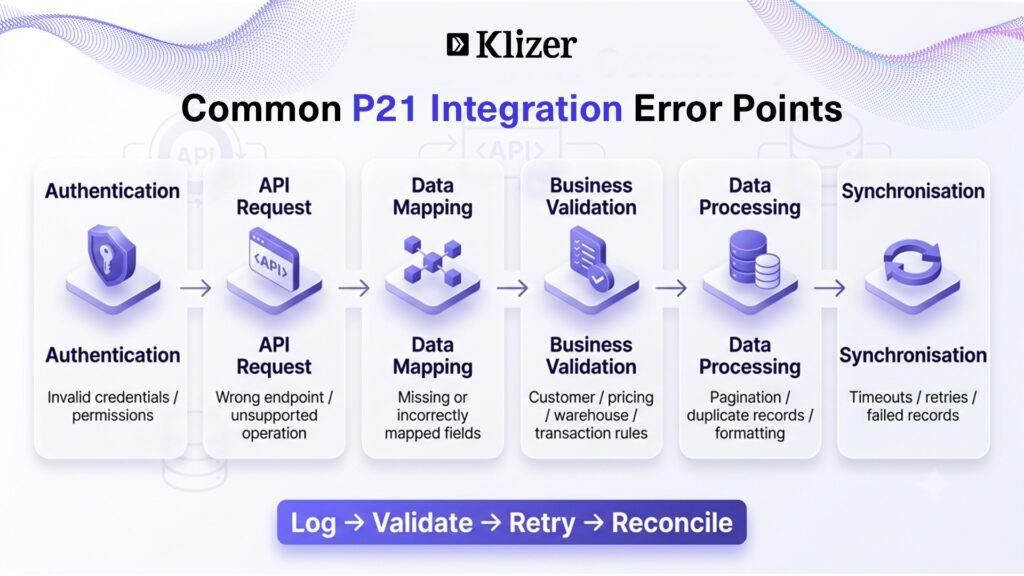
When a P21 integration fails, troubleshooting should start with the specific transaction rather than immediately rerunning the entire synchronisation.
Check:
- Authentication: Is the API credential valid and authorised for the required operation?
- Endpoint: Is the integration calling the correct P21 API and endpoint?
- Request data: Are all required fields present and correctly formatted?
- Business rules: Does the transaction satisfy P21 validation and business requirements?
- Response: Did P21 return a technical error, business validation error, or successful transaction response?
- Record status: Was the expected customer, product, order, or other record actually created or updated?
- Retry history: Has the same transaction already been submitted?
- Logs: Can the request, response, record ID, timestamp, and error message be traced?
- Reconciliation: Does the transaction appear correctly in both systems?
- Reprocessing: Can the individual failed record be safely reprocessed?
This approach makes P21 API troubleshooting more systematic and reduces the risk of creating duplicate transactions while attempting to recover from an error.
Prophet 21 API Integration Checklist
API Architecture
- Are we using the correct P21 API?
- Are read and write operations separated appropriately?
- Are business transactions going through the appropriate service?
- Are unsupported direct database writes avoided?
- Is the API approach appropriate for the required real-time or batch process?
Data
- Is every field mapped explicitly?
- Are location-level rules documented?
- Are date and time conversions handled?
- Are currency conversions handled?
- Are null and empty values handled?
- Are customer-specific business rules documented?
Performance
- Are queries filtered?
- Are only required fields retrieved?
- Is pagination implemented?
- Is incremental synchronisation supported?
- Are large operations processed asynchronously where appropriate?
- Has the integration been tested with production-scale data volumes?
Reliability
- Are P21 API errors logged?
- Are transient failures retried?
- Are permanent errors separated from temporary failures?
- Is duplicate processing prevented?
- Is the integration idempotent?
- Can failed records be reprocessed individually?
Monitoring
- Can successful and failed records be identified?
- Is reconciliation available?
- Are integration failures reported through alerts?
- Can individual records be traced?
- Can failed records be reprocessed without rerunning the entire synchronisation?
Upgrades
- Is the P21 version documented?
- Is the API version documented?
- Are endpoint and schema changes monitored?
- Is there a regression-testing process?
- Is the integration tested before P21 upgrades?
Final Thoughts
Reliable Prophet 21 API integration depends on treating the ERP as a business system, not simply a data source.
The most common P21 integration errors are rarely caused by the API request alone. They often come from incorrect API selection, poor data mapping, misunderstood business rules, inadequate error handling, duplicate processing, inefficient queries, or a lack of monitoring.
The goal is not simply to make an API request succeed. It is to make sure the right business transaction happens, the data remains consistent, failures can be diagnosed, and the integration continues to work as volumes and P21 environments change.
For manufacturers and distributors, this becomes even more important as ecommerce, marketplaces, CRM platforms, warehouses, and other business applications become part of the same connected commerce environment.
Klizer builds and manages Prophet 21 API integrations for manufacturers and distributors across Adobe Commerce, Magento, Shopify Plus, and BigCommerce. We connect P21 pricing, inventory, customer data, and order workflows through integration architectures designed for reliability, scalability, and ongoing maintenance.
Book a free consultation with Klizer to map your P21 integration requirements and build an integration that can evolve with your ERP environment.