
Migration of Shopify to BigCommerce involves moving important data like products, customers, orders, and more from your current store to a new platform.
While Shopify is widely used, some businesses look for more built-in features and want to reduce extra app costs. This is where BigCommerce can be a good option.
In this blog, you will learn how to migrate Shopify to BigCommerce step by step, along with key things to consider before and after migration.
ON THIS PAGE
Step-By-Step Guide to Migrate Shopify to BigCommerce
Migrating from Shopify to BigCommerce requires careful planning and execution. Follow this Shopify to BigCommerce migration process to ensure a smooth transition:
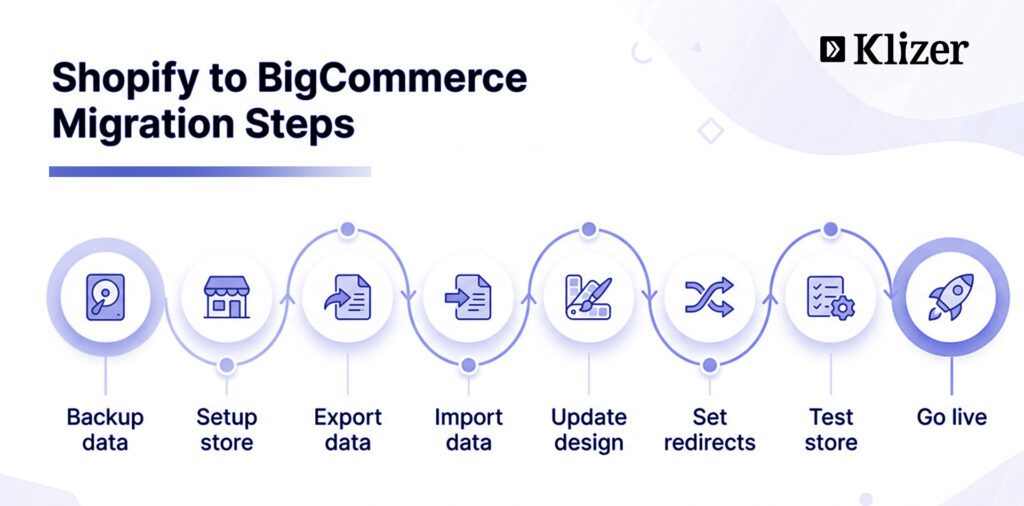
Step 1: Back up and Evaluate your Current Shopify Store
Before starting the migration, review your Shopify store. Identify key data such as products, customer details, order history, and customizations.
Backup Options:
- Manually export Shopify data using CSV files (limited to products, customers, orders, gift cards, discount codes, and themes).
- Build a backup solution using Shopify’s public APIs (challenges include keeping up with changing APIs).
- Use an automated backup solution like Rewind, recommended by Shopify and Shopify Plus, for continuous and reliable data recovery.
Step 2: Create a BigCommerce Account
Create a new BigCommerce account. Choose a theme and set up your store. Ensure the storefront allows easy navigation. Customize the theme to reflect your brand for a seamless transition and engaging interface.
Configure:
- Payment gateways
- Shipping options
- Tax settings
A properly configured store helps in a smooth migration.
Also Read: BigCommerce Store Development
Step 3: Plan Your Data Migration
Choose the method that fits your needs:
- Manual migration
- Migration tools
- Third-party services
Prepare your product data:
- Use CSV export from Shopify
- Export titles, descriptions, SKUs, prices, and images
Check Shopify’s guide for more details on exporting your data.
Step 4: Import Products to BigCommerce
- Go to Products → Import
- Upload your CSV file
- Start import
You can also use BigCommerce’s migration app.
After import:
- Verify product details
- Check customer and order data
Step 5: Adapt Customizations and Themes
Shopify themes are not compatible with BigCommerce.
Options:
- Customize a new theme
- Create a fresh design
BigCommerce offers free and paid themes.
Step 6: Set up SEO Redirects
Set up 301 redirects to maintain SEO rankings.
Steps:
- Go to Settings → 301 Redirect
- Add old and new URLs
Always test your redirects after setup to avoid broken links and traffic loss.
Step 7: Review Your Storefront and Listings for Accuracy
Check all details:
- Product information
- Customer accounts
- Order history
Test:
- Checkout
- Payments
- Shipping
Place a test order to confirm everything works.
Step 8: Personalize Your Store and Go Live
- Connect your domain
- Customize branding
- Launch your store
Keep support ready for any issues.
Step 9: Post-Migration Optimization
After migration:
- Monitor store performance
- Track SEO
- Improve pages
- Collect customer feedback
Recommended Read: BigCommerce to Shopify Migration
What are the Pre-Migration Considerations
It’s essential to address several pre-migration considerations before being involved in the migration process from Shopify to BigCommerce to ensure a smooth and successful transition.
Differences between Shopify and BigCommerce
Understanding the key differences between these two platforms is essential to determine if migrating is the right decision for your business. Consider the following aspects:
- Features: Evaluate the built-in features and integrations offered by both platforms to identify which platform best meets your business requirements.
- Pricing structure: Compare the pricing plans, transaction fees, and costs of additional apps for both platforms to determine which is more cost-effective for your business.
- Customization options: Analyze the templates, themes, and design flexibility offered by Shopify and BigCommerce to ensure you can create the desired user experience for your online BigCommerce store.
The Cost Implication of Migration
Migrating from Shopify to BigCommerce involves several costs, which should factor into your decision-making process. These include:
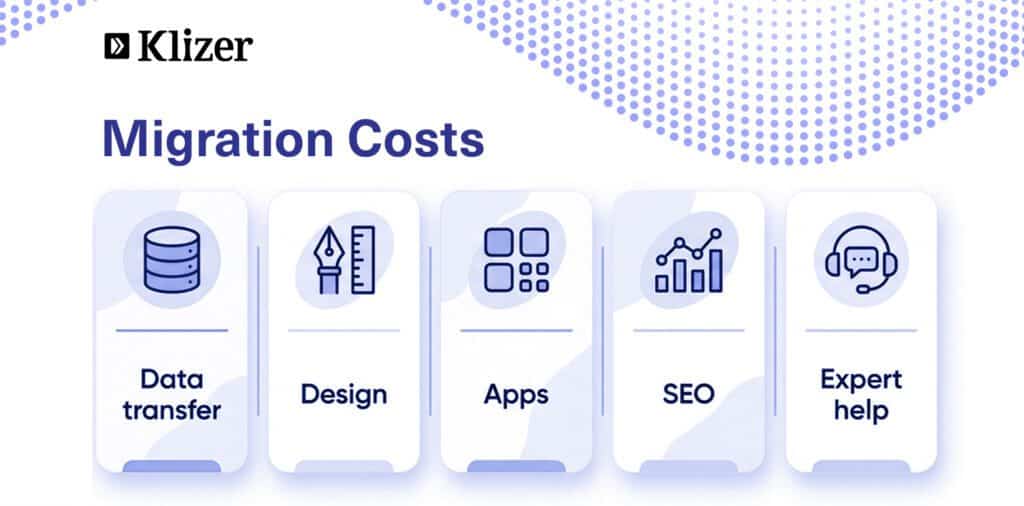
- Data migration: Transferring your target store data, including products, customers, and order history, may require hiring a professional or using a migration tool.
- Redesigning the website: You may need to invest in a new template, hire a designer, or spend time customizing your store’s appearance on BigCommerce.
- App and integration setup: Some apps and integrations may need to be reconfigured or replaced with BigCommerce-compatible alternatives.
Identify the Best Time for Migration
Choosing the right time for migration is crucial to minimize disruptions to your business. Consider the following factors when planning the move:
- Sales cycle: Schedule the migration during a slow sales period to avoid potential losses and minimize the impact on your customers.
- Seasonality: Refrain from migrating during peak seasons, such as holidays or major sales events, to prevent unnecessary stress and complications.
- Resource availability: Ensure you have the necessary resources, such as staff and budget, to complete the migration process.
Backing up Your Shopify Store Data
Therefore, before initiating the migration process, it’s crucial to back up all your Shopify store data to prevent potential data loss.
- Product information: Download a CSV file containing the product data from your Shopify admin.
- Customer information: Export your customer data to a CSV file from the Shopify admin panel.
- Order history: Save a record of your order history by exporting it to a CSV file.
- Theme and design assets: Make a copy of your current theme and any custom design assets for later use.
- Blog content: Export your blog posts and related media files for easy transfer to BigCommerce.
Why Migrate from Shopify to BigCommerce
Businesses might contemplate migrating from Shopify to BigCommerce for various reasons, as each platform presents distinct features and advantages. Some of the key reasons include:
Better Built-in Features
It provides more built-in features than Shopify, such as advanced product options, flexible promotions, and real-time shipping quotes. It can help businesses save on additional app costs and streamline store management.
No transaction Fees
Unlike Shopify, BigCommerce does not charge transaction fees. It can lead to significant and extra cost savings, especially for businesses with high sales volumes.
More Customizable Storefront
Offers a range of templates and customization options compared to Shopify, giving businesses greater control over their website’s design and user experience.
Flexible pricing plans
BigCommerce’s pricing plans cater to various business sizes and needs, offering a more tailored solution than Shopify.
Advantages of Migration
Improved Performance
BigCommerce’s infrastructure handles high volumes of traffic and transactions, ensuring customers experience a smooth and responsive shopping journey.
Integrated Multi-Channel Selling
Simplifies multi-channel selling by integrating seamlessly with popular marketplaces like Amazon, eBay, and social media platforms. This enables businesses to expand their reach and manage orders from a centralized dashboard.
Enhanced Security Measures
Security is a top priority for ecommerce businesses. This platform provides robust security features, including regular updates and patches, to protect against potential threats. Migrating to BigCommerce can enhance the overall security posture of your online store.
Challenges and Risks of Migration
Data Migration Complexity
Transferring product information, customer data, and order history from Shopify to BigCommerce can pose a complex task. Merchants must carefully plan the migration process to ensure accurate and complete data transfer.
SEO Implications
Improper execution of a migration can impact SEO rankings. Changes in URLs and adjustments to metadata may be necessary. Merchants should implement a thorough SEO strategy alongside the migration to minimize negative effects on search engine visibility.
Customization Adaptation:
If your current Shopify store heavily relies on customizations or apps, challenges may arise in adapting these to BigCommerce. Merchants must evaluate their current setup and identify potential areas that may require redevelopment.
Downtime and Customer Impact
Migrating to an online store typically involves a period of downtime. Merchants must communicate this effectively to customers, minimizing any inconvenience. A well-executed migration plan can help reduce the impact on sales and customer satisfaction.
Final Words
A well-planned migration from Shopify to BigCommerce can help improve store performance, reduce extra costs, and make your business easier to manage.
However, migration is not just about moving data. You need to plan each step, check your data, and make sure SEO settings like redirects are done correctly. Even small mistakes can affect your traffic and sales.
If you want to migrate Shopify to BigCommerce, partner with an enterprise ecommerce solutions provider like Klizer for a smooth and reliable transition.
FAQ
Is multiple language transfer to BigCommerce possible?
Yes, it supports multiple languages, and during the migration process, language data can be transferred seamlessly to ensure a consistent multilingual experience.
Is it possible to export customer data to BigCommerce?
Absolutely. Customer data, including profiles and order history, can be exported from your current platform to BigCommerce, facilitating a smooth transition for your clientele.
Can I retry the Demo migration?
Yes, most migration tools and services offer the flexibility to retry demo migrations, allowing you to refine the process and ensure accurate data transfer before the actual migration.
Will my Shopify store data be affected by the migration?
When executed correctly, a migration should not negatively impact your Shopify store data. It’s crucial to follow best practices and thoroughly test the process to avoid any data discrepancies.
How to export Shopify products to BigCommerce?
Utilize the export/import features provided by migration tools or services to seamlessly transfer product data, including details and images, from your Shopify store to BigCommerce.
How do I export orders from the Shopify platform to BigCommerce?
Migration tools often include functionalities to export orders from Shopify and import them into BigCommerce, ensuring a smooth transition of your sales history.
Can I export the Shopify database to BigCommerce?
Yes, migration tools typically allow for the export of essential data, including the database, from Shopify to BigCommerce, ensuring a comprehensive transfer of your store information.
How much time does it take to migrate data from Shopify Plus using CSV files?
The time required for data import using CSV files varies based on the amount of data and complexity. Expert migration services can streamline the process for a more efficient transfer.
What is the best option for online store owners considering BigCommerce migration services?
The best option for online store owners is to choose a migration service that not only ensures data security but also provides a comprehensive solution, including product reviews, product categories, and necessary information for an optimal migration experience.